

Overview
With the Tools Library, you define a tool once and reuse it across all your assistants. Updating a shared tool keeps behavior consistent across every assistant that uses it.Capabilities
- Shared tools — Create tools in a central library and assign them to any assistant.
- Reduced duplication — Eliminates recreating identical tools across assistants with similar workflows.
- Centralized configuration — Update a tool in one place and maintain consistency across assistants.
- Faster deployment — Speed up assistant creation using prebuilt tools from the library.
Getting started
- Log in to the Mission Control Portal.
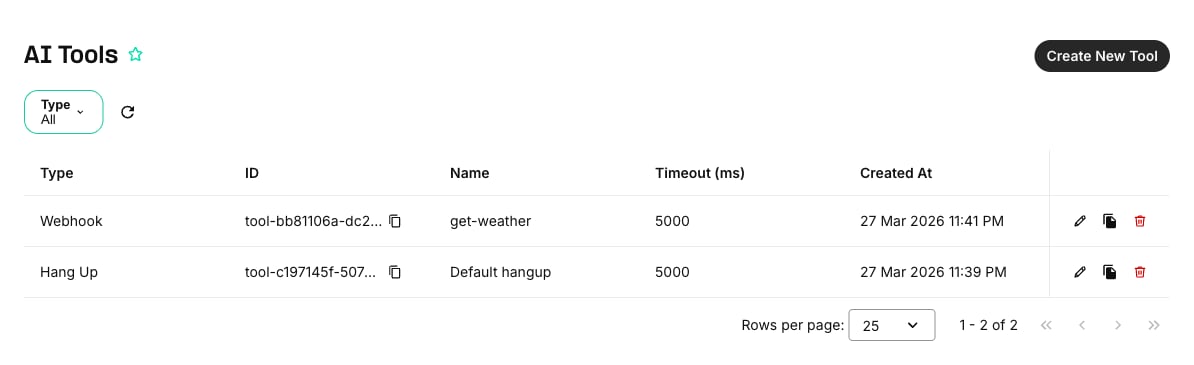
- Navigate to AI, Storage and Compute > AI Tools.
- Click Create New Tool to add a new tool to the library.
- When building or editing an assistant, assign tools from the library instead of creating them inline.
Updating assistants with library tools
When you update an assistant withPOST /v2/ai/assistants/{assistant_id} (the Update Assistant API also accepts PATCH), tools (inline definitions) and tool_ids (library tools) are two independent channels:
- A
toolsarray you send fully replaces the assistant’s inline tools; omit the field to leave them unchanged. The same applies totool_idsfor attached library tools. - Every tool type except
function,webhook, andclient_side_toolallows at most one instance per assistant, counted across inlinetoolsand librarytool_idscombined. Sending a duplicate of such a type returns HTTP 400 with error code10015. - GET responses merge library tools into the
toolsarray, each flagged"shared": true(the flag is read-only — the server sets it; it is not accepted in requests). On update, omitshared: truetools from thetoolsarray and manage them throughtool_idsinstead — re-sending their definitions creates an inline duplicate, rejected with10015when the type allows only one instance.
Migrating existing tools
Existing assistants with legacy (inline) tools continue to work. You can migrate legacy tools to the library at your own pace.Migration is optional. Legacy tools remain functional. You can migrate tools one at a time as needed.