

What you’ll need
Before you start, make sure you have:- An OpenClaw agent — This is the AI agent that will execute your mission. If you don’t have one yet, follow the OpenClaw quickstart to get set up.
- A Telnyx account with an API key — Your agent needs API access to create assistants, schedule calls, and track missions. Create a Telnyx account if you don’t have one, then generate an API key.
-
The Telnyx Missions skill installed — Install it from ClawHub and configure your
TELNYX_API_KEYas an environment variable for your agent.
How it works
Your agent uses several Telnyx APIs to orchestrate the work:- Missions API — creates a mission, plans steps, logs events, and tracks status
- Assistants API — creates a voice assistant with custom prompts and schedules calls
- Numbers API — finds an available phone number and assigns it to the assistant
Give your agent a mission
Once your agent has the Telnyx Missions skill installed, you can describe tasks in natural language. The agent handles the rest.Example: Catering quote negotiation
Here’s a real example — asking your agent to find caterers and negotiate pricing:“Find catering companies in Chicago for a corporate event with 50 people. Call Lakefront Catering, Chicago Grill Co, and Prairie Table Events. Get a baseline quote from the first one, then use that to negotiate better rates with the others. Compare all quotes and recommend the best option.”Your agent will:
- Create a mission in the Telnyx Missions API to track the work
- Build an execution plan with steps (assistant setup → baseline call → negotiation calls → comparison)
- Create a voice assistant — a Telnyx AI Assistant configured as a “Catering Quote Negotiator” with a professional script tailored to your request
- Assign a phone number from your account to the assistant for outbound calling
- Call the first caterer to establish a baseline price
- Call remaining caterers armed with the best quote so far, negotiating for better rates
- Monitor call completions and capture conversation insights
- Summarize results — comparing quotes and recommending the best option
What the agent plans
When the mission starts, your agent creates a structured plan. In the Portal, you can see each step and its status: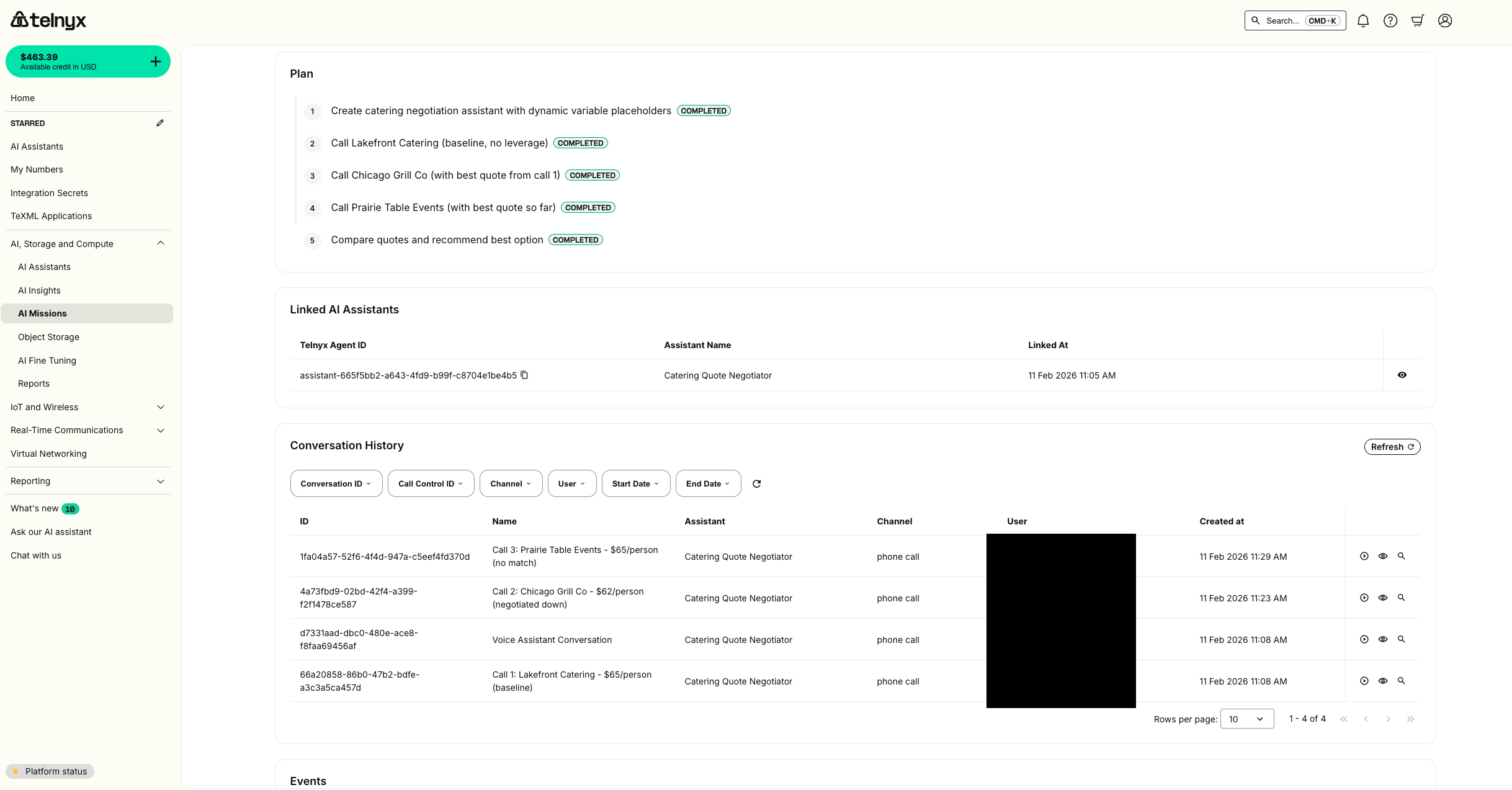
pending, in_progress, completed, failed) so you can see exactly where things stand at any point. In this example, the agent’s plan was:
- Create catering negotiation assistant with dynamic variable placeholders
- Call Lakefront Catering (baseline, no leverage)
- Call Chicago Grill Co (with best quote from call 1)
- Call Prairie Table Events (with best quote so far)
- Compare quotes and recommend best option
Monitor progress in the Portal
You don’t need to watch your agent work. The Telnyx Portal gives you a dashboard view of every mission.Mission overview
Navigate to the AI Missions section in the Telnyx Portal to see all missions, their status, and when they were last updated. The dashboard shows recent runs with result summaries at a glance: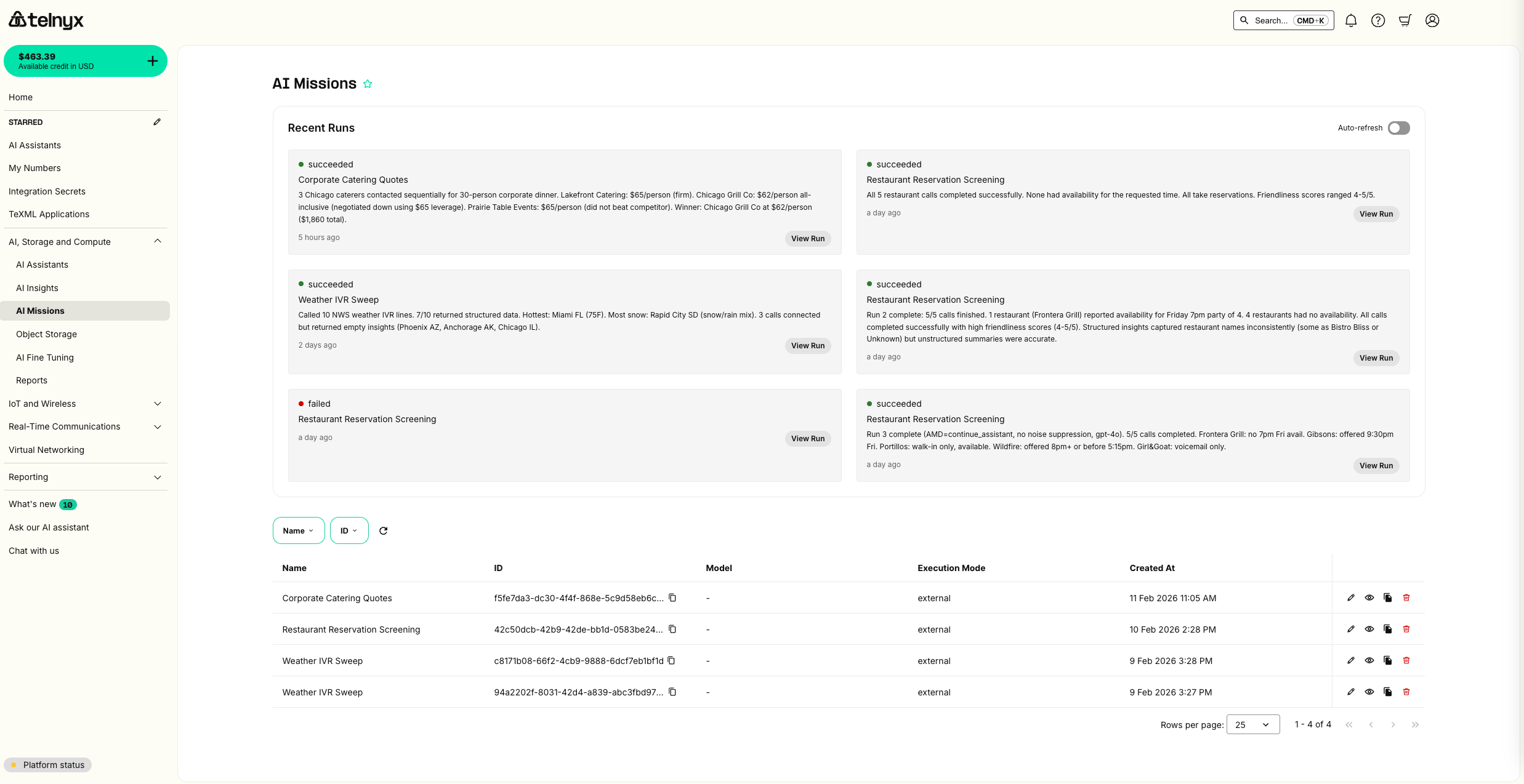
Run details
Click View Run to see the full run detail — status, timing, the original input, and structured result payload. This is where you’ll find the agent’s final analysis: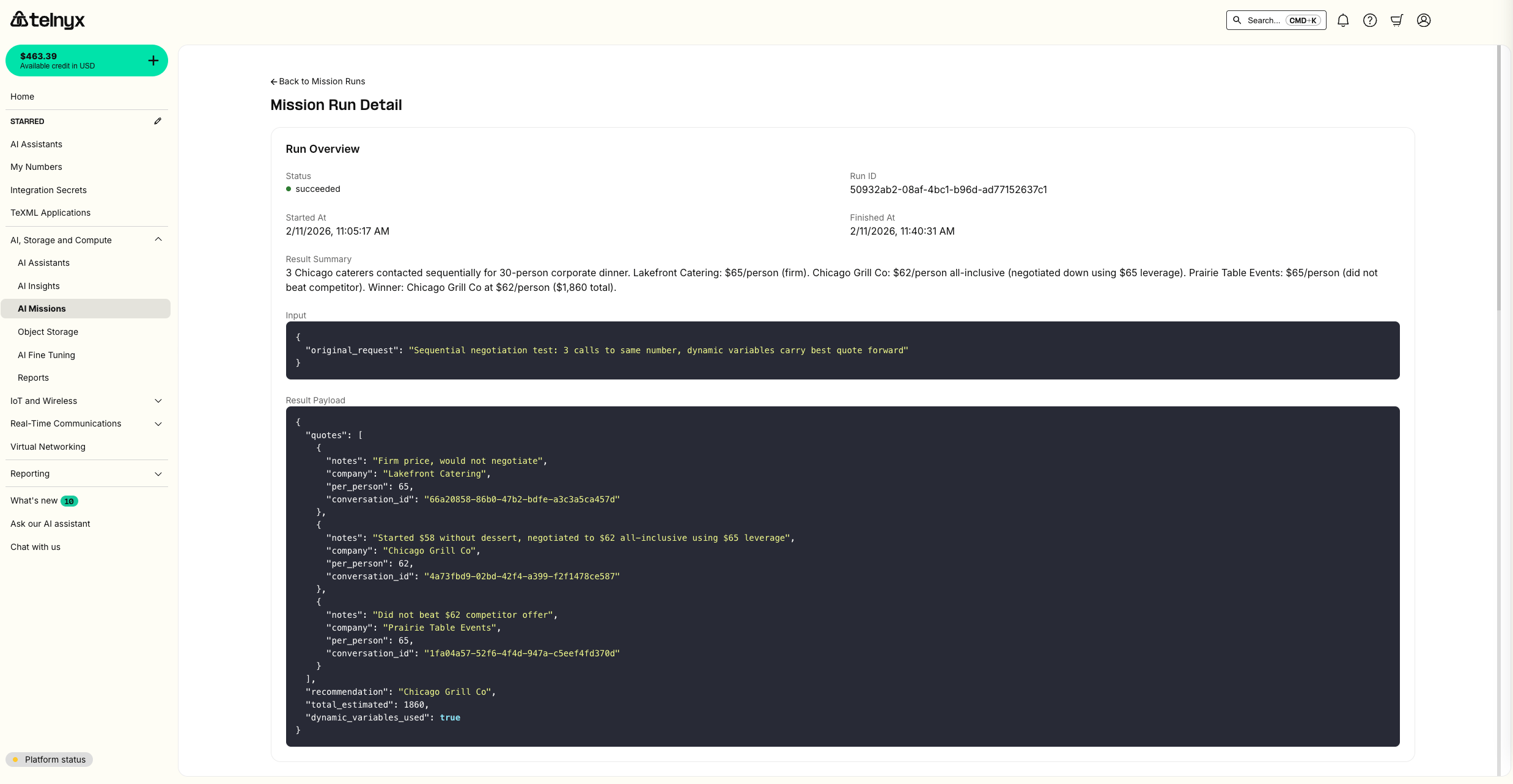
Linked agents and conversation history
Scrolling down, the Portal shows which Telnyx AI Assistants your agent created and linked to the mission run. Below that, you can see every conversation — including which caterer was called, the call channel, and timestamps.Conversation playback
Click any conversation to open the full transcript with audio playback. Here’s the Chicago Grill Co negotiation — watch the agent use the Lakefront’s $65 quote as leverage to negotiate down to $62: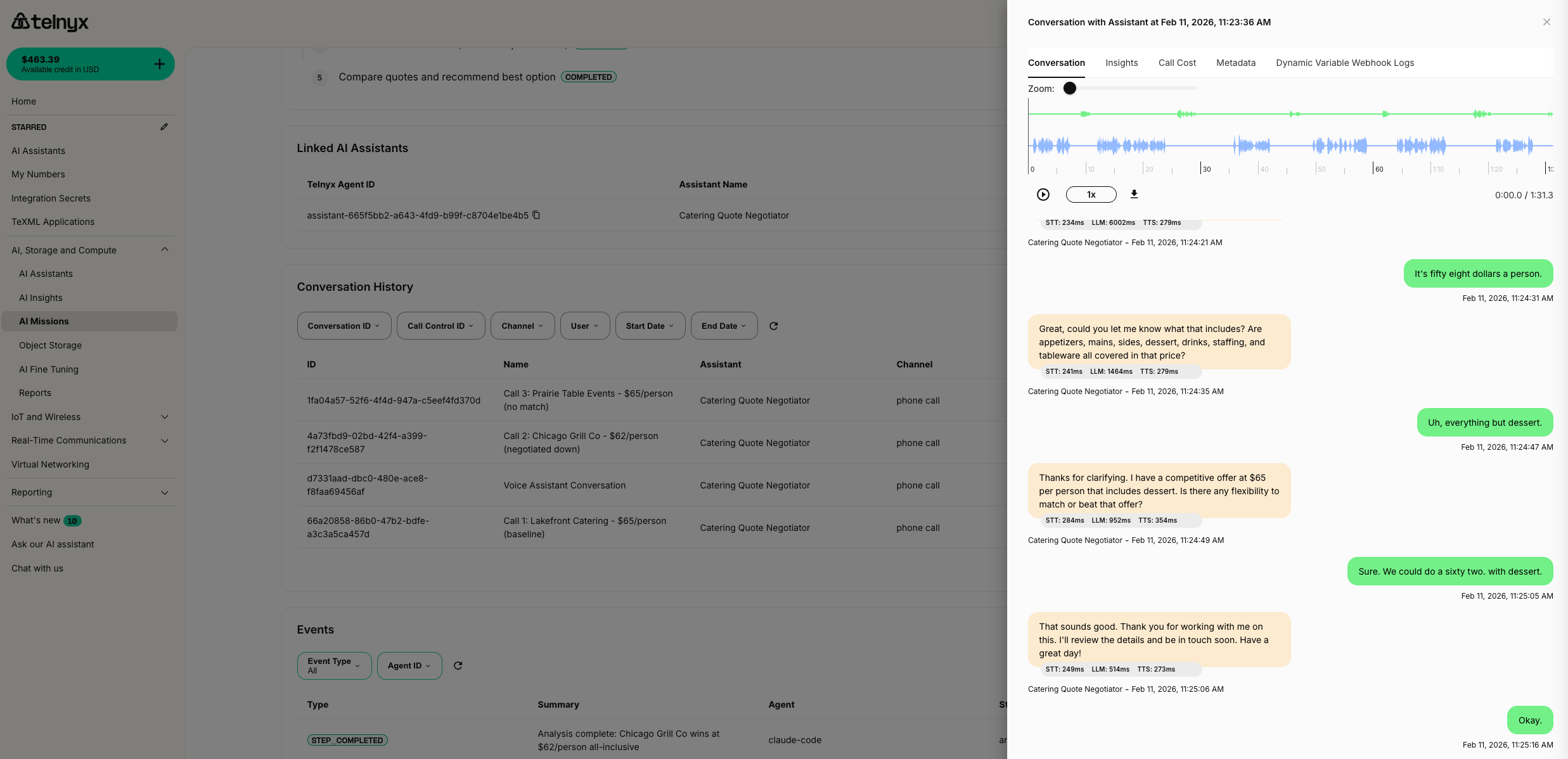
Review call results
After calls complete, your agent captures conversation insights — structured summaries of what was discussed.Conversation insights
For each completed call, the Missions skill can extract structured information using the AI Insights API — pulling out key data points like pricing, availability, and terms into a structured format.The final summary
When all calls are done, your agent compiles everything into a summary with recommendations. Here’s what that looks like for our catering example:Mission Complete: Catering Quote Negotiation Called 3 caterers for a 50-person corporate event:This summary is also stored as the mission’sRecommendation: Chicago Grill Co offers the best value at 150 savings over the baseline for 50 guests.
result_summary and result_payload, so it’s permanently accessible via the API and Portal.
How the voice calls work
Behind the scenes, your agent uses the Telnyx AI Assistants platform to make calls. Here’s what it sets up:Voice assistant creation
The agent creates a Telnyx AI Assistant with:- A system prompt tailored to your specific request (e.g., “You are calling catering companies to negotiate quotes for a 50-person corporate event…”)
- A greeting that opens the conversation naturally (e.g., “Hi, I’m calling to inquire about catering for a corporate event. Do you have a moment?”)
- Dynamic variables that update between calls (e.g., injecting the current best quote before each negotiation call)
- Telephony features enabled for voice calls
Phone number assignment
The agent finds an available phone number from your Telnyx account and assigns it to the assistant’s voice connection. This is the caller ID that businesses will see.You need at least one phone number in your Telnyx account. If none are available, the agent will let you know and link you to the number purchase page.
Call scheduling
Calls are scheduled during business hours to maximize the chance of reaching someone. The agent handles timezone awareness and won’t schedule calls at 3 AM.Call monitoring
After scheduling, the agent polls for call completion and retrieves:- Call status — completed, failed, no answer, busy
- Conversation transcript — full text of what was said
- Conversation insights — structured extraction of key data points (quotes, availability, terms)
Tips for effective missions
Be specific in your request
The more detail you give, the better your agent performs:Let the agent plan first
Your agent will create a plan before executing. If you want to review the plan before calls go out, say so:“Find caterers and create a plan, but wait for my approval before making any calls.”
Check the Portal for real-time status
You don’t need to keep chatting with your agent. The Portal shows live progress — check back when you get a notification that the mission is complete.Start small
Try a mission with 2-3 calls first to see how it works. You can always scale up once you’re comfortable with the workflow.What’s next
- AI Missions API Reference — Full API documentation for creating and managing missions programmatically
- AI Assistants — Learn about async tools and advanced assistant configurations
- AI Insights — Extract structured data from conversations
- Telnyx Missions Skill on ClawHub — Install the skill for your OpenClaw agent