

When to use structured insights
Choose structured insights when you need:- Quantitative Metrics - Scores, ratings, counts, percentages.
- Categorical Data - Status values, types, priorities, classifications.
- Boolean Flags - Yes/no decisions, presence checks, compliance indicators.
- Consistent Format - Data that feeds into databases, dashboards, or analytics systems.
- Multiple Related Fields - Complex data with multiple attributes.
Creating a structured insight
Step 1: Start creating an insight
- Navigate to AI Insights in the Portal.
- Click Create Insight.
- Enter a name and basic instructions.
Step 2: Enable structured data mode
Click the Collect as structured data button to reveal the schema configuration interface.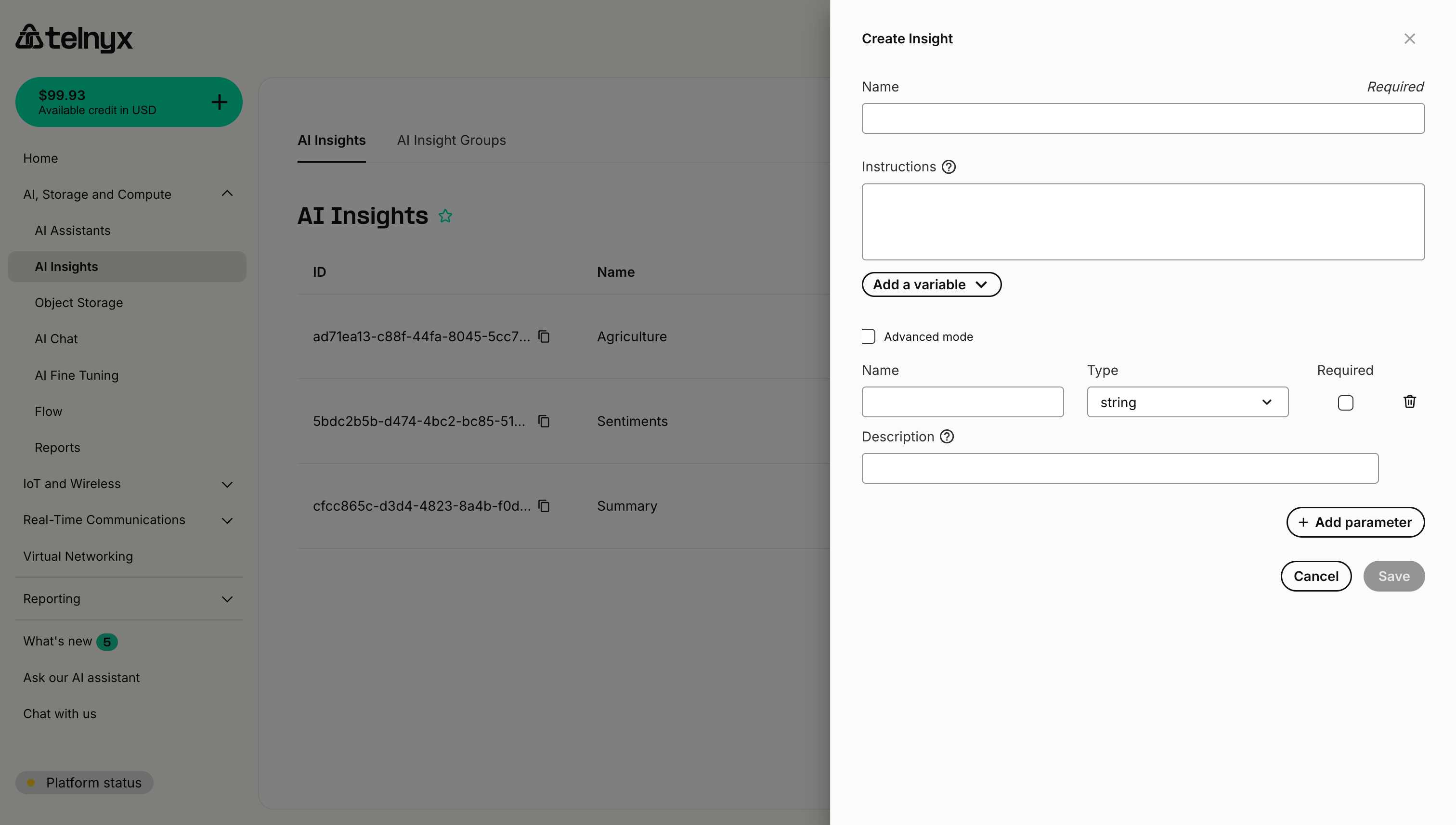
Step 3: Define parameters
For each piece of data you want to extract, add a parameter with:- Name - The field name in the JSON output (e.g.,
sentiment_score,issue_type). - Type - The data type (string, number, boolean, etc.).
- Required - Whether this field must always be present.
- Description - Instructions for extracting this specific field.
Parameter types
String
Text values - use for categories, descriptions, identifiers. Example:Enum
Predefined categories - use when you have a fixed set of possible values. The AI agent will select one value from your provided list. Example:Enums provide better accuracy than asking the AI agent to choose from options in a string description. They enforce strict value validation and make the AI agent’s task clearer.
Number
Numeric values - use for scores, ratings, counts, percentages. Example:Integer
Whole number values - use when you need integers without decimals (counts, quantities, IDs). Example:Use
integer instead of number when you specifically need whole numbers. This provides clearer intent and can help the AI agent avoid returning decimal values.Boolean
True/false values - use for flags, presence checks, yes/no decisions. Example:Array
Lists of values - use for multiple items of the same type. Example:Array (string)
Lists of text values - use for multiple string items with enforced type safety. Example:Array (number)
Lists of numeric values - use for multiple numbers with enforced type safety. Example:Array (boolean)
Lists of true/false values - use for multiple boolean flags with enforced type safety. Example:Typed arrays (string, number, boolean) provide better type safety than the generic
array type. Use them when you know all elements will be of the same specific type.Object
Nested structures - use for complex related data. Example:Complete examples
Example 1: Sentiment analysis
Configuration:Example 2: Sales qualification
Configuration:Example 3: Support ticket categorization
Configuration:Advanced mode
Enable Advanced mode (checkbox at the top of the structured data section) to access additional schema configuration options:- Custom validation rules.
- Enum constraints for string values.
- Min/max constraints for numbers.
- Pattern matching for strings.
- Nested object definitions.
Best practices
1. Keep schemas focused
Don’t try to extract everything in one insight. Create multiple focused insights instead:- ✅ Separate insights for “Sentiment” and “Issue Classification”
- ❌ One massive insight trying to capture sentiment, classification, entities, summary, etc.
2. Make instructions clear
Each parameter’s description should be crystal clear:3. Use enums for categories
When you have a fixed set of categories, use the enum type instead of listing values in a string description: ❌ Less effective (using string with description):4. Mark optional appropriately
Only mark fields as required if they should always be extractable:- Required:
overall_sentiment- should always be detectable - Optional:
competitor_mentioned- may not come up in every conversation
5. Provide value ranges
For numeric fields, specify the range:6. Test with edge cases
Test your structured insights with:- Very short conversations.
- Conversations where some information is missing.
- Ambiguous or unclear discussions.
- Multiple topics in one conversation.
Next steps
- Create Insight Groups - Organize your structured insights.
- Explore Use Cases - Industry-specific structured insight examples.
Related resources
- Creating Insights - Basic insight creation.
- Insight Groups - Organizing insights.
- API Reference - Programmatic access to insights.