

Telnyx Development: APIs fundamentals — Full Documentation
Complete page content for APIs fundamentals (Development section) of the Telnyx developer docs (https://developers.telnyx.com). Root index: https://developers.telnyx.com/llms.txt · Lightweight index for this subsection: https://developers.telnyx.com/development/llms/development-apis-fundamentals-llms-txt.md
Create API Keys
Source: https://developers.telnyx.com/development/api-fundamentals/create-api-keys.mdAPI keys are essential for authenticating your requests to any Telnyx API. This guide shows you how to create and manage your API keys through the Mission Control Portal.
Creating Your API Key
- In the Mission Control Portal, click on your name in the upper right corner, and click API Keys.
- Click the Create API Key button.
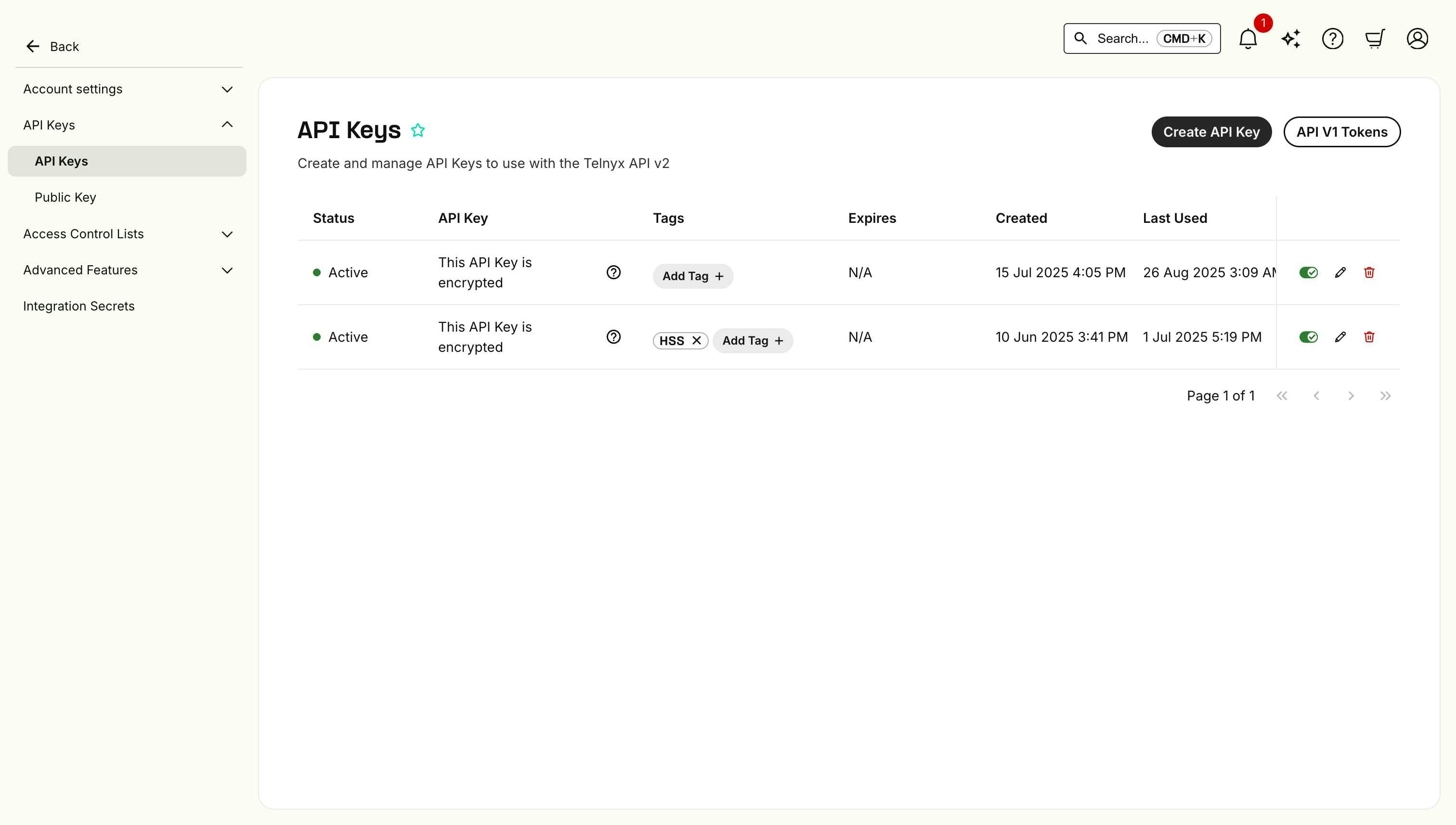
- In the Create API Key dialog, add a descriptive tag (e.g., “Voice API Development”, “SMS Production”, etc.) and choose your expiration settings.

- Click Create.
Important: Save Your API Key Securely
We’ll show the full API key value only once at creation. If you lose the key, you’ll need to generate a new one. We recommend using a secure password manager or secrets vault once you’ve created it. We’re doing this to reduce the risk of accidental key leaks and help keep your account secure. This approach aligns with our best-in-class security standards and helps prevent accidental key exposures.Storing Your API Key
Best Practices:- Never commit API keys to version control (Git, SVN, etc.).
- Use environment variables in your applications.
- Rotate keys regularly for production applications.
- Use separate keys for development and production.
Using Your API Key
Once created, you can use your API key with any Telnyx service:REST API
SDKs
Authentication & Security
API Authentication
Source: https://developers.telnyx.com/development/api-fundamentals/authentication.mdAll Telnyx APIs use consistent authentication mechanisms to ensure secure access to your resources. This guide covers the universal authentication patterns used across Voice, Messaging, Cloud Storage, IoT, and all other Telnyx services.
API Keys
Overview
Telnyx uses API Keys as the primary authentication method across all services. Your API Keys carry significant privileges and provide access to all Telnyx resources associated with your account.Security Best Practices
- Keep API Keys secure: Never share API Keys in publicly accessible areas such as GitHub, client-side code, or logs
- Use environment variables: Store API Keys in environment variables or secure configuration files
- Rotate keys regularly: Periodically generate new API Keys and deactivate old ones
- Use least privilege: If available, use API Keys with minimal required permissions
Managing API Keys
You can view and manage your API Keys in the Auth section of your Mission Control portal.Authentication Methods
Bearer Token Authentication
Most Telnyx APIs use Bearer token authentication in the Authorization header:SDK Authentication
When using Telnyx SDKs, authentication is typically configured once during initialization:Common Authentication Patterns
RESTful APIs
- Voice API: Bearer token in Authorization header
- Messaging API: Bearer token in Authorization header
- Cloud Storage: AWS Signature Version 4 or Bearer token
- IoT APIs: Bearer token in Authorization header
Real-time Connections
- WebRTC: JWT tokens for client authentication
- WebSocket connections: Bearer token during connection establishment
Error Handling
Authentication Errors
Common authentication-related HTTP status codes:- 401 Unauthorized: Invalid or missing API Key
- 403 Forbidden: Valid API Key but insufficient permissions
- 429 Too Many Requests: Rate limit exceeded
Debugging Authentication Issues
- Verify API Key format: Ensure the key is correctly formatted and complete
- Check headers: Confirm the Authorization header is properly set
- Validate permissions: Ensure your API Key has the required permissions for the resource
- Test with curl: Use curl to isolate authentication issues from SDK problems
Environment-Specific Considerations
Development vs Production
- Use separate API Keys for development and production environments
- Never use production API Keys in development or testing
- Consider using restricted API Keys for development
Regional Considerations
Some Telnyx services may have regional API endpoints. Always check the specific service documentation for the correct base URL.Account Management
Account Levels and Access
Account levels determine which APIs and features are available to you. For detailed information about account types, capabilities, and verification requirements, see Account Levels and Capabilities.Next Steps
- API Reliability & Retries - Handle authentication failures gracefully
- Webhook Security - Secure your webhook endpoints
- SDKs & Tools - Language-specific authentication setup
Request & Response
HTTP Patterns
Source: https://developers.telnyx.com/development/api-fundamentals/request-response.mdUnderstanding common request and response patterns will help you build robust integrations across all Telnyx services. This guide covers the universal HTTP concepts that apply to Voice, Messaging, Cloud Storage, IoT, and all other Telnyx APIs.
HTTP Methods
Telnyx APIs follow RESTful conventions using standard HTTP methods:GET - Retrieve Resources
Used to fetch information without making changes:POST - Create Resources
Used to create new resources or trigger actions:PATCH - Update Resources
Used to modify existing resources:DELETE - Remove Resources
Used to delete resources:Request Format
Content-Type Headers
Most Telnyx APIs expect JSON payloads:Request Structure
Response Format
Standard Response Structure
Most Telnyx APIs return JSON responses with consistent structure:Success Responses
- 200 OK: Request successful, data returned
- 201 Created: Resource successfully created
- 202 Accepted: Request accepted, processing asynchronously
- 204 No Content: Request successful, no data to return
Error Responses
Error responses include details to help troubleshoot issues:Telnyx API Error Codes
For a comprehensive list of all Telnyx-specific error codes and their meanings, see the API Error Codes reference. This resource provides detailed explanations for each error code to help you troubleshoot and handle API errors effectively. Common error patterns include:- 10xxx codes: Parameter validation errors
- 20xxx codes: Authentication and authorization errors
- 30xxx codes: Resource not found or unavailable errors
- 40xxx codes: Rate limiting and quota errors
- 50xxx codes: Server-side errors
HTTP Status Codes
Client Errors (4xx)
- 400 Bad Request: Invalid request format or parameters
- 401 Unauthorized: Authentication failed
- 403 Forbidden: Authentication succeeded but access denied
- 404 Not Found: Resource doesn’t exist
- 422 Unprocessable Entity: Valid request format but logical errors
- 429 Too Many Requests: Rate limit exceeded
Server Errors (5xx)
- 500 Internal Server Error: Unexpected server error
- 502 Bad Gateway: Upstream service error
- 503 Service Unavailable: Service temporarily unavailable
- 504 Gateway Timeout: Request timeout
Common Headers
Request Headers
Response Headers
Pagination
For endpoints that return lists, Telnyx uses consistent pagination:Request Parameters
Response Metadata
Filtering and Sorting
Common Filter Patterns
Best Practices
Request Optimization
- Use appropriate HTTP methods: Don’t use POST for retrieving data
- Include relevant headers: Specify Content-Type and Accept headers
- Validate input: Check parameters before sending requests
- Handle timeouts: Set appropriate timeout values
Response Handling
- Check status codes: Don’t assume all responses are successful
- Parse error messages: Use error details for troubleshooting
- Handle edge cases: Account for empty results and partial failures
- Log appropriately: Log errors but avoid logging sensitive data
Next Steps
- API Reliability & Retries - Handle failed requests
- Webhook Fundamentals - Receive asynchronous notifications
- API Glossary - Reference for API terminology
Error Reference
API error codes
Source: https://developers.telnyx.com/development/api-fundamentals/api-errors.mdWhen working with the Telnyx API, you may encounter various error codes. This page provides a complete reference of all error codes returned by the Telnyx API.
Reliability & Performance
Rate Limiting
Source: https://developers.telnyx.com/development/api-fundamentals/reliability/rate-limiting.mdIn order to protect our services, we employ the use of rate limits on the majority of
api.telnyx.com endpoints. These limits are typically static, but are subject to change based on usage and may be adjusted to align with changes in capacity.
For this reason, we include headers in our API responses that should be parsed and respected by your application. These headers aim to help you understand your current consumption rate and self-diagnose or prevent potential throttling issues.
Rate Limit Headers
When the rate limit is exceeded, responses with status code 429 will be returned,
indicating that you have exhausted the number of requests allowed in the current
window.
Rate Limit Response
HTTP Status Code
The status code of rate limit responses is 429.Response Body
Handling Rate Limits
Best Practices
- Monitor Headers: Always check the rate limit headers in API responses
- Implement Backoff: Use exponential backoff when receiving 429 responses
- Cache Results: Cache API responses when possible to reduce request frequency
- Distribute Load: Spread requests across multiple time windows
Over Your Rate Limit?
Contact support@telnyx.com if you find you are exceeding the rate limit.Product-Specific Rate Limits
Different Telnyx services may have different rate limiting strategies:- Messaging: See Rate Limiting and Message Encoding for messaging-specific limits
- 10DLC: See 10DLC rate limits for campaign-specific limits
- Voice API: Standard API rate limits apply to call control endpoints
- Cloud Storage: Rate limits apply to S3-compatible operations
API Reliability & Retries
Source: https://developers.telnyx.com/development/api-fundamentals/reliability/command-retries.mdWhen building applications with Telnyx APIs, you may encounter various reliability challenges that require robust error handling and retry strategies. These patterns apply across all Telnyx services including Voice, Messaging, Cloud Storage, and more.
Common Reliability Challenges
Applications may encounter the following situations across any Telnyx API:- 5XX Errors: Server errors (500, 501, 503, 504) that indicate temporary service issues
- Network Timeouts: Requests that don’t complete within expected timeframes
- Duplicate Responses: Identical responses that may occasionally be delivered
Best Practices for API Reliability
Telnyx carefully monitors all API platforms for 5XX errors, latency, and duplicate responses, and actively works to keep all of these to a minimum across all services. For added reliability, there are several steps developers can take to handle errors, latency, and duplicate responses across any Telnyx API:Retry Strategies
- Retry on 5XX Errors: If your application receives a 500-level error, implement exponential backoff and retry
- Timeout Handling: If your application fails to receive an HTTP response within a reasonable timeframe (typically 500ms-5s depending on the operation), retry the request
- Maximum Retry Attempts: Implement a maximum retry limit (typically 3-5 attempts) to avoid infinite loops
Error Handling Patterns
- Exponential Backoff: Increase wait time between retries (e.g., 1s, 2s, 4s, 8s)
- Circuit Breaker: Temporarily stop making requests if error rates exceed thresholds
- Graceful Degradation: Design your application to continue functioning even when some API calls fail
Webhooks & Events
Webhook Fundamentals
Source: https://developers.telnyx.com/development/api-fundamentals/webhooks/receiving-webhooks.mdOne application can provide another application with real-time updates via a webhook (also referred to as a web callback or HTTP push API). A webhook delivers data to other applications as it happens, meaning you get data immediately. In the past, APIs would typically need to poll for data very frequently to get it promptly. This makes webhooks much more efficient for both providers and consumers. The only drawback to webhooks is the difficulty of initially setting them up - this tutorial walks through how to consume webhooks. Webhooks are sometimes referred to as “Reverse APIs,” as they give you what amounts to an API spec, and you must design an API for the webhook to use. The webhook will make an HTTP request to your app (typically a POST), and you will then be charged with interpreting it. Telnyx can send webhook events that notify your application any time an event happens on your account. This is especially useful for events like receiving an SMS or MMS message and getting feedback on Voice API events. The messaging webhooks section goes into a bit more detail on how SMS and MMS webhooks work.
Universal Webhook Behavior
Across all Telnyx services, webhooks follow consistent patterns:- Primary/Failover URLs: Webhooks are delivered to the primary URL specified in your application configuration. If that URL doesn’t respond successfully, the webhook is sent to the failover URL (if configured)
- Response Requirements: Your endpoint must return a 2xx HTTP status code to indicate successful receipt
- Retry Logic: Failed webhook deliveries are automatically retried with exponential backoff
Webhook Setup Options
Choose one of the following options based on your development stage:Option A: Local Development with ngrok (Recommended for Testing)
- Install ngrok following our ngrok setup guide.
- Start your local webhook server (see example below).
- Create a tunnel:
ngrok http 3000. - Use the provided HTTPS URL (e.g.,
https://abc123.ngrok.io/webhooks).
Option B: Quick Testing with webhook.site
- Visit webhook.site.
- Copy your unique URL.
- Use this for initial testing (note: this won’t allow you to respond to webhooks).
Option C: Production Deployment
Deploy your webhook handler to a cloud service like:- AWS Lambda with API Gateway.
- Google Cloud Functions.
- Heroku.
- DigitalOcean App Platform.
Webhook Delivery Characteristics
To minimize webhook delivery time across all services, Telnyx:- Does not guarantee delivery order: Webhooks may arrive out of sequence
- Implements automatic retries: Failed deliveries are retried with exponential backoff
- Delivers concurrently: Multiple webhooks may arrive simultaneously
- Out-of-order webhooks: Events may not arrive in chronological order
- Simultaneous webhooks: Multiple events may be delivered at the same time
- Duplicate webhooks: The same event may be delivered more than once
Handling Duplicate Events
Duplicate webhooks can cause your application to process the same event multiple times. To prevent this:- Use idempotency keys: Include unique identifiers in your API requests (such as
command_id,idempotency_key, etc.) - Implement deduplication: Track processed webhook IDs to avoid duplicate processing
- Design idempotent operations: Ensure that processing the same event multiple times has no adverse effects
Webhook Payload Structure
All Telnyx webhooks contain common identification fields:- Event ID: Unique identifier for the webhook event
- Timestamp: When the event occurred
- Resource IDs: Identifiers that correlate the webhook with your resources (calls, messages, etc.)
- Event Type: Describes what action triggered the webhook
Security & Protocols
HTTP and HTTPS
- Unsecure (HTTP) URLs are allowed for webhooks.
- If HTTPS (TLS) is used, the certificate will be validated.
Event type naming
Where possible, events map to the C(R)UD operations, but this is certainly not always be applicable.- resource.created
- resource.updated
- resource.deleted
- message.created
- message.deleted
- message.delivered
- message.received
- porting_sub_request.ported
- porting_sub_request.closed
Webhook Structure
The top-level structure of the webhook will vary by product, but not by type of event received. For example, Voice API webhooks have a different top-level structure than Messaging webhooks however, the webhook structure across all Voice API commands is consistent. Thepayload of the webhook contains the most valuable information for your application.
Voice API top-level structure
Messaging top-level structure
Example: Receiving a Webhook
When you place an incoming call to a number associated with your Voice API Application, you will receive a callback for the incoming call. It should look something like the JSON below:Note: After pasting the above content, Kindly check and remove any new line addedField Value record_type Description of the record. event_type The type of event detected by the Telnyx system id unique id for the webhook occurred_at ISO-8601 datetime of when event occured call_control_id call id used to issue commands via Voice API connection_id Voice API App ID (formerly Telnyx connection ID) used in the call. call_leg_id ID that is unique to the call and can be used to correlate webhook events call_session_id ID that is unique to the call session and can be used to correlate webhook events. Call session is a group of related call legs that logically belong to the same phone call, e.g. an inbound and outbound leg of a transferred call. client_state State received from a command from Number or SIP URI placing the call to Destination number or SIP URI of the call direction Whether the call is ‘incoming’ or ‘outgoing’ state Whether the call is in ‘bridging’ or ‘parked’ state
Full Voice API example
Responding to a webhook
To acknowledge receipt of a webhook, your endpoint should return a2xx HTTP status code. Any other information returned in the request headers or request body is ignored. All response codes outside this range, including 3xx codes, will indicate to Telnyx that you did not receive the webhook. URL redirection or a “Not Modified” response will be treated as a failure.
Retries
Webhooks will be retried to each of the supplied URLs if your application does not respond in 2000 milliseconds.Best practices
If your webhook script performs complex logic or makes network calls, it’s possible the script would timeout before Telnyx sees its complete execution. For that reason, you may want to have your webhook endpoint immediately acknowledge receipt by returning a2xx HTTP status code, and then perform the rest of its duties.
Webhook endpoints may occasionally receive the same event more than once. We advise you to guard against duplicated event receipts by making your event processing idempotent. One way of doing this is logging the events you’ve processed, and then not processing already-logged events. Additionally, we recommend verifying webhook signatures to confirm that received events are being sent from Telnyx.
Webhook signing
Telnyx signs the webhook events it sends to clients so that the authenticity of the request can be verified. Webhook signing in API V2 uses public key encryption. Telnyx stores a public-private key pair and uses the private key to sign the payload. The public key is available to you so that you can verify the request. The public key can be viewed in the Mission Control Portal. The signature for the payload is calculated by building a string that is the combination of the timestamp of when the request was initiated, the pipe| character and the JSON payload. The signature is then Base64 encoded.
Base64 encoded) and the timestamp (in Unix format) are assigned to the request headers telnyx-signature-ed25519 and telnyx-timestamp respectively.
You can then use cryptographic libraries in your language of choice to verify the signature using the public key. Refer to the Telnyx SDKs for implementation examples in your preferred language.
Data Standards
Parameters & Field Names
Source: https://developers.telnyx.com/development/api-fundamentals/data-standards/parameters-fields.mdThe Parameter & Field names section provides an overview of patterns for API request and response parameters and field names.
Data Types
Booleans
Boolean values are presented astrue and false values. They will not be 1 or 0 nor will they be strings such as “true” and “false”.
Date-times
All date-times are represented in UTC with precisely the following format:YYYY-MM-DDThh:mm:ss.fffZ where fff is the first three decimals of the fractional seconds (i.e., millisecond precision).
API V2 accepts date-times in at least the following 12 formats:
YYYY-MM-DDThh:mm:ss.fffZYYYY-MM-DDThh:mm:ssZYYYY-MM-DDThh:mmZ- The above with
-00,-0000, or-00:00instead of theZtimezone identifier.
Times (no date portion)
All times are represented in UTC with precisely the following format:hh:mm:ss.fffZ where fff is the first three decimals of the fractional seconds (i.e., millisecond precision).
Durations
If a parameter represents a unit of time, then the unit name should be part of the field name so that the consumer knows what the value represents. For example, a retry timeout value would be namedretry_timeout_secs or retry_timeout_millis.
Valid field suffixes are:
- millis
- secs
- hours
- days
- weeks
- months
- years
P4Y, PT0,42M or P3Y6M4DT12H30M5.423S).
Time zones
Time zone field names are always spelled astimezone and the value is always the Time Zone Database area name spelled out as Europe/Berlin, America/Chicago for example.
Date Literals
User-friendly date ranges use this naming convention.HTTP Headers
Date-times in HTTP headers follow RFC-7231 §7.1.1.1’s recommended “IMF-fixdate” format. An example of the preferred format is Sun, 06 Nov 1994 08:49:37 GMT ; IMF-fixdateNaming Conventions
Enums and string literals
Enum and string literal parameters use snake case. If there is an acronym involved, there will not be an underscore between every letter. For example,by_ani instead ofByANI, byAni, or by_a_n_i.
Country codes
The field namecountry_code is always used to represent a country. It will be in ISO 3166-1 alpha-2 format in capital letters to represent the country. For example DE for Germany.
Phone numbers
Phone numbers are always specified in e164 format. For example,+18005550199.
If the country calling code needs to be represented in the API, the field name will always be country_calling_code. If representing the actual country via its alpha 2 representation, country_code will be used.
Ex: {"country_calling_code": "1", "country_code": "US"}
City names
City names are always calledlocality and represented in title case. For example, New York City instead of NEW YORK CITY.
Address Format
Addresses are represented like this:U.S. addresses
US states are always represented in their two-digit form in capital letters. For example,NY for New York.
Pagination
The parameter which contains pagination ispage. This parameter is a map of pagination attributes.
Example
GET /phone_numbers?page[number]=3&page[size]=1 HTTP/1.1
The default number of items per page is 20; however, sometimes, this may not be appropriate.
Page numbering is 1-based and omitting the page, or the page[number] parameter will return the first page.
Generally speaking, the maximum allowable results will not be more than 250, although there may be some exceptions to this rule.
The total number of results is provided in the total_pages field so that clients will know how many page options to display.
Example Response
Sorting
An endpoint may support requests to sort the primary data with asort query parameter.
Example
created_at DESC
An endpoint may also support multiple sort fields using the array syntax. Sort fields will be applied in the order specified.
Multiple Sort Fields
Filtering
Filtering of a resource collection based upon associations do so by allowing query parameters that combine the filter with the association name. For example, the following is a request for all phone_numbers associated with a particular tag:null to filter on resources that don’t have a particular value set:
Filtering on values of nested or related objects
To denote that a filter applies to an attribute of a nested object, use the dot notation. For example, the phone numbers endpoint returns data in this format:name was a top-level key as in the below example:
Complex filters
When filtering, you may need to specify more complex filters thanequal to.
Options are:
eqnegtgteltltestarts_withends_withcontains
eq then:
starts_with, ends_with or contains: