

Telnyx AI: Embedding & RAG — Full Documentation
Complete page content for Embedding & RAG (AI section) of the Telnyx developer docs (https://developers.telnyx.com). Root index: https://developers.telnyx.com/llms.txt · Lightweight index for this subsection: https://developers.telnyx.com/development/llms/ai-embedding-rag-llms-txt.md
Overview
Overview
Source: https://developers.telnyx.com/docs/inference/embedding-rag.mdEmbedding and retrieval-augmented generation (RAG) let your applications search prior knowledge before asking a model to respond. Use this section for primitives that add memory or searchable context to an AI workflow:
- Embeddings - Generate embeddings from documents stored in Telnyx Storage and use them as retrieval context.
- Conversation History - Search persisted conversation transcripts and messages.
Conversation History
Overview
Source: https://developers.telnyx.com/docs/inference/embedding-rag/conversation-history.mdConversation History stores and indexes conversation records so your agents can search previous interactions and use them as memory or retrieval context.
How It Works
- Enable conversation persistence on a supported source.
- Telnyx stores and indexes the conversation record.
- Search the indexed history by text, record type, region, and filters.
- Use search results as retrieval context for RAG.
Next Steps
Feature Coverage
Source: https://developers.telnyx.com/docs/inference/embedding-rag/conversation-history/feature-coverage.mdConversation History coverage is organized by communication channel. Voice records are currently available from SIP connections.
Voice
Voice coverage currently includes call history from SIP connections. Enableconversation_persistence on a covered SIP connection resource to store and index voice conversation history.
Supported Connection Types
ip_connectionscredential_connectionsfqdn_connections
Enable
Disable
Verify
conversation_persistence on the connection resource.
Messaging
Coming soon.Searching
Source: https://developers.telnyx.com/docs/inference/embedding-rag/conversation-history/searching.mdRun a semantic search across persisted conversation records with
GET /v2/ai/conversation_histories. Your query text is embedded into a vector and matched against indexed transcript chunks, so each result is a single chunk with a relevance score and its parent record’s metadata — ready to use as retrieval context for RAG.
q) and a record_type (use voice for SIP call history). Narrow results with the region, min_score, and filter[field][operator] parameters.
See the Search conversation histories API reference for the full set of parameters, filter operators, the response schema, and SDK code samples.
Retention
Source: https://developers.telnyx.com/docs/inference/embedding-rag/conversation-history/retention.mdConversation History includes 30 days of indexed retention for persisted conversation records.
Default Retention
Conversation History stores and indexes covered conversation records for 30 days by default. During the included retention period, records can be returned by the Conversation Histories API when they match the search query and filters.After 30 Days
After the included 30-day retention period, records are no longer retained for indexed Conversation History search unless extended retention is enabled.Retention Scope
This retention behavior applies to Conversation History indexing and search. It does not describe retention for the source product that generated the record, such as call recordings, messaging records, or other product-specific storage.Pricing
Source: https://developers.telnyx.com/docs/inference/embedding-rag/conversation-history/pricing.mdConversation History pricing has three parts: persisted text, extended storage, and search.
Rates
Example
A 10-minute call with about 10,000 transcript characters and one search within the free tier would be priced as:Embedding
Embeddings
Source: https://developers.telnyx.com/docs/inference/embeddings.mdIn this tutorial, you’ll learn how to:
- Upload documents to Telnyx Storage
- Transform these documents into embeddings, enabling a language model to retrieve relevant sections of your documents
- Provide the storage bucket as context for the language model
Upload your documents
You can upload objects to Telnyx’s S3-Compatible storage API using our quickstart or with our drag-and-drop interface in the portal.Embed your documents
Once you’ve uploaded your documents, you can embed them via API or by clicking the “Embed for AI Use” button in the portal while viewing your storage bucket’s contents. Behind the scenes, your documents will be processed into sections and each section will be “embedded” based on its contents. Later, when a user asks a language model a question, it will automatically be provided with the most relevant sections of documents from the bucket to help answer the question.Chat over your documents
Once your documents are embedded, you can try it out in the AI Playground in the portal by selecting your embedded bucket from the storage dropdown. You can also use embeddings via our chat completions API. Here is a Python example. Make sure you have set theTELNYX_API_KEY environment variable. Also, update the question and bucket variables in the sample code.
Clusters
Source: https://developers.telnyx.com/docs/inference/clusters.mdIn this tutorial, you’ll learn:
- How Embeddings and Clusters work
- How to leverage them to identify common themes in your data
Embeddings and Clusters
Embeddings are numerical representations of concepts within text, image, or audio data. The representation is a real-valued vector that encodes the meaning of the word in such a way that the words that are closer in the vector space are expected to be similar in meaning Quantifying the semantic similarity of your data opens up several possibilities. For instance, by embedding a Telnyx storage bucket, you can search for similar content within your bucket. This tutorial is focused on another application of embeddings: analyzing how your semantic data is clustered, which provides insight into common themes and niche subtopics. For example, pictured below are clusters of embeddings computed for the novel The Great Gatsby.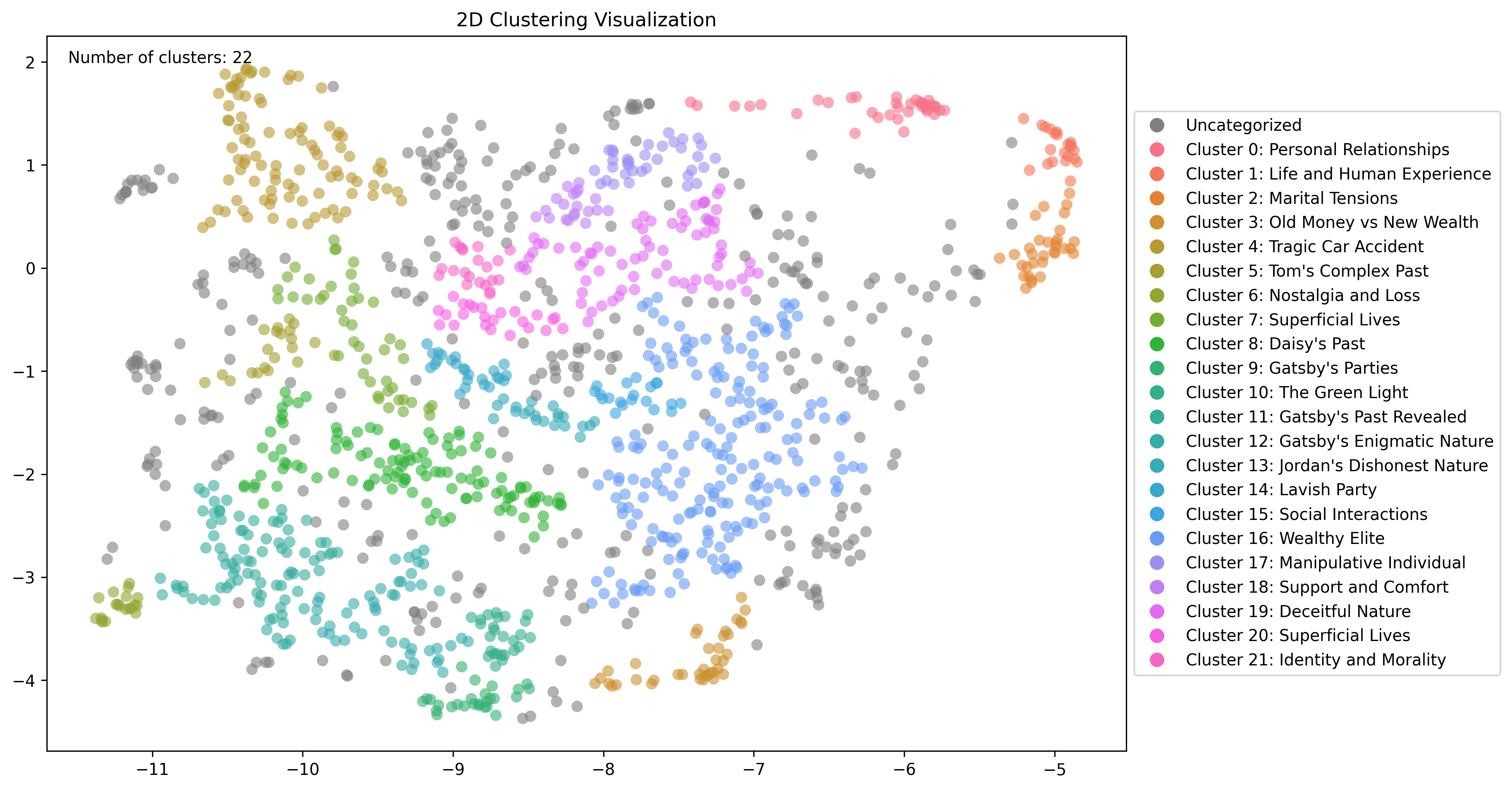
Clustering content with Telnyx
Embed your documents
Embedding your content in a Telnyx storage bucket is a prerequisite for computing these clusters. For more information, check out our Embeddings tutorial.Identify clusters
Once your documents are embedded, you can compute clusters via API. The optionalprefix and files parameters allow you to specfiy a subset of your bucket you would like to cluster.
The min_cluster_size and min_subcluster_size parameters control how clusters are identified.
Top-level clusters should be thought of as identifying broad themes in your data. Choose min_cluster_size based on the minimum data points you would like to constitute a broader theme.
Sub-clusters should be thought of as identifying more specific topics within a broader theme. Choose min_subcluster_size based on the minimum data points you would like to constitute a more niche subtopic.
Identifying themes in The Great Gatsby
To demonstrate embedding and clustering a Telnyx storage bucket, we will be using the text from The Great Gatsby.Upload to Telnyx Storage
You can upload objects to Telnyx’s S3-Compatible storage API using our quickstart or with our drag-and-drop interface in the portal.Embed your documents
Once you’ve uploaded your documents, you can embed them via API or by clicking the “Embed for AI Use” button in the portal while viewing your storage bucket’s contents. Behind the scenes, your documents will be processed into chunks and each chunk will be “embedded” based on its contents. Each chunk will be a single data point used in the clustering step.Compute clusters
You can compute multiple clusterings on the same data. This is helpful to tweak the parameters to find the best clusters for your data. Below is an example API requestInspect clusters
You can then take thattask_id and view the clusters structured as JSON via
top_n_nodes query parameter which will include the top N most central data points for each cluster.
You can also view a simple graph of the clusters via
cluster_id query parameter. Here is a closer look at the sub-clusters related to the cluster for “Daisy’s Past” using this endpoint
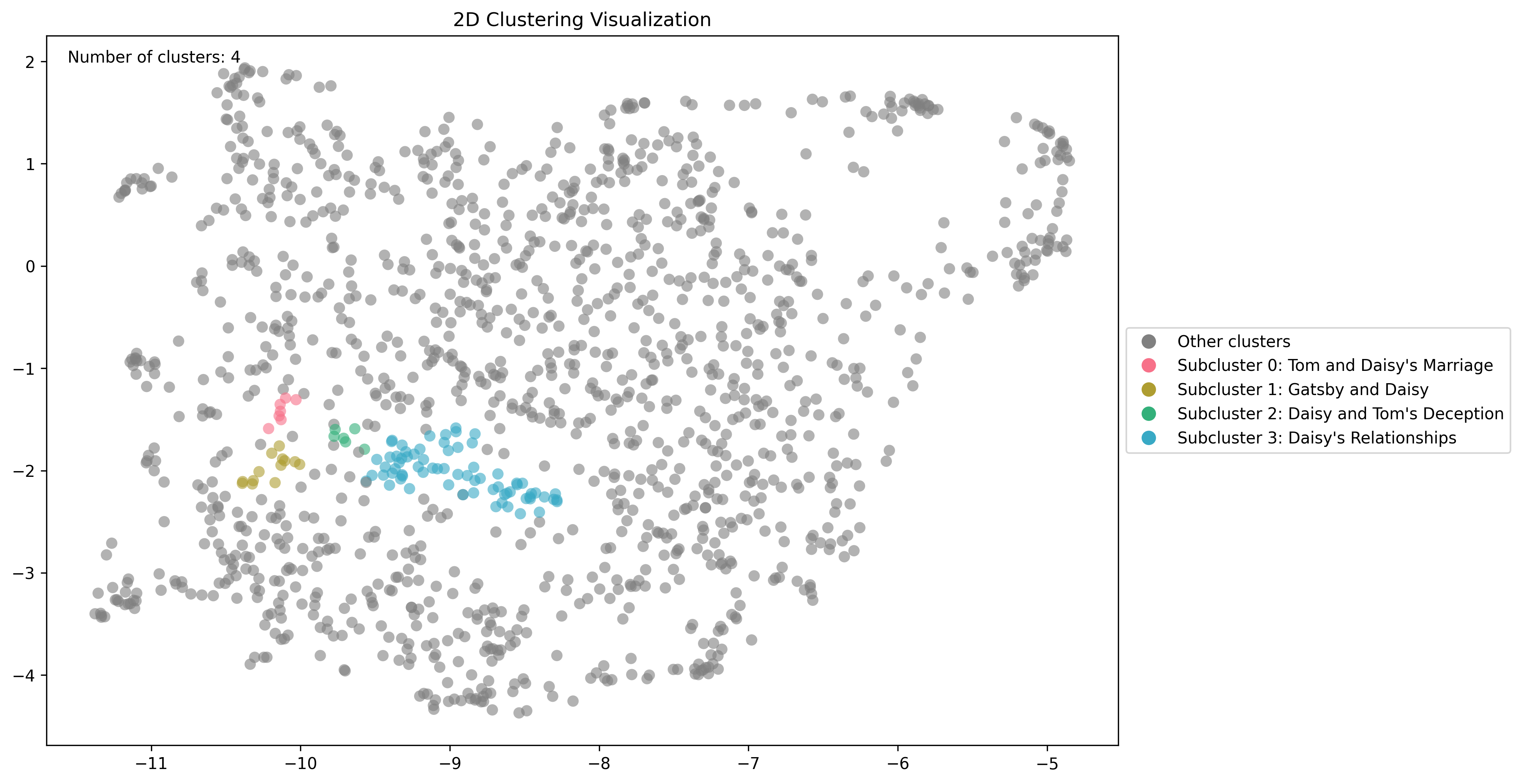
min_cluster_size will result in broader, more generic clusters.
You can also compute as many configurations over your data as you like so you have multiple ways of clustering your data if you’d like.
API Reference (Embedding & RAG)
Conversation Histories
- Search conversation histories: Performs semantic vector search across conversation history records.
Embeddings
- Get Tasks by Status: Retrieve tasks for the user that are either
queued,processing,failed,successorpartial_successbased on the query string. Defaults toqueuedan… - Embed documents: Perform embedding on a Telnyx Storage Bucket using the a embedding model.
- List embedded buckets: Get all embedding buckets for a user.
- Get file-level embedding statuses for a bucket: Get all embedded files for a given user bucket, including their processing status.
- Disable AI for an Embedded Bucket: Deletes an entire bucket’s embeddings and disables the bucket for AI-use, returning it to normal storage pricing.
- Search for documents: Perform a similarity search on a Telnyx Storage Bucket, returning the most similar
num_docsdocument chunks to the query. - Embed URL content: Embed website content from a specified URL, including child pages up to 5 levels deep within the same domain. The process crawls and loads content from the mai…
- Get an embedding task’s status: Check the status of a current embedding task. Will be one of the following:
Clusters
- List all clusters
- Compute new clusters: Starts a background task to compute how the data in an embedded storage bucket is clustered. This helps identify common themes and patterns in the data.
- Fetch a cluster
- Delete a cluster
- Fetch a cluster visualization
OpenAI Embeddings
- Create embeddings: Creates an embedding vector representing the input text. This endpoint is compatible with the OpenAI Embeddings API and may be used with the OpenAI JS or Pytho…
- List embedding models: Returns a list of available embedding models. This endpoint is compatible with the OpenAI Models API format.