> ## Documentation Index
> Fetch the complete documentation index at: https://developers.telnyx.com/llms.txt
> Use this file to discover all available pages before exploring further.
# Identifying themes in your data with Clusters
> Group similar documents and discover themes in your data with Telnyx Inference clusters. Run unsupervised clustering on embeddings to surface insights.
In this tutorial, you'll learn:
* How [Embeddings](https://developers.telnyx.com/api-reference/embeddings/embed-url-content#embed-url-content) and [Clusters](https://developers.telnyx.com/api-reference/clusters/compute-new-clusters#compute-new-clusters) work
* How to leverage them to identify common themes in your data
# Embeddings and Clusters
Embeddings are numerical representations of concepts within text, image, or audio data.
[The representation is a real-valued vector that encodes the meaning of the word in such a way that the words that are closer in the vector space are expected to be similar in meaning](https://en.wikipedia.org/wiki/Word_embedding)
Quantifying the semantic similarity of your data opens up several possibilities. For instance, by embedding a Telnyx storage bucket, you can [search for similar content](https://developers.telnyx.com/api-reference/embeddings/embed-url-content#embed-url-content) within your bucket.
This tutorial is focused on another application of embeddings: analyzing how your semantic data is [clustered](https://en.wikipedia.org/wiki/Cluster_analysis), which provides insight into common themes and niche subtopics.
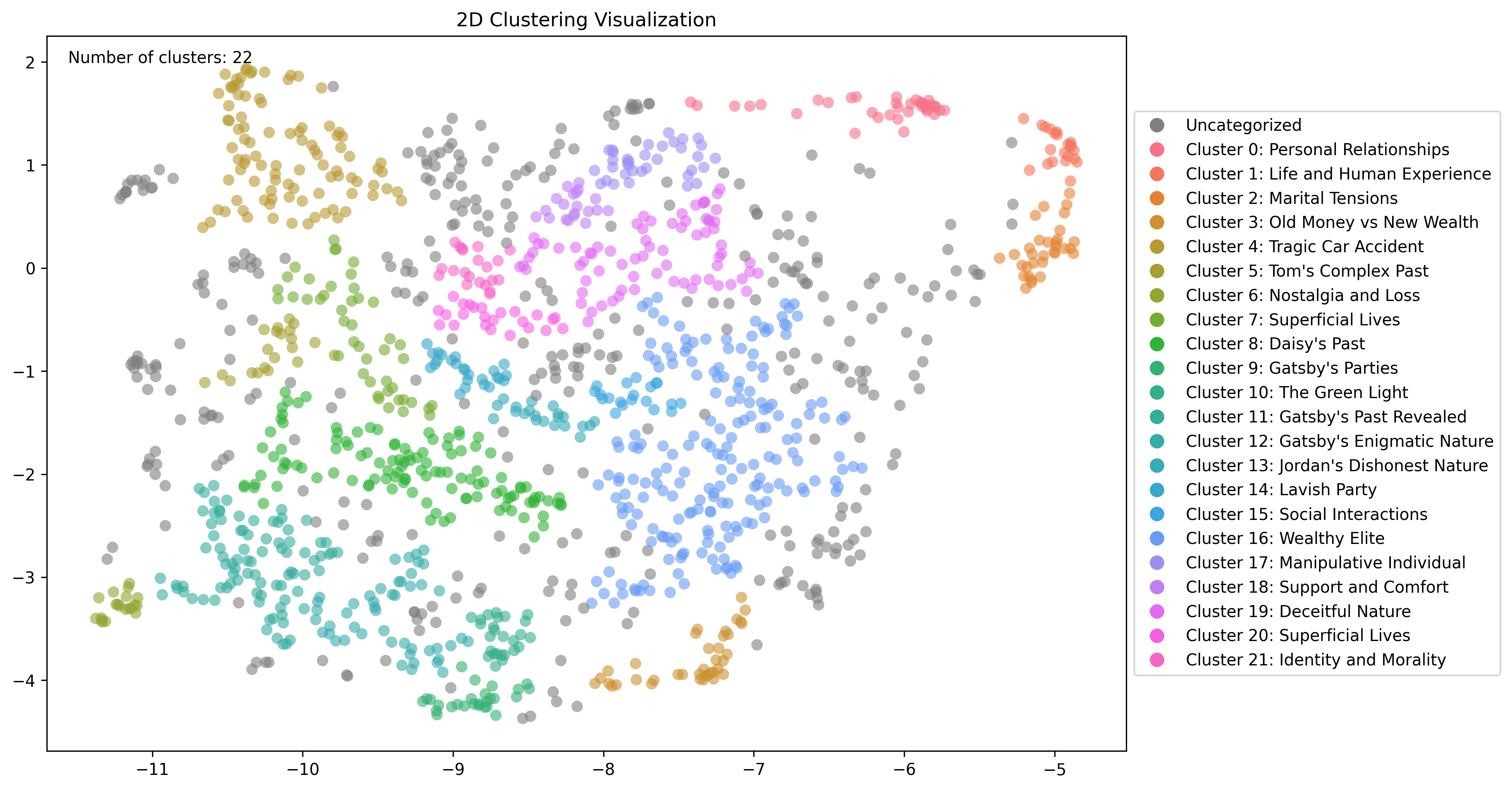
For example, pictured below are clusters of embeddings computed for the novel The Great Gatsby.
 # Clustering content with Telnyx
## Embed your documents
Embedding your content in a Telnyx storage bucket is a prerequisite for computing these clusters. For more information, check out our [Embeddings](https://developers.telnyx.com/docs/inference/embeddings) tutorial.
## Identify clusters
Once your documents are embedded, you can [compute clusters](https://developers.telnyx.com/api-reference/clusters/compute-new-clusters#compute-new-clusters) via API.
The optional `prefix` and `files` parameters allow you to specfiy a subset of your bucket you would like to cluster.
The `min_cluster_size` and `min_subcluster_size` parameters control how clusters are identified.
Top-level clusters should be thought of as identifying broad themes in your data. Choose `min_cluster_size` based on the minimum data points you would like to constitute a broader theme.
Sub-clusters should be thought of as identifying more specific topics within a broader theme. Choose `min_subcluster_size` based on the minimum data points you would like to constitute a more niche subtopic.
## Identifying themes in The Great Gatsby
To demonstrate embedding and clustering a Telnyx storage bucket, we will be using the text from The Great Gatsby.
### Upload to Telnyx Storage
You can upload objects to Telnyx's S3-Compatible storage API using our [quickstart](https://developers.telnyx.com/docs/cloud-storage/quick-start) or with our [drag-and-drop interface in the portal](https://portal.telnyx.com/#/storage/buckets).
### Embed your documents
Once you've uploaded your documents, you can [embed them via API](https://developers.telnyx.com/api-reference/embeddings/embed-url-content#embed-url-content) or by clicking the "Embed for AI Use" button in the portal while viewing your storage bucket's contents.
Behind the scenes, your documents will be processed into chunks and each chunk will be "embedded" based on its contents. Each chunk will be a single data point used in the clustering step.
### Compute clusters
You can compute multiple clusterings on the same data. This is helpful to tweak the parameters to find the best clusters for your data. Below is an example API request
```
$ curl --request POST \
--url https://api.telnyx.com/v2/ai/clusters \
--header "Authorization: Bearer $TELNYX_API_KEY" \
--header 'Content-Type: application/json' \
--data '{
"bucket": "cluster-gatsby",
"min_cluster_size": 50,
"min_subcluster_size": 10
}'
```
And the response
```
{"data":{"task_id":"04dd624f-c9b3-4fc8-8cec-492c8696e9ea"}}
```
### Inspect clusters
You can then take that `task_id` and view the clusters structured as JSON via
```
$ curl --request GET \
--url "https://api.telnyx.com/v2/ai/clusters/04dd624f-c9b3-4fc8-8cec-492c8696e9ea?show_subclusters=true" \
--header "Authorization: Bearer $TELNYX_API_KEY"
```
If you want to see example data from each cluster, you can also pass the `top_n_nodes` query parameter which will include the top N most central data points for each cluster.
You can also view a simple graph of the clusters via
```
$ curl --request GET \
--url "https://api.telnyx.com/v2/ai/clusters/04dd624f-c9b3-4fc8-8cec-492c8696e9ea/graph" \
--header "Authorization: Bearer $TELNYX_API_KEY" --output clusters.png
```
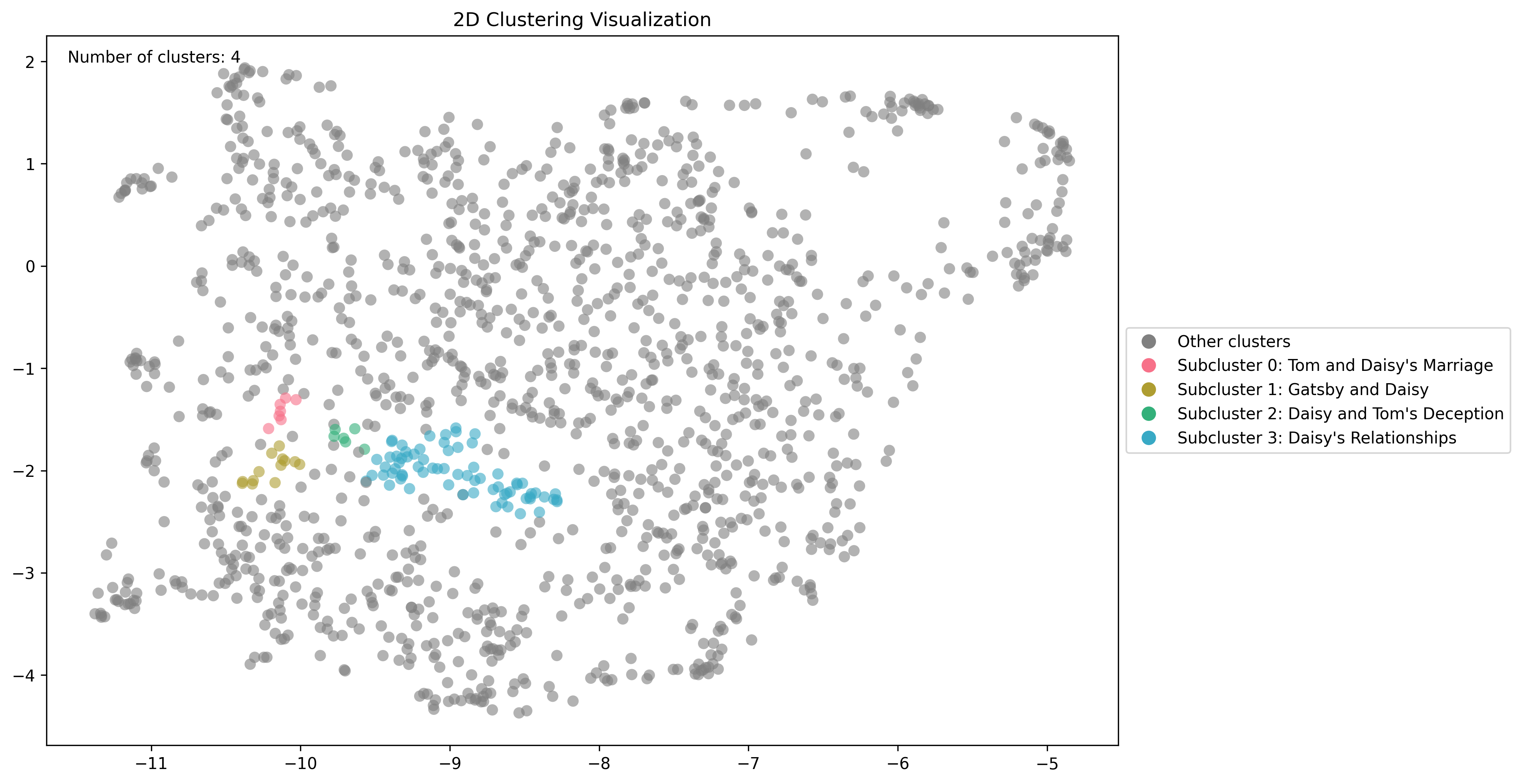
If you want to look at a cluster's subclusters, you can pass the `cluster_id` query parameter. Here is a closer look at the sub-clusters related to the cluster for "Daisy's Past" using this endpoint
# Clustering content with Telnyx
## Embed your documents
Embedding your content in a Telnyx storage bucket is a prerequisite for computing these clusters. For more information, check out our [Embeddings](https://developers.telnyx.com/docs/inference/embeddings) tutorial.
## Identify clusters
Once your documents are embedded, you can [compute clusters](https://developers.telnyx.com/api-reference/clusters/compute-new-clusters#compute-new-clusters) via API.
The optional `prefix` and `files` parameters allow you to specfiy a subset of your bucket you would like to cluster.
The `min_cluster_size` and `min_subcluster_size` parameters control how clusters are identified.
Top-level clusters should be thought of as identifying broad themes in your data. Choose `min_cluster_size` based on the minimum data points you would like to constitute a broader theme.
Sub-clusters should be thought of as identifying more specific topics within a broader theme. Choose `min_subcluster_size` based on the minimum data points you would like to constitute a more niche subtopic.
## Identifying themes in The Great Gatsby
To demonstrate embedding and clustering a Telnyx storage bucket, we will be using the text from The Great Gatsby.
### Upload to Telnyx Storage
You can upload objects to Telnyx's S3-Compatible storage API using our [quickstart](https://developers.telnyx.com/docs/cloud-storage/quick-start) or with our [drag-and-drop interface in the portal](https://portal.telnyx.com/#/storage/buckets).
### Embed your documents
Once you've uploaded your documents, you can [embed them via API](https://developers.telnyx.com/api-reference/embeddings/embed-url-content#embed-url-content) or by clicking the "Embed for AI Use" button in the portal while viewing your storage bucket's contents.
Behind the scenes, your documents will be processed into chunks and each chunk will be "embedded" based on its contents. Each chunk will be a single data point used in the clustering step.
### Compute clusters
You can compute multiple clusterings on the same data. This is helpful to tweak the parameters to find the best clusters for your data. Below is an example API request
```
$ curl --request POST \
--url https://api.telnyx.com/v2/ai/clusters \
--header "Authorization: Bearer $TELNYX_API_KEY" \
--header 'Content-Type: application/json' \
--data '{
"bucket": "cluster-gatsby",
"min_cluster_size": 50,
"min_subcluster_size": 10
}'
```
And the response
```
{"data":{"task_id":"04dd624f-c9b3-4fc8-8cec-492c8696e9ea"}}
```
### Inspect clusters
You can then take that `task_id` and view the clusters structured as JSON via
```
$ curl --request GET \
--url "https://api.telnyx.com/v2/ai/clusters/04dd624f-c9b3-4fc8-8cec-492c8696e9ea?show_subclusters=true" \
--header "Authorization: Bearer $TELNYX_API_KEY"
```
If you want to see example data from each cluster, you can also pass the `top_n_nodes` query parameter which will include the top N most central data points for each cluster.
You can also view a simple graph of the clusters via
```
$ curl --request GET \
--url "https://api.telnyx.com/v2/ai/clusters/04dd624f-c9b3-4fc8-8cec-492c8696e9ea/graph" \
--header "Authorization: Bearer $TELNYX_API_KEY" --output clusters.png
```
If you want to look at a cluster's subclusters, you can pass the `cluster_id` query parameter. Here is a closer look at the sub-clusters related to the cluster for "Daisy's Past" using this endpoint
 The initial parameters can have a large effect on the computed clusters, and the "right" clusters depend heavily on your data set and your goals, so you may have to play around a bit to find what works best. The general idea is that raising `min_cluster_size` will result in broader, more generic clusters.
You can also compute as many configurations over your data as you like so you have multiple ways of clustering your data if you'd like.
The initial parameters can have a large effect on the computed clusters, and the "right" clusters depend heavily on your data set and your goals, so you may have to play around a bit to find what works best. The general idea is that raising `min_cluster_size` will result in broader, more generic clusters.
You can also compute as many configurations over your data as you like so you have multiple ways of clustering your data if you'd like.