

Overview
Telnyx’s Pay over Voice feature enables accepting payments securely over the phone. The feature guides callers through an automated IVR flow to collect payment details (credit card or ACH debit), sends them to the configured payment processor, and returns the result — keeping sensitive card data out of recordings, logs, and AI assistants.How it works
- Create a Payment Connector pointing to the payment processor’s endpoint.
- A Pay session is started on an active call (via Voice API, TeXML, or AI Assistant).
- The caller is guided through IVR prompts to enter payment details via DTMF.
- Telnyx collects and sends the details to the configured processor endpoint. Use HTTPS to encrypt this connection.
- The processor charges or tokenizes the payment and returns a result.
- Telnyx emits progress and completed events to the webhook and AI assistant.
Create a Payment Connector
A Payment Connector is the bridge between Telnyx and the payment processor. It stores the processor’s endpoint URL and authentication credentials (encrypted at rest with AES-256).Step 1 — Navigate to Payment Connectors
In the Telnyx Portal, go to Voice API → Applications → Payment Connectors. The portal displays a list of existing connectors: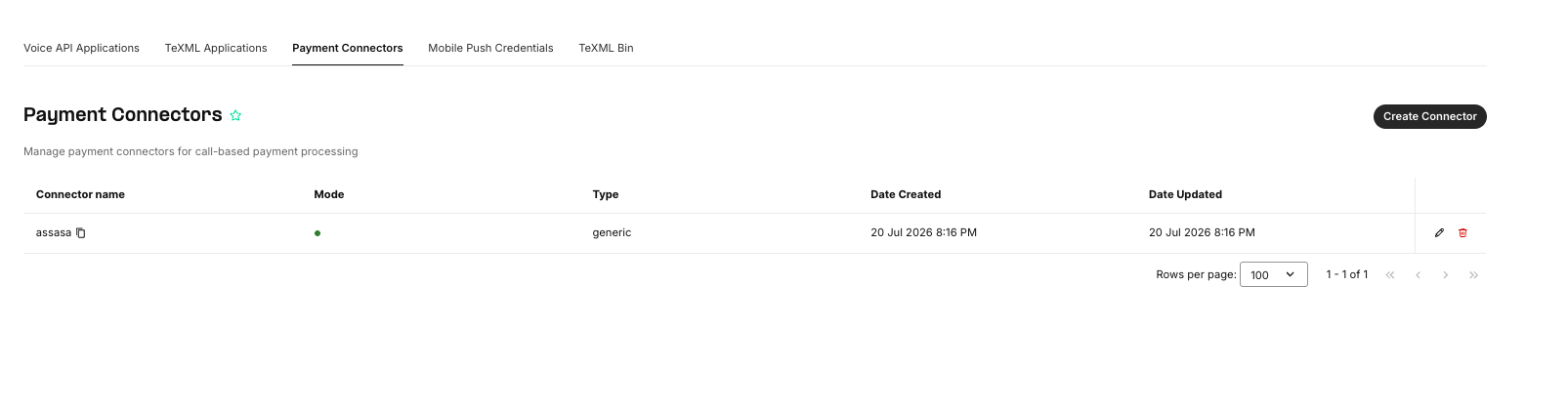
Step 2 — Create a new connector
Click Create Connector. Fill in the following fields: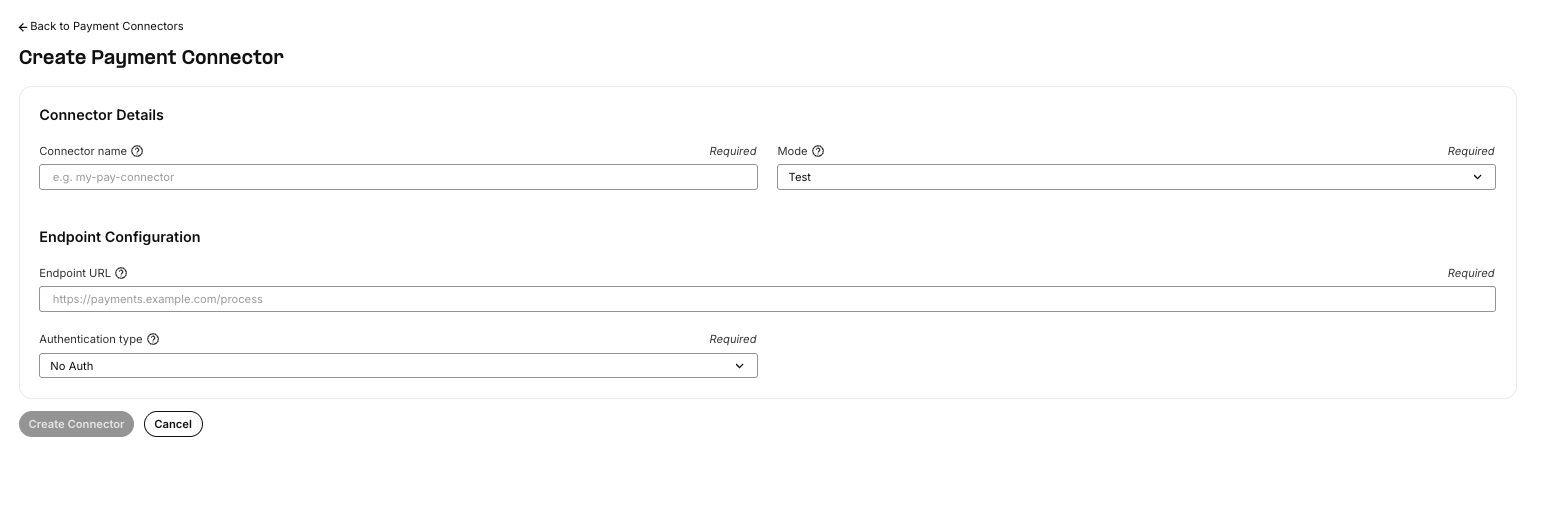
When Authentication type is set to
basic, Telnyx sends the credentials as HTTP Basic Auth headers with each request to the processor. The credentials are encrypted with AES-256-CTR before storage and are never exposed in logs or events.
When Authentication type is set to bearer, Telnyx sends the token in an Authorization: Bearer header with each request to the processor.
Generic connectors can also be managed through the Pay Connectors API. Authenticate these API requests with a Telnyx API key; config.auth_type controls separate authentication from Telnyx to the processor. Set auth_type explicitly (none, basic, or bearer). If omitted, validation requires basic credentials, but the processor request does not acquire a Basic Auth header automatically.
Names are unique within the authenticated organization. Retrieve, update, or delete a connector by its URL-encoded name, not its UUID. Passwords and tokens are omitted from all connector responses; usernames remain visible.
A PATCH containing config replaces the entire configuration. Re-send the endpoint URL and required credentials. A mode-only update omitting config preserves them. Optional config.timeout is the processor HTTP timeout in milliseconds: default 10000, range 1–4294967295. Omit it or supply null in a replacement config to use the default.
Payment Modes: Test vs Live
Test mode (default)
New connectors default to test mode whenmode is omitted. In test mode, the Pay session accepts only a predefined set of test card numbers. Any other card number is rejected with an invalid-card-number error, and the caller is asked to re-enter the number (up to max_attempts times).
For generic connectors, test mode still sends requests to the configured processor URL using the configured credentials. It does not select a processor sandbox or guarantee that no funds move. Use the processor’s sandbox endpoint and credentials for testing.
Valid test card numbers
For ACH-debit test mode, any valid-length routing and account numbers are accepted.
Live mode
Live mode removes the test-card allowlist; normal card validation still applies. The configured processor endpoint and credentials determine where transactions are processed. The API permits updates and deletion in both modes. UsePATCH /v2/pay_connectors/{name} with {"mode":"live"} to change mode without replacing credentials. Review the processor endpoint and credentials before switching to live.
The Payment Process
When a Pay session starts on a call, Telnyx takes over the call leg and guides the caller through a series of IVR steps. Each step plays a voice prompt, then collects the caller’s DTMF input.Security during payment
Before the first IVR prompt is played, Telnyx automatically disables all processes that could capture payment data:IVR steps
The IVR flow depends on the payment method selected:Credit card flow
ACH debit flow
Custom prompts
Prompts can be overridden by passing aprompts map. Each key is a step name, and the value is either a string or a list of prompt objects with conditional qualifiers:
attempt (1–3), error_type (e.g., invalid-card-number, timeout), card_type (e.g., visa, mastercard, amex, discover).
Error handling and retries
Each step allows up tomax_attempts (default 3) retries. If the caller enters too few digits, the wrong format, or times out, the step is repeated with an appropriate error prompt. If all attempts are exhausted, the session ends with too-many-failed-attempts.
Request sent to the payment processor
Once all digits are collected, Telnyx sends a POST to the connector’s endpoint URL with the payment details. The URL determines the transport: HTTPS encrypts the connection; HTTP sends payment details (including card numbers and CVVs) and any processor credentials in plaintext. Configure an HTTPS endpoint; the API does not enforce HTTPS.Credit card — charge
Credit card — tokenize
Whentransaction_type is tokenize (or amount is 0 or omitted), amount and currency_code are not sent:
ACH debit — charge
Response expected from the payment processor
The processor should return a JSON response: Charge — success:error_code (non-null and non-empty) and error_message; the session ends with payment-connector-error. A charge success requires a non-empty string charge_id; tokenization requires a non-empty string token_id. Transport timeouts and non-success HTTP statuses are processor failures, not successful payments.
Using Pay over Voice
Pay over Voice can be triggered from three interfaces: the Voice API, TeXML, and AI Assistant.Voice API
Start a Pay session by sending a POST request to the pay endpoint on an active call:Request parameters
TeXML
Use the<Pay> verb in a TeXML application. This is the simplest way to start a Pay session — include the verb in the TeXML response and Telnyx handles the rest:
call_payment_progress and call_payment_completed events. The application can use these to update external systems, confirm the payment, or continue the call flow.
AI Assistant
When using Telnyx’s AI Voice Assistant, a Pay tool can be added to the assistant so it can trigger a payment session during a conversation.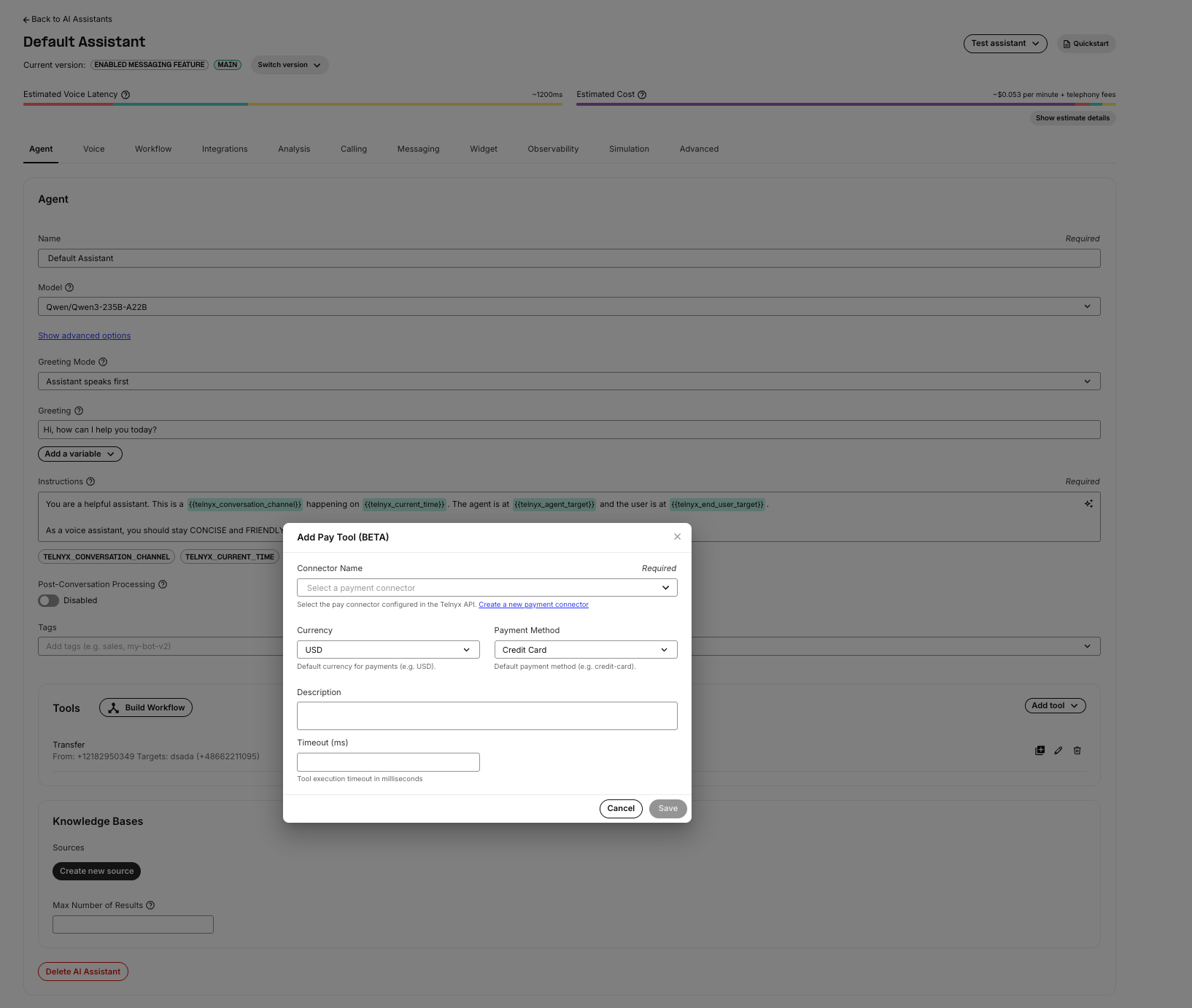
Further fields are available through the Assistant API but not in the Portal form:
When the AI assistant invokes the Pay tool, it starts a Pay session on the call. The assistant receives
call.payment.progress events after each IVR step and a call.payment.completed event with the final result. This lets the assistant inform the caller of the payment status and continue the conversation naturally.
:::note
During the Pay session, the AI assistant does not receive DTMF input or audio from the caller. The assistant only receives progress and completion events with masked payment data. This ensures the assistant never has access to raw card numbers, CVVs, or bank account details.
:::
Events
Two events are emitted during a Pay session. Both are sent to the configured webhook URL and, if active, to the AI assistant.Payment Progress
Sent after each IVR step completes or fails. Event name:call.payment.progress (API v2) or call_payment_progress (TeXML).
xxx).
Payment Completed
Sent when the Pay session ends (success, failure, or cancellation). Event name:call.payment.completed (API v2) or call_payment_completed (TeXML).
Success: