cURL
Sticky Sender makes sure the same “From” number is selected every time your application sends a message to a particular recipient. This allows your application to consistently send messages to your user from a single recognizable phone number. When Sticky Sender is enabled, Telnyx will maintain a mapping of the “To” and “From” numbers. This mapping is created after the first message is sent to a particular recipient. Any future messages to that recipient will use the same “From” number. This information is stored during 8 days since the last message sent to the destination number. Once the 8 days window expires with no new messages, another “From” number could be assigned to start a new Sticky Sender process. If Sticky Sender is turned off, Telnyx will disregard previously established “To” and “From” mappings when selecting the “From” number for new messages. When a Telnyx phone number is removed from your profile, all associated Sticky Sender mappings are removed. Your Messaging Profile ID can found at the top of your Messaging Profile under the “Profile Info” section. The code below enables Sticky Sender for a Messaging Profile:Don’t forget to update
YOUR_API_KEY here.After pasting the above content, Kindly check and remove any new line added
Python
Sticky Sender makes sure the same “From” number is selected every time your application sends a message to a particular recipient. This allows your application to consistently send messages to your user from a single recognizable phone number. When Sticky Sender is enabled, Telnyx will maintain a mapping of the “To” and “From” numbers. This mapping is created after the first message is sent to a particular recipient. Any future messages to that recipient will use the same “From” number. This information is stored during 8 days since the last message sent to the destination number. Once the 8 days window expires with no new messages, another “From” number could be assigned to start a new Sticky Sender process. If Sticky Sender is turned off, Telnyx will disregard previously established “To” and “From” mappings when selecting the “From” number for new messages. When a Telnyx phone number is removed from your profile, all associated Sticky Sender mappings are removed. Your Messaging Profile ID can found at the top of your Messaging Profile under the “Profile Info” section. The code below enables and then disables Sticky Sender for a Messaging Profile:After pasting the above content, Kindly check and remove any new line added
PHP
Sticky Sender makes sure the same “From” number is selected every time your application sends a message to a particular recipient. This allows your application to consistently send messages to your user from a single recognizable phone number. When Sticky Sender is enabled, Telnyx will maintain a mapping of the “To” and “From” numbers. This mapping is created after the first message is sent to a particular recipient. Any future messages to that recipient will use the same “From” number. This information is stored during 8 days since the last message sent to the destination number. Once the 8 days window expires with no new messages, another “From” number could be assigned to start a new Sticky Sender process. If Sticky Sender is turned off, Telnyx will disregard previously established “To” and “From” mappings when selecting the “From” number for new messages. When a Telnyx phone number is removed from your profile, all associated Sticky Sender mappings are removed. Your Messaging Profile ID can found at the top of your Messaging Profile under the “Profile Info” section. The code below enables and then disables Sticky Sender for a Messaging Profile:After pasting the above content, Kindly check and remove any new line added
Node
Sticky Sender makes sure the same “From” number is selected every time your application sends a message to a particular recipient. This allows your application to consistently send messages to your user from a single recognizable phone number. When Sticky Sender is enabled, Telnyx will maintain a mapping of the “To” and “From” numbers. This mapping is created after the first message is sent to a particular recipient. Any future messages to that recipient will use the same “From” number. This information is stored during 8 days since the last message sent to the destination number. Once the 8 days window expires with no new messages, another “From” number could be assigned to start a new Sticky Sender process. If Sticky Sender is turned off, Telnyx will disregard previously established “To” and “From” mappings when selecting the “From” number for new messages. When a Telnyx phone number is removed from your profile, all associated Sticky Sender mappings are removed. Your Messaging Profile ID can found at the top of your Messaging Profile under the “Profile Info” section. The code below enables and then disables Sticky Sender for a Messaging Profile:After pasting the above content, Kindly check and remove any new line added
.NET
Sticky Sender makes sure the same “From” number is selected every time your application sends a message to a particular recipient. This allows your application to consistently send messages to your user from a single recognizable phone number. When Sticky Sender is enabled, Telnyx will maintain a mapping of the “To” and “From” numbers. This mapping is created after the first message is sent to a particular recipient. Any future messages to that recipient will use the same “From” number. This information is stored during 8 days since the last message sent to the destination number. Once the 8 days window expires with no new messages, another “From” number could be assigned to start a new Sticky Sender process. If Sticky Sender is turned off, Telnyx will disregard previously established “To” and “From” mappings when selecting the “From” number for new messages. When a Telnyx phone number is removed from your profile, all associated Sticky Sender mappings are removed. Your Messaging Profile ID can found at the top of your Messaging Profile under the “Profile Info” section. The code below enables and then disables Sticky Sender for a Messaging Profile:After pasting the above content, Kindly check and remove any new line added
Ruby
Sticky Sender makes sure the same “From” number is selected every time your application sends a message to a particular recipient. This allows your application to consistently send messages to your user from a single recognizable phone number. When Sticky Sender is enabled, Telnyx will maintain a mapping of the “To” and “From” numbers. This mapping is created after the first message is sent to a particular recipient. Any future messages to that recipient will use the same “From” number. This information is stored during 8 days since the last message sent to the destination number. Once the 8 days window expires with no new messages, another “From” number could be assigned to start a new Sticky Sender process. If Sticky Sender is turned off, Telnyx will disregard previously established “To” and “From” mappings when selecting the “From” number for new messages. When a Telnyx phone number is removed from your profile, all associated Sticky Sender mappings are removed. Your Messaging Profile ID can found at the top of your Messaging Profile under the “Profile Info” section. The code below enables and then disables Sticky Sender for a Messaging Profile:After pasting the above content, Kindly check and remove any new line added
Portal
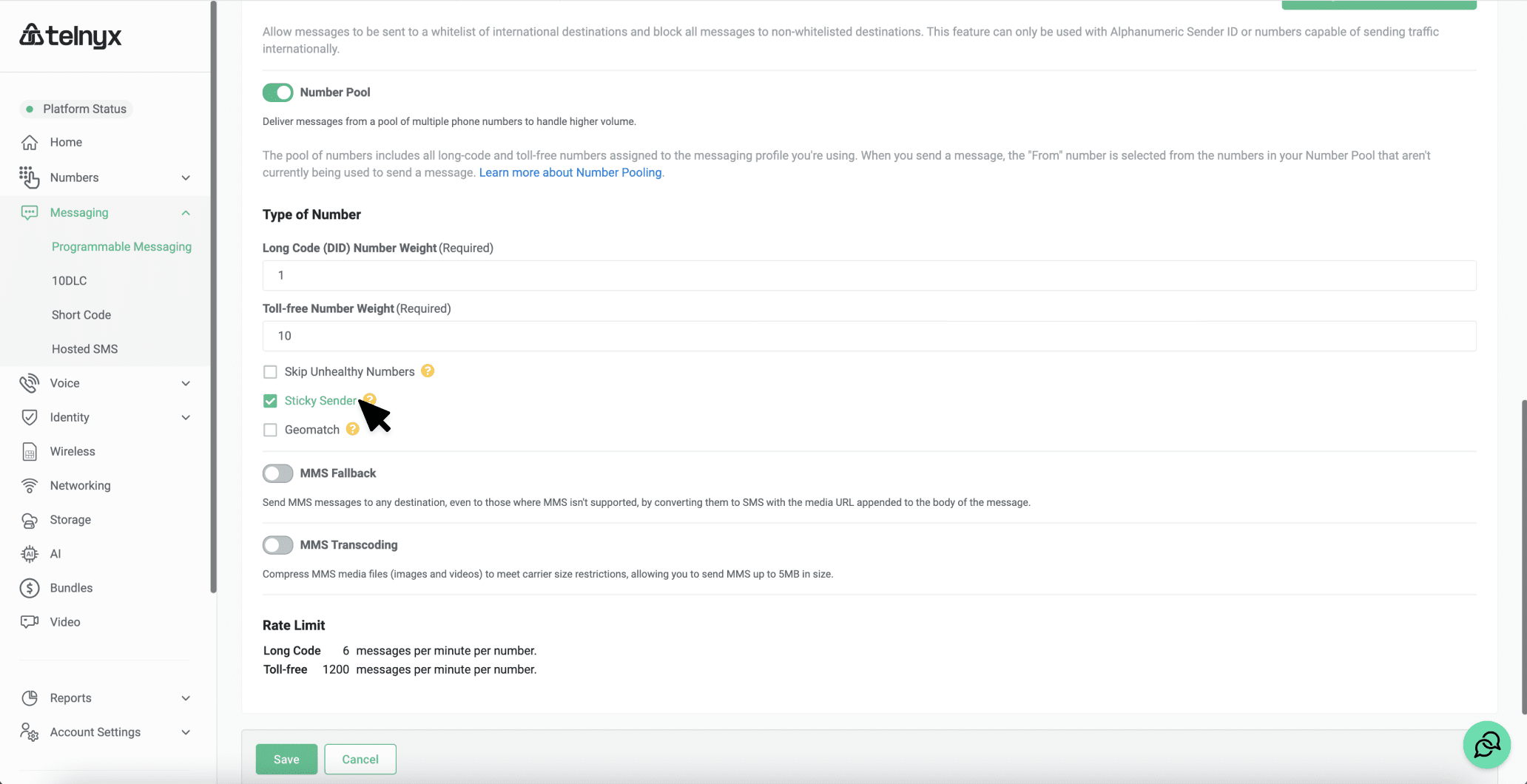
Sticky Sender makes sure the same “From” number is selected every time your application sends a message to a particular recipient. Your application will consistently send messages to your end user from a single recognizable phone number. Once this feature is enabled, Telnyx will maintain a mapping of the “To” and “From” numbers after the first message is sent to a particular recipient, and any future messages to that recipient will use the same “From” number. This information is stored during 8 days since the last message sent to the destination number. Once the 8 days window expires with no new messages, another “From” number could be assigned to start a new Sticky Sender process. If Sticky Sender is turned off, Telnyx will disregard previously established “To” and “From” mappings when selecting the “From” number for new messages. When a Telnyx phone number is removed from your profile, all associated Sticky Sender mappings are removed. To configure Sticky Sender in your Portal:- Click on “Messaging” in the navigation menu on the left-hand side of the Telnyx Mission Control Portal.
- Click the edit symbol next to the Messaging Profile you want to use.
- Under Outbound, toggle on “Number Pool” to enable.
- Select the “Sticky Sender” checkbox.
- Click “Save”.