

All new numbers start as A2P by default. After Telnyx monitors your traffic pattern, eligible numbers can be switched to P2P.
A2P vs P2P Comparison
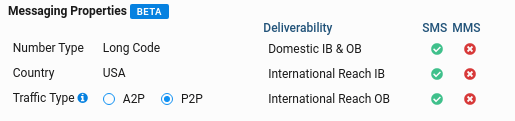
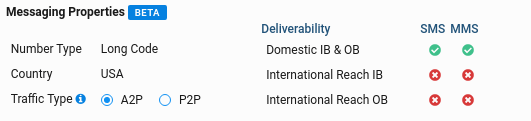
Changing traffic types affects features and pricing. Switching to P2P removes MMS support but enables international outbound SMS.
When to Use Each Type
Keep A2P
Marketing campaigns, transactional alerts, OTP codes, appointment reminders—any automated business messaging.
Switch to P2P
Support conversations, two-way chat applications, international reach, or use cases requiring a more personal sender profile.
US A2P Messaging: If you’re sending A2P traffic in the United States using 10-digit long codes, you must register your brand and campaigns through 10DLC. Unregistered A2P traffic faces heavy filtering and delivery failures.
How Eligibility Works
Telnyx monitors your messaging patterns to determine P2P eligibility: Theeligible_messaging_products field in the API response shows which options are available for your number.
Prerequisites
- A Telnyx account
- A phone number assigned to a Messaging Profile
- An API key (for API access)
Check Traffic Type
Retrieve a number’s current traffic type and eligibility using the Messaging Phone Numbers API.- API
- Portal
Response Fields
The API response includes key fields for understanding your number’s messaging configuration:Change Traffic Type
If your number is eligible for both A2P and P2P (checkeligible_messaging_products), you can switch between them.
Feature changes take effect immediately. Switching to P2P disables MMS but enables international SMS. Review the comparison table before changing.
- API
- Portal
After Changing to P2P
Your number’s features will update immediately:mmssection is now empty (MMS disabled)international_outboundis nowtruefor SMS- Pricing may change—check your rate sheet
International Messaging with P2P
Once your number is configured for P2P, you can send SMS internationally:If you try to send internationally from an A2P number, Telnyx will automatically fall back to an alphanumeric sender (like “Telnyx”) where supported.
Troubleshooting
Number not eligible for P2P
Number not eligible for P2P
Cause: Telnyx hasn’t observed enough conversational traffic to qualify the number for P2P.Solutions:
- Continue using the number with conversational (two-way) messaging
- Wait for the next eligibility review cycle
- Contact Telnyx support if you believe your traffic qualifies
Lost MMS after switching to P2P
Lost MMS after switching to P2P
Cause: P2P traffic type doesn’t support MMS—this is expected behavior.Solutions:
- Switch back to A2P if you need MMS
- Use a separate A2P number for MMS messages
- For mixed use cases, maintain both A2P and P2P numbers
International messages still failing
International messages still failing
Cause: Destination country may require sender registration, or the number isn’t fully switched.Solutions:
- Verify the number shows
messaging_product: "P2P"in the API response - Check if the destination country requires sender pre-registration
- Confirm
features.sms.international_outboundistrue - Review webhook delivery reports for specific error codes
Can't switch back to A2P
Can't switch back to A2P
Cause: The number may have lost A2P eligibility based on traffic patterns.Solutions:
- Check
eligible_messaging_productsto confirm A2P is still an option - Contact Telnyx support if A2P eligibility is unexpectedly missing
Next Steps
Number Pool
Distribute messages across multiple numbers
Rate Limiting
Understand messaging throughput limits
10DLC Registration
Register for A2P 10DLC compliance in the US
Alphanumeric Sender
Send internationally with branded sender IDs