

Telnyx Calling: TeXML — Full Documentation
Complete page content for TeXML (Calling section) of the Telnyx developer docs (https://developers.telnyx.com). This file: https://developers.telnyx.com/development/llms/calling-texml-llms-full-txt.md · Root index: https://developers.telnyx.com/llms.txt
Guides
TeXML Fundamentals
Source: https://developers.telnyx.com/docs/voice/programmable-voice/texml-fundamentals.md
Overview
TeXML is an XML-based markup language to define call control and processing instructions. When properly configured, Telnyx will fetch TeXML instructions from the user’s application and process the calls accordingly. See Verbs & Nouns.TeXML Application
An instance of TeXML Application is a collection of configuration parameters that defines the interaction between Telnyx and the user’s application:
A TeXML Application can be created through the Telnyx Mission Control Portal
or via the Telnyx API.
Instruction Fetching
See Instruction Fetching.Twilio Compatibility
See Twilio Compatibility.Instruction Fetching
Source: https://developers.telnyx.com/docs/voice/programmable-voice/texml-instruction-fetching.mdOn inbound calls (PSTN or External SIP to Telnyx), Telnyx fetches TeXML instructions from the URL defined on the TeXML Application associated with the SIP subdomain or phone number. On outbound calls (Telnyx to PSTN or External SIP), there are two ways the user can trigger instructions fetching, the details of which are described below.
Instruction Fetching on Inbound Calls
An instance of TeXML application can have a specific SIP subdomain or phone number assigned to it. When Telnyx receives a call to that SIP subdomain or phone number, Telnyx will fetch the instructions from the URL defined on the TeXML Application.Instruction Fetching on Outbound Calls
Using TeXML Application
Instructions fetching can be triggered by TeXML Calls API. In this case, a TeXML application is required. Example:Using SIP Trunking Connections
The user can configure a SIP trunking connection of any type to “Park Outbound Calls”. When the user initiates an outbound call on that SIP connection, Telnyx will “park” that call leg, fetch the instructions from the URL defined on the connection, and then process the call based on the instructions. In this use case, a TeXML application is not required.HTTP Request Details
When a call is being handled by a TeXML application, Telnyx makes HTTP requests to fetch instructions from the user’s application. These requests include specific parameters that provide context about the call, allowing the user’s application to generate appropriate TeXML responses.- Method: Configurable (GET or POST, default is GET)
- URL: The URL configured for the user’s TeXML application
- Failover URL: Used if the primary URL is unavailable (optional)
Request Parameters
When Telnyx makes a request to fetch TeXML instructions, the following parameters are always included:Optional Parameters
Depending on the call context, additional parameters are added to the request. Full list of the parameters can be found on the documentation page for each of the TeXML verbsParameter Format
Depending on the HTTP method selected for the requests, the parameters are added in the following way:- GET requests - as URL query parameters
- POST requests - in the request body as form-encoded data
Response Requirements
The user’s application should respond with valid TeXML. The response should:- Be valid XML with a root
<Response>element - Not exceed size limits
- Return HTTP status code 200 OK
Example
Request (GET method)
Response
Best Practices
Here are a few best practices to follow:- Always verify the CallSid parameter to ensure the request is legitimate
- Include error handling in your application to handle unexpected parameters
- Keep response times low to avoid call delays
- Use the parameters to customize call flows based on caller information
- Test your application with various parameter combinations
- By properly handling these parameters, you can create dynamic, responsive TeXML applications that provide excellent caller experiences
TeXML Interpreter
Source: https://developers.telnyx.com/docs/voice/programmable-voice/texml-interpreter.md
Basic Syntax
A proper TeXML response comprises the following elements:<Response>element — tag defining the body of the TeXML document- verb — an XML tag denoting the desired action
- noun — an XML tag denoting the object of the desired action
Dynamic parameters
When creating a TeXML set of instructions you can make use of Mustache Templates to generate instructions dynamically at runtime.Inserting dynamic content
You can make use of Mustache Dynamic templating to insert content into your TeXML instructions through HTTP request parameters in the webhook URL we use to fetch your TeXML set of instructions. For example, you could create a TeXML set of instructions that calls a number that is set until the HTTP request is made to fetch your TeXML instructions. You first create your TeXML instructions using Mustache Templating and set the{{PhoneNumber}} as a variable like this
PhoneNumber as a parameter.
Iterate through lists
You can set arrays as parameters in your TeXML webhook URL and let Mustache Template handle them. If for example, you want the dial command to have two numbers, you could add aNumbers list parameter to your callback Url.
PhoneNumbers parameter in the TeXML instructions using the following syntax.
Render conditional content
Conditional content is supported by usingif/else statements in the TeXML instructions. You could define a set of instructions to dial a specific number depending on From parameter present in the HTTP request.
==, != and no operator for checking if the parameter value is not null.
TeXML TwiML Compatibility
Source: https://developers.telnyx.com/docs/voice/programmable-voice/texml-twiml-compatibility.mdTeXML services was created to allow the easy migration from Twilio to Telnyx, allowing you to use the same verbs and nouns in both platforms. This page provides a comparison of verb support between TeXML and TwiML, helping you understand which features are available in each platform.
Verb Compatibility
For detailed information about particular TeXML verb click the link under the name of the verb in the table.
Noun Compatibility
More information about the nouns can be found on
<Dial> documentation page
REST API Endpoint Compatibility
The following table outlines the compatibility between Twilio’s REST API endpoints and Telnyx’s TeXML API endpoints.
For detailed information about TeXML REST API endpoints and their usage, please use the links to the documentation from the table.
Dynamic TeXML Bins
Source: https://developers.telnyx.com/docs/voice/programmable-voice/texml-bin-dynamic.mdIn this guide, we’ll cover how to create dynamic parameters in TeXML Bin using Mustache Templates. You can get started with TeXML Bin in the Mission Control Portal by following the first steps in our previous guide.
Dynamic parameters for TeXML
Mustache is a logic-less web template system used mainly for mobile and web applications. And a great way to generate instructions dynamically at runtime when creating a TeXML set of instructions. By using Mustache Dynamic templating you can insert content into your TeXML instructions through HTTP request parameters in the webhook URL that is used to fetch your TeXML set of instructions. For example, you could create a TeXML set of instructions that calls a phone number which is set until the HTTP request is made to fetch your TeXML instructions. To do this you’ll first need create your TeXML instructions using Mustache Templating, and set the{{PhoneNumber}} as a variable like this:
PhoneNumber as a parameter like so:
Don’t forget to update YOUR_API_KEY here.
Iterating through lists
TeXML Bin allows users to set arrays as parameters in the TeXML webhook url and let Mustache Template handle them. For example, if you want the dial command to have two numbers, you could add aNumbers list parameter to your callback Url.
PhoneNumbers parameter in the TeXML instructions using the following syntax:
How to render conditional content
Conditional content is supported by usingif/else statements in the TeXML instructions. You could define a set of instructions to dial an specific number depending on From parameter present in the HTTP request.
==, != and there is no operator for checking if the parameter value is not null.
Sending HTTP Requests
Source: https://developers.telnyx.com/docs/voice/programmable-voice/texml-sending-http-requests.mdIn the previous tutorial, we explained how to use dynamic parameters in the TeXML instructions. In this tutorial, we’ll cover how to integrate your systems using HTTP requests from a TeXML file without needing your own server-side application, as well as retrieve required information for call flows from external systems and send notifications to any REST API.
Sending HTTP request
The requests can be sent using<HTTPRequest> verb in the following way:
- Headers
- The method for the request (GET or POST)
- And the body
Synchronous requests
The requests are sent asynchronously by default. The TeXML process does not wait for the result of the request and immediately executes the next instruction from the TeXML file. It is possible to change that behavior by using theasync attribute and setting it to true. In that case, the TeXML process will wait for the HTTP response and send a callback to the action URL immediately afterward.
Using secrets
API keys or any other secrets can be stored in the secure storage. You can upload them using a dedicated REST endpoint.Sending notifications about the call to your Slack workspace using information about the caller retrieved from Salesforce database
In this section we will present how to retrieve the information about the caller from the Salesforce database and send it as a message to the Slack channel.- Upload an api_key to your Slack workspace under the name slack_api_key
- Upload a token to the Salesforce API under the name salesforce_token
- Create a TeXML file that will send a message to the Slack channel and make a call to your SIP account and name it slack_http_request
- Create a TeXML file that will retrieve the information about the caller and their name from Salesforce.
- Update your TeXML application webhook URL (If you need to create your application, please take a look at this tutorial)
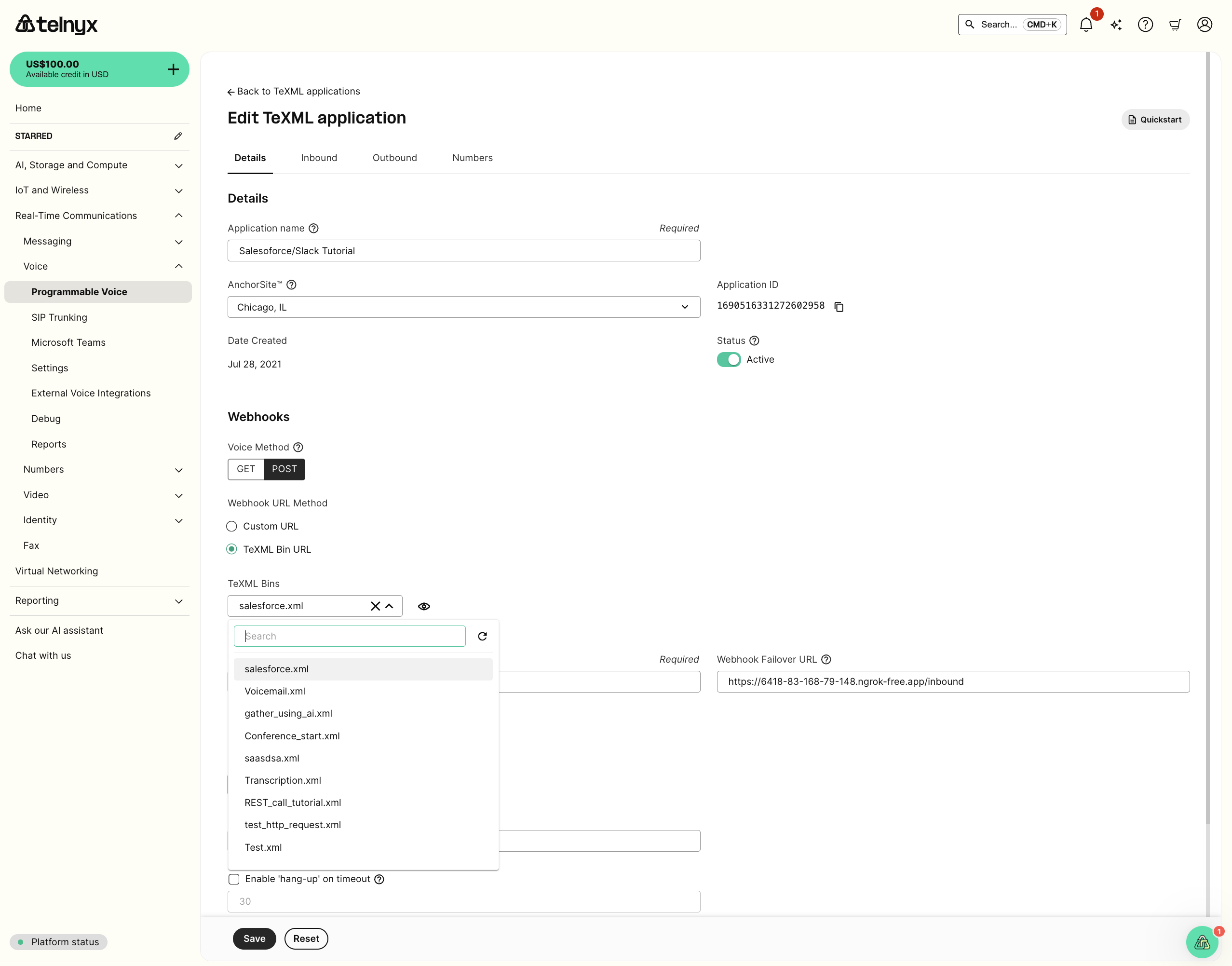
- Make a call to the number associated with the TeXML application and observe the notification in your Slack workspace
TeXML Answering Machine
Source: https://developers.telnyx.com/docs/voice/programmable-voice/texml-answering-machine.mdTeXML is an XML-based data structure you can use to control calls with Telnyx and is the quickest way to get started with Programmable Voice using a simple .xml file, allowing you to specify call instructions in your file using commands called verbs and nouns.
Initiating a TeXML outbound call using REST endpoint with AMD enabled
There are 2 possible options for using Answering Machine Detection for outbound calls:- Synchronous mode: In this case, the TeXML instructions are not executed until the results of AMD process are provided in the status callback. The new instructions can be sent back as response to be processed by the TeXML engine.
- Asynchronous mode: Here, the TeXML instructions are processed in parallel to the AMD process. The results of the AMD analysis are being provided in the AsyncAmdStatusCallback callback.
Synchronous mode request
The outbound TeXML call with AMD support enable in the synchronous mode can be requested in the following way: Don’t forget to updateYOUR_API_KEY here.
AnsweredBy parameter of the StatusCallback request.
AnsweredBy parameter values
The values returned depend on the MachineDetection mode used:
When MachineDetection is Enable (detects as soon as the answering machine is identified):
When
MachineDetection is DetectMessageEnd (waits for the answering machine greeting to finish):
The
MachineDetection parameter accepts the following values: Enable, Disable (default), and DetectMessageEnd. The DetectionMode parameter accepts Regular (default) or Premium.
Asynchronous mode request
Similarly, the asynchronous AMD processing can be requested for outgoing TeXML calls:AsyncAmdStatusCallback parameter. Note that this can be used for basic and premium AMD.
AsyncAmdStatusCallback parameters
The callback to your AsyncAmdStatusCallback URL includes the following parameters:
Markup Language
Dial
Source: https://developers.telnyx.com/docs/voice/programmable-voice/texml-verbs/dial.mdThe
<Dial> verb transfers an existing call to another destination. <Dial> will end this new call if: the called party does not answer, the number does not exist, or Telnyx receives a busy signal.
Attributes
ATTRIBUTE DESCRIPTION OPTIONS DEFAULT action Optional URL where TeXML will make a request when the<Dial> call ends to retrieve a new set of TeXML instructions to continue the call flow.
<Dial> verb. It works with the <Number> and <Sip> nouns only. If you want to record the conference, please use the record attribute on <Conference> noun. Recordings are available in two options: single or dual.
do-not-record, record-from-answer, record-from-ringing, record-from-answer-dual, record-from-ringing-dual
do-not-record
recordingChannels
The number of channels in the final recording. Possible values are: single (for mono) and dual (for stereo). Defaults to single.
single, dual
single
recordMaxLength
Defines the maximum length for the recording in seconds (0 for infinite)
0 - 14400
0
recordingStatusCallback
Optional URL that tells Telnyx where to make its GET or POST request when the recording is available.
<Number> or <Sip> nouns, Telnyx dials each destination one at a time in the order listed. The next destination is attempted only if the current attempt completes without being answered. If omitted or set to false, all destinations are dialed at the same time and the first answered call is connected.
false
passDiversionHeader
When set to true, the Diversion SIP header from the inbound call is passed through to the outbound dial attempt.
false
machineDetectionSpeechThreshold
Maximum duration of a greeting in milliseconds. If a greeting is longer than this value, the call is classified as a machine. Only used when machineDetection is enabled and detectionMode is Premium.
Child verbs/nouns
NOUN/VERB DESCRIPTION Number Specifies a phone number to dial. Sip The<Sip> noun specifies a SIP endpoint to dial.
Queue
The <Queue> noun allows you to add a call to a queue.
Number Attributes
ATTRIBUTE DESCRIPTION OPTIONS DEFAULT statusCallback A URL for Telnyx to send webhook requests to on each event specified in the statusCallbackEvent attribute for outbound calls only. Inbound Status Callback events can be configured for TeXML the connection settings in the Mission Control Portal.<Gather> and <Hangup> verbs so that the called party can chose to take an action on the incoming call before the two parties are connected. The callee will continue to hear ringback while the url document is executed.
machineDetection Enables Answering Machine Detection. Note: add amd event type to statusCallbackEvent list to receive the detection result webhook. Enable, DetectMessageEnd, Disable Disable detectionMode Sets the Answering Machine Detection mode. Use PremiumCallScreening for premium iOS call screening detection. See https://developers.telnyx.com/docs/voice/programmable-voice/answering-machine-detection Regular, Premium, PremiumCallScreening Regular machineDetectionTimeout Maximum timeout threshold for overall detection, in milliseconds. 500 - 60000 3500 machineDetectionPromptEndTimeout Silence duration threshold after a call screening prompt before ending prompt detection, in milliseconds. Only used when machineDetection is enabled and detectionMode is PremiumCallScreening. 1000 - 120000
sipRegion The geographic region of the SIP infrastructure Telnyx should use when dialing the destination. US, Europe, Canada, Australia, Middle East USSip Attributes
ATTRIBUTE DESCRIPTION OPTIONS DEFAULT username Username to use for SIP authentication.<Gather> and <Hangup> verbs so that the called party can chose to take an action on the incoming call before the two parties are connected. The callee will continue to hear ringback while the url document is executed.
method HTTP request type used for url. GET, POST POST machineDetection Enables Answering Machine Detection. Note: add amd event type to statusCallbackEvent list to receive the detection result webhook. Enable, DetectMessageEnd, Disable Disable detectionMode Sets the Answering Machine Detection mode. Use PremiumCallScreening for premium iOS call screening detection. See https://developers.telnyx.com/docs/voice/programmable-voice/answering-machine-detection Regular, Premium, PremiumCallScreening Regular machineDetectionTimeout Maximum timeout threshold for overall detection, in milliseconds. 500 - 60000 3500 machineDetectionPromptEndTimeout Silence duration threshold after a call screening prompt before ending prompt detection, in milliseconds. Only used when machineDetection is enabled and detectionMode is PremiumCallScreening. 1000 - 120000
sipRegion The geographic region of the SIP infrastructure Telnyx should use when dialing the destination. US, Europe, Canada, Australia, Middle East USQueue Attributes
ATTRIBUTE DESCRIPTION OPTIONS DEFAULT url Optional URL to another TeXML document that can contain<Play>, <Say>, <Gather>, <Pause> and <Redirect> verbs. The document will be executed on the queued call before bridging the calls.
Simultaneous dialing
You can use multiple<Number> and <Sip> nouns within a <Dial> verb to dial multiple phone numbers and SIP addresses at the same time. The first person to answer the call will be connected to the caller, while the rest of the call attempts are hung up:
Sequential dialing
Setsequential="true" to dial multiple <Number> and <Sip> nouns one at a time in the order listed. Telnyx attempts the next destination only if the current attempt completes without being answered. If a destination answers, it is connected to the caller and the remaining destinations are not dialed.
Examples
Expected callbacks
Ifaction is set, a callback is sent when the dialed call ends. See Dial Action Callback for the full payload reference.
The error_code and error_message fields are provided only in case of failed calls. The full list of errors can be found under the API Errors page.
If statusCallbackEvent is set, the following webhooks are sent based on configured events:
If
machineDetection is enabled, an AMD callback is sent to amdStatusCallback. See AMD Callback for the full payload reference.
If deepfakeDetection is set to Enable, a deepfake detection callback is sent to deepfakeDetectionCallbackUrl (or to statusCallback if "deepfake" is included in statusCallbackEvent). The callback payload includes DeepfakeResult (real, fake, or silence_timeout), DeepfakeScore (0.0–1.0), and DeepfakeConsistency (0–100). On detection failure, a DeepfakeError field is sent instead.
If recordingStatusCallbackEvent is set, the following webhooks are sent:
Say
Source: https://developers.telnyx.com/docs/voice/programmable-voice/texml-verbs/say.mdThe
<Say> verb speaks the text specified back to the caller, enabling text-to-speech for any application.
Attributes
ATTRIBUTE DESCRIPTION OPTIONS DEFAULT voice Optional text-to-speech voice type. For basic text-to-speech use man or woman (en-US only). For premium text-to-speech use alice or one of the following provider-prefixed formats: Polly.VoiceId / Polly.VoiceId-Neural for Amazon Polly, AWS.Polly.VoiceId for direct AWS Polly notation, Azure.VoiceId for Azure TTS (supports gender and effect attributes), ElevenLabs.ModelId.VoiceId for ElevenLabs (requires api_key_ref), Telnyx.ModelId.VoiceId for Telnyx native TTS, Resemble.ModelId.VoiceId for Resemble AI, Minimax.ModelId.VoiceId for Minimax, Rime.ModelId.VoiceId for Rime, Inworld.ModelId.VoiceId for Inworld, and FishAudio.ModelId.VoiceId for Fish Audio (ModelId is one of s2.1-pro, s2-pro, or s1). man, woman, alice, Polly.VoiceId, Polly.VoiceId-Neural, AWS.Polly.VoiceId, Azure.VoiceId, ElevenLabs.ModelId.VoiceId, Telnyx.ModelId.VoiceId, Resemble.ModelId.VoiceId, Minimax.ModelId.VoiceId, Rime.ModelId.VoiceId, Inworld.ModelId.VoiceId, FishAudio.ModelId.VoiceId man language ISO language type to be used if voice type alice is selected. If man or woman is selected, the language accent will always be en-US. This parameter is ignored when a specific Amazon Polly voice is used.gender Specifies the gender of the voice. Only applicable when using Azure voices (Azure.*). Male, Female
effect Applies an audio effect to the spoken text. Only applicable when using Azure voices (Azure.*). eq_telecomhp8k, eq_car
voiceSpeed Speech rate for the voice. Must be a decimal between 0.1 and 2.0. Defaults to 1. 0.1 - 2.0 1 api_key_ref Reference to the API key for authentication with the TTS provider. The key must be stored via the integration secrets API. Used with ElevenLabs and Azure voices.Examples
Play
Source: https://developers.telnyx.com/docs/voice/programmable-voice/texml-verbs/play.mdThe
<Play> verb plays an MP3 or WAV audio file, which Telnyx fetches back to the caller from the URL you configure.
Alternatively, specify mediaStorage="true" to fetch a file you previously uploaded to Telnyx using media storage APIs. When mediaStorage="true" is used the verb expects a media_name instead of a URL.
You can also use the digits attribute to play DTMF tones instead of an audio file.
The ringTone attribute generates a country-specific ringback tone instead of fetching an audio file; it cannot be combined with an audio body and is not supported inside <Conference>.
By default, a playback failure (e.g. the audio URL returns 404) aborts the TeXML script. Set continueOnError="true" to log the failure and proceed with the next verb instead.
Set failoverUrl to retry once with a backup audio source before the failure path is taken; continueOnError still applies if the failover also fails.
<Play> can be used independently as a verb or nested within <Gather> as a noun to play an audio file while waiting for DTMF tones.
Attributes
ATTRIBUTE DESCRIPTION OPTIONS DEFAULT loop Times to repeat the audio. When used withringTone, forwarded to FreeSWITCH as the tone_stream loops parameter; loop="0" plays the tone indefinitely until interrupted by a subsequent verb or hangup.
1
mediaStorage
When true fetches the file from Telnyx media storage using the provided media name.
true, false
false
digits
DTMF tones to play. The value can include digits 0-9, *, #, and w (for a 0.5 second pause). When specified, the verb plays DTMF tones instead of an audio file.
mediaStorage flag also applies to this URL. Only one retry attempt is made.
ringTone
Plays a country-specific ringback tone instead of an audio file. Cannot be combined with an audio body. Not supported inside <Conference>.
at, au, bg, br, be, ch, cl, cn, cz, de, dk, ee, es, fi, fr, gr, hu, il, in, it, lt, jp, mx, my, nl, no, nz, ph, pl, pt, ru, se, sg, th, tw, ve, za, us, us-old, uk
Examples
Gather
Source: https://developers.telnyx.com/docs/voice/programmable-voice/texml-verbs/gather.mdThe
<Gather> verb collects DTMF tones during a call. <Say> can be nested within <Gather> to create an interactive IVR with text-to-speech.
Attributes
ATTRIBUTE DESCRIPTION OPTIONS DEFAULT action URL where TeXML will send the gathered result and message history. Same method (GET/POST) as set for the TexML application is used. Transfers control of the current call to the TeXML file returned.<Gather> digits are sent to your action URL. Telnyx will wait until all nested verbs have been executed before beginning the timeout period.
1 - 120
5
input
The input type for the gather action.
dtmf, speech, dtmf speech
dtmf
speechTimeout
Time in seconds to wait after speech ends before timing out.
model="deepgram/nova-2"; it is silently dropped on Nova-3 (use keyterms instead). Accepts a comma-separated string.
model="deepgram/nova-3"; silently dropped on Nova-2 (use hints instead). Accepts a comma-separated string.
transcriptionEngine Engine to use for speech recognition: Google, Telnyx, Azure, Deepgram, xAI, AssemblyAI, Soniox, Speechmatics, Parakeet, Humain, Reson8, Cohere Google, Telnyx, Azure, Deepgram, xAI, AssemblyAI, Soniox, Speechmatics, Parakeet, Humain, Reson8, Cohere
model Speech recognition model. Format isvendor/model-name — e.g. deepgram/nova-2, deepgram/nova-3, azure/fast, assemblyai/universal-streaming, soniox/stt-rt-v4, speechmatics/standard, nvidia/parakeet-v3, xai/grok-stt, humain/realtime, reson8/turns, cohere/ar-stt. The vendor must match transcriptionEngine. On Deepgram, defaults to deepgram/nova-3 when unset.
numDigits The number of digits to be gathered.
Child verbs/nouns
NOUN/VERB DESCRIPTION Say PlayExamples
Expected callbacks
Ifaction is set, a callback is sent when gather completes with the collected digits or speech.
See Gather Callback for the full payload reference.
AIGather
Source: https://developers.telnyx.com/docs/voice/programmable-voice/texml-verbs/aigather.mdThe
<AIGather> verb collects specific information from call participants leveraging AI. It requires the child node <Parameters> to be provided with a JSON Schema object that describes the parameters to be gathered.
Attributes
ATTRIBUTE DESCRIPTION OPTIONS DEFAULT action URL where TeXML will send the gathered speech input. The same method (GET/POST) as set for the TeXML application is used. Transfers control of the current call to the TeXML file returned.Child verbs/nouns
NOUN/VERB DESCRIPTION Greeting Reads supplied text back to the caller when the gathering starts, if none then nothing will be played when the gathering starts. Voice The voice to be used by the voice assistant. Parameters The parameters are described as a JSON Schema object that needs to be gathered by the voice assistant. It needs to be provided within CDATA tags (see the example below). MessageHistory The message history you want the voice assistant to be aware of, this can be useful to keep the context of the conversation, or to pass additional information to the voice assistant. They can be provided as a list of<Message> nodes. Each <Message> node must contain a role attribute that can be either user or assistant. The role attribute is used to determine if the message is from the user or the assistant. The text of the message is provided in the <Message> node (see the example below).
Tools
The list of <Tools> to be used by the AI assistant. The <Tool> should contain at tool definition in json format. All of the available tools are defined in the Voice API Gather using AI documentation.
Voice Attributes
ATTRIBUTE DESCRIPTION OPTIONS DEFAULT name The voice to be used by the voice assistant. Currently, we support ElevenLabs, Telnyx and AWS voices only, for ElevenLabs voices you can pass the voice as ElevenLabs.model_id.voice_id, for Telnyx voices you can pass the voice as Telnyx.model_id.voice_id, for AWS Polly voices you can pass the voice as AWS.Polly.voice_id, we also support this notation for AWS Polly voices: Polly.voice_id Telnyx.NaturalHD.Astra api_key_ref The reference to the ElevenLabs API key to be used for the voice assistant. The API key must be added to the account text-to-speech secrets /v2/text-to-speech/secret. Note: this is only used when using an ElevenLabs voice.Examples
Expected callbacks
Ifaction is set, a callback is sent when the AI gather completes with the collected result and message history.
See AI Gather Callback for the full payload reference.
AIAssistant
Source: https://developers.telnyx.com/docs/voice/programmable-voice/texml-verbs/aiassistant.mdThe
<AIAssistant> verb allows you to start a voice assistant on the call.
Attributes
ATTRIBUTE DESCRIPTION OPTIONS DEFAULT id The identifier of the AI assistant. The AI assistant can be created using the AI Assistant API.participantName and participantRole to configure the joining participant.
join is set.
join is set.
user, assistant
user
Examples
action attribute is set on <Connect>, TeXML makes a request to that URL when the assistant conversation ends and executes the TeXML instructions returned in the response. The request payload includes a Reason field describing why the conversation ended (for example service_error), so the action endpoint can branch on it — such as returning a <Dial> to a human agent on error:
Record
Source: https://developers.telnyx.com/docs/voice/programmable-voice/texml-verbs/record.mdThe
<Record> verb creates an audio file with the call audio. If a recordingStatusCallback, Telnyx will deliver the URL for the recording to that address once the call has ended. Recording URLs are valid for 10 minutes after the call has ended. All recordings are also available via the Telnyx Mission Control Portal
Note In addition to recording, the <Record> verb supports automatic transcription by setting transcription="true" and providing a transcriptionCallback URL. The transcription result will be sent via webhook.
Attributes
ATTRIBUTE DESCRIPTION OPTIONS DEFAULT action Optional URL where TeXML will make a request when the<Record> ends to retrieve a new set of TeXML instructions to continue the call flow sent with additional request parameters.
trim Will remove silence from the beginning and end of the recording when set to trim-silence. trim-silence
channels When using dual channels, the final audio file will be stereo recorded with the first leg on channel A, and the rest on channel B. single, dual dual recordingStatusCallback Optional URL that tells Telnyx where to make its GET or POST request when the recording is available.A uses Google (default) and B uses Telnyx. Set to Deepgram to transcribe the recording with Deepgram, optionally pairing it with transcriptionModel to choose a specific Deepgram model.
A, B, Deepgram, deepgram
A
transcriptionModel
Optional model to use with the specified transcriptionEngine. Format is vendor/model-name — e.g. deepgram/nova-2 or deepgram/nova-3. The vendor must match transcriptionEngine. If not specified, the engine’s default model will be used. On Deepgram, defaults to deepgram/nova-3. See transcription models in transcription_engine_config.
en-US. The set of supported languages depends on the transcriptionEngine and transcriptionModel — see languages in transcription_engine_config.
en-US
format
The format of the recording file.
mp3, wav
mp3
recordingStatusCallbackEvent
The recording events for which Telnyx should send a webhook to the recordingStatusCallback URL. Multiple events are separated by a space.
in-progress, completed
completed
Examples
Example 1Expected callbacks
Ifaction or statusCallback is set, recording status callbacks are sent:
If
transcribe is enabled, a transcription callback is sent to transcribeCallback:
See Transcription Callback for the full payload reference.
Conference
Source: https://developers.telnyx.com/docs/voice/programmable-voice/texml-verbs/conference.mdThe
<Dial> verb’s <Conference> noun allows you to connect to a conference room. Much like how the <Number> noun allows you to connect to another phone number, the <Conference> noun allows you to connect to a named conference room and talk with the other callers who have also connected to that room. Conference is commonly used as a container for calls when implementing hold, transfer, and barge. If the specified conference name does not exist, a new conference will be created.
Attributes
ATTRIBUTE DESCRIPTION OPTIONS DEFAULT muted Specify whether a participant is muted or not. false startConferenceOnEnter Start the conference when a participant joins. If this is false and the participant joins a conference that has not started, they are muted and hear background music until a participant joins where startConferenceOnEnter is true. This is useful for implementing moderated conferences. true endConferenceOnExit If a participant has this attribute set to true, then when that participant leaves, the conference ends and all other participants drop out. This is useful for implementing moderated conferences that bridge two calls and allow either call leg to continue executing TexML if the other hangs up. false maxParticipants The maximum number of participants allowed in the conference. 2 - 250 250 beep Specify whether a notification beep is played to the conference when a participant joins or leaves the conference. The participant joining the conference will never hear a beep. Note: this attribute does not affect the recording start beep. To disable the beep played when recording starts, set the recordBeep attribute to false. true, false, onEnter, onExit true participantLabel A unique label for the participant which will be added into the conference as a result of executing the TeXML instruction. The label can be used to read or update participant attributes using the TeXML REST API.statusCallbackEvent The conference events for which Telnyx should send a webhook on. Multiple events are separated by a space. start, end, join, leave, speaker
waitUrl A URL to an MP3 or WAV file that should be used for the conference’s hold music before the conference starts. The URL can also return an XML document with instructions that will be executed while the call is waiting for the conference to start.Examples
Expected callbacks
IfstatusCallbackEvent is set, the following webhooks are sent based on configured events:
Enqueue
Source: https://developers.telnyx.com/docs/voice/programmable-voice/texml-verbs/enqueue.mdThe
<Enqueue> verb enqueues the current call in a call queue.
Attributes
ATTRIBUTE DESCRIPTION OPTIONS DEFAULT action Defines an absolute or relative URL used to send a request when the call leaves the queue. It will be sent right away when the call is dequeued using<Leave> verb. When a call is dequeued using <Dial> verb, the request will be sent once the bridged calls disconnect.
<Play>, <Say>, <Gather>, <Pause>, <Hangup>, <Redirect>, <Leave>.
Examples
Expected callbacks
IfwaitUrl is set, a callback is sent when the call enters the queue. See Queue Callback for the full payload reference.
Hangup
Source: https://developers.telnyx.com/docs/voice/programmable-voice/texml-verbs/hangup.mdEnds the call
Examples
Expected callbacks
When the call ends, a callback is sent to the webhook URL defined on the connection level withCallStatus set to completed.
See Call Completed Callback for the full payload reference.
Pause
Source: https://developers.telnyx.com/docs/voice/programmable-voice/texml-verbs/pause.mdThe
<Pause> verb waits silently for a specified number of seconds or one second by default. No nouns can be nested within <Pause>, and a self-closing tag must be used.
Attributes
ATTRIBUTE DESCRIPTION OPTIONS DEFAULT length Seconds to pause 1 - 180 1Examples
Pay
Source: https://developers.telnyx.com/docs/voice/programmable-voice/texml-verbs/pay.mdThe
<Pay> verb collects payment information from a caller using DTMF and either charges or tokenizes the payment method through a configured Pay connector. Connectors may run in test or live mode. Test-mode connectors accept only the documented test card numbers.
Attributes
ATTRIBUTE DESCRIPTION OPTIONS DEFAULT action Optional URL where TeXML requests the next set of instructions after<Pay> completes. The request includes normalized PayResult, the raw Result, and available payment result fields.
action URL.
GET, POST
POST
statusCallback
Optional URL where Telnyx will send status callbacks for payment progress and completion events.
statusCallback.
GET, POST
POST
paymentConnector
The name of the payment connector to use. The connector must be configured in the Telnyx API. Defaults to Default.
Default
chargeAmount
The amount to charge (e.g. 10.50). Required when transactionType is charge. Ignored for tokenize transactions.
USD.
USD
USD
paymentToken
An existing payment token to use for the transaction. If provided, the payment data collection steps are skipped.
credit-card collects card number, expiration date, postal code, and security code. ach-debit collects bank routing and account numbers.
credit-card, ach-debit
credit-card
transactionType
The transaction type. charge processes a payment and returns a ChargeId. tokenize tokenizes the payment data and returns a TokenId. If omitted, Pay infers tokenize when chargeAmount is absent or zero and charge when it is positive.
charge, tokenize
description
An optional description for the payment transaction.
female, male).
female
language
The language used for payment prompts (e.g. en-US, es-ES).
en-US
serviceLevel
The service level for payment processing.
premium
premium
parameters
A JSON string of additional parameters to pass to the payment connector.
<Prompt> elements.
Child verbs/nouns
NOUN/VERB DESCRIPTION Parameter Optional key-value parameter merged into the Pay parameters map. Use thename and value attributes to specify the key and value.
Prompt
Custom text-to-speech prompt for a specific payment collection step. Use the for attribute to specify the step and include the prompt text in a nested <Say> element.
Connector modes and test cards
Pay connectors can operate intest or live mode. Before contacting the configured processor, a test-mode connector rejects every card number except those below.
A test-mode payment using any other card number fails with
ErrorType=invalid-card-number. Live-mode connectors pass the captured payment details to the configured payment processor.
Charge a credit card
Collect credit-card details and charge a specific amount. ThepaymentConnector must name a Pay connector configured for the account:
Tokenize a credit card
Collect credit-card details and tokenize them without charging:transactionType is omitted, Pay infers tokenize when chargeAmount is absent or zero and charge when chargeAmount is positive.
Collect ACH bank-account details
Collect a 9-digit bank routing number and a 4–17 digit bank account number:Custom prompts
Override a payment step’s text-to-speech prompt with a nested<Prompt> and <Say>:
for values are payment-card-number, expiration-date, postal-code, security-code, bank-routing-number, and bank-account-number.
Prompts may be qualified by attempt, errorType, and cardType. Qualifiers are optional and may be combined. attempt accepts a space-separated list of 1-based attempt numbers. Card-type values are lowercase and case-sensitive.
prompts JSON attribute is an alternative to nested <Prompt> elements. Each step may contain a string or a list of prompt objects:
Additional connector parameters
Pass extra string parameters with nested<Parameter> elements. Child parameters override keys with the same name in the parameters JSON attribute.
Status callbacks
WhenstatusCallback is set, TeXML sends callbacks as payment collection progresses and another callback when the Pay session completes. Parameters are form encoded for POST callbacks and query encoded for GET callbacks.
The following call and payment context fields are included when available:
Progress callback
A progress callback always containsStatus=processing and Result=pending. It can also contain:
Progress callbacks accumulate the masked payment data collected so far. For example, the expiration-date callback can include the card number and card type collected by an earlier step.
Completed callback
The final status callback containsStatus=completed and a normalized Result of success or failed. It can also contain:
Masked payment-data fields
Progress and completed callbacks include these fields when the corresponding values have been collected:Action request
After Pay completes, TeXML requests theaction URL using method. If action is omitted, TeXML requests the current document URL instead. The response must contain the next TeXML instructions.
The action request has its own payload shape; it is not identical to the completed statusCallback payload.
The action request also includes any available masked payment-data fields listed above.
Redirect
Source: https://developers.telnyx.com/docs/voice/programmable-voice/texml-verbs/redirect.mdThe
<Redirect> verb transfers control of a call to the TeXML document to another TeXML application. This is useful to create a tree structure of TeXML files for different applications. No nouns can be nested within <Redirect>
Attributes
ATTRIBUTE DESCRIPTION OPTIONS DEFAULT method The type of requested used<Redirect> URL.
GET, POST
POST
Examples
Reject
Source: https://developers.telnyx.com/docs/voice/programmable-voice/texml-verbs/reject.mdThe
<Reject> verb rejects a call to your Telnyx number. It is effectively an exit statement from the current document, as there is no way to return to any instructions listed after the <Reject> verb. If placed as the very first verb in an incoming call, <Reject> will prevent the call from being answered and will incur no cost. If placed elsewhere in the call, the call will hang up but will be charged up to that point.You can’t nest any verbs within <Reject> and you can’t nest <Reject> in any other verbs.
Attributes
ATTRIBUTE DESCRIPTION OPTIONS DEFAULT reason The tone to play to indicate the reason the call was rejected. rejected, busy rejectedExamples
Stream
Source: https://developers.telnyx.com/docs/voice/programmable-voice/texml-verbs/stream.mdThe
<Stream> instruction starts streaming the media from a call to a specific WebSocket address in near-real-time. Audio will be delivered as base64-encoded RTP payloads (no headers), wrapped in JSON payloads.
Attributes
ATTRIBUTE DESCRIPTION OPTIONS DEFAULT url The destination WebSocket address where the stream is going to be delivered.true.
true
Child verbs/nouns
NOUN/VERB DESCRIPTION Parameter Custom key-value parameter to pass to the WebSocket server. Parameters are included in thestart message sent over the WebSocket connection.
Parameter Attributes
ATTRIBUTE DESCRIPTION OPTIONS DEFAULT name The name of the custom parameter.Examples
Disabling automatic reconnection
By default,enableReconnect is "true", and the platform will automatically attempt to reconnect the WebSocket stream if it is disconnected. Set enableReconnect="false" to disable this behavior, for example when a disconnection should immediately end the stream.
Expected callbacks
IfstatusCallback is set, stream status callbacks are sent for the following events:
stream-started— Stream has startedstream-stopped— Stream has stoppedstream-failed— Stream failed to start or was interrupted
ConversationRelay
Source: https://developers.telnyx.com/docs/voice/programmable-voice/texml-verbs/conversationrelay.mdThe
<ConversationRelay> verb routes a call to a ConversationRelay service that provides voice interactions over a WebSocket connection. It provides speech-to-text transcription and allows requesting text-to-speech synthesis for the call over WebSocket.
Attributes
ATTRIBUTE DESCRIPTION OPTIONS DEFAULT url The WebSocket URL of the conversation relay server.Telnyx.Natural.abbie, Telnyx.NaturalHD.astra).
en, fr, es).
deepgram).
true is an alias for any, false is an alias for none.
none, any, speech, dtmf, true, false
any
welcomeGreetingInterruptible
Whether the welcome greeting can be interrupted by the caller. true is an alias for any, false is an alias for none.
none, any, speech, dtmf, true, false
any
dtmfDetection
Whether to enable DTMF detection during the conversation relay session.
false
backgroundAudioType
The type of background audio to mix into the call during the conversation relay session. Must be set together with backgroundAudioValue; both must be present for background audio to apply.
media_url
backgroundAudioValue
The background audio source. For media_url, a URL pointing to an audio file (e.g., https://example.com/hold-music.mp3). Must be set together with backgroundAudioType; both must be present for background audio to apply.
Child verbs/nouns
NOUN/VERB DESCRIPTION Language Configures a supported language with optional per-language voice and provider settings. Multiple<Language> elements can be specified to enable multilingual conversations.
Parameter
Custom key-value parameter passed to the WebSocket server as assistant dynamic variables.
Language Attributes
ATTRIBUTE DESCRIPTION OPTIONS DEFAULT code The language code (e.g.,en, fr, es).
telnyx, google).
google, telnyx, deepgram).
nova-2).
backgroundAudioType
The type of background audio to mix into the call for this language. Must be set together with backgroundAudioValue; both must be present for background audio to apply.
media_url
backgroundAudioValue
The background audio source for this language. For media_url, a URL pointing to an audio file (e.g., https://example.com/hold-music.mp3). Must be set together with backgroundAudioType; both must be present for background audio to apply.
Parameter Attributes
ATTRIBUTE DESCRIPTION OPTIONS DEFAULT name The name of the custom parameter.Examples
Basic usage with greeting and voice
Multilingual with DTMF language selection
Custom parameters
Custom parameters are passed to the WebSocket server as assistant dynamic variables.Non-interruptible greeting
UsewelcomeGreetingInterruptible="none" to ensure the greeting plays fully before accepting input.
Background audio
Mix a background audio track into the call by settingbackgroundAudioType and backgroundAudioValue together. Both attributes must be present; media_url plays audio from a URL.
<Language> elements:
Connect
Source: https://developers.telnyx.com/docs/voice/programmable-voice/texml-verbs/connect.mdThe
<Connect> verb starts the service defined in the nested noun in synchronous mode. The following instructions will be executed when the service is stopped.
Attributes
ATTRIBUTE DESCRIPTION OPTIONS DEFAULT action Optional URL where TeXML will make a request when the<Connect> service ends to retrieve a new set of TeXML instructions to continue the call flow. Supported for the <ConversationRelay> and <AIAssistant> nouns.
Child verbs/nouns
NOUN/VERB DESCRIPTION Stream Start media stream over websocket. See the Stream documentation for more information. ConversationRelay Route a call to a ConversationRelay service that provides voice interactions over a WebSocket connection. See the ConversationRelay documentation for more information. AIAssistant Start a voice assistant on the call. See the AIAssistant documentation for more information.Expected callbacks
Ifaction is set, TeXML makes a request to the action URL when the connected service ends and executes the TeXML instructions returned in the response, replacing the remaining call flow. This is supported for the <ConversationRelay> and <AIAssistant> nouns.
The request payload includes a Reason field describing why the service ended. For <AIAssistant>, common reasons include normal (a transfer is in progress — the call flow continues and the action is not requested), service_error, stt_error, handoff, and hangup. The action endpoint can branch on Reason to decide how to continue the call — for example, returning a <Dial> to a human agent when the conversation ended with a server-error reason.
HttpRequest
Source: https://developers.telnyx.com/docs/voice/programmable-voice/texml-verbs/httprequest.mdThe
<HttpRequest> verb sends a request to the external servers. It consists of 2 child nodes <Request> and <Response>
Attributes
ATTRIBUTE DESCRIPTION OPTIONS DEFAULT async Defines if TeXML process should wait for the request response. When it is set to false, the callback will be sent to the action URL, when the request is processed false action Defines the action url that will be used to send the callback when the request is processed (only if async is set to false)Child verbs/nouns
NOUN/VERB DESCRIPTION Request The<Request> node defines all the attributes of the request. It can have 2 child nodes <Headers> and <Body>
Response
The <Response> node defines all the attributes of the response. It can have 2 child nodes <Headers> and <Body>
Examples
Expected callbacks
When the HTTP request completes, a callback is sent to theaction URL. See HTTP Request Callback for the full payload reference.
Leave
Source: https://developers.telnyx.com/docs/voice/programmable-voice/texml-verbs/leave.mdThe
<Leave> verb removes a call from the queue and continues with the next verb after the original <Enqueue>. The <Leave> verb doesn’t support any attributes.
Examples
Refer
Source: https://developers.telnyx.com/docs/voice/programmable-voice/texml-verbs/refer.mdThe
<Refer> verb in Telnyx allows you to transfer a phone call to another SIP infrastructure during a TeXML call. You can initiate it at any point during the call. When you use the <Refer> verb, Telnyx will replace the original call with a new call to the external system you specify, effectively transferring the call to that system.
Attributes
ATTRIBUTE DESCRIPTION OPTIONS DEFAULT action Optional URL where TeXML will make a request when the Refer verb ends, to retrieve a new set of TeXML instructions to continue the call flow.Examples
Expected callbacks
Ifaction is set, a callback is sent when the <Refer> verb finishes. See Refer Status Callback for the full payload reference.
Siprec
Source: https://developers.telnyx.com/docs/voice/programmable-voice/texml-verbs/siprec.mdThe
<Siprec> instruction starts the SIPREC session on the given call.
Attributes
ATTRIBUTE DESCRIPTION OPTIONS DEFAULT connectorName Specifies which pre-configured external connector shall be used for this request.Examples
Expected callbacks
IfstatusCallback is set, SIPREC status callbacks are sent for the following events:
siprec-started— SIPREC session has startedsiprec-stopped— SIPREC session has stoppedsiprec-failed— SIPREC session failed to start
Start
Source: https://developers.telnyx.com/docs/voice/programmable-voice/texml-verbs/start.mdThe
<Start> verb starts the service defined in the nested noun. As soon as the service is started, the next TeXML instructions will be executed from the provided instructions.
Child verbs/nouns
NOUN/VERB DESCRIPTION Suppression Start noise suppression. See the Suppression documentation for more information. Transcription Start transcription. See the Transcription documentation for more information. Stream Start media stream over websocket. See the Stream documentation for more information. Recording Start recording the call. See the Recording documentation for more information.Stop
Source: https://developers.telnyx.com/docs/voice/programmable-voice/texml-verbs/stop.mdThe
<Stop> verb stops the instruction specified by noun on a call.
Child verbs/nouns
NOUN/VERB DESCRIPTION Suppression Stops current suppression, no attributes need to be provided. Transcription Stops current transcription, no attributes need to be provided. Stream Stops current media stream, no attributes need to be provided.Examples
Suppression
Source: https://developers.telnyx.com/docs/voice/programmable-voice/texml-verbs/suppression.mdThe
<Suppression> noun is used inside <Start> and <Stop> verbs to control noise suppression on the call to improve audio quality.
Attributes
ATTRIBUTE DESCRIPTION OPTIONS DEFAULT direction Specifies which side of the audio shall be denoised. inbound, outbound, both inboundnoiseSuppressionEngine
The noise suppression engine to use. Defaults to Denoiser.
Denoiser, DeepFilterNet, Krisp, AiCoustics
model
The Krisp model to use. Only applicable when noiseSuppressionEngine is Krisp. Available models: krisp-viva-tel-v2.kef, krisp-viva-tel-lite-v1.kef, krisp-viva-pro-v1.kef, krisp-viva-ss-v1.kef.
noiseSuppressionEngine is Krisp.
noiseSuppressionEngine is AiCoustics. Valid values: sparrow (default), quail.
noiseSuppressionEngine is AiCoustics. Valid values: s (default), l, vf (vf requires family to be quail). CCA-supported size aliases are also accepted and normalized.
noiseSuppressionEngine is AiCoustics. Defaults to 0.8.
Examples
Start suppression with default settings
Start suppression with Krisp engine
Stop suppression
Transcription
Source: https://developers.telnyx.com/docs/voice/programmable-voice/texml-verbs/transcription.mdThe
<Transcription> verb enables real-time speech-to-text transcription for the call.
Attributes
ATTRIBUTE DESCRIPTION OPTIONS DEFAULT language Language to use for speech recognition. See languages in transcription_engine_config. en interimResults Whether to send also interim results. If set to false, only final results will be sent. Applies to transcriptionEngine A only. false transcriptionEngine Engine to use for speech recognition. Available engines: Google (default), Telnyx, Deepgram, Azure, xAI, AssemblyAI, Soniox, Speechmatics, Parakeet, Humain, Reson8, Cohere. Each engine supports different models and languages - see model attribute and examples below. Legacy values “A” (maps to Google) and “B” (maps to Telnyx) are supported for backward compatibility. Google, Telnyx, Deepgram, Azure, xAI, AssemblyAI, Soniox, Speechmatics, Parakeet, Humain, Reson8, Cohere, A, B Google transcriptionTracks Indicates which leg of the call will be transcribed. Use inbound for the leg that requested the transcription, outbound for the other leg, and both for both legs of the call. inbound, outbound, both inbound transcriptionCallback URL that tells Telnyx where to make its GET or POST requests with transcription data.vendor/model-name — e.g. deepgram/nova-2, deepgram/nova-3, azure/fast, assemblyai/universal-streaming, soniox/stt-rt-v4, speechmatics/standard, nvidia/parakeet-v3, xai/grok-stt, humain/realtime, reson8/turns, cohere/ar-stt. The vendor must match transcriptionEngine. If not specified, the engine’s default model will be used. On Deepgram, defaults to deepgram/nova-3. See transcription models in transcription_engine_config.
model="deepgram/nova-2"; it is silently dropped on Nova-3 (use keyterms instead). Accepts a comma-separated string.
model="deepgram/nova-3"; silently dropped on Nova-2 (use hints instead). Accepts a comma-separated string.
Examples
Example 1: Basic transcription using Google (default)Expected callbacks
IftranscriptionCallback is set, transcription results are sent as they become available.
See Transcription Callback for the full payload reference.
API Reference
Applications
Source: https://developers.telnyx.com/docs/voice/texml/rest-api/applications.mdA TeXML application defines how inbound and outbound calls are handled using TeXML instructions. Each TeXML application instance encapsulates a set of configuration parameters that control call behavior, instruction retrieval, and webhook interactions. These parameters determine where Telnyx fetches TeXML from, how call events are handled, and how call flows are executed. More details: Applications
Calls
Source: https://developers.telnyx.com/docs/voice/texml/rest-api/calls.mdA call object represents a single call leg. It contains all state, metadata, and lifecycle information of that call leg.
Creating calls
A call object is instantiated in the following situations: 1. When an outbound call is initiated through the REST API. Telnyx immediately creates a call resource to represent this outbound call. 2. When an inbound call reaches a phone number assigned to a TeXML application.- Before processing any TeXML, a call resource is created to represent the inbound call itself.
- At that point, the call is answered and the instruction fetch request is sent. The lifecycle of this inbound call is driven by the instructions defined in the TeXML response.
<Dial> verb is executed inside a TeXML script.
Each execution of <Dial> creates a new call resource. This call is logically associated with the parent call that initiated the TeXML request, and Telnyx manages both calls as part of a multi-leg call flow if needed.
Fetching call details
The details of the call can be retrieved using the calls endpoint up to 30 days after the call has ended.Conferences
Source: https://developers.telnyx.com/docs/voice/texml/rest-api/conferences.mdA conference object represents a multi-participant audio session.
Creating conference
A conference is instantiated in the following way: 1. When a<Dial> to a non-existent <Conference> is executed
Documentation: <Conference>
2. When Telnyx processes a TeXML response that includes a <Dial> verb with a <Conference> noun, it attempts to place the current call into a named conference.
Documentation: <Dial>
Managing Existing Conferences
Once instantiated, conferences can be managed via REST API endpoints, including:Conference participants
Source: https://developers.telnyx.com/docs/voice/texml/rest-api/conference-participants.mdA conference participant object represents an individual call leg that has been added to a conference.
Creating a conference participant
A conference participant is instantiated in the following situations: 1. When a new participant is dialed and added to a conference via the REST API API reference: dial-a-new-conference-participant. When your application requests to dial a new party into an existing conference using the REST API, a conference participant resource for the new call leg is created. 2. When a call leg is added to a conference via<Dial> with <Conference> in TeXML
Documentation: <Conference>
When a TeXML <Dial> verb that contains a <Conference> element is executed, the call leg joins the specified conference. At that point, Telnyx creates a conference participant object associated with that call leg.
When Participant API Responses Return No Results
Certain situations cause the participant API to return no participant records, even if the call or conference previously existed. Telnyx will return no participant objects under the following conditions: 1. The conference has been completed Once a conference ends (e.g., all participants disconnect or the session is terminated), Telnyx no longer returns participant objects associated with that completed conference. 2. A participant’s call leg is no longer active (i.e., has been hung up) If a participant disconnects - whether intentionally, due to call failure, or because of application logic - their call leg is considered complete, and the participant object is no longer returned by the API. 3. The participant has been explicitly removed via the REST API API reference: delete-a-conference-participant 4. The participant’s call leg has been given new TeXML instructions via the REST API API reference: update-call If a call leg that was previously in a conference is updated with new TeXML instructions via the REST API, it effectively leaves the conference context. As a result, it is no longer included in participant API responses.Recordings
Source: https://developers.telnyx.com/docs/voice/texml/rest-api/recordings.mdA recording object represents an audio recording generated during a call or conference using TeXML application. Recording objects track metadata such as format, duration, start and end times, and storage locations.
Creating recording
A recording can be created in the following situations: 1. When an outbound call is initiated with record enabled via the REST API API reference: Initiate an outbound call If your application initiates an outbound call and specifies the record attribute, Telnyx automatically begins recording the call when it is answered. 2. When a<Record> verb is executed in a TeXML script
Documentation: <Record>
Whenever a <Record> verb is encountered in a TeXML response, Telnyx initiates audio capture for the call leg that executed the verb. Each execution produces a distinct recording object that captures the audio during the <Record> period
3. When a <Dial> verb is executed with record attributes enabled
Documentation: <Dial>
If a <Dial> verb includes recording parameters (e.g., to record the outbound leg created by the dial), Telnyx begins recording as soon as that outbound call leg is created.
4. When a <Dial> to <Conference> is executed with record attributes
Documentation: <Conference>
When a <Dial> connects a call into a <Conference> and recording attributes are provided, Telnyx initiates conference recording.
5. When recording is started manually via the REST API
API reference: Request recording for a call
The recording may be triggered dynamically on any existing call by making a request to the start recording endpoint. When the request is executed, Telnyx creates a new recording object associated with that ongoing call.
6. When a conference participant is dialed and joined via the REST API with recording enabled
API reference: Dial a new conference participant
If a new participant is added to a conference using the REST API and recording is enabled for that action, Telnyx begins capturing audio for the participant or the entire conference session.
Fetching Recordings
Recording objects can be retrieved through several query paths depending on how the recording was initiated: 1. By Recording ID - API reference 2. By Conference ID - API reference 3. By Call ID - API referenceControlling Ongoing Recordings
Once recording is active, your application can manage or modify the recording session using the REST API: 1. Update or stop an ongoing recording on a call - API referenceTranscripts
Source: https://developers.telnyx.com/docs/voice/texml/rest-api/transcripts.md
Transcription Creation
A transcription can be enabled from TeXML in 2 scenarios: 1. When a<Transcription> verb is executed in TeXML
Documentation: <Transcription>
When Telnyx processes a TeXML document containing the <Transcription> verb, it initiates an audio capture operation based on the parameters defined in that verb. Once the audio is captured and processed, a transcription is provided in statuscallbacks in real-time.
2. When a <Record> verb is executed with transcription attributes
Documentation: <Record>
If a TeXML <Record> verb includes transcription-related attributes, Telnyx performs transcription on the recorded audio once the recording is complete.
Retrieving recording transcription
Upon completion of the transcription process, a transcription object representing the text output associated with that recording segment is created and can be retrieved using the following endpoint: Fetch a recording transcription resourceSIPREC
Source: https://developers.telnyx.com/docs/voice/texml/rest-api/siprec.mdA SIPREC session represents an active SIP Client Recording (SIPREC) media session associated with a call. SIPREC sessions enable the delivery of call media to an external SIP recording server for compliance recording, monitoring, or archival purposes. Each SIPREC session object encapsulates the configuration, state, and lifecycle of a single recording session tied to a call. In order to use SIPREC, the SIPREC client connectors must be configured in your Telnyx account. See SIPREC client tutorial for more information.
Creating SIPREC session
A SIPREC session can be started in the following ways: 1. Starting a SIPREC session via the REST API API reference: Request a SIPREC session for a call Using the REST API, an application can explicitly request the initiation of a SIPREC session for an active call. When this endpoint is invoked, Telnyx creates a SIPREC session object and begins streaming the call media to the configured SIP recording endpoint according to the supplied parameters. This approach allows SIPREC to be started dynamically at any point during the call lifecycle. 2. Starting a SIPREC session via the TeXML<Siprec> verb
Documentation: <Siprec>
The SIPREC session is initiated synchronously (nested to <Start> verb) as part of the sequential TeXML execution flow. Subsequent TeXML instructions are processed only after the SIPREC session has been stopped.
Managing and Stopping a SIPREC Session
Once a SIPREC session has been started—either via the REST API or via TeXML - it can be managed throughout its lifecycle using the REST API. API reference: Update a SIPREC session for a call This endpoint allows an application to update the state of an active SIPREC session or explicitly stop the recording.Streams
Source: https://developers.telnyx.com/docs/voice/texml/rest-api/streams.mdA stream object represents an active media streaming session originating from a call. Streams allow real-time audio from a call to be delivered to an external destination using WebSockets. Each stream object encapsulates the configuration, state, and lifecycle of a single streaming session associated with a call.
Creating stream
A stream object can be started in the following ways: 1. Starting a stream via the REST API API reference: Start streaming media from a call Using the REST API, an application can explicitly start streaming media from an active call. When this endpoint is invoked, a stream object is created and audio begins streaming from the specified call according to the provided configuration. This method allows streaming to be initiated dynamically at any point during the call lifecycle. 2. Starting a stream via the TeXML<Stream> verb
Streams can also be initiated as part of TeXML execution using the <Stream> verb, which supports two operational modes:
- Asynchronous streaming via
<Start>
<Stream> verb is nested inside a <Start> verb, the stream is started asynchronously. In this mode, streaming begins in parallel with the ongoing call flow, allowing audio to be streamed without interrupting or blocking other TeXML instructions.
- Synchronous streaming via
<Connect>
<Stream> verb is nested inside a <Connect> verb, streaming is initiated synchronously. In this mode, the call flow waits for the streaming operation to stop before proceeding to the next TeXML instruction.
In both cases, execution of the <Stream> verb results in the creation of a stream object associated with the active call.
Managing and Stopping a Stream
Once a stream has been started—whether via the REST API or TeXML—it can be managed throughout its lifecycle using the REST API. 1.Updating or stopping a stream via the REST API. API reference: Update streaming on a call When streaming is stopped, the associated stream object transitions to a completed state, and websockets are closed.Queues
Source: https://developers.telnyx.com/docs/voice/texml/rest-api/queues.mdA queue object represents a holding area for calls. Calls in a queue are ordered by the time they were enqueued (First-In-First-Out).
Creating queues
There are two ways to instantiate a new queue: 1. Using the REST API A queue can be explicitly created by sending a request to the Create New Queue endpoint. 2. Using the<Enqueue> Verb
A queue can also be created dynamically during call flow execution. When an <Enqueue> verb is executed inside a TeXML script with a specific queue name, Telnyx checks if a queue with that name already exists.
If the queue exists, the call is added to it. If it does not exist, a new queue is automatically created with default settings, and the call is then added.
Managing queues
Once a queue is instantiated, it can be managed using the TeXML REST API. Get detailed information about a specific queue by its Queue SID or name. This returns the current state, including the number of calls currently waiting (current size), the average wait time, and the maximum size configuration. Modify the properties of an existing queue. For example, you can change the maximum number of allowed calls (max size) to prevent overloading the system. Remove a queue from your account.TeXML application secrets
Source: https://developers.telnyx.com/docs/voice/texml/rest-api/secrets.mdThe TeXML Secrets API provides a secure mechanism for storing, managing, and retrieving sensitive information required by your TeXML applications. This includes credentials, API keys, tokens, and other confidential values that should not be hardcoded into TeXML documents or exposed in application source code. See the tutorial for more information.
Creating a Secret
The secret can be created using the following endpoint: Create a TeXML secretAPI Reference (TeXML)
TeXML Applications
- List all TeXML Applications: Returns a list of your TeXML Applications.
- Creates a TeXML Application: Creates a TeXML Application.
- Retrieve a TeXML Application: Retrieves the details of an existing TeXML Application.
- Update a TeXML Application: Updates settings of an existing TeXML Application.
- Deletes a TeXML Application: Deletes a TeXML Application.
TeXML REST Commands
- Fetch multiple call resources: Returns multiple call resouces for an account. This endpoint is eventually consistent.
- Initiate an outbound call: Initiate an outbound TeXML call. Telnyx will request TeXML from the XML Request URL configured for the connection in the Mission Control Portal.
- Fetch a call: Returns an individual call identified by its CallSid. This endpoint is eventually consistent.
- Update call: Update TeXML call. Please note that the keys present in the payload MUST BE formatted in CamelCase as specified in the example.
- Initiate an outbound AI call: Initiate an outbound AI call with warm-up support. Validates parameters, builds an internal TeXML with an AI Assistant configuration, encodes instructions into…
- List conference resources: Lists conference resources.
- Fetch a conference resource: Returns a conference resource.
- Update a conference resource: Updates a conference resource.
- List conference participants: Lists conference participants
- Dial a new conference participant: Dials a new conference participant
- Get conference participant resource: Gets conference participant resource
- Update a conference participant: Updates a conference participant
- Delete a conference participant: Deletes a conference participant
- Fetch multiple recording resources: Returns multiple recording resources for an account.
- Fetch recording resource: Returns recording resource identified by recording id.
- Delete recording resource: Deletes recording resource identified by recording id.
- Fetch recordings for a call: Returns recordings for a call identified by call_sid.
- Request recording for a call: Starts recording with specified parameters for call idientified by call_sid.
- Update recording on a call: Updates recording resource for particular call.
- List conference recordings: Lists conference recordings
- Fetch recordings for a conference: Returns recordings for a conference identified by conference_sid.
- List recording transcriptions: Returns multiple recording transcription resources for an account.
- Fetch a recording transcription resource: Returns the recording transcription resource identified by its ID.
- Delete a recording transcription: Permanently deletes a recording transcription.
- Request siprec session for a call: Starts siprec session with specified parameters for call idientified by call_sid.
- Updates siprec session for a call: Updates siprec session identified by siprec_sid.
- Start streaming media from a call.: Starts streaming media from a call to a specific WebSocket address.
- Update streaming on a call: Updates streaming resource for particular call.
- List queue resources: Lists queue resources.
- Create a new queue: Creates a new queue resource.
- Fetch a queue resource: Returns a queue resource.
- Update a queue resource: Updates a queue resource.
- Delete a queue resource: Delete a queue resource.
- Create a TeXML secret: Create a TeXML secret which can be later used as a Dynamic Parameter for TeXML when using Mustache Templates in your TeXML. In your TeXML you will be able to u…
Callbacks
- TeXML AI Gather: Webhook sent when AI Gather completes with transcription results.
- TeXML Call AMD: Webhook sent when Answering Machine Detection (AMD) completes during a TeXML call.
- TeXML Call Answered: Webhook sent when a TeXML call is answered.
- TeXML Call Completed: Webhook sent when a TeXML call is completed.
- TeXML Call DTMF: Webhook sent when a DTMF digit is received during a TeXML call.
- TeXML Call Initiated: Webhook sent when a TeXML call is initiated.
- TeXML Call Ringing: Webhook sent when a TeXML call is ringing.
- TeXML Gather: Webhook sent when a Gather command completes (sent to the action URL).
- TeXML HTTP Request: Webhook sent as response to an HTTP Request instruction.
- TeXML Refer Status: Webhook sent for SIP REFER status updates.
- TeXML Conference End: Webhook sent when a TeXML conference ends.
- TeXML Conference Start: Webhook sent when a TeXML conference starts.
- TeXML Conference Join: Webhook sent when a participant joins a TeXML conference.
- TeXML Conference Leave: Webhook sent when a participant leaves a TeXML conference.
- TeXML Conference Speaker: Webhook sent when a participant starts or stops speaking in a TeXML conference.
- TeXML Recording Completed: Webhook sent when a recording is completed during a TeXML call (triggered by recordingStatusCallbackEvent).
- TeXML Recording In-Progress: Webhook sent when a recording starts during a TeXML call (triggered by recordingStatusCallbackEvent).
- TeXML Transcription: Webhook sent when a recording transcription is completed.
- TeXML SIPREC: Webhook sent for SIPREC session status updates.
- TeXML Stream: Webhook sent for media streaming status updates.
- TeXML Queue: Webhook sent for queue status events (triggered by Enqueue command waitUrl).