

Telnyx AI: Inference — Full Documentation
Complete page content for Inference (AI section) of the Telnyx developer docs (https://developers.telnyx.com). This file: https://developers.telnyx.com/development/llms/ai-inference-llms-full-txt.md · Root index: https://developers.telnyx.com/llms.txt
Models
Models
Source: https://developers.telnyx.com/docs/inference/models.mdOpen-weight LLMs hosted on Telnyx GPU infrastructure. All models accessible via the Chat Completions API (OpenAI-compatible).
Chat Models
Embedding Models
Regions & Availability
Source: https://developers.telnyx.com/docs/inference/models/regions.mdGPU infrastructure across five regions on four continents. Telnyx will endeavor to process requests in the region nearest the ingress domain you call, but this is not guaranteed.
Current Regions
Routing
Inference processing is latency-based, influenced by the ingress domain you call, not by your account’s data locality setting. Telnyx will endeavor to process in the preferred region, but does not guarantee it:
Calling a regional ingress domain (for example,
api.telnyx.eu) directs requests to the nearest GPU region for that domain under normal conditions. Telnyx does not guarantee processing location: during failover or capacity events, requests are processed at the next-lowest-latency region rather than failing. A region-selection API parameter is on the roadmap.
Data Residency
Processing location and storage location are controlled separately:- Processing in transit is latency-based, influenced by the ingress domain you call (see Routing above). Telnyx will endeavor to process in the preferred region, but it is not a guaranteed processing location.
- Storage at rest depends on the endpoint. The chat completions endpoint does not store request or response data. The responses endpoint stores conversations, and that storage is governed by your Data Locality setting (US, EU, APAC, or Middle East).
Roadmap
- Region selection API parameter
- Per-region model status and latency metrics
- Edge inference for sub-50ms response times
Pricing
Source: https://developers.telnyx.com/docs/inference/models/pricing.mdPay-per-token. No minimums, no commitments. For current per-model pricing, see telnyx.com/pricing/inference-api.
Service tiers
Inference requests use thedefault service tier unless you set service_tier to
priority. The priority tier is available for select models and is billed at
the priority rates shown on the pricing page.
Data Residency
Data Residency & Compliance FAQ
Source: https://developers.telnyx.com/docs/inference/data-residency.mdThis page answers common customer questions about where data is processed and stored, which providers are used, retention, and model training. Telnyx AI spans two products that handle processing location differently:
- Inference API — chat completions, the responses endpoint, and related model APIs.
- Voice AI Assistants — telephony-based conversational agents.
Processing vs. storage: the key distinction
Data Locality governs storage at rest for covered data types (available regions: US, EU, APAC, and Middle East). Neither the data locality flag nor the anchorsite is a hard guarantee of where live processing happens.
Inference API
Where is Inference processing performed?
Inference processing in transit is latency-based, influenced by the ingress domain you call, not by your data locality setting. Telnyx will endeavor to process in the preferred region, but does not guarantee it:
Calling a regional ingress domain (for example,
api.telnyx.eu) directs requests to the nearest GPU region for that domain. Telnyx will endeavor to route to that region, but does not guarantee the processing location: during failover or capacity events, requests are processed at the next-lowest-latency region rather than failing. See Inference Regions & Availability for the underlying GPU regions.
Does Inference store my data?
It depends on the endpoint:- Chat completions endpoint — does not store request or response data.
- Responses endpoint — stores conversations. For stored data, your Data Locality setting dictates the storage region.
Can Inference traffic be pinned to a specific region?
Not as a hard guarantee. Routing is latency-based: calling a regional ingress domain (for example,api.telnyx.eu) directs requests to that region under normal conditions, and Telnyx will endeavor to keep them there, but Telnyx does not guarantee processing location. During failover or capacity events, requests are processed at the next-lowest-latency region rather than failing. If you have a strict compliance requirement for guaranteed processing location, contact support to discuss what is possible for your account.
Voice AI Assistants
Where is Voice AI Assistant processing performed?
For Voice AI Assistants, processing location is influenced by the anchorsite configured on the assistant’s TeXML application — not by the data locality flag. Setting the anchorsite (for example, Frankfurt for the EU) directs media/processing to that region under normal conditions. The anchorsite is not a hard control. Telnyx will endeavor to honor it, but does not guarantee processing location: under failover or capacity events, processing can shift to another region rather than failing the call.Where is Voice AI Assistant data stored?
Storage location at rest is a hard control, governed by your Data Locality flag. Retention of conversation content is further controlled by the data-retention setting (see Data retention). Recording storage can also be directed to your own storage destination, which Telnyx respects.Are call audio, transcripts, prompts, responses, summaries, or recordings ever handled outside the configured region?
- Processing location is influenced by the assistant’s anchorsite; Telnyx will endeavor to honor it, but it is not guaranteed.
- Storage at rest is a hard control, following your data locality flag. Recordings can be directed to a customer-controlled storage destination, which Telnyx respects.
Example: EU-focused Voice AI setup
A typical EU-oriented configuration combines:- Data locality: EU (Germany) — a hard control over storage at rest
- Anchorsite on the TeXML app: an EU site (for example, Frankfurt) — Telnyx will endeavor to influence media/processing location, but it is not guaranteed
- Voice API endpoint:
api.telnyx.eu - SIP endpoint:
sip.telnyx.eu
STT, TTS, and LLM providers (Voice AI)
For Voice AI Assistants, the STT, TTS, and LLM providers in use depend on the models and voices you select. Some are self-hosted by Telnyx (run on Telnyx-operated infrastructure); others are third-party services that Telnyx integrates with. This distinction matters for compliance: self-hosted models keep that processing step within Telnyx infrastructure, whereas third-party models route that step to the vendor. Hosting (self-hosted vs. third-party) is about which infrastructure performs the step, not a guarantee of region. Processing region is not guaranteed for any provider — see the processing vs. storage note above.Speech-to-text (STT)
Text-to-speech (TTS)
TTS is delivered through Telnyx’s TTS gateway, which integrates multiple providers. The provider depends on the voice you select:
See Text to Speech voices for the current voice catalog.
Large language model (LLM)
The assistant’s model is served through Telnyx’s inference platform. The model in use is the one you configure on the assistant. Self-hosted by Telnyx (open models served on Telnyx infrastructure) include the Qwen and Moonshot (Kimi) model families — for example,Qwen/Qwen3-235B-A22B, moonshotai/Kimi-K2.5, and moonshotai/Kimi-K2.6.
Third-party models — including those from Anthropic (Claude), OpenAI (GPT), and Google (Gemini) — are not self-hosted. When you select one of these, the prompt is sent to that external provider to generate the response.
The available models evolve over time — for the current catalog and which models are recommended for assistants, see Models.
If data residency or third-party data sharing is a concern, choose a self-hosted model (a Qwen or Moonshot/Kimi model) to keep prompt and response generation on Telnyx infrastructure. Region is not guaranteed even for self-hosted models.
Can STT, TTS, or LLM processing be restricted to the EU?
There is no hard guarantee of processing region for any provider — Telnyx will endeavor to honor the configured region, but does not guarantee it. In addition:- Self-hosted providers keep that processing step on Telnyx infrastructure, but region is not guaranteed.
- Third-party providers route that step to the vendor, whose own region behavior applies.
Recordings
Are call recordings disabled by default?
No — for Voice AI Assistants, call recordings are enabled by default, and you can turn them off. When recordings are enabled, the recording is stored as Media Storage, which is subject to your Data Locality setting. Disable recording on the assistant (or per call) if you do not want recordings retained.Data retention and model training
What does the data-retention setting control?
Voice AI Assistants expose a data-retention privacy setting (privacy_settings.data_retention). It is enabled by default. When you disable it, the assistant stops persisting conversation content while continuing the minimum processing needed to run and bill the call.
When data_retention is disabled, conversation content is not retained:
A limited set of records is still retained even when conversation retention is off, because they are required to operate and bill the service:
The data-retention flag governs retention of conversation content for Voice AI Assistants. Disabling it stops persistence of conversation content and insights; it does not change where data that is retained lives — storage region is controlled by Data Locality. Recordings are governed separately by the recording setting (see Recordings above). For a guarantee tailored to your exact configuration (audio, tool inputs/outputs, memory, observability traces, and third-party provider logs), confirm in writing with your account team and DPA.
Can a customer opt out of model improvement / training / evaluation?
Customer data handling for model training is governed by Telnyx’s applicable terms and DPA. If you require an opt-out from model improvement, training, or evaluation — for both input and output data, and covering Telnyx and any third-party AI providers in your configuration — contact your account team to confirm the governing terms and document the opt-out.Usage reporting and billing
Can usage be broken down by assistant, phone number, or metadata/tag?
Usage and conversation data can be attributed using identifiers such as the assistant, the associated phone number, and metadata. For subscriber-level or per-tag billing breakdowns, contact support to confirm which dimensions are available and how to structure metadata/tags for clean attribution. See Agent Observability and Session Analysis.Related resources
- Data Locality
- Inference Regions & Availability
- Models
- Transcription Settings
- Text to Speech voices
- Agent Observability
Disclaimer
This FAQ is provided for informational purposes only and describes the current design, functionality, and operation of the products, services, and features discussed herein. It is not intended to, and does not, create any contractual commitment, representation, warranty, guarantee, service level, or other binding obligation on the part of Telnyx. The information in this FAQ reflects Telnyx’s current products, features, configurations, and operational practices as of the date of publication and may change from time to time. Any descriptions regarding processing locations, storage locations, data locality, service architecture, routing, infrastructure, providers, retention settings, product functionality, or the operation of the services should not be relied upon as contractual commitments or guarantees. References to particular regions, locations, providers, configurations, or operational outcomes do not constitute guarantees that data processing, storage, routing, or other service activities will occur exclusively in a particular location or manner. Customer rights and Telnyx obligations are governed exclusively by the applicable agreement(s) between the parties, including any Master Services Agreement, Data Processing Agreement, Order Form, and any other written contractual commitments expressly agreed by Telnyx. Nothing in this FAQ modifies or supplements such agreements. To the extent of any inconsistency between this FAQ and such agreements, the applicable agreement(s) shall control.Integrations
Integrations
Source: https://developers.telnyx.com/docs/inference/integrations.mdOpenAI-compatible API. Swap
base_url and api_key in any framework that supports OpenAI.
Quick Reference
Environment Variables
Route all OpenAI SDK calls through Telnyx with no code changes:OpenAI Migration
Source: https://developers.telnyx.com/docs/inference/openai.mdSwap two environment variables and change the model name. That’s it.
Reasoning models
Reasoning models such aszai-org/GLM-5.2 add a reasoning_content field alongside
the usual content. It holds the model’s chain-of-thought and appears on message
(non-streaming) or delta (streaming). Read it the same way you read content:
Chat Completions Compatibility
Transcriptions Compatibility
Anthropic Migration
Source: https://developers.telnyx.com/docs/inference/anthropic.mdSwap the base URL and pass your Telnyx API key as a Bearer token. That’s it. The Telnyx Inference API now exposes an Anthropic-compatible Messages endpoint at
POST /v2/ai/anthropic/v1/messages. It accepts the same request body as the
Anthropic Messages API and returns
the same response shape — including streaming via Anthropic SSE event types
(message_start, content_block_start, content_block_delta, content_block_stop,
message_delta, message_stop).
Authentication
The Anthropic SDK sends requests with anx-api-key header by default. Telnyx
uses Authorization: Bearer <TELNYX_API_KEY> instead. Pass the Telnyx key as a
default_headers override and set the SDK’s own api_key to any placeholder
value — the gateway ignores it.
api_key to be set to a non-empty string, even
when you override auth via default_headers. Use any placeholder — the
Telnyx gateway only reads the Authorization: Bearer header.
Quickstart
Python
JavaScript / TypeScript
curl
Streaming
The endpoint streams Anthropic-format Server-Sent Events. Use the SDK’s built-in streaming just as you would with the native Anthropic API:Tool Calling
Tool definitions and tool results follow the Anthropic tool use format:Extended Thinking
For models that support extended thinking (e.g. Claude reasoning models), pass thethinking parameter. On older SDK versions that reject unknown kwargs, use
extra_body to forward it into the request JSON:
System Prompts
Thesystem parameter can be a plain string or an array of content blocks,
matching the Anthropic API format:
Models
Anthropic models are available under theanthropic/ prefix. See
Available Models for the full list. Open-source models
hosted on Telnyx (e.g. zai-org/GLM-5.2, moonshotai/Kimi-K2.6) also work
through this endpoint — the request is translated to the OpenAI-compatible
format internally and the response is translated back to the Anthropic shape.
Telnyx Extensions
The endpoint accepts several Telnyx-specific fields alongside the standard Anthropic request body:
These fields pass through as extra body parameters in the SDK:
Compatibility
LangChain
Source: https://developers.telnyx.com/docs/inference/langchain-integration.mdOpenAI-compatible. Use
ChatOpenAI with a base_url swap.
Setup
Usage
Function Calling
Streaming
LlamaIndex
Source: https://developers.telnyx.com/docs/inference/llama-index.mdOpenAI-compatible. Use
OpenAILike with api_base swap.
Setup
Usage
RAG with Embeddings
Combine with Telnyx Embeddings for retrieval-augmented generation. See the Embeddings guide for document upload and indexing.CrewAI
Source: https://developers.telnyx.com/docs/inference/crewai.mdOpenAI-compatible. Use as LLM backend for CrewAI agents.
Setup
Usage
Set environment variables for global routing:Tool Calling
LiveKit
Source: https://developers.telnyx.com/docs/inference/livekit.mdLiveKit’s agent framework lets you build real-time, programmable voice agents. Telnyx integrates with LiveKit through the OpenAI plugin for LLM inference and through
livekit-plugins-telnyx for native STT and TTS.
Voice assistant example
This example is based on LiveKit’s agents examples repo, modified to use Telnyx for LLM inference.Set up and activate a virtual env
Install requirements
Download files
This downloads model weights for voice-activity detection:Agent code
The following code uses Telnyx for LLM inference viaopenai.LLM.with_telnyx(), with Telnyx STT and TTS.
Set environment variables
Run the agent worker
Test with a LiveKit frontend
Use the LiveKit Agents Playground to test your agent without building a frontend.Telnyx STT & TTS plugin
Thelivekit-plugins-telnyx package provides native Telnyx STT and TTS plugins for LiveKit agents.
STT
Usetelnyx.STT() for real-time speech-to-text via Telnyx’s WebSocket streaming API:
TTS
Usetelnyx.TTS() for real-time text-to-speech. Pass a voice parameter to select a specific voice:
Related resources
Tutorials
Inference API
Source: https://developers.telnyx.com/docs/inference/getting-started.md
Prerequisites
- Telnyx account
- API Key
- Python 3.8+
base_url swap.
Python
zai-org/GLM-5.2 return their chain-of-thought in a
separate reasoning_content field (on message for non-streaming responses, or
delta when streaming). Models without reasoning simply omit it, so the
getattr(..., "reasoning_content", None) guard works for every model.
Core Concepts
Messages
Chat history passed to the model.Roles
Every message has a role: system, user, assistant, or tool.- system — model behavior instructions
- user — end-user input
- assistant — model output
- tool — function call results. See Function Calling.
Models
Available Models lists all hosted LLMs with context lengths and capabilities.Streaming
Server-sent events, same as OpenAI.What Next?
Function Calling
Source: https://developers.telnyx.com/docs/inference/functions.mdIn this tutorial, you’ll learn how to connect large language models to external tools using our chat completions API. This includes:
- Defining a function
- Enabling the language model to choose the function
- Executing the function
- Sharing the results with the language model
Introduction
Using thetools field, you can enable a language model to choose functions to call. The chat completions API does not call the function itself. It will return the arguments you need to execute the function yourself.
Of the open-source language models hosted on Telnyx, zai-org/GLM-5.2 is especially good at calling functions. While we recommend you start with this model, every model in our API supports the tools interface.
Simple get_current_weather example
A popular toy example for function calls is the get_current_weather example.
The following code defines a function and passes it to the language model via the tools field.
Make sure you have set the TELNYX_API_KEY environment variable.
tool_choice of auto lets the language model decide to call a function (or not).
The options for tool_choice are:
required: this forces the language model to choose a toolnone: this forces the language model to NOT choose a toolauto: this lets the language model decide
tool_calls field populated.
Defining functions programmatically
In the next example, we will implement and executeget_current_weather. To do this cleanly, we are first going to define a helper function func_to_tool that extends the schema function from Jeremy Howard’s A Hacker’s Guide to Language Models.
Executing functions
Ok, it’s nice that the language model wants to execute theget_current_weather, but how do we actually do that, and incorporate the results back into the interaction?
Continuing from the chat_completion response in the previous example
Streaming and Parallel Calls
Source: https://developers.telnyx.com/docs/inference/streaming-functions.mdIn the previous tutorial, we learned the basics for defining and executing functions using our chat completions API. In this tutorial, we will introduce more advanced use cases:
- Streaming function calls
- Passing multiple functions
- Executing function calls in parallel
Defining our functions
First, we will define two functions we want to execute in parallel:sleep and dream.
Our goal is to use the dream function to make an API call to the Telnyx chat completions endpoint while we sleep.
We will also re-use the func_to_tool helped function we defined in the previous tutorial to easily convert between our Python functions and the JSON we need to pass to the tools field for our chat completions API.
Make sure you have set the TELNYX_API_KEY environment variable
Parsing Streaming Tools + Executing Tasks in Parallel
Next we will define a few functions to help us parse and execute tasks in parallel.handle_tool_calls
Thehandle_tool_calls function will iterate over streamed chunks from the chat completions endpoint. The language model may invoke multiple tool calls to be executed in parallel and will differentiate them using the index attribute on the chunk.
As we progress through the stream, we will build our local copy of this list of function calls in the tool_calls list.
The first chunk of a new tool call will contain the name of the function. This enables you to give early feedback to users that a function will be executed. In this example, we simply print the name of the function when it is detected.
As we build the arguments from the streamed chunks, we attempt to parse what we have built as JSON. Once we have a valid JSON object, we create an async task to be scheduled for execution (if we have not already done so).
NB: Telnyx guarantees valid JSON is returned for tool calls, so you don’t have to worry about lengthy retries or fuzzy matching.
execute_tasks
This function executes the tasks from the previous function and returns the results as they are completed, enabling users to receive feedback as soon as possible.func_wrapper
This is a trivial helper function that exposes the tool call ID and function name toexecute_tasks
Putting it all together
With our helper functions defined, we are ready to stream and execute multiple function calls in parallel. In this code, we:- Ask the language model to
sleepanddreamat the same time - Execute the returned tool calls in parallel
- Provide the results back to the language model and get a final response
sleep was detected and executed first, but dream still returned results first.
JSON Mode and Beyond
Source: https://developers.telnyx.com/docs/inference/json-mode.mdIn this tutorial, you’ll learn how to:
- Guarantee structured output using our chat completions API
- This can be done using JSON Schema / Pydantic models, (schemaless) JSON Mode, regular expressions, and multiple choice.
Sentiment Analysis using Multiple Choice
One of the simplest forms of structured output is multiple choice. The only possible outputs of the following code snippet arepositive or negative.
Make sure you have set the TELNYX_API_KEY environment variable
zai-org/GLM-5.2 is a reasoning model. Your structured output still arrives in
choices[0].message.content — the model’s chain-of-thought is returned separately in
choices[0].message.reasoning_content, so it never pollutes the JSON you parse. To
surface the reasoning, read it alongside content:
Building on this with guided_json
Now let’s say we want to capture an explanation for the classification as well. We can leverage the guided_json field for this.
Simplifying Schema Generation using Pydantic
The above is helpful to see the raw JSON Schema specification being sent via API. However, for practical purposes, using Pydantic models can help simplify generating the specs. The following is functionally equivalent to the previous example.Schema-less JSON Mode
We also support the schema-less JSON mode provided by OpenAIAnd now for something completely different (regular expressions)
You can do a lot with regular expressions, and now you can ensure language model outputs follow a regex. Something we see a lot, especially in a voice context, is wanting to limit the length of a response. Below is a toy example limiting a response to a sentence with 20 words or fewer.Fine Tuning
Source: https://developers.telnyx.com/docs/inference/fine-tuning.mdIn this tutorial, you’ll learn how to:
- Upload documents to Telnyx Storage
- Customize a language model for your unique needs, using those documents
- Chat with this fine-tuned language model in the portal or via API
.jsonl training file as input.
Unlike most fine-tuning providers, Telnyx will also use AI to generate a training file from your raw documents automatically. This is the workflow covered in this tutorial.
Upload your documents
You can upload objects to Telnyx’s S3-Compatible storage API using our quickstart or with our drag-and-drop interface in the portal.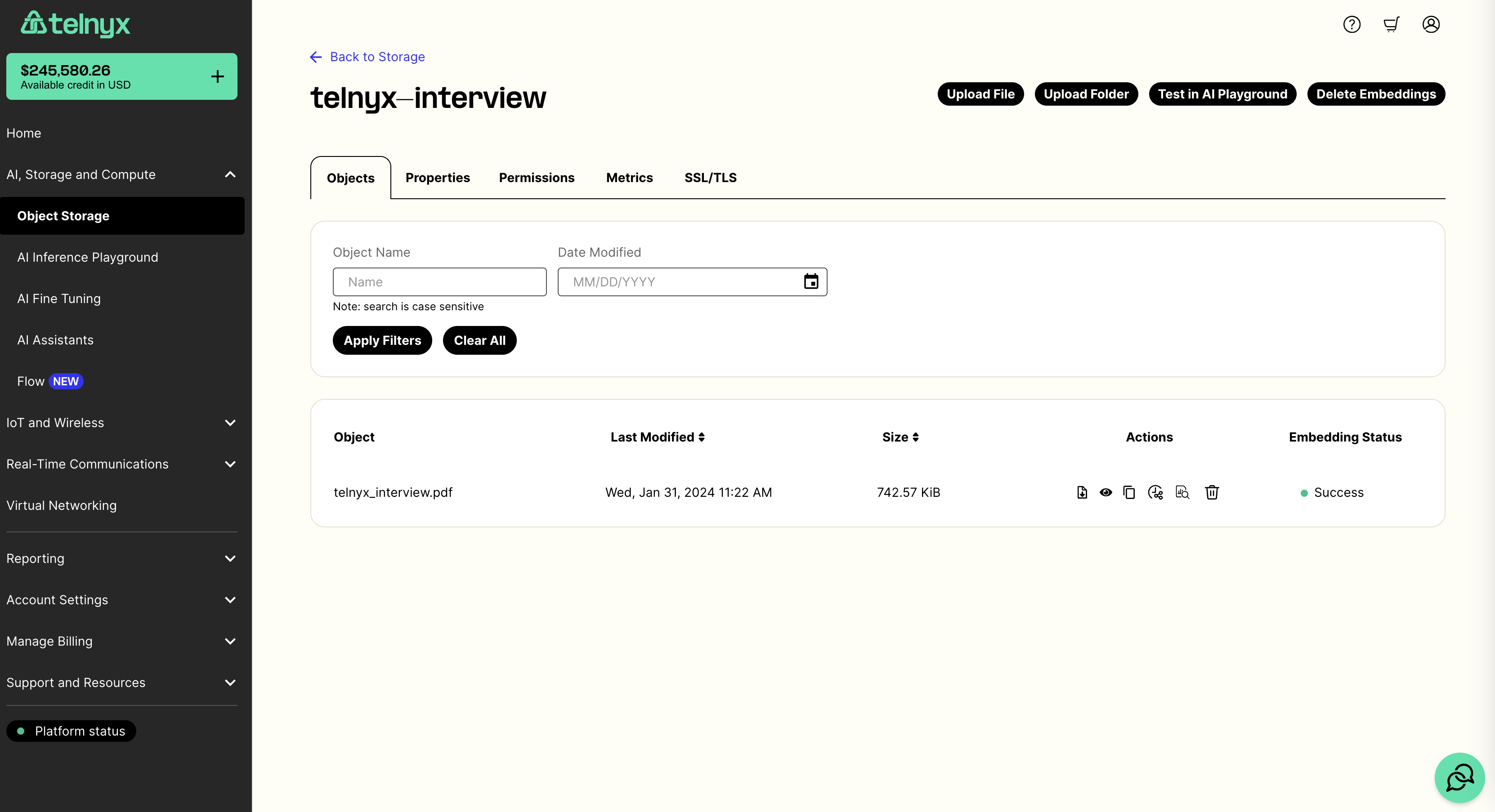
Fine-tune a language model on your documents
Once you’ve uploaded your documents, you can fine tune on them via API or by navigating to the fine-tuning tab in the portal. Once there you can select a base model to train and the bucket with your training documents.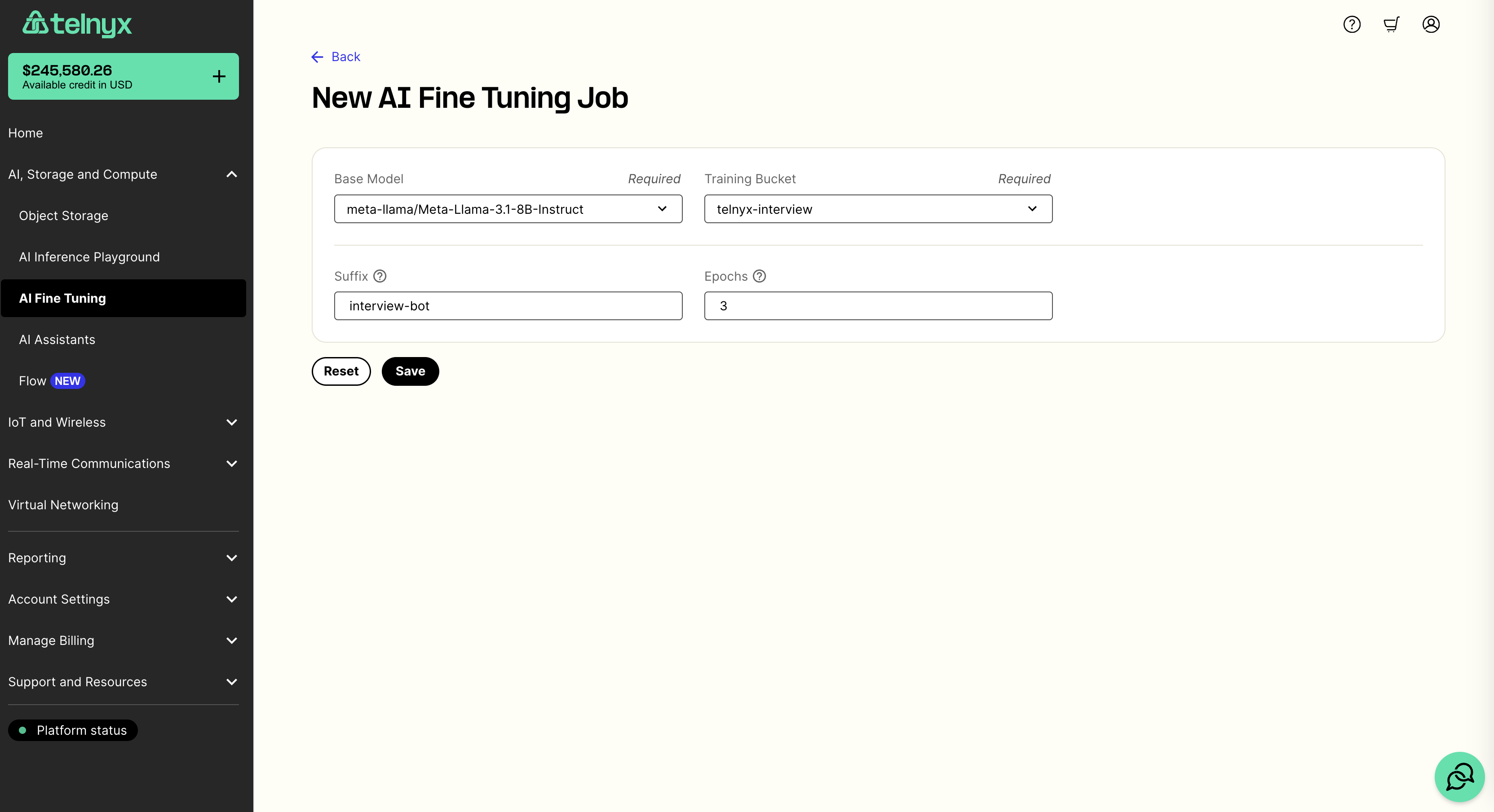
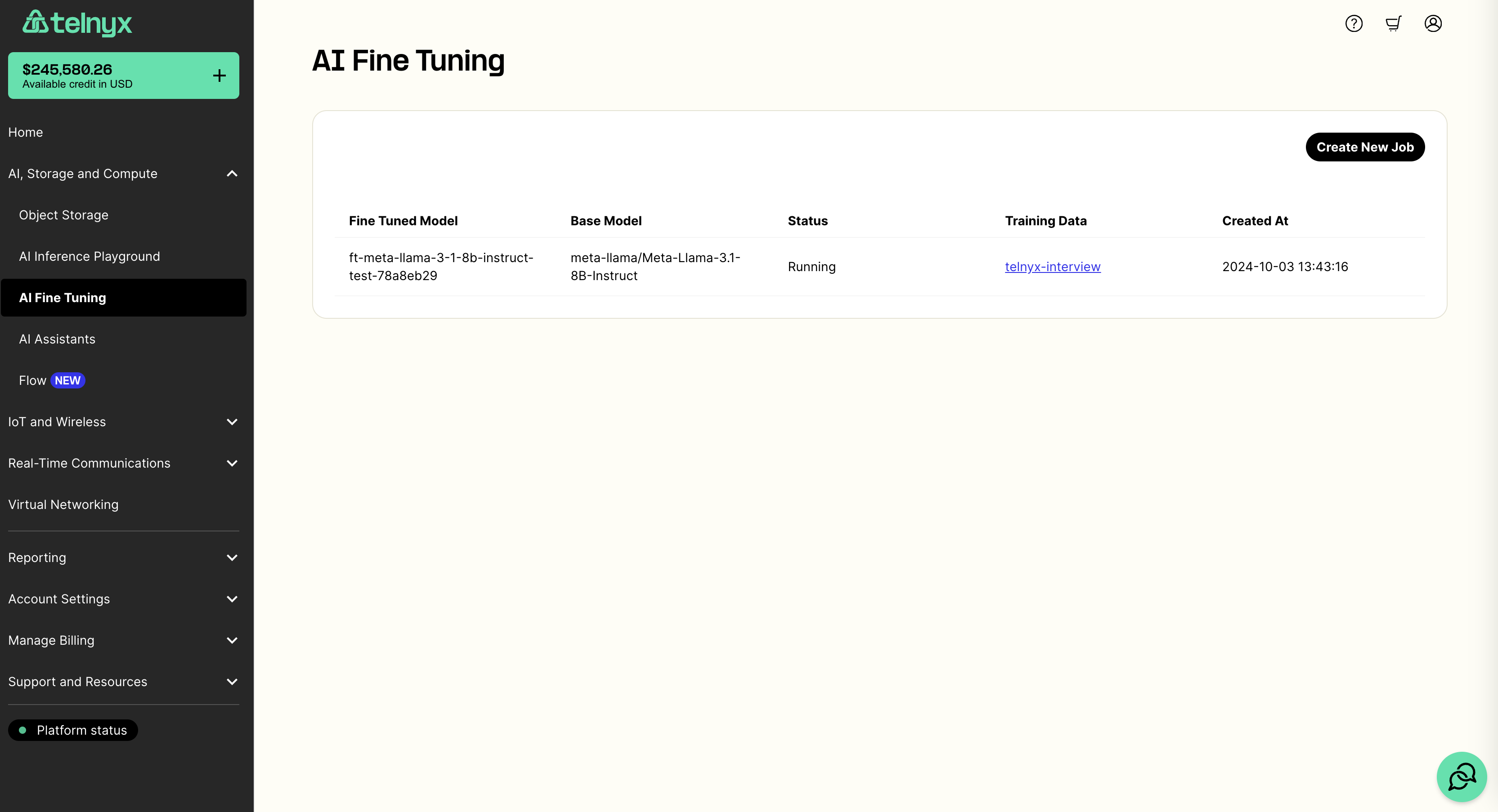
.jsonl training file. Immediately after, we will begin fine-tuning your model using this training file.
This whole process may take several minutes to complete. You can monitor the status of your fine-tuning job in the fine-tuning tab.
Chat with your new model
Once your model is fine-tuned, you can try it out in the AI Playground in the portal by selecting your model in the dropdown. You can also use your fine-tuned model via our chat completions API. Here is a Python example. Make sure you have set theTELNYX_API_KEY environment variable. Also, update the question and model variables in the sample code.
Audio Language Models
Source: https://developers.telnyx.com/docs/inference/audio-language-models.mdIn this tutorial, you’ll learn how to:
- Identify which Audio Language Models are available using our models API
- Chat with open source Audio Language Models using our chat completions API
Getting started
Audio Language Models are identified in our models API with atask type of audio-text-to-text.
Audio is made available to the model in two main ways:
- passing a link to the audio in a user message
- passing the base64 encoded audio directly in a user message
PR Reviewer - Github Action
Source: https://developers.telnyx.com/docs/inference/pr-reviewer.md
Introduction
Welcome to the PR Reviewer by Telnyx GitHub Action! This guide will teach you how to set up and use the PR Reviewer By Telnyx, which leverages open-source language models running on Telnyx GPUs to automatically review your pull requests.Prerequisites
- Sign up for a free Telnyx account if you haven’t already.
Setup guide
Step 1: Obtain Your Telnyx API Key
- Log in to your Telnyx account.
- Navigate to the API Keys section in the Telnyx portal.
- Click on Create API Key.
- Copy the generated API key and store it in a secure location.
Step 2: Add Your Telnyx API Key as a Secret on GitHub
- In your GitHub repository, go to Settings > Secrets and variables > Actions.
- Click on New repository secret.
- Name the secret
TELNYX_API_KEY. - Paste your Telnyx API key in the Value field and click Add secret.
Step 3: Create the GitHub workflow file
To integrate the Telnyx PR Reviewer into your project, follow these steps:-
In your repository, create a new file at
.github/workflows/review_pr.yml. -
Copy and paste the following configuration into the file:
- Commit the file to your repository.
Step 4: Optional Configuration
Themodel_name parameter in the workflow file is optional. If omitted, the action will use a default language model. If you wish to specify a different model, replace 'meta-llama/Meta-Llama-3.1-8B-Instruct' with your desired model from the Telnyx LLM Library.
Core Concepts
GitHub Actions
GitHub Actions automate workflows directly in your GitHub repository. In this case, the PR Reviewer By Telnyx is triggered by pull request events, such as when a PR is opened or updated.Telnyx Inference API
The PR Reviewer By Telnyx uses the Telnyx Inference API to analyze and review the content of pull requests. This API allows interaction with large language models (LLMs) hosted on Telnyx infrastructure.Model Selection
Your choice of LLM will affect the quality and behavior of the reviews. You can experiment with different models from the Telnyx LLM Library to find the best fit for your project.Automatic PR Reviews
Once configured, the PR Reviewer By Telnyx automatically generates a review for every pull request based on the content, providing suggestions or feedback powered by the chosen language model.Not sure how to get started?
Additional references
- Dive into our Telnyx Inference API documentation
- Explore our full API reference
- Review our OpenAI Compatibility Matrix
- Check out our pricing page
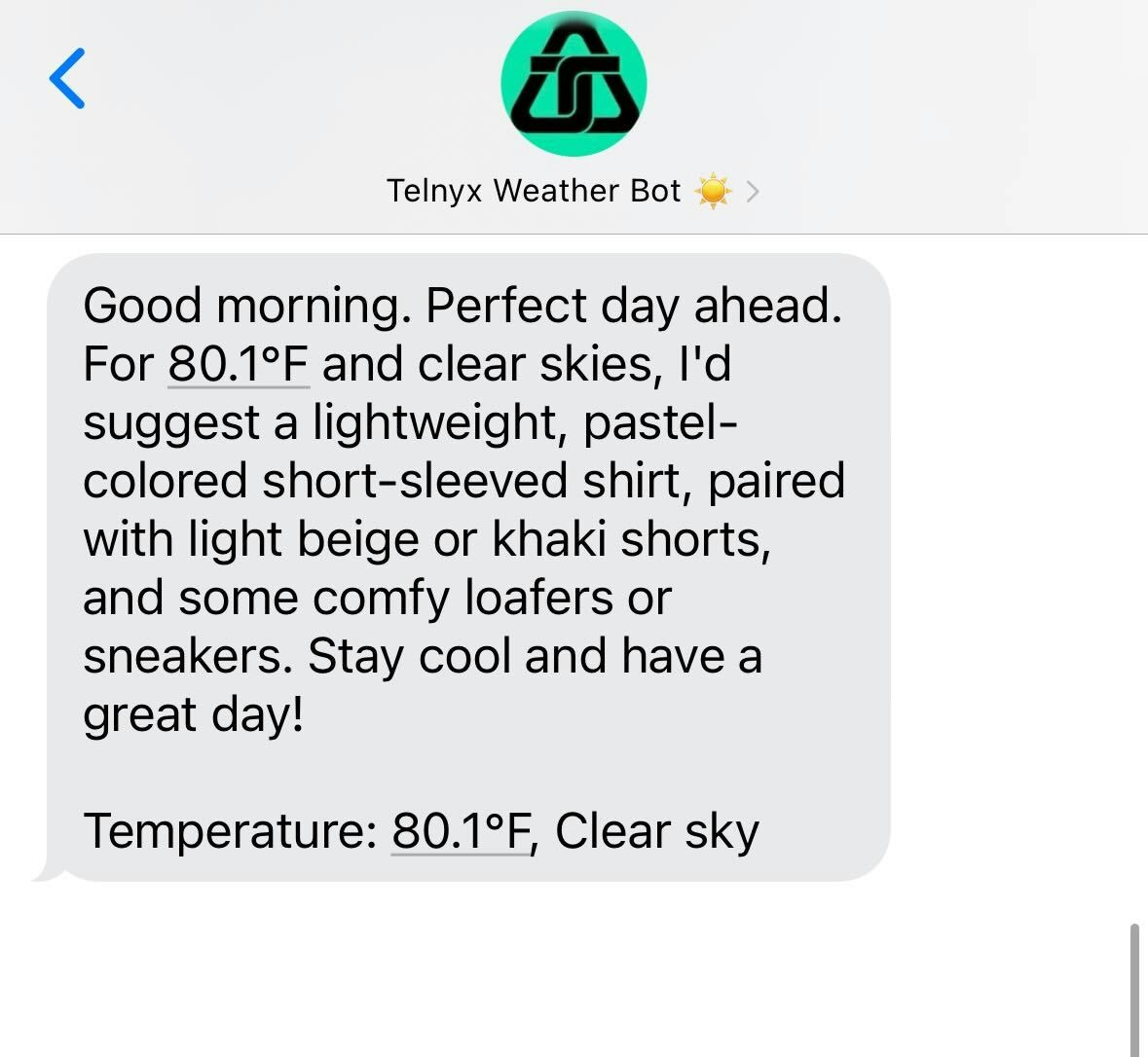
AI SMS Outfit Recommender with OpenMeteo
Source: https://developers.telnyx.com/docs/inference/ai-outfit-recommender.mdToday we will be making a fun script to text us a nice recommendation for outfits based on the weather every morning. It will look something like this at the end:
- Check the weather using the free OpenMeteo API
- Pass the weather info to Telnyx Inference using the model of our choice
- Send the recommendation to the user using Telnyx SMS
Checking the weather with OpenMeteo
OpenMeteo is a great free API that allows you to retrieve the forecast for the current day. They have a ton of options for what you can retrieve, but for this demo, we will stick with just the temperature and weather code (although feel free to experiment with other things like humidity!). The following functions can be used to retrieve a weather_description that we can feed into our Telnyx Inference model:Getting our recommendation text from Telnyx Inference
Now that we have the current weather, let’s make a call to Telnyx Inference to generate a text to send to our user. There are many state-of-the-art open source models available through the Telnyx API, so for this one we will select GLM-5.2 from Zhipu AI. Let’s write a function to retrieve a good weather recommendation from Telnyx Inference. We will just use therequests library to not add an additional pip requirement, but the Telnyx LLM API is also compatible with the OpenAI Python and JS SDKs, see the OpenAI Migration Guide Here.
TELNYX_API_KEY is set in your environment variables so that they can be loaded with os.getenv('TELNYX_API_KEY'). The API spec for chat completions can be found here if you would prefer to use HTTP requests instead of the OpenAI client or want to play around with some of the LLM parameters offered.
The output of this function will be a string with our recommendation, for example:
“Good morning. Perfect day ahead. Why not try a light, pastel-colored short-sleeved shirt, paired with some beige or light-gray shorts? Add some loafers or sneakers, and you’re all set for a sunny day. Have a great one!”
Sending our text to the user
Great! Now that we have our weather and text recommendation, we can send the text to the user. Sending a message with Telnyx SMS is easy, follow the tutorial here if you have not set up a Telnyx number yet. We can use the following snippet to send a text using Telnyx:Putting it all together
Now that we have all the pieces in place, let’s run the script! We can use the following sequence to chain everything together:cronjob or the task scheduler of your choice. Thanks for following along!
API Reference (Inference)
OpenAI Chat
- Create a chat completion (OpenAI-compatible): Chat with a language model. This endpoint is consistent with the OpenAI Chat Completions API and may be used with the OpenAI JS or Python SDK by setting the ba…
- Get available models (OpenAI-compatible): Lists every model currently available to your account on Telnyx Inference, including SOTA open-source LLMs hosted on Telnyx GPUs (for example `moonshotai/Kimi-…
- Create an OpenAI-compatible response: Create a response using Telnyx’s OpenAI-compatible Responses API. This endpoint is compatible with the OpenAI Responses API and may be used with the OpenAI JS…
Fine Tuning
- List fine tuning jobs: Retrieve a list of all fine tuning jobs created by the user.
- Create a fine tuning job: Create a new fine tuning job.
- Get a fine tuning job: Retrieve a fine tuning job by
job_id. - Cancel a fine tuning job: Cancel a fine tuning job.
Anthropic Messages
- Create a message (Anthropic-compatible): Send a message to a language model using the Anthropic Messages API format. This endpoint is compatible with the Anthropic Messages API and may be used with th…
Chat
- Summarize file content: Generate a summary of a file’s contents.