Private Wireless Gateways Architecture
Private Wireless Gateways are a dedicated piece of infrastructure that you can create via the Telnyx API or portal to ensure that the request flow of your data is entirely siloed from all other customers. PWGs connect to a virtual routing and forwarding (VRF) defined network on top of our MPLS backbone, which allows the SIM to connect directly to a variety of network interfaces. You can think of the VRF-defined network as a sliver of Telnyx’s private IP network. Virtual Cross Connects (VXC) or Wireguard Interface (Cloud VPNs) can also be connected to your VRF-defined network on top of our MPLS backbone to your corporate network and cloud infrastructure. All interfaces on the same VRF-defined network can see each other allowing traffic to flow from PWGs to Cloud VPNs and/or VXCs which bridge the Telnyx network to your corporate network. In an upcoming feature release, Public Internet Gateways will enable public internet access on SIMs connected to your VRF-defined network. The diagram below illustrates how these components fit together to deploy devices to the edge of your corporate network:
Managing Private Wireless Gateways
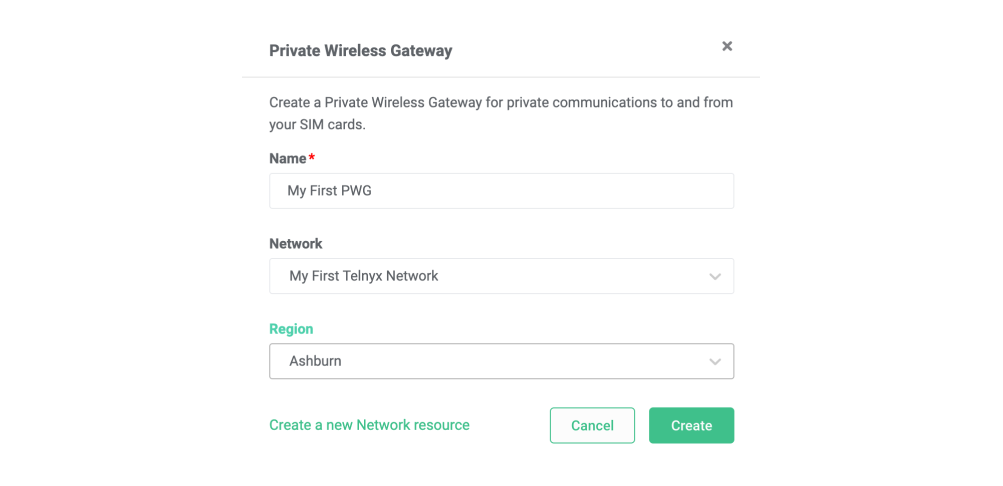
Private Wireless Gateways can be managed in the Wireless section of the Mission Control Portal. Each Private Wireless Gateway must be associated with a Network. Networks can be created and managed in the Networking section of the Portal. To create a private Wireless Gateway select the Create PWG button, enter the name of your PWG and associate it with one of your Networks.