

Prerequisites
- Admin access to the tailnet, to edit its policy file, generate an auth key, and approve routes.
- A function project and the
telnyx-edgeCLI, as in the Edge Compute Quick Start. - A region that offers Tailscale Subnet Routers.
GET /v2/network_coverage?filter[available_services][contains]=tailscale_subnet_routerlists them. A location’slocation.code, such asashburn-va, is theregion_codeto use.
Create a Network and a WireGuard Interface
Create a Network and a WireGuard Interface in the router’s region, as in the WireGuard Interfaces Quick Start. The interface’sserver_ip_address is 172.27.0.1/24 here, so its subnet is 172.27.0.0/24. Wait until the interface is provisioned, about three minutes.
Prepare the Tailnet
In the tailnet policy file, define the tag the router carries. Let the tag advertise the interface’s subnet withautoApprovers, and let members reach it with an access rule. The auto-approver approves the route as soon as the router advertises it. Without one, approve the route in the admin console later.
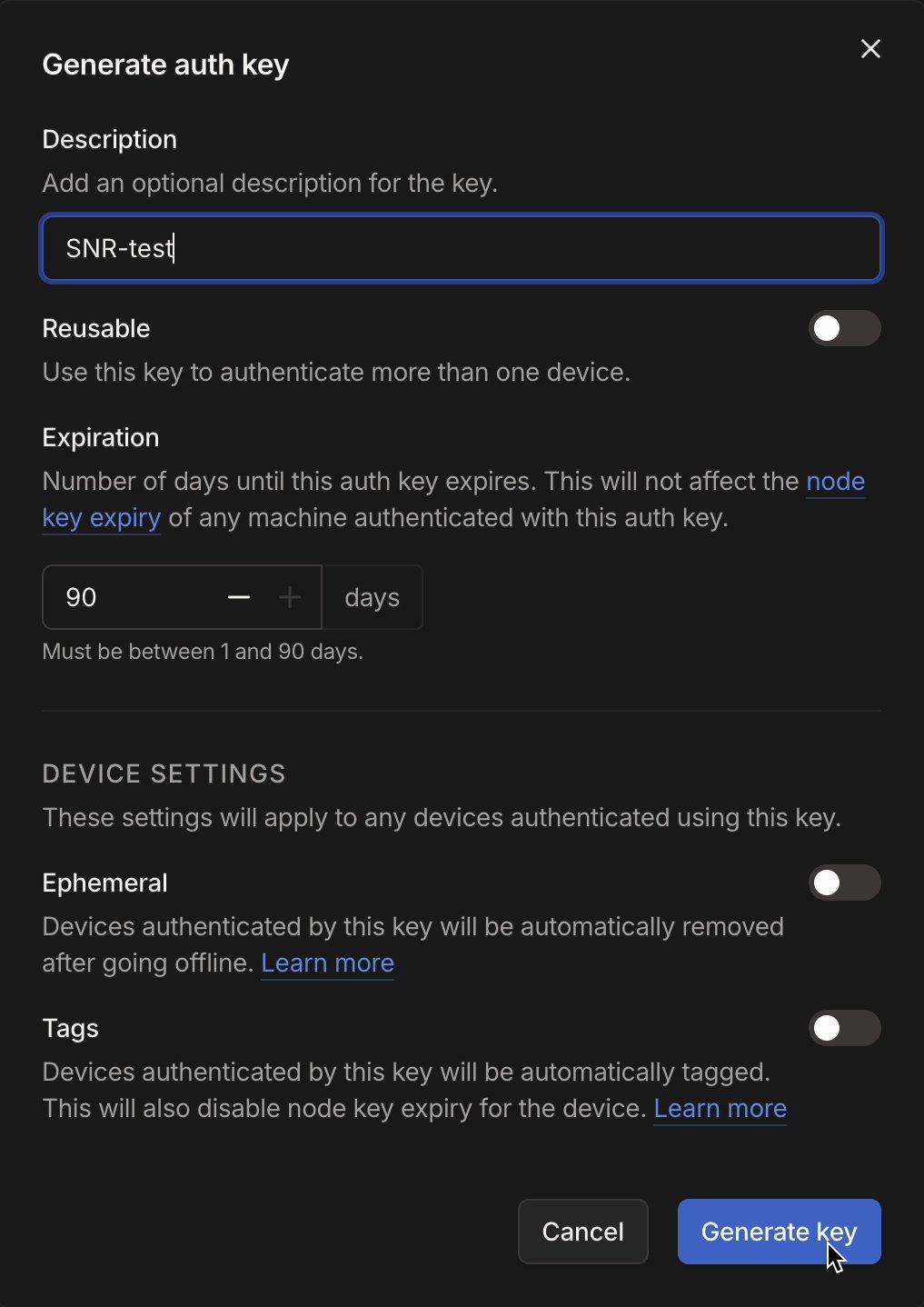
tag:telnyx, and not ephemeral. A single-use key enrolls one router, and a reusable key enrolls several.
Create the Router
SendPOST /v2/tailscale_subnet_routers with the interface’s Network and subnet:
status: provisioning and the router’s customer_address. Traffic from devices behind the router enters the Network from that address.
Wait for Enrollment
PollGET /v2/tailscale_subnet_routers/{id} until status is provisioned. This takes several minutes. device_id, tailnet_name, and tailscale_ips then describe the router’s machine:
ts plus the first eight characters of the router’s id, ts837c5e7f here.
A failed status means enrollment did not complete, for example because the tailnet rejected the key. Retry with PATCH /v2/tailscale_subnet_routers/{id} and a new key. The router keeps its customer_address.
Approve the Route
With the auto-approver above, the route is active as soon as the router advertises it. Otherwise open the machine’s menu in the admin console and choose Edit route settings: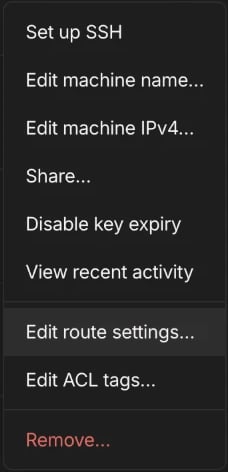
172.27.0.0/24 and save, as in Tailscale’s subnet routers guide:
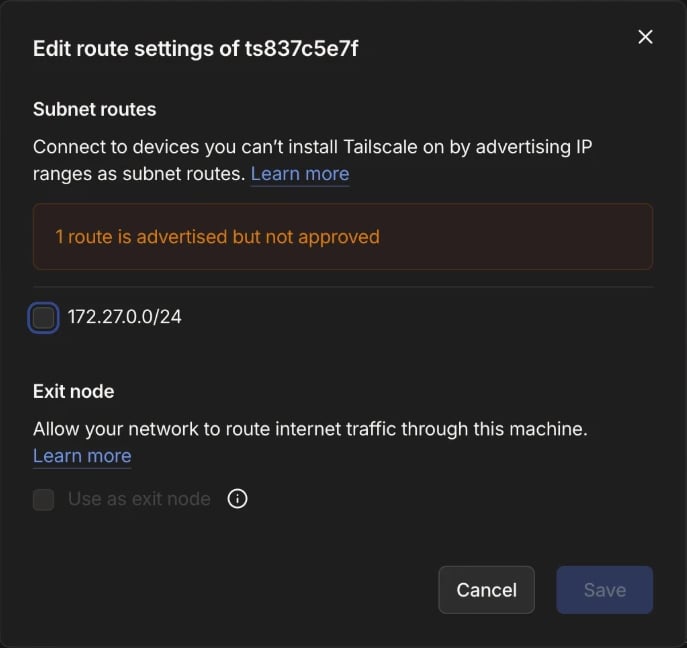
provisioned reports enrollment, not approval. The tailnet decides which routes are approved and who reaches them.
Bind the Function
Add a network binding with the interface’sid to the function’s func.toml:
func-<function-id>.
Find the Address
GET /v2/wireguard_peers?filter[wireguard_interface_id]=<interface-id> lists the interface’s peers. The function’s peer configuration, GET /v2/wireguard_peers/{id}/config, shows its Address, 172.27.0.4/32 here.
Each deploy gives the function a new address. Look it up again after every deploy.
Call the Function From Behind the Router
A tailnet device is behind the router once it accepts the route. Devices on macOS, Windows, iOS, and Android accept it automatically. Linux devices need:PORT, 8080:
customer_address, 172.27.254.1.
Change the Routes
PATCH /v2/tailscale_subnet_routers/{id} with a new advertised_routes list replaces the advertisement:
provisioning for about four minutes. It keeps its machine, with the same device_id and tailscale_ips. A new route needs approval unless an auto-approver covers it. A request while the router is provisioning or deleting returns 409.
Delete the Router
DELETE /v2/tailscale_subnet_routers/{id} returns status: deleting, and the record disappears within a few minutes. The router logs out of the tailnet. Its machine stays in the admin console, expired, until an admin chooses Remove in the machine’s menu. Delete the tag, the auto-approver, and the ACL entry when nothing else uses them.
Delete a Network’s routers before the Network, as for its other interfaces.