

When to Use Number Pool
High Volume Campaigns
Distribute traffic across numbers to avoid per-number rate limits and increase total throughput.
Improved Deliverability
Automatically skip unhealthy numbers and spread reputation across multiple senders.
Mixed Number Types
Balance between long codes and toll-free numbers with configurable weights.
Simplified Sending
No need to track which number to use—Telnyx handles sender selection.
How It Works
- Pool creation: All long code and toll-free numbers assigned to your Messaging Profile form the pool
- Sender selection: When you send a message, Telnyx picks an available number from the pool
- Weight distribution: Control the ratio of long code vs. toll-free usage with weights
- Health monitoring: Optionally skip numbers with poor delivery rates
Prerequisites
- A Messaging Profile with at least one phone number assigned
- Multiple numbers recommended for effective load distribution
Configure Number Pool
Enable Number Pool on your Messaging Profile by setting thenumber_pool_settings. The weights control which number types are preferred.
- API
- Portal
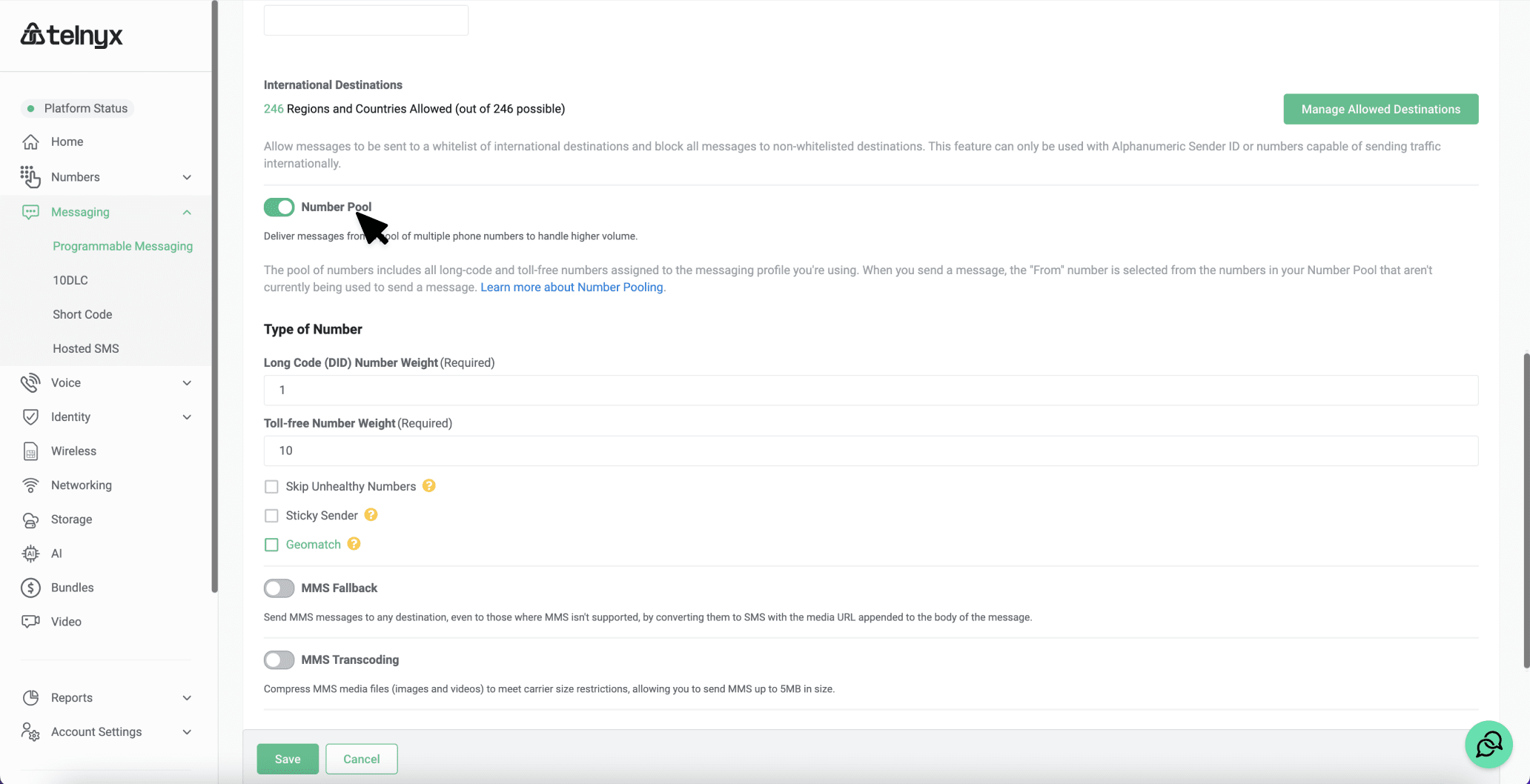
Configuration Options
Send Messages with Number Pool
When sending with Number Pool, omit thefrom field and specify your messaging_profile_id instead. Telnyx automatically selects the optimal sender.
from number that was selected:
Disable Number Pool
To disable Number Pool, setnumber_pool_settings to an empty object:
Related Features
Number Pool works alongside these Messaging Profile features:Sticky Sender
Sticky Sender
Maintains consistency by using the same number for a recipient across messages. When enabled, if you’ve previously messaged a recipient, the same number is reused when available.Enable with:See Sticky Sender for details.
Geomatch
Geomatch
Selects a sender number matching the recipient’s geographic area, improving deliverability and user trust by showing a local number.Enable with:See Geomatch for details.
Skip Unhealthy Numbers
Skip Unhealthy Numbers
Monitors delivery success rates and automatically excludes numbers performing poorly. This helps maintain overall campaign deliverability.
Troubleshooting
Message rejected: No healthy numbers in pool
Message rejected: No healthy numbers in pool
Cause: All numbers are flagged as unhealthy and
skip_unhealthy is enabled.Solutions:- Temporarily disable
skip_unhealthyto allow sending - Add more numbers to your Messaging Profile
- Investigate delivery issues on your existing numbers
Messages always sent from same number type
Messages always sent from same number type
Cause: Weight of one type set to 0, or only one number type assigned.Solutions:
- Verify weights are non-zero for both types
- Ensure you have both long codes and toll-free numbers assigned to the profile
Receiving 'messaging_profile_id required' error
Receiving 'messaging_profile_id required' error
Cause: Using the standard
/v2/messages endpoint instead of /v2/messages/number_pool.Solution: Use the Number Pool send endpoint which requires messaging_profile_id instead of from.Next Steps
Sticky Sender
Maintain sender consistency for recipients
Geomatch
Match sender to recipient geography
Rate Limiting
Understand messaging throughput limits
API Reference
View full Number Pool API details