

Step 1: Setup with Telnyx
Setup a Telnyx account, phone number, and programmable fax application
First, follow our Quickstart guide to create a Telnyx account, phone number, and Fax Application. The phone number that you select and associate with the Programmable Fax Application will receive incoming fax calls. You can also port an existing number to Telnyx and use it for Programmable Fax.Step 2: Receiving Webhooks
In order for the webhooks in this tutorial to work, Telnyx must be able to send your web application an HTTP request over the Internet. That means your application needs to have a URL or IP address that Telnyx can reach. Telnyx sends webhooks to the URL or IP address to notify your application of incoming faxes. For the purpose of this tutorial, we’re using ngrok , a popular tunneling tool used to expose a locally running application to the internet. ngrok gives you a public URL for a local port on your development machine, which you can use to configure your Telnyx webhooks as described above. Download and install ngrok, then use it at the command line to create a tunnel to whatever port your web application is running on. For example, this command will create a public URL for a web application listening on port 3000.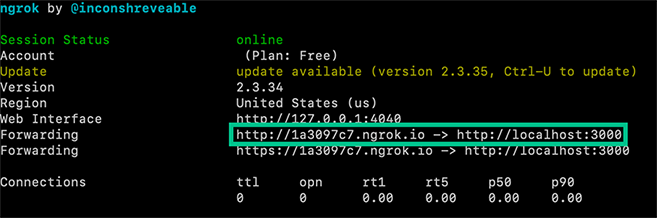
Example Webhooks
If you have set everything up correctly, any time an inbound fax is received you can expect to receive the following webhooks:| Webhook Name | Description |
fax.receiving.started | The fax has begun transmitting to Telnyx successfully. |
fax.media.processing.started | Telnyx has received the fax and is generating the digital PDF file. |
fax.received | The PDF has been generated and the file is ready to be downloaded. |
fax.failed | Transmission of the fax failed. Check the <code>failure_reason</code> for more details. |
Fax has begun transmitting to Telnyx
Fax transmission is complete and Telnyx is converting to PDF
PDF has been generated and is ready for download
Themedia_url field contains a signed AWS link to a PDF of the received fax. This URL is valid for 10 minutes before the file is no longer accessible so be sure to download the file if you wish to keep it!