> ## Documentation Index
> Fetch the complete documentation index at: https://developers.telnyx.com/llms.txt
> Use this file to discover all available pages before exploring further.
# Pay over Voice
> Accept payments securely over the phone. Telnyx's Pay over Voice feature guides callers through an automated IVR flow to collect payment details, sends them to the configured payment processor, and returns the result — keeping sensitive card data out of recordings, logs, and AI assistants.
## Overview
Telnyx's Pay over Voice feature enables accepting payments securely over the phone. The feature guides callers through an automated IVR flow to collect payment details (credit card or ACH debit), sends them to the configured payment processor, and returns the result — keeping sensitive card data out of recordings, logs, and AI assistants.
### How it works
```
Caller ←→ Telnyx (IVR + DTMF gather) ←→ Payment Processor
│
└── Payment events → Webhook / AI assistant
```
1. Create a **Payment Connector** pointing to the payment processor's endpoint.
2. A **Pay session** is started on an active call (via Voice API, TeXML, or AI Assistant).
3. The caller is guided through IVR prompts to enter payment details via DTMF.
4. Telnyx collects, encrypts, and sends the details to the processor.
5. The processor charges or tokenizes the payment and returns a result.
6. Telnyx emits **progress** and **completed** events to the webhook and AI assistant.
Throughout the session, all processes that could capture payment data — recordings, transcriptions, AI assistant audio, and DTMF logging — are automatically disabled.
***
## Create a Payment Connector
A Payment Connector is the bridge between Telnyx and the payment processor. It stores the processor's endpoint URL and authentication credentials (encrypted at rest with AES-256).
### Step 1 — Navigate to Payment Connectors
In the Telnyx Portal, go to **Voice API → Applications → Payment Connectors**. The portal displays a list of existing connectors:
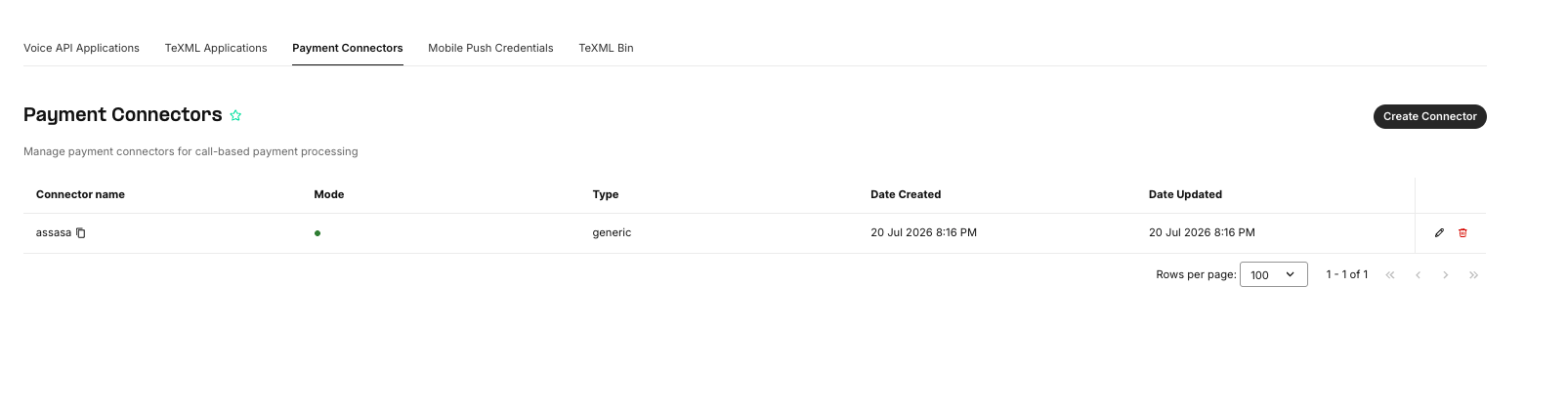 Each connector shows its **name**, **mode** (test or live), **type**, and creation/update timestamps.
### Step 2 — Create a new connector
Click **Create Connector**. Fill in the following fields:
Each connector shows its **name**, **mode** (test or live), **type**, and creation/update timestamps.
### Step 2 — Create a new connector
Click **Create Connector**. Fill in the following fields:
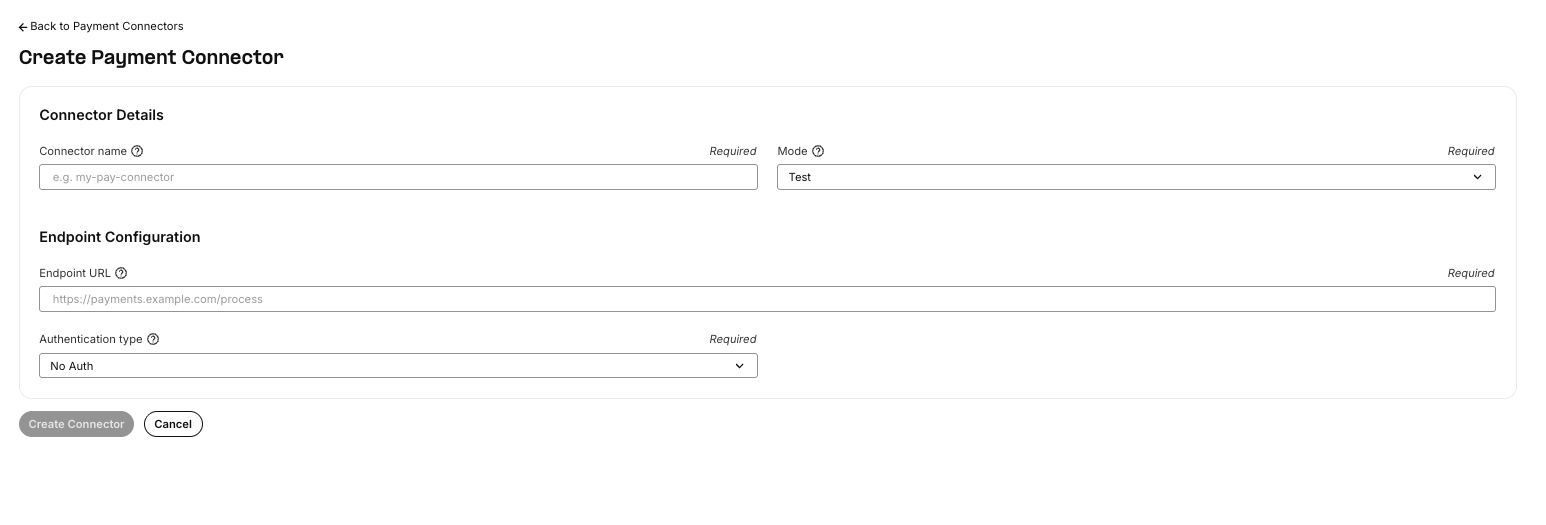 | Field | Required | Description |
| ----------------------- | -------- | ------------------------------------------------------------------------------------------------- |
| **Connector name** | Yes | A unique name for this connector within the organization. |
| **Mode** | Yes | `test` or `live`. New connectors default to **test** mode. |
| **Endpoint URL** | Yes | The HTTPS URL of the payment processor's API endpoint. Telnyx will POST the payment request here. |
| **Authentication type** | Yes | `none` or `basic`. If `basic`, provide a username and password. |
When **Authentication type** is set to `basic`, Telnyx sends the credentials as HTTP Basic Auth headers with each request to the processor. The credentials are encrypted with AES-256-CTR before storage and are never exposed in logs or events.
Connectors can also be managed programmatically via the API:
```bash theme={null}
# Create a connector
curl -X POST https://api.telnyx.com/v2/pay_connectors \
-H "Authorization: Bearer YOUR_API_KEY" \
-H "Content-Type: application/json" \
-d '{
"name": "my-payment-connector",
"type": "generic",
"mode": "test",
"config": {
"endpoint_url": "https://api.your-processor.com/v1/payments",
"auth_type": "basic",
"username": "merchant_id",
"password": "your_secret_key"
}
}'
# List connectors
curl https://api.telnyx.com/v2/pay_connectors \
-H "Authorization: Bearer YOUR_API_KEY"
```
***
## Payment Modes: Test vs Live
### Test mode (default)
New connectors are created in **test mode**. In test mode, the Pay session accepts only a predefined set of test card numbers. Any other card number is rejected with an `invalid-card-number` error, and the caller is asked to re-enter the number (up to `max_attempts` times).
This allows testing the IVR flow, webhook handling, and processor integration end-to-end without processing real payments.
#### Valid test card numbers
| Card number | Card type |
| ------------------ | ---------------- |
| `4111111111111111` | Visa |
| `5555555555554444` | Mastercard |
| `378282246310005` | American Express |
| `6011111111111117` | Discover |
| `3065930009020004` | Diners Club |
| `3566002020360505` | JCB |
| `6200000000000005` | UnionPay |
| `6771798021000008` | Maestro |
For ACH-debit test mode, any valid-length routing and account numbers are accepted.
### Live mode
When ready to accept real payments, switch the connector to **live mode**. Once a connector is in live mode:
* **It cannot be edited.** The endpoint URL, authentication type, and credentials are locked. This prevents accidental changes to a production payment integration.
* All card numbers are accepted (no test card restriction).
* Real charges are processed through the payment processor.
To make changes to a live connector, delete it and create a new one.
***
## The Payment Process
When a Pay session starts on a call, Telnyx takes over the call leg and guides the caller through a series of IVR steps. Each step plays a voice prompt, then collects the caller's DTMF input.
### Security during payment
Before the first IVR prompt is played, Telnyx automatically disables all processes that could capture payment data:
| Process | What happens |
| --------------------------- | ------------------------------------------------------------------------------------------------------------------------------------------------------------------------------------- |
| **Call recordings** | All ongoing recordings are **masked** (audio goes silent). They are automatically **resumed** when the Pay session ends. |
| **Transcriptions** | Transcription audio is silenced by the recording mask. DTMF tones are not captured. |
| **AI assistant connection** | DTMF events are **suppressed** — the AI assistant does not receive keypad input during the Pay session. The assistant receives progress and completed events to track payment status. |
| **DTMF event logging** | The `sensitive_dtmf` flag is set on the channel, preventing FreeSWITCH from logging DTMF digits. DTMF events are not dispatched to webhooks. |
### IVR steps
The IVR flow depends on the payment method selected:
#### Credit card flow
| Step | Prompt | Digits | Min | Max |
| ---------------------- | ------------------------------------------------------------------------------------------ | -------- | --- | --- |
| **1. Card number** | "Please enter your credit card number." | 12–19 | 12 | 19 |
| **2. Expiration date** | "Please enter your expiration date. Two digits for the month and two digits for the year." | 4 (MMYY) | 4 | 4 |
| **3. Postal code** | "Please enter your billing zip code." | 1–10 | 1 | 10 |
| **4. Security code** | "Please enter your security code. It's the three digits located on the back of your card." | 3–4 | 3 | 4 |
| **5. Processing** | "Your payment is being processed." | — | — | — |
#### ACH debit flow
| Step | Prompt | Digits | Min | Max |
| --------------------- | ---------------------------------------- | ------ | --- | --- |
| **1. Routing number** | "Please enter your bank routing number." | 9 | 9 | 9 |
| **2. Account number** | "Please enter your bank account number." | 4–17 | 4 | 17 |
| **3. Processing** | "Your payment is being processed." | — | — | — |
### Custom prompts
Prompts can be overridden by passing a `prompts` map. Each key is a step name, and the value is either a string or a list of prompt objects with conditional qualifiers:
```json theme={null}
{
"prompts": {
"payment-card-number": "Please enter the 16-digit number on your card.",
"expiration-date": "Please enter the expiry date as 4 digits, month first.",
"postal-code": "Enter your 5-digit billing zip code.",
"security-code": "Enter the 3-digit code from the back of your card."
}
}
```
For conditional prompts (e.g., different message on retry or by card type), use a list of objects:
```json theme={null}
{
"prompts": {
"payment-card-number": [
{ "text": "Please enter your credit card number." },
{ "text": "That card number was not valid. Please try again.", "attempt": "2", "error_type": "invalid-card-number" },
{ "text": "Please enter your Amex card number.", "card_type": "amex" }
]
}
}
```
Qualifier fields: `attempt` (1–3), `error_type` (e.g., `invalid-card-number`, `timeout`), `card_type` (e.g., `visa`, `mastercard`, `amex`, `discover`).
### Error handling and retries
Each step allows up to `max_attempts` (default 3) retries. If the caller enters too few digits, the wrong format, or times out, the step is repeated with an appropriate error prompt. If all attempts are exhausted, the session ends with `too-many-failed-attempts`.
### Request sent to the payment processor
Once all digits are collected, Telnyx sends an HTTPS POST to the connector's **endpoint URL** with the payment details.
#### Credit card — charge
```json theme={null}
{
"method": "charge",
"transaction_id": "550e8400-e29b-41d4-a716-446655440000",
"amount": "10.00",
"currency_code": "USD",
"description": "Order #12345",
"cardnumber": "4111111111111111",
"cvv": "123",
"expiry_month": "08",
"expiry_year": "27",
"postal_code": "94111",
"parameters": {
"order_id": "12345",
"customer_id": "cust_67890"
}
}
```
#### Credit card — tokenize
When `transaction_type` is `tokenize` (or `amount` is 0 or omitted), `amount` and `currency_code` are not sent:
```json theme={null}
{
"method": "tokenize",
"transaction_id": "550e8400-e29b-41d4-a716-446655440000",
"description": "Save card for future use",
"cardnumber": "4111111111111111",
"cvv": "123",
"expiry_month": "08",
"expiry_year": "27",
"postal_code": "94111",
"parameters": {}
}
```
#### ACH debit — charge
```json theme={null}
{
"method": "charge",
"transaction_id": "550e8400-e29b-41d4-a716-446655440000",
"amount": "10.00",
"currency_code": "USD",
"description": "Order #12345",
"bankaccountnumber": "1234567890",
"routingnumber": "021000021",
"parameters": {}
}
```
### Response expected from the payment processor
The processor should return a JSON response:
**Charge — success:**
```json theme={null}
{
"charge_id": "ch_abc123",
"error_code": null,
"error_message": null
}
```
**Tokenize — success:**
```json theme={null}
{
"token_id": "tok_abc123",
"error_code": null,
"error_message": null
}
```
**Error:**
```json theme={null}
{
"error_code": "card_declined",
"error_message": "The card was declined."
}
```
If `error_code` is present and non-empty, the session ends with `payment-connector-error`.
***
## Using Pay over Voice
Pay over Voice can be triggered from three interfaces: the **Voice API**, **TeXML**, and **AI Assistant**.
### Voice API
Start a Pay session by sending a POST request to the pay endpoint on an active call:
```bash theme={null}
curl -X POST https://api.telnyx.com/v2/calls/{call_control_id}/pay \
-H "Authorization: Bearer YOUR_API_KEY" \
-H "Content-Type: application/json" \
-d '{
"connector_name": "my-payment-connector",
"amount": "10.00",
"currency": "USD",
"payment_method": "credit-card",
"description": "Order #12345"
}'
```
#### Request parameters
| Parameter | Type | Default | Description |
| ---------------------------- | ------- | --------------- | ---------------------------------------------------------------------------------------- |
| `connector_name` | string | `"Default"` | Name of the payment connector to use. |
| `amount` | decimal | — | Charge amount. Omit or set to `0` for tokenize. Required for `charge`. |
| `currency` | string | `"USD"` | ISO 4217 currency code. |
| `payment_method` | string | `"credit-card"` | `credit-card` or `ach-debit`. |
| `transaction_type` | string | auto | `charge` or `tokenize`. Auto-detected from amount if omitted. |
| `payment_token` | string | — | A previously obtained token for charging a saved card. Skips IVR and processes directly. |
| `description` | string | — | Description sent to the processor and included in events. |
| `metadata` | object | `{}` | Arbitrary key-value metadata. |
| `parameters` | object | `{}` | Custom parameters sent to the processor in the `parameters` field. |
| `prompts` | object | `{}` | Custom IVR prompts (see [Custom prompts](#custom-prompts)). |
| `max_attempts` | integer | `3` | Max retry attempts per step (1–3). |
| `timeout_millis` | integer | `5000` | Timeout per gather in milliseconds (1–600000). |
| `inter_digit_timeout_millis` | integer | `5000` | Timeout between digits in milliseconds (1–600000). |
| `voice` | string | `"female"` | TTS voice for prompts. |
| `language` | string | `"en-US"` | Language for prompts. |
| `service_level` | string | `"premium"` | TTS service level. |
| `client_state` | string | — | Base64 client state, echoed back in webhook events. |
### TeXML
Use the `` verb in a TeXML application. This is the simplest way to start a Pay session — include the verb in the TeXML response and Telnyx handles the rest:
```xml theme={null}
```
For tokenization (no charge):
```xml theme={null}
```
As the Pay session progresses, Telnyx sends webhook callbacks to the TeXML application's webhook URL with `call_payment_progress` and `call_payment_completed` events. The application can use these to update external systems, confirm the payment, or continue the call flow.
### AI Assistant
When using Telnyx's AI Voice Assistant, a **Pay tool** can be added to the assistant so it can trigger a payment session during a conversation.
| Field | Required | Description |
| ----------------------- | -------- | ------------------------------------------------------------------------------------------------- |
| **Connector name** | Yes | A unique name for this connector within the organization. |
| **Mode** | Yes | `test` or `live`. New connectors default to **test** mode. |
| **Endpoint URL** | Yes | The HTTPS URL of the payment processor's API endpoint. Telnyx will POST the payment request here. |
| **Authentication type** | Yes | `none` or `basic`. If `basic`, provide a username and password. |
When **Authentication type** is set to `basic`, Telnyx sends the credentials as HTTP Basic Auth headers with each request to the processor. The credentials are encrypted with AES-256-CTR before storage and are never exposed in logs or events.
Connectors can also be managed programmatically via the API:
```bash theme={null}
# Create a connector
curl -X POST https://api.telnyx.com/v2/pay_connectors \
-H "Authorization: Bearer YOUR_API_KEY" \
-H "Content-Type: application/json" \
-d '{
"name": "my-payment-connector",
"type": "generic",
"mode": "test",
"config": {
"endpoint_url": "https://api.your-processor.com/v1/payments",
"auth_type": "basic",
"username": "merchant_id",
"password": "your_secret_key"
}
}'
# List connectors
curl https://api.telnyx.com/v2/pay_connectors \
-H "Authorization: Bearer YOUR_API_KEY"
```
***
## Payment Modes: Test vs Live
### Test mode (default)
New connectors are created in **test mode**. In test mode, the Pay session accepts only a predefined set of test card numbers. Any other card number is rejected with an `invalid-card-number` error, and the caller is asked to re-enter the number (up to `max_attempts` times).
This allows testing the IVR flow, webhook handling, and processor integration end-to-end without processing real payments.
#### Valid test card numbers
| Card number | Card type |
| ------------------ | ---------------- |
| `4111111111111111` | Visa |
| `5555555555554444` | Mastercard |
| `378282246310005` | American Express |
| `6011111111111117` | Discover |
| `3065930009020004` | Diners Club |
| `3566002020360505` | JCB |
| `6200000000000005` | UnionPay |
| `6771798021000008` | Maestro |
For ACH-debit test mode, any valid-length routing and account numbers are accepted.
### Live mode
When ready to accept real payments, switch the connector to **live mode**. Once a connector is in live mode:
* **It cannot be edited.** The endpoint URL, authentication type, and credentials are locked. This prevents accidental changes to a production payment integration.
* All card numbers are accepted (no test card restriction).
* Real charges are processed through the payment processor.
To make changes to a live connector, delete it and create a new one.
***
## The Payment Process
When a Pay session starts on a call, Telnyx takes over the call leg and guides the caller through a series of IVR steps. Each step plays a voice prompt, then collects the caller's DTMF input.
### Security during payment
Before the first IVR prompt is played, Telnyx automatically disables all processes that could capture payment data:
| Process | What happens |
| --------------------------- | ------------------------------------------------------------------------------------------------------------------------------------------------------------------------------------- |
| **Call recordings** | All ongoing recordings are **masked** (audio goes silent). They are automatically **resumed** when the Pay session ends. |
| **Transcriptions** | Transcription audio is silenced by the recording mask. DTMF tones are not captured. |
| **AI assistant connection** | DTMF events are **suppressed** — the AI assistant does not receive keypad input during the Pay session. The assistant receives progress and completed events to track payment status. |
| **DTMF event logging** | The `sensitive_dtmf` flag is set on the channel, preventing FreeSWITCH from logging DTMF digits. DTMF events are not dispatched to webhooks. |
### IVR steps
The IVR flow depends on the payment method selected:
#### Credit card flow
| Step | Prompt | Digits | Min | Max |
| ---------------------- | ------------------------------------------------------------------------------------------ | -------- | --- | --- |
| **1. Card number** | "Please enter your credit card number." | 12–19 | 12 | 19 |
| **2. Expiration date** | "Please enter your expiration date. Two digits for the month and two digits for the year." | 4 (MMYY) | 4 | 4 |
| **3. Postal code** | "Please enter your billing zip code." | 1–10 | 1 | 10 |
| **4. Security code** | "Please enter your security code. It's the three digits located on the back of your card." | 3–4 | 3 | 4 |
| **5. Processing** | "Your payment is being processed." | — | — | — |
#### ACH debit flow
| Step | Prompt | Digits | Min | Max |
| --------------------- | ---------------------------------------- | ------ | --- | --- |
| **1. Routing number** | "Please enter your bank routing number." | 9 | 9 | 9 |
| **2. Account number** | "Please enter your bank account number." | 4–17 | 4 | 17 |
| **3. Processing** | "Your payment is being processed." | — | — | — |
### Custom prompts
Prompts can be overridden by passing a `prompts` map. Each key is a step name, and the value is either a string or a list of prompt objects with conditional qualifiers:
```json theme={null}
{
"prompts": {
"payment-card-number": "Please enter the 16-digit number on your card.",
"expiration-date": "Please enter the expiry date as 4 digits, month first.",
"postal-code": "Enter your 5-digit billing zip code.",
"security-code": "Enter the 3-digit code from the back of your card."
}
}
```
For conditional prompts (e.g., different message on retry or by card type), use a list of objects:
```json theme={null}
{
"prompts": {
"payment-card-number": [
{ "text": "Please enter your credit card number." },
{ "text": "That card number was not valid. Please try again.", "attempt": "2", "error_type": "invalid-card-number" },
{ "text": "Please enter your Amex card number.", "card_type": "amex" }
]
}
}
```
Qualifier fields: `attempt` (1–3), `error_type` (e.g., `invalid-card-number`, `timeout`), `card_type` (e.g., `visa`, `mastercard`, `amex`, `discover`).
### Error handling and retries
Each step allows up to `max_attempts` (default 3) retries. If the caller enters too few digits, the wrong format, or times out, the step is repeated with an appropriate error prompt. If all attempts are exhausted, the session ends with `too-many-failed-attempts`.
### Request sent to the payment processor
Once all digits are collected, Telnyx sends an HTTPS POST to the connector's **endpoint URL** with the payment details.
#### Credit card — charge
```json theme={null}
{
"method": "charge",
"transaction_id": "550e8400-e29b-41d4-a716-446655440000",
"amount": "10.00",
"currency_code": "USD",
"description": "Order #12345",
"cardnumber": "4111111111111111",
"cvv": "123",
"expiry_month": "08",
"expiry_year": "27",
"postal_code": "94111",
"parameters": {
"order_id": "12345",
"customer_id": "cust_67890"
}
}
```
#### Credit card — tokenize
When `transaction_type` is `tokenize` (or `amount` is 0 or omitted), `amount` and `currency_code` are not sent:
```json theme={null}
{
"method": "tokenize",
"transaction_id": "550e8400-e29b-41d4-a716-446655440000",
"description": "Save card for future use",
"cardnumber": "4111111111111111",
"cvv": "123",
"expiry_month": "08",
"expiry_year": "27",
"postal_code": "94111",
"parameters": {}
}
```
#### ACH debit — charge
```json theme={null}
{
"method": "charge",
"transaction_id": "550e8400-e29b-41d4-a716-446655440000",
"amount": "10.00",
"currency_code": "USD",
"description": "Order #12345",
"bankaccountnumber": "1234567890",
"routingnumber": "021000021",
"parameters": {}
}
```
### Response expected from the payment processor
The processor should return a JSON response:
**Charge — success:**
```json theme={null}
{
"charge_id": "ch_abc123",
"error_code": null,
"error_message": null
}
```
**Tokenize — success:**
```json theme={null}
{
"token_id": "tok_abc123",
"error_code": null,
"error_message": null
}
```
**Error:**
```json theme={null}
{
"error_code": "card_declined",
"error_message": "The card was declined."
}
```
If `error_code` is present and non-empty, the session ends with `payment-connector-error`.
***
## Using Pay over Voice
Pay over Voice can be triggered from three interfaces: the **Voice API**, **TeXML**, and **AI Assistant**.
### Voice API
Start a Pay session by sending a POST request to the pay endpoint on an active call:
```bash theme={null}
curl -X POST https://api.telnyx.com/v2/calls/{call_control_id}/pay \
-H "Authorization: Bearer YOUR_API_KEY" \
-H "Content-Type: application/json" \
-d '{
"connector_name": "my-payment-connector",
"amount": "10.00",
"currency": "USD",
"payment_method": "credit-card",
"description": "Order #12345"
}'
```
#### Request parameters
| Parameter | Type | Default | Description |
| ---------------------------- | ------- | --------------- | ---------------------------------------------------------------------------------------- |
| `connector_name` | string | `"Default"` | Name of the payment connector to use. |
| `amount` | decimal | — | Charge amount. Omit or set to `0` for tokenize. Required for `charge`. |
| `currency` | string | `"USD"` | ISO 4217 currency code. |
| `payment_method` | string | `"credit-card"` | `credit-card` or `ach-debit`. |
| `transaction_type` | string | auto | `charge` or `tokenize`. Auto-detected from amount if omitted. |
| `payment_token` | string | — | A previously obtained token for charging a saved card. Skips IVR and processes directly. |
| `description` | string | — | Description sent to the processor and included in events. |
| `metadata` | object | `{}` | Arbitrary key-value metadata. |
| `parameters` | object | `{}` | Custom parameters sent to the processor in the `parameters` field. |
| `prompts` | object | `{}` | Custom IVR prompts (see [Custom prompts](#custom-prompts)). |
| `max_attempts` | integer | `3` | Max retry attempts per step (1–3). |
| `timeout_millis` | integer | `5000` | Timeout per gather in milliseconds (1–600000). |
| `inter_digit_timeout_millis` | integer | `5000` | Timeout between digits in milliseconds (1–600000). |
| `voice` | string | `"female"` | TTS voice for prompts. |
| `language` | string | `"en-US"` | Language for prompts. |
| `service_level` | string | `"premium"` | TTS service level. |
| `client_state` | string | — | Base64 client state, echoed back in webhook events. |
### TeXML
Use the `` verb in a TeXML application. This is the simplest way to start a Pay session — include the verb in the TeXML response and Telnyx handles the rest:
```xml theme={null}
```
For tokenization (no charge):
```xml theme={null}
```
As the Pay session progresses, Telnyx sends webhook callbacks to the TeXML application's webhook URL with `call_payment_progress` and `call_payment_completed` events. The application can use these to update external systems, confirm the payment, or continue the call flow.
### AI Assistant
When using Telnyx's AI Voice Assistant, a **Pay tool** can be added to the assistant so it can trigger a payment session during a conversation.
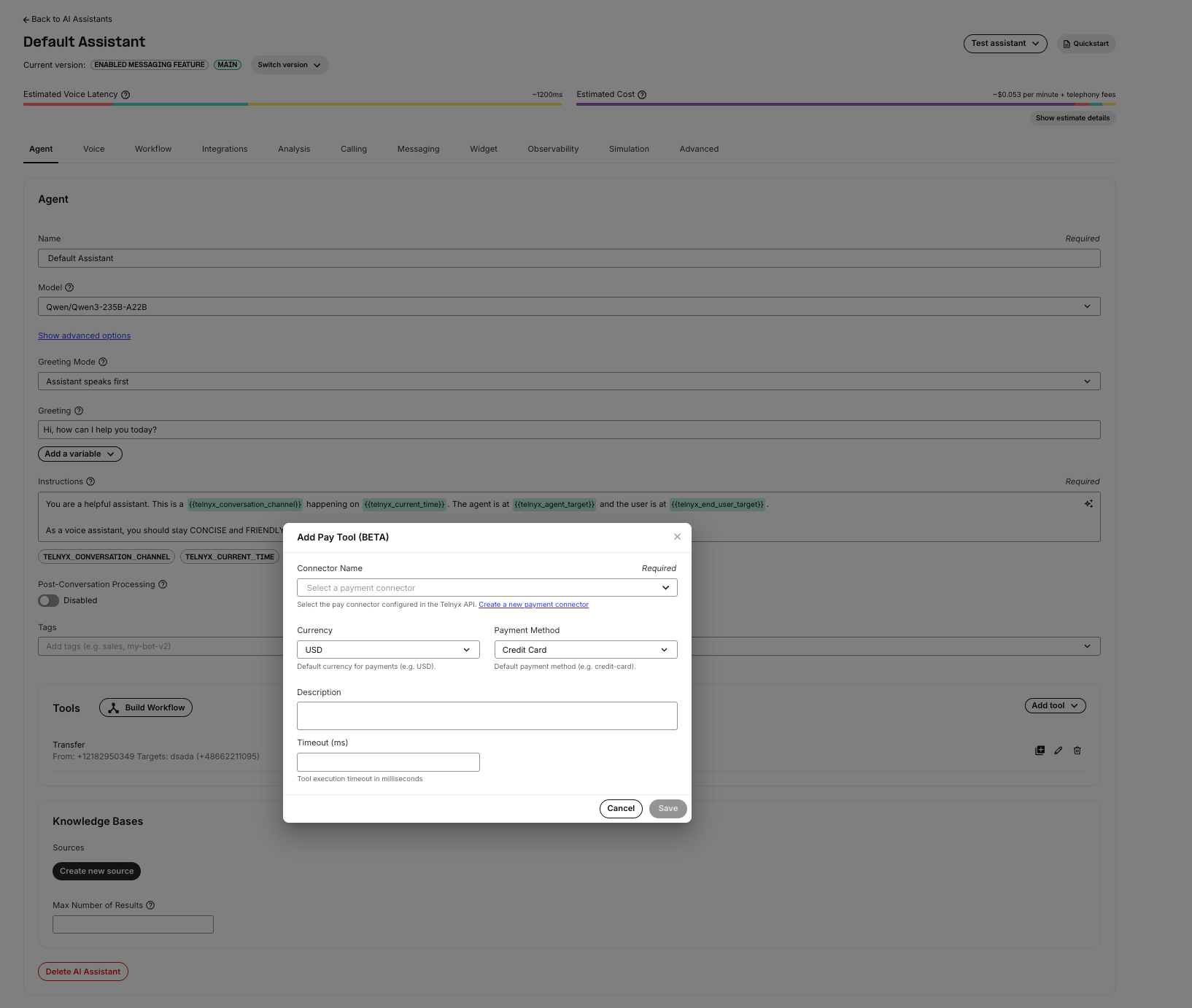 In the AI Assistant configuration, click **Add Pay Tool (BETA)** and configure:
| Field | Required | Description |
| ------------------ | -------- | ------------------------------------- |
| **Connector Name** | Yes | The payment connector to use. |
| **Currency** | Yes | ISO 4217 currency code (e.g., `USD`). |
| **Payment Method** | Yes | `credit-card` or `ach-debit`. |
| **Description** | No | Description sent to the processor. |
| **Timeout** | No | Gather timeout in milliseconds. |
When the AI assistant invokes the Pay tool, it starts a Pay session on the call. The assistant receives `call.payment.progress` events after each IVR step and a `call.payment.completed` event with the final result. This lets the assistant inform the caller of the payment status and continue the conversation naturally.
:::note
During the Pay session, the AI assistant does not receive DTMF input or audio from the caller. The assistant only receives progress and completion events with masked payment data. This ensures the assistant never has access to raw card numbers, CVVs, or bank account details.
:::
***
## Events
Two events are emitted during a Pay session. Both are sent to the configured webhook URL and, if active, to the AI assistant.
### Payment Progress
Sent after each IVR step completes or fails. Event name: `call.payment.progress` (API v2) or `call_payment_progress` (TeXML).
```json theme={null}
{
"event_type": "call.payment.progress",
"occurred_at": "2026-07-20T20:30:00.000Z",
"payment_connector": "my-payment-connector",
"payment_method": "credit-card",
"payment_step": "payment-card-number",
"payment_status": "completed",
"attempt": 1,
"error_type": null,
"payment_card_type": "visa",
"payment_card_number": "xxxxxxxxxxxx1111",
"expiration_date": null,
"security_code": null,
"payment_card_postal_code": null
}
```
Accumulated masked payment data is included from all previously completed steps. Card numbers are masked to show only the last 4 digits. Security codes are fully masked (`xxx`).
### Payment Completed
Sent when the Pay session ends (success, failure, or cancellation). Event name: `call.payment.completed` (API v2) or `call_payment_completed` (TeXML).
**Success:**
```json theme={null}
{
"event_type": "call.payment.completed",
"occurred_at": "2026-07-20T20:31:15.000Z",
"payment_connector": "my-payment-connector",
"payment_method": "credit-card",
"result": "success",
"payment_card_type": "visa",
"payment_card_number": "xxxxxxxxxxxx1111",
"expiration_date": "0827",
"security_code": "xxx",
"payment_card_postal_code": "94111",
"charge_id": "ch_abc123",
"payment_error": null,
"pay_error_code": null
}
```
**Failure:**
```json theme={null}
{
"event_type": "call.payment.completed",
"occurred_at": "2026-07-20T20:31:15.000Z",
"payment_connector": "my-payment-connector",
"payment_method": "credit-card",
"result": "payment-connector-error",
"payment_card_type": "visa",
"payment_card_number": "xxxxxxxxxxxx1111",
"payment_error": "connector_error",
"pay_error_code": "card_declined",
"connector_error": { "error_code": "card_declined", "error_message": "The card was declined." }
}
```
### Result values
| Result | Description |
| -------------------------- | --------------------------------------------------------------------------------- |
| `success` | Payment was processed successfully. `charge_id` or `token_id` is included. |
| `cancelled` | Caller hung up or the call was cancelled during the session. |
| `too-many-failed-attempts` | A step failed more than `max_attempts` times. |
| `payment-connector-error` | The processor returned an error, was unreachable, or the connector was not found. |
| `internal-error` | Unexpected response from the processor (e.g., missing `charge_id` or `token_id`). |
***
## Quick reference
### Endpoints
| Method | Path | Description |
| -------- | --------------------------------- | ------------------------------------------- |
| `POST` | `/v2/pay_connectors` | Create a payment connector |
| `GET` | `/v2/pay_connectors` | List payment connectors |
| `GET` | `/v2/pay_connectors/{name}` | Get a payment connector |
| `PATCH` | `/v2/pay_connectors/{name}` | Update a payment connector (test mode only) |
| `DELETE` | `/v2/pay_connectors/{name}` | Delete a payment connector |
| `POST` | `/v2/calls/{call_control_id}/pay` | Start a Pay session on a call |
### Transaction types
| Type | When | Behavior |
| ---------- | ----------------------- | --------------------------------------------------------------------- |
| `charge` | `amount` > 0 | Captures funds immediately. Processor must return `charge_id`. |
| `tokenize` | `amount` = 0 or omitted | Obtains a token for future charges. Processor must return `token_id`. |
In the AI Assistant configuration, click **Add Pay Tool (BETA)** and configure:
| Field | Required | Description |
| ------------------ | -------- | ------------------------------------- |
| **Connector Name** | Yes | The payment connector to use. |
| **Currency** | Yes | ISO 4217 currency code (e.g., `USD`). |
| **Payment Method** | Yes | `credit-card` or `ach-debit`. |
| **Description** | No | Description sent to the processor. |
| **Timeout** | No | Gather timeout in milliseconds. |
When the AI assistant invokes the Pay tool, it starts a Pay session on the call. The assistant receives `call.payment.progress` events after each IVR step and a `call.payment.completed` event with the final result. This lets the assistant inform the caller of the payment status and continue the conversation naturally.
:::note
During the Pay session, the AI assistant does not receive DTMF input or audio from the caller. The assistant only receives progress and completion events with masked payment data. This ensures the assistant never has access to raw card numbers, CVVs, or bank account details.
:::
***
## Events
Two events are emitted during a Pay session. Both are sent to the configured webhook URL and, if active, to the AI assistant.
### Payment Progress
Sent after each IVR step completes or fails. Event name: `call.payment.progress` (API v2) or `call_payment_progress` (TeXML).
```json theme={null}
{
"event_type": "call.payment.progress",
"occurred_at": "2026-07-20T20:30:00.000Z",
"payment_connector": "my-payment-connector",
"payment_method": "credit-card",
"payment_step": "payment-card-number",
"payment_status": "completed",
"attempt": 1,
"error_type": null,
"payment_card_type": "visa",
"payment_card_number": "xxxxxxxxxxxx1111",
"expiration_date": null,
"security_code": null,
"payment_card_postal_code": null
}
```
Accumulated masked payment data is included from all previously completed steps. Card numbers are masked to show only the last 4 digits. Security codes are fully masked (`xxx`).
### Payment Completed
Sent when the Pay session ends (success, failure, or cancellation). Event name: `call.payment.completed` (API v2) or `call_payment_completed` (TeXML).
**Success:**
```json theme={null}
{
"event_type": "call.payment.completed",
"occurred_at": "2026-07-20T20:31:15.000Z",
"payment_connector": "my-payment-connector",
"payment_method": "credit-card",
"result": "success",
"payment_card_type": "visa",
"payment_card_number": "xxxxxxxxxxxx1111",
"expiration_date": "0827",
"security_code": "xxx",
"payment_card_postal_code": "94111",
"charge_id": "ch_abc123",
"payment_error": null,
"pay_error_code": null
}
```
**Failure:**
```json theme={null}
{
"event_type": "call.payment.completed",
"occurred_at": "2026-07-20T20:31:15.000Z",
"payment_connector": "my-payment-connector",
"payment_method": "credit-card",
"result": "payment-connector-error",
"payment_card_type": "visa",
"payment_card_number": "xxxxxxxxxxxx1111",
"payment_error": "connector_error",
"pay_error_code": "card_declined",
"connector_error": { "error_code": "card_declined", "error_message": "The card was declined." }
}
```
### Result values
| Result | Description |
| -------------------------- | --------------------------------------------------------------------------------- |
| `success` | Payment was processed successfully. `charge_id` or `token_id` is included. |
| `cancelled` | Caller hung up or the call was cancelled during the session. |
| `too-many-failed-attempts` | A step failed more than `max_attempts` times. |
| `payment-connector-error` | The processor returned an error, was unreachable, or the connector was not found. |
| `internal-error` | Unexpected response from the processor (e.g., missing `charge_id` or `token_id`). |
***
## Quick reference
### Endpoints
| Method | Path | Description |
| -------- | --------------------------------- | ------------------------------------------- |
| `POST` | `/v2/pay_connectors` | Create a payment connector |
| `GET` | `/v2/pay_connectors` | List payment connectors |
| `GET` | `/v2/pay_connectors/{name}` | Get a payment connector |
| `PATCH` | `/v2/pay_connectors/{name}` | Update a payment connector (test mode only) |
| `DELETE` | `/v2/pay_connectors/{name}` | Delete a payment connector |
| `POST` | `/v2/calls/{call_control_id}/pay` | Start a Pay session on a call |
### Transaction types
| Type | When | Behavior |
| ---------- | ----------------------- | --------------------------------------------------------------------- |
| `charge` | `amount` > 0 | Captures funds immediately. Processor must return `charge_id`. |
| `tokenize` | `amount` = 0 or omitted | Obtains a token for future charges. Processor must return `token_id`. |