> ## Documentation Index
> Fetch the complete documentation index at: https://developers.telnyx.com/llms.txt
> Use this file to discover all available pages before exploring further.
# WireGuard Peer Config on Windows
> Configure a Windows device as a WireGuard peer to connect to a Telnyx WireGuard Gateway. Includes the WireGuard Windows client and tunnel config.
## Prerequisite
You come from [here](https://developers.telnyx.com/docs/network/gateways/wireguard-gateway) and have a `.conf` file ready.
## Step 1: Install WireGuard Client
From [here](https://www.wireguard.com/install/), choose and install the Windows Installer.
## Step 2: Create a Tunnel
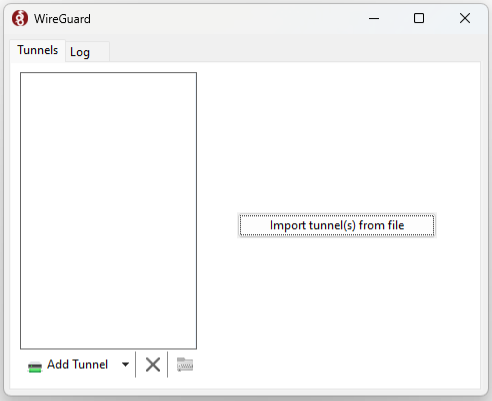
"Import Tunnel(s) from File..."
 "Activate"
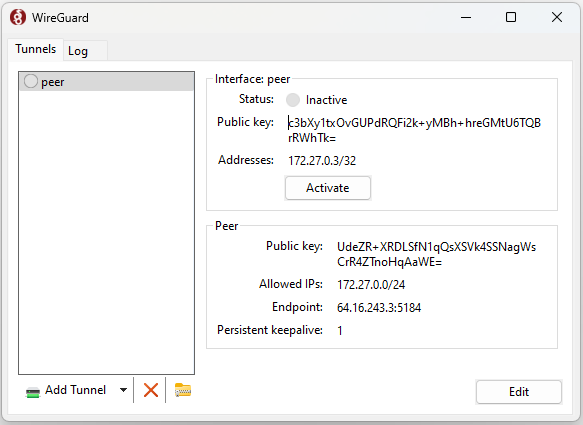 At this point, it should show "Status: Active"
## Step 3: Validating and Testing
You can try pinging to/from a connected peer.
If that does not work you can also try to set up a barebones http server and hit it from the connected peer (or vice versa).
An example barebones server in python:
```
import socket
SERVER_HOST = "0.0.0.0"
SERVER_PORT = 8000
server_socket = socket.socket(socket.AF_INET, socket.SOCK_STREAM)
server_socket.setsockopt(socket.SOL_SOCKET, socket.SO_REUSEADDR, 1)
server_socket.bind((SERVER_HOST, SERVER_PORT))
server_socket.listen(1)
while True:
client_connection, client_address = server_socket.accept()
request = client_connection.recv(1024).decode()
response = 'HTTP/1.0 200 OK\n\nIt works!'
client_connection.sendall(response.encode())
client_connection.close()
```
Run the server in one peer (`python3 server.py` - assuming you saved the above example in a file named `server.py`) and reach it with a client / browser from the other peer:
```
$ curl --location 'http://172.27.0.4:8000/'
It works!
```
## Next Steps
[WireGuard Gateway (WGW) Guide](https://developers.telnyx.com/docs/network/gateways/wireguard-gateway) outlines many use cases that may be valuable to you.
At this point, it should show "Status: Active"
## Step 3: Validating and Testing
You can try pinging to/from a connected peer.
If that does not work you can also try to set up a barebones http server and hit it from the connected peer (or vice versa).
An example barebones server in python:
```
import socket
SERVER_HOST = "0.0.0.0"
SERVER_PORT = 8000
server_socket = socket.socket(socket.AF_INET, socket.SOCK_STREAM)
server_socket.setsockopt(socket.SOL_SOCKET, socket.SO_REUSEADDR, 1)
server_socket.bind((SERVER_HOST, SERVER_PORT))
server_socket.listen(1)
while True:
client_connection, client_address = server_socket.accept()
request = client_connection.recv(1024).decode()
response = 'HTTP/1.0 200 OK\n\nIt works!'
client_connection.sendall(response.encode())
client_connection.close()
```
Run the server in one peer (`python3 server.py` - assuming you saved the above example in a file named `server.py`) and reach it with a client / browser from the other peer:
```
$ curl --location 'http://172.27.0.4:8000/'
It works!
```
## Next Steps
[WireGuard Gateway (WGW) Guide](https://developers.telnyx.com/docs/network/gateways/wireguard-gateway) outlines many use cases that may be valuable to you.