> ## Documentation Index
> Fetch the complete documentation index at: https://developers.telnyx.com/llms.txt
> Use this file to discover all available pages before exploring further.
# Private Wireless Gateway (PGW)
> Configure a Private Wireless Gateway (PGW) to route Telnyx IoT SIM traffic into your private network. Includes APN, IP, and policy configuration.
## Introduction
Private Wireless Gateway (PGW) is an element that routes traffic between a group of Telnyx SIMs and other network elements. Refer to [this guide](https://developers.telnyx.com/docs/iot-sim/private-wireless-gateways) for more information on PGW.
## Creating a PGW
### Step 1: Create a Network
Follow [this guide](https://developers.telnyx.com/docs/network/networks).
### Step 2: Check for Coverage
Follow [this guide](https://developers.telnyx.com/docs/network/coverage). Use `filter[available_services][contains]=private_wireless_gateway` to look for a desired site at which to deploy the WGW.
Currently, Ashburn, VA is the only supported site. We are working on making more sites available.
### Step 3: Create a PGW
Once a PGW is created on a specific network, it cannot be "migrated" to another one; it needs to be recreated on the other network. Double check the correct network\_id is used in the following API request.
```
POST /v2/private_wireless_gateways HTTP/1.1
Host: api.telnyx.com
Content-Type: application/json
Authorization: Bearer XXX
Content-Length: 115
{
"network_id": "f09e6854-fdef-4581-b3bc-63c2008fc4b5",
"name": "pgw-08160937",
"region_code": "ashburn-va"
}
```
It's not yet ready to be used immediately after the creation since its status is `provisioning`.
```
{
"data": {
"assigned_resources": [
{
"count": null,
"record_type": "sim_card_group"
}
],
"created_at": "2024-08-16T14:37:47Z",
"id": "2280aa63-b9b8-4d8a-867a-ff153e5ec422",
"ip_range": "100.64.199.0/24",
"name": "pgw-08160937",
"network_id": "f09e6854-fdef-4581-b3bc-63c2008fc4b5",
"record_type": "private_wireless_gateway",
"region_code": "ashburn-va",
"status": {
"error_code": null,
"error_description": null,
"value": "provisioning"
},
"updated_at": "2024-08-16T14:37:47Z"
}
}
```
### Step 4: Wait for Status Transition
The expected time for `status.value` to transition to `provisioned` is approximately 15 minutes. You can poll the PGW to check for status.
```
GET /v2/private_wireless_gateways/2280aa63-b9b8-4d8a-867a-ff153e5ec422 HTTP/1.1
Host: api.telnyx.com
Authorization: Bearer XXX
```
### Step 5: Attach a SIM Group
The PGW is of little use when there is no SIMs are attached to it. Individual SIM must be added to a SIM group which then can be attached to the PGW. This is easily accomplished on the Mission Control Portal.
PGW will show the SIM group after a successful attachment.
```
{
"data": {
"assigned_resources": [
{
"count": 1,
"record_type": "sim_card_group"
}
],
"created_at": "2024-08-16T14:37:47Z",
"id": "2280aa63-b9b8-4d8a-867a-ff153e5ec422",
"ip_range": "100.64.199.0/24",
"name": "pgw-08160937",
"network_id": "f09e6854-fdef-4581-b3bc-63c2008fc4b5",
"record_type": "private_wireless_gateway",
"region_code": "ashburn-va",
"status": {
"error_code": null,
"error_description": null,
"value": "provisioned"
},
"updated_at": "2024-08-16T15:08:15Z"
}
}
```
## Use Cases
In the following examples, abbreviations are consistently used for brevity.
* PWG = Private Wireless Gateway
* WGW = WireGuard Gateway
* IGW = Internet Gateway
* VXC = Virtual Cross Connect
### Use Case 1: PWG + WGW
We will construct this architecture which is useful when
1. Traffic to and from SIMs needs to be segmented and private, and
2. They do not need high bandwidth connection back to your internal service.
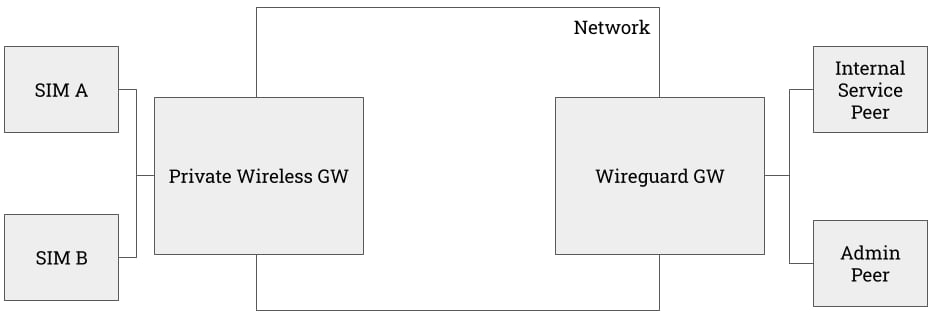 In the following example
* The connected device is an iPhone.
* It only has access to the peers attached to the WGW; there exists no default route for them.
* Internal Service Peer is a Droplet on DigitalOcean that runs an toy Apache web server.
* Admin Peer is a local host.
Detailed WGW and Peer setup guide can be found [here](https://developers.telnyx.com/docs/network/gateways/wireguard-gateway).
On both peers, ensure that both the WGW subnet and the PGW subnet are on the `AllowedIPs` of the `[Peer]` config.
```
[Peer]
PublicKey = XXX
AllowedIPs = 172.27.0.0/24, 100.64.199.0/24
Endpoint = XXX
PersistentKeepalive = XXX
```
From the internal service peer, we can see there is a route to the iPhone.
```
root@ubuntu-s-1vcpu-512mb-10gb-nyc1-01:~# traceroute 100.64.199.1
traceroute to 100.64.199.1 (100.64.199.1), 64 hops max
1 172.27.0.1 21.591ms 21.000ms 20.677ms
2 * * *
3 * * *
4 * * *
5 100.64.199.1 885.269ms 179.245ms 171.923ms
```
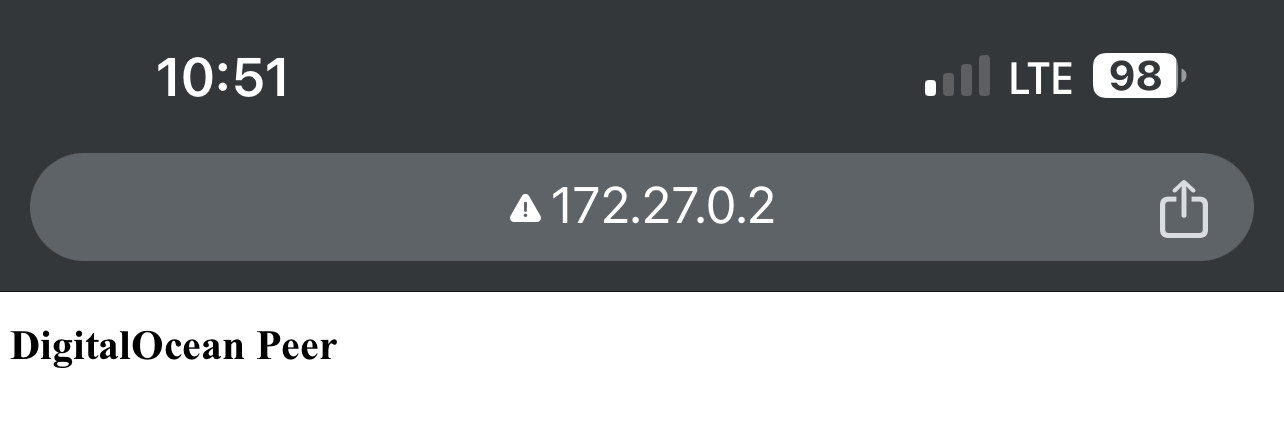
From the iPhone, it has access to the internal service peer.
In the following example
* The connected device is an iPhone.
* It only has access to the peers attached to the WGW; there exists no default route for them.
* Internal Service Peer is a Droplet on DigitalOcean that runs an toy Apache web server.
* Admin Peer is a local host.
Detailed WGW and Peer setup guide can be found [here](https://developers.telnyx.com/docs/network/gateways/wireguard-gateway).
On both peers, ensure that both the WGW subnet and the PGW subnet are on the `AllowedIPs` of the `[Peer]` config.
```
[Peer]
PublicKey = XXX
AllowedIPs = 172.27.0.0/24, 100.64.199.0/24
Endpoint = XXX
PersistentKeepalive = XXX
```
From the internal service peer, we can see there is a route to the iPhone.
```
root@ubuntu-s-1vcpu-512mb-10gb-nyc1-01:~# traceroute 100.64.199.1
traceroute to 100.64.199.1 (100.64.199.1), 64 hops max
1 172.27.0.1 21.591ms 21.000ms 20.677ms
2 * * *
3 * * *
4 * * *
5 100.64.199.1 885.269ms 179.245ms 171.923ms
```
From the iPhone, it has access to the internal service peer.
 ### Use Case 2: PWG + WGW + IGW
The above architecture lacks a crucial functionality --- internet reachability. Though a workaround can be constructed by using one of the peers as an exit node for all default traffic, it's far better to attach an IGW to the network.
### Use Case 2: PWG + WGW + IGW
The above architecture lacks a crucial functionality --- internet reachability. Though a workaround can be constructed by using one of the peers as an exit node for all default traffic, it's far better to attach an IGW to the network.
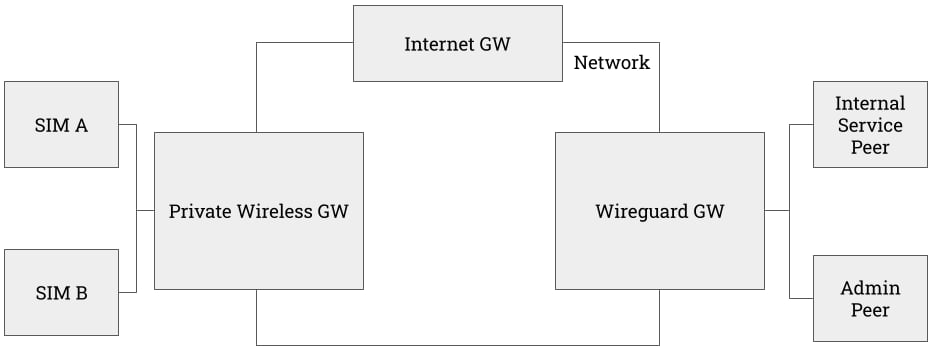 Follow the procedure outlined in [this guide](https://developers.telnyx.com/docs/network/gateways/internet-gateway) to set up an IGW on the same network.
At this point, the iPhone has internet reachability in addition to the WGW subnet and the PGW subnet.
Follow the procedure outlined in [this guide](https://developers.telnyx.com/docs/network/gateways/internet-gateway) to set up an IGW on the same network.
At this point, the iPhone has internet reachability in addition to the WGW subnet and the PGW subnet.
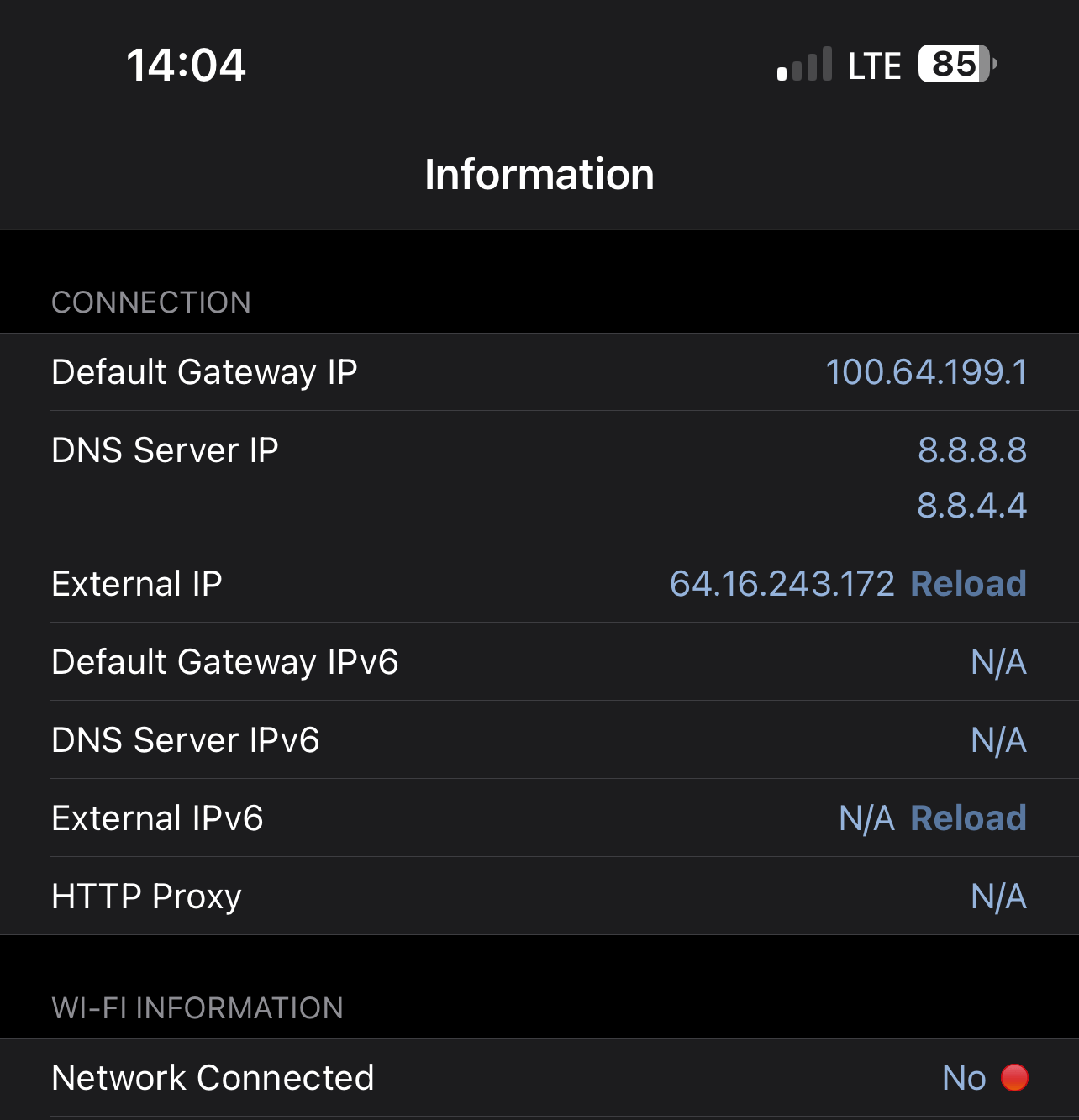
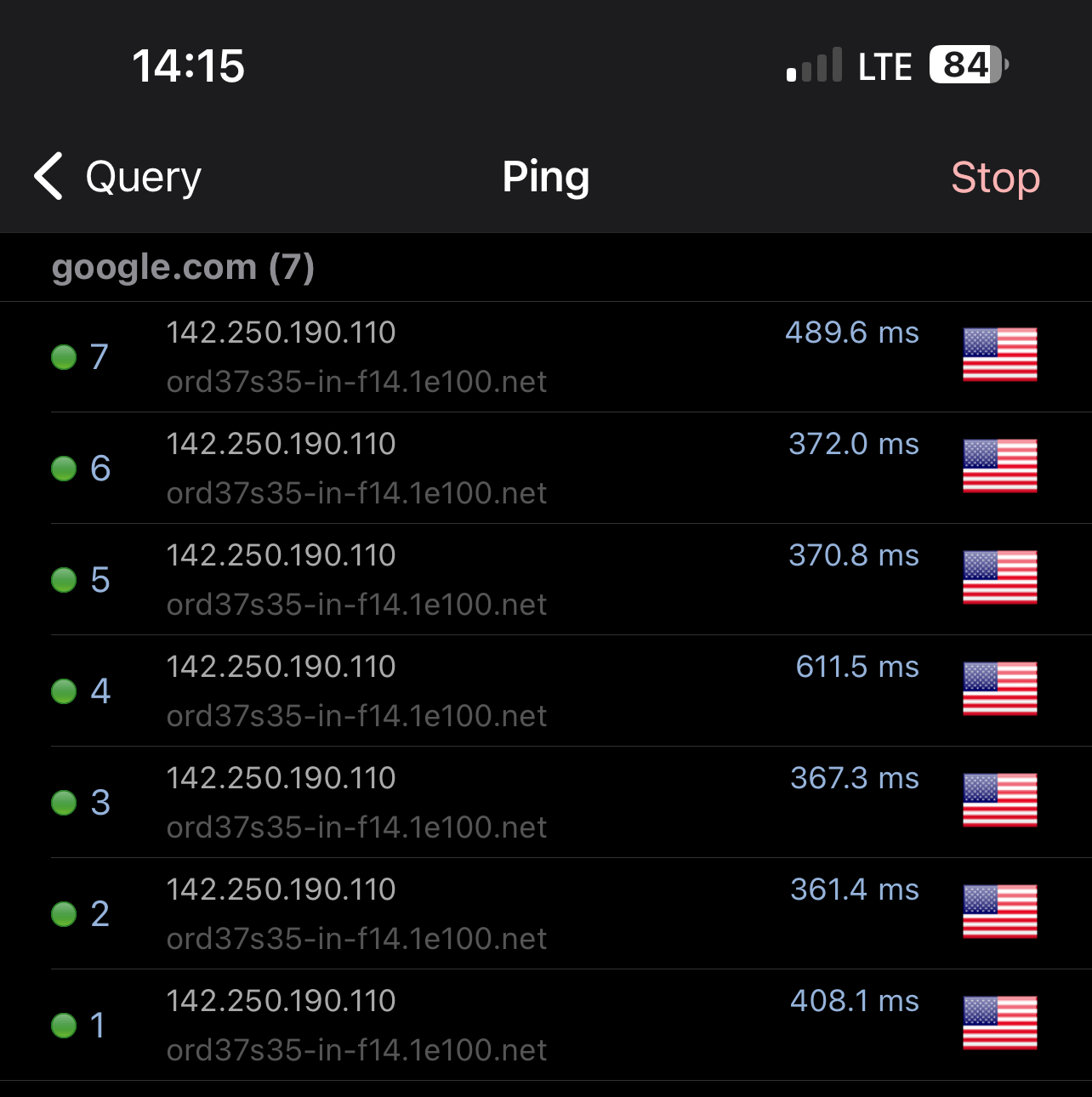 In the above screenshots,
* the iPhone's wifi is turned off
* its "Default Gateway IP" is `100.64.199.1` which is that of the PGW
* its "External IP" is `64.16.243.172` which is that of the IGW
* it can ping `google.com`
Roundtrip ping time is high since in this example, the PGW is in Ashburn US while the IGW is in Frankfurt DE.
### Use Case 3: PWG + WGW + IGW + VXC
Currently, the PWG + WGW + IGW + VXC combination only works when WGW, IGW, and VXC are at the Frankfurt Site.
We are working on expanding the coverage so it will work universally across all Telnyx sites.
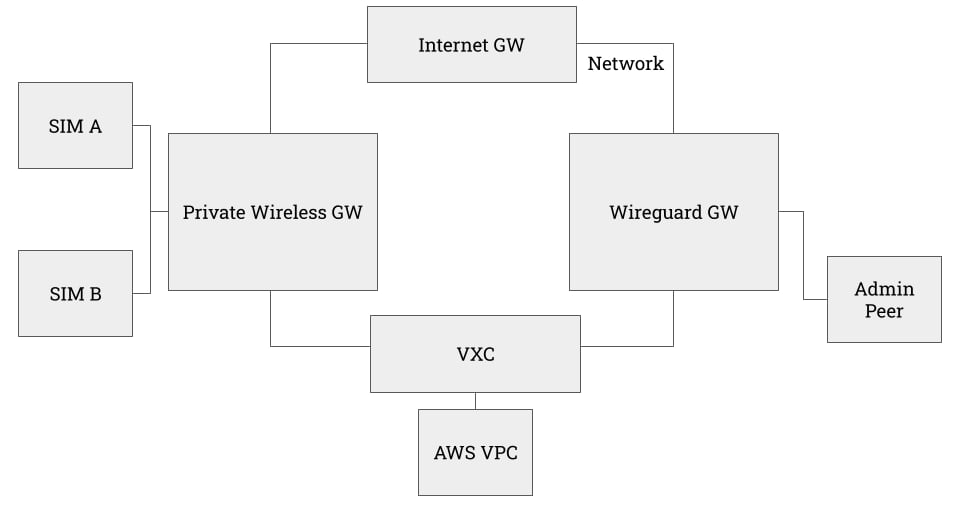
In the case where the user's internal services reside in a cloud provider, the architecture can be augmented yet again.
In this case, a VXC can be attached to the network to accommodate this scenario.
In the following example, we will establish
* a VXC from AWS `eu-central-1`
* an EC2 in AWS `eu-central-1` running a toy Apache server.
For detailed VXC guide on AWS and other providers, please refer to this collection of [guides](https://developers.telnyx.com/docs/network/vxc/intro)
In the above screenshots,
* the iPhone's wifi is turned off
* its "Default Gateway IP" is `100.64.199.1` which is that of the PGW
* its "External IP" is `64.16.243.172` which is that of the IGW
* it can ping `google.com`
Roundtrip ping time is high since in this example, the PGW is in Ashburn US while the IGW is in Frankfurt DE.
### Use Case 3: PWG + WGW + IGW + VXC
Currently, the PWG + WGW + IGW + VXC combination only works when WGW, IGW, and VXC are at the Frankfurt Site.
We are working on expanding the coverage so it will work universally across all Telnyx sites.
In the case where the user's internal services reside in a cloud provider, the architecture can be augmented yet again.
In this case, a VXC can be attached to the network to accommodate this scenario.
In the following example, we will establish
* a VXC from AWS `eu-central-1`
* an EC2 in AWS `eu-central-1` running a toy Apache server.
For detailed VXC guide on AWS and other providers, please refer to this collection of [guides](https://developers.telnyx.com/docs/network/vxc/intro)
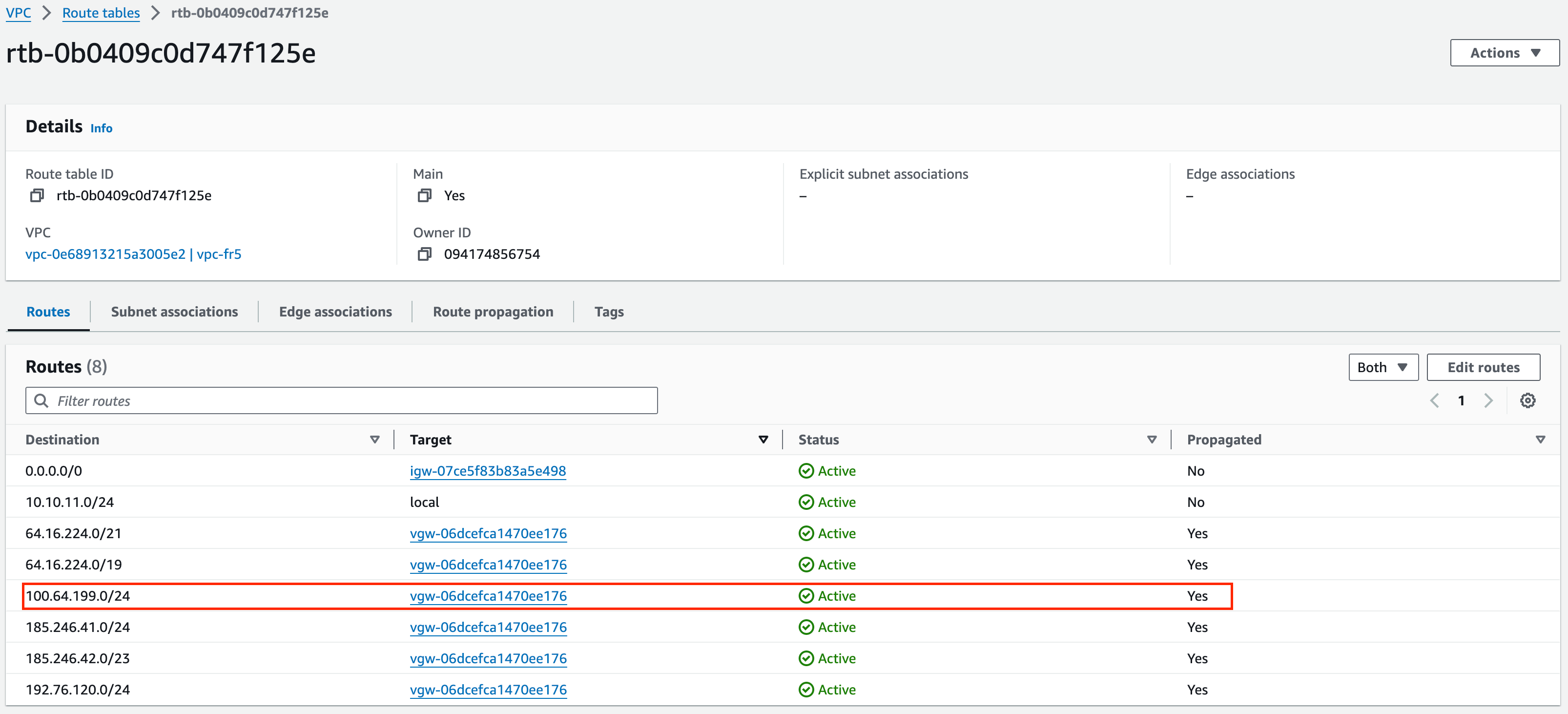
 In AWS's VPC, we can see the routes from Telnyx's public APIs AND the SIMs' private IP ranges are advertised and propagated.
 This is also validated by the `traceroute` output from within the EC2 instance. Latency is high as expected since the EC2 is in Frankfurt while the device is attached to a PGW in Ashburn.
```
ubuntu@ip-10-10-11-9:~$ traceroute 100.64.199.1
traceroute to 100.64.199.1 (100.64.199.1), 64 hops max
1 169.254.237.21 0.916ms 1.091ms 1.079ms
2 169.254.69.2 0.911ms 0.827ms 0.816ms
3 169.254.69.1 1.398ms 1.347ms 1.338ms
4 100.100.100.1 1.833ms 1.782ms 1.769ms
5 100.65.72.1 120.938ms 120.001ms 119.756ms
6 64.16.254.219 119.999ms 119.879ms 119.924ms
7 64.16.254.71 119.758ms 119.691ms 120.006ms
8 * * *
9 169.254.208.167 119.488ms 119.552ms 119.599ms
10 172.22.25.82 120.438ms 120.072ms 119.640ms
11 100.64.199.1 274.343ms 252.264ms 246.660ms
```
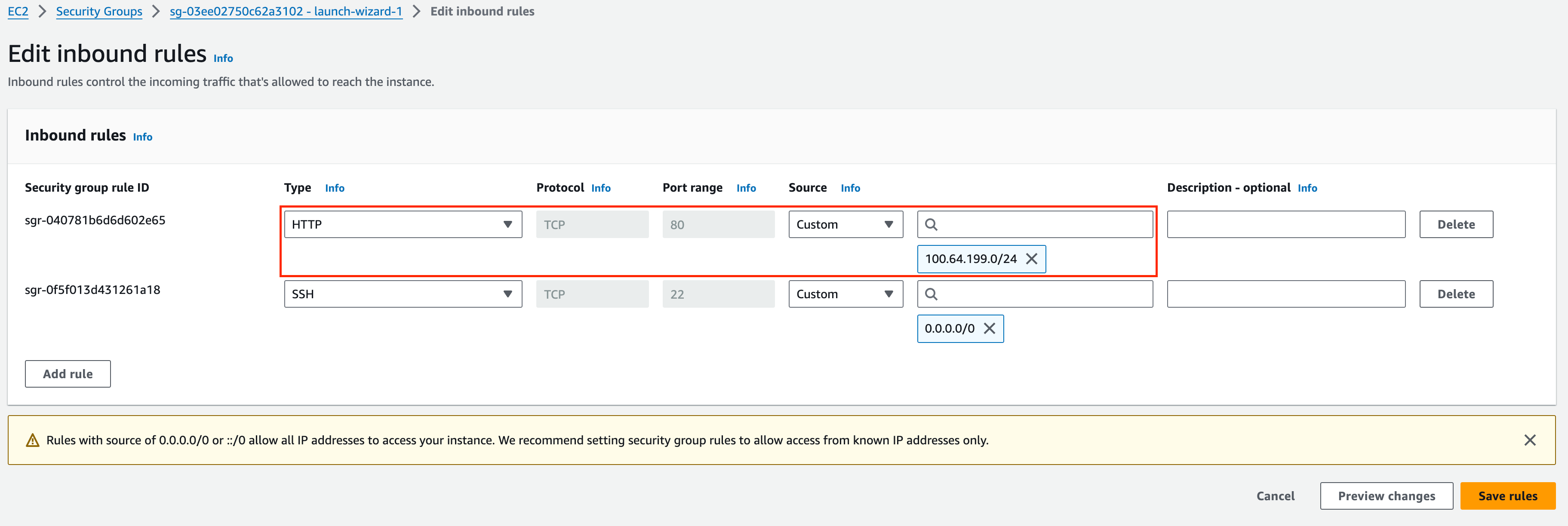
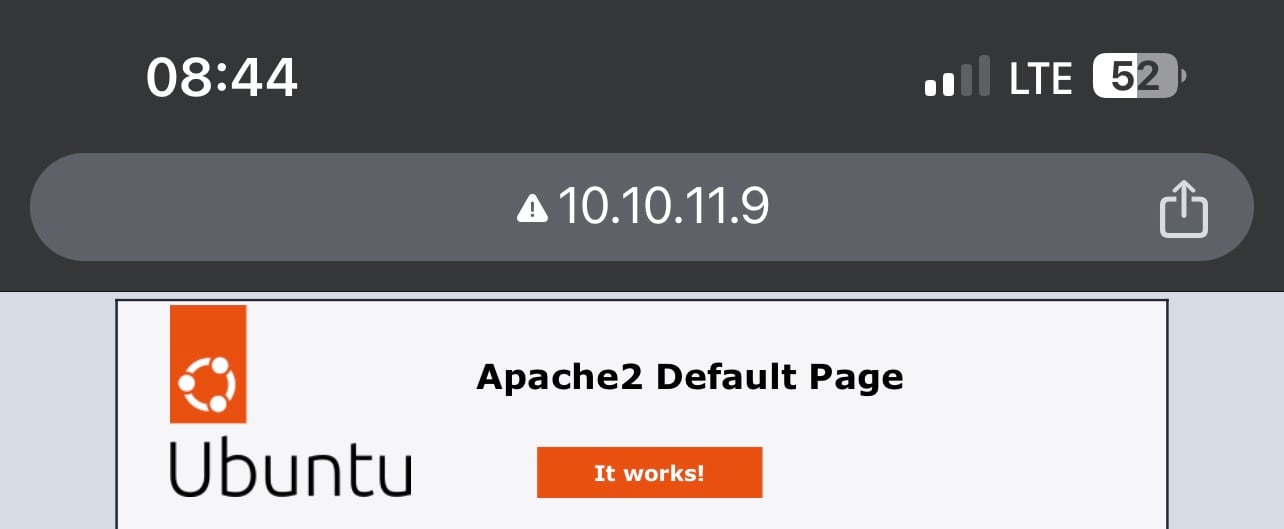
Lastly, validate the connection from the device to EC2. Since the EC2 runs a toy Apache server, open up the HTTP port 80 for the SIM subnet.
This is also validated by the `traceroute` output from within the EC2 instance. Latency is high as expected since the EC2 is in Frankfurt while the device is attached to a PGW in Ashburn.
```
ubuntu@ip-10-10-11-9:~$ traceroute 100.64.199.1
traceroute to 100.64.199.1 (100.64.199.1), 64 hops max
1 169.254.237.21 0.916ms 1.091ms 1.079ms
2 169.254.69.2 0.911ms 0.827ms 0.816ms
3 169.254.69.1 1.398ms 1.347ms 1.338ms
4 100.100.100.1 1.833ms 1.782ms 1.769ms
5 100.65.72.1 120.938ms 120.001ms 119.756ms
6 64.16.254.219 119.999ms 119.879ms 119.924ms
7 64.16.254.71 119.758ms 119.691ms 120.006ms
8 * * *
9 169.254.208.167 119.488ms 119.552ms 119.599ms
10 172.22.25.82 120.438ms 120.072ms 119.640ms
11 100.64.199.1 274.343ms 252.264ms 246.660ms
```
Lastly, validate the connection from the device to EC2. Since the EC2 runs a toy Apache server, open up the HTTP port 80 for the SIM subnet.
 From the iPhone, the server is clearly accessible via private IP.
 ## Costs
* The monthly recurring cost (MRC) for each instance of PGW is \$100.
* Additional costs on SIM and data are applicable as well. Consult [this guide](https://developers.telnyx.com/docs/iot-sim/iot-pricing) for more detail.
## API References
* [PGW](/api-reference/private-wireless-gateways/create-a-private-wireless-gateway)
## Costs
* The monthly recurring cost (MRC) for each instance of PGW is \$100.
* Additional costs on SIM and data are applicable as well. Consult [this guide](https://developers.telnyx.com/docs/iot-sim/iot-pricing) for more detail.
## API References
* [PGW](/api-reference/private-wireless-gateways/create-a-private-wireless-gateway)