> ## Documentation Index
> Fetch the complete documentation index at: https://developers.telnyx.com/llms.txt
> Use this file to discover all available pages before exploring further.
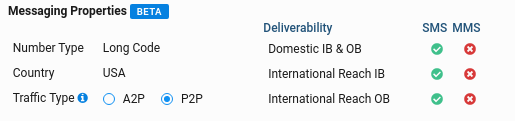
# Traffic Type
> Configure your phone numbers as A2P or P2P traffic to optimize deliverability and unlock features like international messaging.
Traffic Type determines how carriers route your messages. Telnyx supports two types: **Application-to-Person (A2P)** for business messaging and **Person-to-Person (P2P)** for conversational traffic. Selecting the right type improves deliverability and unlocks features like international SMS.
All new numbers start as **A2P** by default. After Telnyx monitors your traffic pattern, eligible numbers can be switched to P2P.
## A2P vs P2P Comparison
| Feature | A2P (Application-to-Person) | P2P (Person-to-Person) |
| --------------------- | ------------------------------------- | -------------------------------------- |
| **Use case** | Marketing, notifications, OTP, alerts | Conversational, support, 1:1 messaging |
| **Message volume** | High volume expected | Lower volume, more interactive |
| **Domestic SMS** | ✅ Yes | ✅ Yes |
| **Domestic MMS** | ✅ Yes | ❌ No |
| **International SMS** | ❌ No (uses alphanumeric fallback) | ✅ Yes |
| **International MMS** | ❌ No | ❌ No |
| **Carrier filtering** | Stricter (anti-spam rules apply) | More lenient |
| **Pricing** | Standard A2P rates | P2P rates (may differ) |
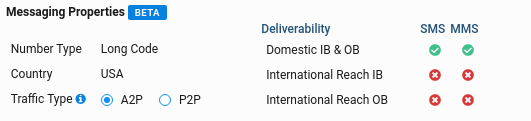
Changing traffic types affects features and pricing. Switching to P2P **removes MMS support** but **enables international outbound SMS**.
## When to Use Each Type
Marketing campaigns, transactional alerts, OTP codes, appointment reminders—any automated business messaging.
Support conversations, two-way chat applications, international reach, or use cases requiring a more personal sender profile.
**US A2P Messaging**: If you're sending A2P traffic in the United States using 10-digit long codes, you must register your brand and campaigns through [10DLC](/docs/messaging/10dlc/quickstart). Unregistered A2P traffic faces heavy filtering and delivery failures.
## How Eligibility Works
Telnyx monitors your messaging patterns to determine P2P eligibility:
```mermaid theme={null}
flowchart LR
A[New Number] --> B[A2P Default]
B --> C{Traffic Monitored}
C -->|Conversational pattern| D[P2P Eligible]
C -->|High volume/one-way| B
D --> E{User Decision}
E -->|Change to P2P| F[P2P Active]
E -->|Keep A2P| B
```
The `eligible_messaging_products` field in the API response shows which options are available for your number.
## Prerequisites
* A [Telnyx account](https://telnyx.com/sign-up)
* A phone number assigned to a [Messaging Profile](https://portal.telnyx.com/#/app/messaging)
* An [API key](https://portal.telnyx.com/#/app/api-keys) (for API access)
***
## Check Traffic Type
Retrieve a number's current traffic type and eligibility using the Messaging Phone Numbers API.
```bash curl theme={null}
curl -X GET "https://api.telnyx.com/v2/messaging_phone_numbers/YOUR_PHONE_NUMBER" \
-H "Content-Type: application/json" \
-H "Authorization: Bearer YOUR_API_KEY"
```
```javascript Node theme={null}
import Telnyx from 'telnyx';
const client = new Telnyx({ apiKey: process.env.TELNYX_API_KEY });
const response = await client.messagingPhoneNumbers.retrieve(
'+15551234567'
);
console.log(`Current: ${response.data.messaging_product}`);
console.log(`Eligible: ${response.data.eligible_messaging_products}`);
```
```python Python theme={null}
import os
from telnyx import Telnyx
client = Telnyx(api_key=os.environ.get("TELNYX_API_KEY"))
response = client.messaging_phone_numbers.retrieve("+15551234567")
print(f"Current: {response.data.messaging_product}")
print(f"Eligible: {response.data.eligible_messaging_products}")
```
```ruby Ruby theme={null}
require "telnyx"
client = Telnyx::Client.new(api_key: ENV["TELNYX_API_KEY"])
response = client.messaging_phone_numbers.retrieve("+15551234567")
puts "Current: #{response.messaging_product}"
puts "Eligible: #{response.eligible_messaging_products}"
```
```go Go theme={null}
package main
import (
"context"
"fmt"
"os"
"github.com/team-telnyx/telnyx-go"
"github.com/team-telnyx/telnyx-go/option"
)
func main() {
client := telnyx.NewClient(
option.WithAPIKey(os.Getenv("TELNYX_API_KEY")),
)
response, err := client.MessagingPhoneNumbers.Retrieve(
context.TODO(),
"+15551234567",
)
if err != nil {
panic(err.Error())
}
fmt.Printf("Current: %s\n", response.Data.MessagingProduct)
fmt.Printf("Eligible: %v\n", response.Data.EligibleMessagingProducts)
}
```
```java Java theme={null}
package com.telnyx.example;
import com.telnyx.sdk.client.TelnyxClient;
import com.telnyx.sdk.client.okhttp.TelnyxOkHttpClient;
import com.telnyx.sdk.models.messagingphonenumbers.*;
public final class Main {
public static void main(String[] args) {
TelnyxClient client = TelnyxOkHttpClient.fromEnv();
MessagingPhoneNumberRetrieveResponse response = client.messagingPhoneNumbers()
.retrieve("+15551234567");
System.out.println("Current: " + response.data().messagingProduct());
System.out.println("Eligible: " + response.data().eligibleMessagingProducts());
}
}
```
```csharp .NET theme={null}
using System;
using Telnyx;
TelnyxConfiguration.SetApiKey(Environment.GetEnvironmentVariable("TELNYX_API_KEY"));
var service = new MessagingPhoneNumberService();
var number = service.Retrieve("+15551234567");
Console.WriteLine($"Current: {number.MessagingProduct}");
Console.WriteLine($"Eligible: {string.Join(", ", number.EligibleMessagingProducts)}");
```
```php PHP theme={null}
messaging_product . "\n";
echo "Eligible: " . implode(", ", $number->eligible_messaging_products) . "\n";
```
1. Go to [Numbers](https://portal.telnyx.com/#/app/numbers/my-numbers) in the portal
2. Find your number and click the **Messaging** icon (SMS bubble)
3. View the **Traffic Type** section to see current type and available options
 ### Response Fields
The API response includes key fields for understanding your number's messaging configuration:
```json theme={null}
{
"data": {
"phone_number": "+15551234567",
"messaging_product": "A2P",
"traffic_type": "A2P",
"eligible_messaging_products": ["A2P", "P2P"],
"health": {
"message_count": 85,
"inbound_outbound_ratio": 0.43,
"success_ratio": 0.95,
"spam_ratio": 0.03
},
"features": {
"sms": {
"domestic_two_way": true,
"international_inbound": false,
"international_outbound": false
},
"mms": {
"domestic_two_way": true,
"international_inbound": false,
"international_outbound": false
}
}
}
}
```
| Field | Description |
| ------------------------------- | ------------------------------------- |
| `messaging_product` | Current traffic type (`A2P` or `P2P`) |
| `traffic_type` | Alias for `messaging_product` |
| `eligible_messaging_products` | Available options for this number |
| `health.message_count` | Recent message volume |
| `health.inbound_outbound_ratio` | Ratio of inbound to outbound messages |
| `health.success_ratio` | Delivery success rate |
| `health.spam_ratio` | Spam/block rate |
| `features.sms` | SMS capabilities by direction |
| `features.mms` | MMS capabilities by direction |
A low `inbound_outbound_ratio` (mostly outbound) typically indicates A2P usage, while higher ratios suggest conversational P2P patterns.
***
## Change Traffic Type
If your number is eligible for both A2P and P2P (check `eligible_messaging_products`), you can switch between them.
**Feature changes take effect immediately.** Switching to P2P disables MMS but enables international SMS. Review the [comparison table](#a2p-vs-p2p-comparison) before changing.
```bash curl theme={null}
curl -X PATCH "https://api.telnyx.com/v2/messaging_phone_numbers/YOUR_PHONE_NUMBER" \
-H "Content-Type: application/json" \
-H "Authorization: Bearer YOUR_API_KEY" \
-d '{"messaging_product": "P2P"}'
```
```javascript Node theme={null}
import Telnyx from 'telnyx';
const client = new Telnyx({ apiKey: process.env.TELNYX_API_KEY });
const response = await client.messagingPhoneNumbers.update(
'+15551234567',
{ messaging_product: 'P2P' }
);
console.log(`Changed to: ${response.data.messaging_product}`);
console.log(`International SMS: ${response.data.features.sms.international_outbound}`);
```
```python Python theme={null}
import os
from telnyx import Telnyx
client = Telnyx(api_key=os.environ.get("TELNYX_API_KEY"))
response = client.messaging_phone_numbers.update(
"+15551234567",
messaging_product="P2P"
)
print(f"Changed to: {response.data.messaging_product}")
print(f"International SMS: {response.data.features.sms.international_outbound}")
```
```ruby Ruby theme={null}
require "telnyx"
client = Telnyx::Client.new(api_key: ENV["TELNYX_API_KEY"])
response = client.messaging_phone_numbers.update(
"+15551234567",
messaging_product: "P2P"
)
puts "Changed to: #{response.messaging_product}"
puts "International SMS: #{response.features.sms.international_outbound}"
```
```go Go theme={null}
package main
import (
"context"
"fmt"
"os"
"github.com/team-telnyx/telnyx-go"
"github.com/team-telnyx/telnyx-go/option"
)
func main() {
client := telnyx.NewClient(
option.WithAPIKey(os.Getenv("TELNYX_API_KEY")),
)
response, err := client.MessagingPhoneNumbers.Update(
context.TODO(),
"+15551234567",
telnyx.MessagingPhoneNumberUpdateParams{
MessagingProduct: telnyx.String("P2P"),
},
)
if err != nil {
panic(err.Error())
}
fmt.Printf("Changed to: %s\n", response.Data.MessagingProduct)
fmt.Printf("International SMS: %v\n", response.Data.Features.SMS.InternationalOutbound)
}
```
```java Java theme={null}
package com.telnyx.example;
import com.telnyx.sdk.client.TelnyxClient;
import com.telnyx.sdk.client.okhttp.TelnyxOkHttpClient;
import com.telnyx.sdk.models.messagingphonenumbers.*;
public final class Main {
public static void main(String[] args) {
TelnyxClient client = TelnyxOkHttpClient.fromEnv();
MessagingPhoneNumberUpdateParams params = MessagingPhoneNumberUpdateParams.builder()
.messagingProduct("P2P")
.build();
MessagingPhoneNumberUpdateResponse response = client.messagingPhoneNumbers()
.update("+15551234567", params);
System.out.println("Changed to: " + response.data().messagingProduct());
System.out.println("International SMS: " + response.data().features().sms().internationalOutbound());
}
}
```
```csharp .NET theme={null}
using System;
using Telnyx;
TelnyxConfiguration.SetApiKey(Environment.GetEnvironmentVariable("TELNYX_API_KEY"));
var service = new MessagingPhoneNumberService();
var options = new MessagingPhoneNumberUpdateOptions
{
MessagingProduct = "P2P"
};
var number = service.Update("+15551234567", options);
Console.WriteLine($"Changed to: {number.MessagingProduct}");
Console.WriteLine($"International SMS: {number.Features.Sms.InternationalOutbound}");
```
```php PHP theme={null}
"P2P"
]);
echo "Changed to: " . $number->messaging_product . "\n";
echo "International SMS: " . ($number->features->sms->international_outbound ? "true" : "false") . "\n";
```
1. Go to [Numbers](https://portal.telnyx.com/#/app/numbers/my-numbers) in the portal
2. Find your number and click the **Messaging** icon (SMS bubble)
3. Under **Traffic Type**, select your preferred option
4. Click **Save**
If the radio buttons are grayed out, your number isn't eligible for P2P yet. Continue using the number with conversational traffic patterns and check back later.
### Response Fields
The API response includes key fields for understanding your number's messaging configuration:
```json theme={null}
{
"data": {
"phone_number": "+15551234567",
"messaging_product": "A2P",
"traffic_type": "A2P",
"eligible_messaging_products": ["A2P", "P2P"],
"health": {
"message_count": 85,
"inbound_outbound_ratio": 0.43,
"success_ratio": 0.95,
"spam_ratio": 0.03
},
"features": {
"sms": {
"domestic_two_way": true,
"international_inbound": false,
"international_outbound": false
},
"mms": {
"domestic_two_way": true,
"international_inbound": false,
"international_outbound": false
}
}
}
}
```
| Field | Description |
| ------------------------------- | ------------------------------------- |
| `messaging_product` | Current traffic type (`A2P` or `P2P`) |
| `traffic_type` | Alias for `messaging_product` |
| `eligible_messaging_products` | Available options for this number |
| `health.message_count` | Recent message volume |
| `health.inbound_outbound_ratio` | Ratio of inbound to outbound messages |
| `health.success_ratio` | Delivery success rate |
| `health.spam_ratio` | Spam/block rate |
| `features.sms` | SMS capabilities by direction |
| `features.mms` | MMS capabilities by direction |
A low `inbound_outbound_ratio` (mostly outbound) typically indicates A2P usage, while higher ratios suggest conversational P2P patterns.
***
## Change Traffic Type
If your number is eligible for both A2P and P2P (check `eligible_messaging_products`), you can switch between them.
**Feature changes take effect immediately.** Switching to P2P disables MMS but enables international SMS. Review the [comparison table](#a2p-vs-p2p-comparison) before changing.
```bash curl theme={null}
curl -X PATCH "https://api.telnyx.com/v2/messaging_phone_numbers/YOUR_PHONE_NUMBER" \
-H "Content-Type: application/json" \
-H "Authorization: Bearer YOUR_API_KEY" \
-d '{"messaging_product": "P2P"}'
```
```javascript Node theme={null}
import Telnyx from 'telnyx';
const client = new Telnyx({ apiKey: process.env.TELNYX_API_KEY });
const response = await client.messagingPhoneNumbers.update(
'+15551234567',
{ messaging_product: 'P2P' }
);
console.log(`Changed to: ${response.data.messaging_product}`);
console.log(`International SMS: ${response.data.features.sms.international_outbound}`);
```
```python Python theme={null}
import os
from telnyx import Telnyx
client = Telnyx(api_key=os.environ.get("TELNYX_API_KEY"))
response = client.messaging_phone_numbers.update(
"+15551234567",
messaging_product="P2P"
)
print(f"Changed to: {response.data.messaging_product}")
print(f"International SMS: {response.data.features.sms.international_outbound}")
```
```ruby Ruby theme={null}
require "telnyx"
client = Telnyx::Client.new(api_key: ENV["TELNYX_API_KEY"])
response = client.messaging_phone_numbers.update(
"+15551234567",
messaging_product: "P2P"
)
puts "Changed to: #{response.messaging_product}"
puts "International SMS: #{response.features.sms.international_outbound}"
```
```go Go theme={null}
package main
import (
"context"
"fmt"
"os"
"github.com/team-telnyx/telnyx-go"
"github.com/team-telnyx/telnyx-go/option"
)
func main() {
client := telnyx.NewClient(
option.WithAPIKey(os.Getenv("TELNYX_API_KEY")),
)
response, err := client.MessagingPhoneNumbers.Update(
context.TODO(),
"+15551234567",
telnyx.MessagingPhoneNumberUpdateParams{
MessagingProduct: telnyx.String("P2P"),
},
)
if err != nil {
panic(err.Error())
}
fmt.Printf("Changed to: %s\n", response.Data.MessagingProduct)
fmt.Printf("International SMS: %v\n", response.Data.Features.SMS.InternationalOutbound)
}
```
```java Java theme={null}
package com.telnyx.example;
import com.telnyx.sdk.client.TelnyxClient;
import com.telnyx.sdk.client.okhttp.TelnyxOkHttpClient;
import com.telnyx.sdk.models.messagingphonenumbers.*;
public final class Main {
public static void main(String[] args) {
TelnyxClient client = TelnyxOkHttpClient.fromEnv();
MessagingPhoneNumberUpdateParams params = MessagingPhoneNumberUpdateParams.builder()
.messagingProduct("P2P")
.build();
MessagingPhoneNumberUpdateResponse response = client.messagingPhoneNumbers()
.update("+15551234567", params);
System.out.println("Changed to: " + response.data().messagingProduct());
System.out.println("International SMS: " + response.data().features().sms().internationalOutbound());
}
}
```
```csharp .NET theme={null}
using System;
using Telnyx;
TelnyxConfiguration.SetApiKey(Environment.GetEnvironmentVariable("TELNYX_API_KEY"));
var service = new MessagingPhoneNumberService();
var options = new MessagingPhoneNumberUpdateOptions
{
MessagingProduct = "P2P"
};
var number = service.Update("+15551234567", options);
Console.WriteLine($"Changed to: {number.MessagingProduct}");
Console.WriteLine($"International SMS: {number.Features.Sms.InternationalOutbound}");
```
```php PHP theme={null}
"P2P"
]);
echo "Changed to: " . $number->messaging_product . "\n";
echo "International SMS: " . ($number->features->sms->international_outbound ? "true" : "false") . "\n";
```
1. Go to [Numbers](https://portal.telnyx.com/#/app/numbers/my-numbers) in the portal
2. Find your number and click the **Messaging** icon (SMS bubble)
3. Under **Traffic Type**, select your preferred option
4. Click **Save**
If the radio buttons are grayed out, your number isn't eligible for P2P yet. Continue using the number with conversational traffic patterns and check back later.
 ### After Changing to P2P
Your number's features will update immediately:
```json theme={null}
{
"data": {
"phone_number": "+15551234567",
"messaging_product": "P2P",
"traffic_type": "P2P",
"features": {
"sms": {
"domestic_two_way": true,
"international_inbound": true,
"international_outbound": true
},
"mms": {}
}
}
}
```
Note that:
* `mms` section is now empty (MMS disabled)
* `international_outbound` is now `true` for SMS
* Pricing may change—check your [rate sheet](https://portal.telnyx.com/#/app/reports/rates)
***
## International Messaging with P2P
Once your number is configured for P2P, you can send SMS internationally:
```bash curl theme={null}
curl -X POST "https://api.telnyx.com/v2/messages" \
-H "Content-Type: application/json" \
-H "Authorization: Bearer YOUR_API_KEY" \
-d '{
"from": "+15551234567",
"to": "+447700900123",
"text": "Hello from the US!"
}'
```
```python Python theme={null}
import os
from telnyx import Telnyx
client = Telnyx(api_key=os.environ.get("TELNYX_API_KEY"))
response = client.messages.create(
from_="+15551234567", # Your P2P number
to="+447700900123", # UK number
text="Hello from the US!"
)
print(f"Sent: {response.data.id}")
```
```javascript Node theme={null}
import Telnyx from 'telnyx';
const client = new Telnyx({ apiKey: process.env.TELNYX_API_KEY });
const response = await client.messages.create({
from: '+15551234567', // Your P2P number
to: '+447700900123', // UK number
text: 'Hello from the US!'
});
console.log(`Sent: ${response.data.id}`);
```
If you try to send internationally from an **A2P** number, Telnyx will automatically fall back to an alphanumeric sender (like "Telnyx") where supported.
***
## Troubleshooting
**Cause**: Telnyx hasn't observed enough conversational traffic to qualify the number for P2P.
**Solutions**:
1. Continue using the number with conversational (two-way) messaging
2. Wait for the next eligibility review cycle
3. Contact [Telnyx support](https://support.telnyx.com) if you believe your traffic qualifies
**Cause**: P2P traffic type doesn't support MMS—this is expected behavior.
**Solutions**:
1. Switch back to A2P if you need MMS
2. Use a separate A2P number for MMS messages
3. For mixed use cases, maintain both A2P and P2P numbers
**Cause**: Destination country may require sender registration, or the number isn't fully switched.
**Solutions**:
1. Verify the number shows `messaging_product: "P2P"` in the API response
2. Check if the destination country requires sender pre-registration
3. Confirm `features.sms.international_outbound` is `true`
4. Review webhook delivery reports for specific error codes
**Cause**: The number may have lost A2P eligibility based on traffic patterns.
**Solutions**:
1. Check `eligible_messaging_products` to confirm A2P is still an option
2. Contact [Telnyx support](https://support.telnyx.com) if A2P eligibility is unexpectedly missing
***
## Next Steps
Distribute messages across multiple numbers
Understand messaging throughput limits
Register for A2P 10DLC compliance in the US
Send internationally with branded sender IDs
### After Changing to P2P
Your number's features will update immediately:
```json theme={null}
{
"data": {
"phone_number": "+15551234567",
"messaging_product": "P2P",
"traffic_type": "P2P",
"features": {
"sms": {
"domestic_two_way": true,
"international_inbound": true,
"international_outbound": true
},
"mms": {}
}
}
}
```
Note that:
* `mms` section is now empty (MMS disabled)
* `international_outbound` is now `true` for SMS
* Pricing may change—check your [rate sheet](https://portal.telnyx.com/#/app/reports/rates)
***
## International Messaging with P2P
Once your number is configured for P2P, you can send SMS internationally:
```bash curl theme={null}
curl -X POST "https://api.telnyx.com/v2/messages" \
-H "Content-Type: application/json" \
-H "Authorization: Bearer YOUR_API_KEY" \
-d '{
"from": "+15551234567",
"to": "+447700900123",
"text": "Hello from the US!"
}'
```
```python Python theme={null}
import os
from telnyx import Telnyx
client = Telnyx(api_key=os.environ.get("TELNYX_API_KEY"))
response = client.messages.create(
from_="+15551234567", # Your P2P number
to="+447700900123", # UK number
text="Hello from the US!"
)
print(f"Sent: {response.data.id}")
```
```javascript Node theme={null}
import Telnyx from 'telnyx';
const client = new Telnyx({ apiKey: process.env.TELNYX_API_KEY });
const response = await client.messages.create({
from: '+15551234567', // Your P2P number
to: '+447700900123', // UK number
text: 'Hello from the US!'
});
console.log(`Sent: ${response.data.id}`);
```
If you try to send internationally from an **A2P** number, Telnyx will automatically fall back to an alphanumeric sender (like "Telnyx") where supported.
***
## Troubleshooting
**Cause**: Telnyx hasn't observed enough conversational traffic to qualify the number for P2P.
**Solutions**:
1. Continue using the number with conversational (two-way) messaging
2. Wait for the next eligibility review cycle
3. Contact [Telnyx support](https://support.telnyx.com) if you believe your traffic qualifies
**Cause**: P2P traffic type doesn't support MMS—this is expected behavior.
**Solutions**:
1. Switch back to A2P if you need MMS
2. Use a separate A2P number for MMS messages
3. For mixed use cases, maintain both A2P and P2P numbers
**Cause**: Destination country may require sender registration, or the number isn't fully switched.
**Solutions**:
1. Verify the number shows `messaging_product: "P2P"` in the API response
2. Check if the destination country requires sender pre-registration
3. Confirm `features.sms.international_outbound` is `true`
4. Review webhook delivery reports for specific error codes
**Cause**: The number may have lost A2P eligibility based on traffic patterns.
**Solutions**:
1. Check `eligible_messaging_products` to confirm A2P is still an option
2. Contact [Telnyx support](https://support.telnyx.com) if A2P eligibility is unexpectedly missing
***
## Next Steps
Distribute messages across multiple numbers
Understand messaging throughput limits
Register for A2P 10DLC compliance in the US
Send internationally with branded sender IDs