> ## Documentation Index
> Fetch the complete documentation index at: https://developers.telnyx.com/llms.txt
> Use this file to discover all available pages before exploring further.
# Geomatch
> Automatically select sender numbers that match recipient area codes for higher engagement and trust.
Geomatch automatically selects sender numbers that share the same area code as your recipients. When enabled, Telnyx matches your outbound messages with locally-recognized numbers—boosting trust and engagement with your customers.
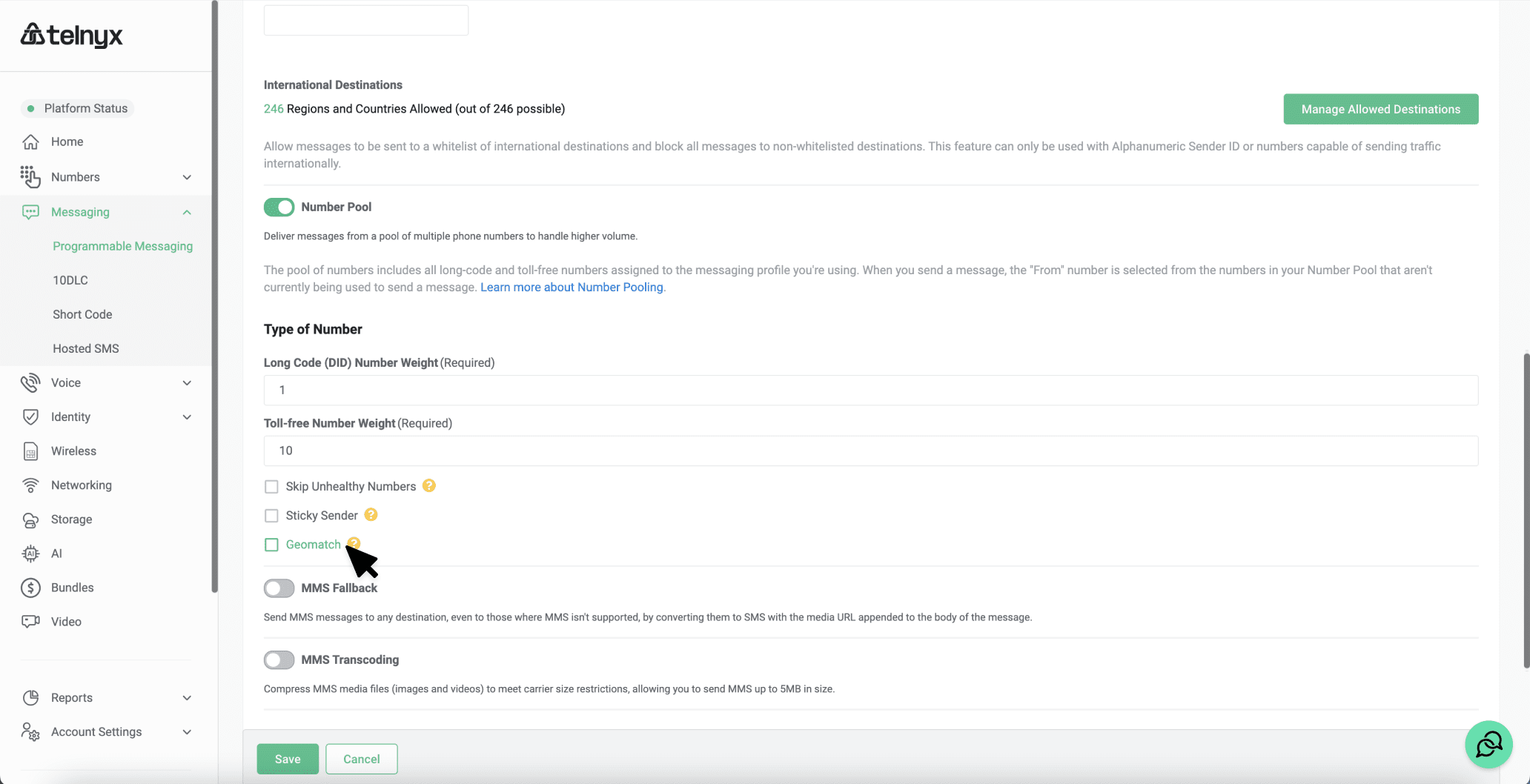
Geomatch is part of **Number Pool** settings. You must have [Number Pool](/docs/messaging/messages/number-pool) enabled to use Geomatch.
## When to Use Geomatch
Appear local to recipients—messages from familiar area codes are more likely to be read and trusted.
Local numbers typically see better response rates than out-of-area or toll-free numbers.
Automatically match senders across different geographic areas without manual routing logic.
Build rapport with customers who prefer communicating with local business numbers.
**NANP only**: Geomatch currently supports only North American numbers (US, Canada, Caribbean). International numbers don't participate in geomatching.
## How It Works
1. **Message sent**: Your app sends a message without specifying a `from` number (using Number Pool)
2. **Area code lookup**: Telnyx identifies the recipient's area code
3. **Pool search**: Telnyx searches your number pool for a matching area code
4. **Selection**: If found, that number is used; otherwise, a number with a different area code is selected
```mermaid theme={null}
sequenceDiagram
participant App as Your App
participant TLX as Telnyx
participant R1 as +1(415) 555-1234
participant R2 as +1(212) 555-6789
Note over App: Send to SF recipient
App->>TLX: Send to +14155551234
Note over TLX: Pool has +14155550000 (415)
TLX->>R1: From: +14155550000 ✓ Match!
Note over App: Send to NYC recipient
App->>TLX: Send to +12125556789
Note over TLX: No 212 number in pool
Note over TLX: Fallback to available number
TLX->>R2: From: +14155550000 (no match)
```
## Prerequisites
* A [Messaging Profile](/docs/messaging/messages/send-message) with [Number Pool](/docs/messaging/messages/number-pool) enabled
* Phone numbers from multiple area codes assigned to the profile (for effective geomatching)
***
## Configure Geomatch
Enable Geomatch by updating your Messaging Profile's `number_pool_settings`.
```bash curl theme={null}
curl -X PATCH "https://api.telnyx.com/v2/messaging_profiles/YOUR_PROFILE_ID" \
-H "Content-Type: application/json" \
-H "Authorization: Bearer YOUR_API_KEY" \
-d '{
"number_pool_settings": {
"long_code_weight": 1,
"geomatch": true
}
}'
```
```javascript Node theme={null}
import Telnyx from 'telnyx';
const client = new Telnyx({ apiKey: process.env.TELNYX_API_KEY });
const response = await client.messagingProfiles.update(
'YOUR_PROFILE_ID',
{
number_pool_settings: {
long_code_weight: 1,
geomatch: true
}
}
);
console.log(response.data);
```
```python Python theme={null}
import os
from telnyx import Telnyx
client = Telnyx(api_key=os.environ.get("TELNYX_API_KEY"))
response = client.messaging_profiles.update(
"YOUR_PROFILE_ID",
number_pool_settings={
"long_code_weight": 1,
"geomatch": True
}
)
print(response.data)
```
```ruby Ruby theme={null}
require "telnyx"
client = Telnyx::Client.new(api_key: ENV["TELNYX_API_KEY"])
response = client.messaging_profiles.update(
"YOUR_PROFILE_ID",
number_pool_settings: {
long_code_weight: 1,
geomatch: true
}
)
puts response
```
```go Go theme={null}
package main
import (
"context"
"fmt"
"os"
"github.com/team-telnyx/telnyx-go"
"github.com/team-telnyx/telnyx-go/option"
)
func main() {
client := telnyx.NewClient(
option.WithAPIKey(os.Getenv("TELNYX_API_KEY")),
)
response, err := client.MessagingProfiles.Update(
context.TODO(),
"YOUR_PROFILE_ID",
telnyx.MessagingProfileUpdateParams{
NumberPoolSettings: &telnyx.NumberPoolSettingsParam{
LongCodeWeight: telnyx.Int(1),
Geomatch: telnyx.Bool(true),
},
},
)
if err != nil {
panic(err.Error())
}
fmt.Printf("%+v\n", response)
}
```
```java Java theme={null}
package com.telnyx.example;
import com.telnyx.sdk.client.TelnyxClient;
import com.telnyx.sdk.client.okhttp.TelnyxOkHttpClient;
import com.telnyx.sdk.models.messagingprofiles.*;
public final class Main {
public static void main(String[] args) {
TelnyxClient client = TelnyxOkHttpClient.fromEnv();
NumberPoolSettings poolSettings = NumberPoolSettings.builder()
.longCodeWeight(1)
.geomatch(true)
.build();
MessagingProfileUpdateParams params = MessagingProfileUpdateParams.builder()
.numberPoolSettings(poolSettings)
.build();
MessagingProfileUpdateResponse response = client.messagingProfiles()
.update("YOUR_PROFILE_ID", params);
System.out.println(response);
}
}
```
```csharp .NET theme={null}
using System;
using Telnyx;
TelnyxConfiguration.SetApiKey(Environment.GetEnvironmentVariable("TELNYX_API_KEY"));
var service = new MessagingProfileService();
var options = new MessagingProfileUpdateOptions
{
NumberPoolSettings = new NumberPoolSettings
{
LongCodeWeight = 1,
Geomatch = true
}
};
var profile = service.Update("YOUR_PROFILE_ID", options);
Console.WriteLine(profile);
```
```php PHP theme={null}
[
"long_code_weight" => 1,
"geomatch" => true
]
]);
print_r($profile);
```
The examples include `long_code_weight` to ensure Number Pool is active. If you already have Number Pool configured, you can omit weight fields—PATCH requests merge with existing settings.
1. Go to [Messaging](https://portal.telnyx.com/#/app/messaging) in the portal
2. Click the edit icon next to your Messaging Profile
3. Under **Outbound**, toggle on **Number Pool**
4. Check the **Geomatch** option
5. Click **Save**
 ***
## Selection Behavior
Understanding how Geomatch selects senders helps you optimize your number pool coverage.
### Selection Priority
When both Geomatch and [Sticky Sender](/docs/messaging/messages/sticky-sender) are enabled:
| Priority | Condition | Behavior |
| -------- | ----------------------------------------- | ----------------------------------------------- |
| 1 | Sticky mapping exists | Use the mapped sender (geomatch ignored) |
| 2 | No mapping + matching area code available | Use geomatched number, create sticky mapping |
| 3 | No mapping + no matching area code | Use any available number, create sticky mapping |
Sticky Sender takes precedence over Geomatch. Once a recipient is mapped to a sender, that sender is used regardless of area code matching.
### Coverage Planning
For effective geomatching, ensure your number pool covers the area codes where your recipients are located:
| Coverage Level | Description | Example |
| --------------------- | --------------------------------------- | -------------------------------------------------------------- |
| **Full coverage** | Numbers in all target area codes | Pool: 415, 212, 312, 305 for SF, NYC, Chicago, Miami campaigns |
| **Regional coverage** | Numbers per region, not every area code | Pool: 415 for CA, 212 for NY, 312 for IL |
| **Minimal coverage** | Single area code | Pool: Only 415 numbers (geomatch rarely activates) |
Use the [Phone Numbers API](/api-reference/numbers/list-phone-numbers) to audit your pool's area code coverage. Search for numbers in missing area codes to improve geomatch rates.
***
## Disable Geomatch
To disable Geomatch while keeping Number Pool active:
```bash curl theme={null}
curl -X PATCH "https://api.telnyx.com/v2/messaging_profiles/YOUR_PROFILE_ID" \
-H "Content-Type: application/json" \
-H "Authorization: Bearer YOUR_API_KEY" \
-d '{
"number_pool_settings": {
"geomatch": false
}
}'
```
```javascript Node theme={null}
import Telnyx from 'telnyx';
const client = new Telnyx({ apiKey: process.env.TELNYX_API_KEY });
await client.messagingProfiles.update('YOUR_PROFILE_ID', {
number_pool_settings: {
geomatch: false
}
});
```
```python Python theme={null}
import os
from telnyx import Telnyx
client = Telnyx(api_key=os.environ.get("TELNYX_API_KEY"))
client.messaging_profiles.update(
"YOUR_PROFILE_ID",
number_pool_settings={
"geomatch": False
}
)
```
***
## Related Features
Geomatch works best combined with other Number Pool features:
Maintain the same sender for each recipient. When combined with Geomatch:
* First message uses geomatch selection
* Subsequent messages use the "stuck" sender (even if area code no longer matches)
See [Sticky Sender](/docs/messaging/messages/sticky-sender) for details.
Exclude poorly performing numbers from the pool. A geomatched number will be skipped if:
* `skip_unhealthy: true` is enabled
* The number's deliverability rate is below 25% OR spam ratio exceeds 75%
The next best geomatch candidate is used instead.
Control the ratio of long codes to toll-free numbers. Geomatch respects these weights—if you weight toll-free higher, toll-free numbers are preferred even when long codes have matching area codes.
See [Number Pool](/docs/messaging/messages/number-pool) for configuration details.
***
## Troubleshooting
**Possible causes**:
* Geomatch not enabled on the profile
* No numbers with matching area code in your pool
* Sticky Sender is enabled and recipient already has a mapping to a different number
* Matching number is unhealthy and `skip_unhealthy` is enabled
**Solution**: Verify Geomatch is enabled, then check your pool's area code coverage. Use the portal or API to list numbers assigned to your messaging profile.
**Cause**: Geomatch only supports NANP (North American Numbering Plan) numbers—US, Canada, and Caribbean.
**Solution**: For international messaging, use explicit `from` numbers or rely on weight-based Number Pool selection.
**Possible causes**:
* Number Pool is not enabled (Geomatch requires Number Pool)
* Only one number in the pool (nothing to match against)
* Sending with explicit `from` number (bypasses Number Pool entirely)
**Solution**: Ensure Number Pool is enabled with at least one weight > 0, verify multiple numbers are assigned to the profile, and omit `from` when sending to use the pool.
***
## Next Steps
Learn about multi-number distribution and weights
Maintain consistent sender numbers per recipient
Complete messaging quickstart
Full Messaging Profiles API details
***
## Selection Behavior
Understanding how Geomatch selects senders helps you optimize your number pool coverage.
### Selection Priority
When both Geomatch and [Sticky Sender](/docs/messaging/messages/sticky-sender) are enabled:
| Priority | Condition | Behavior |
| -------- | ----------------------------------------- | ----------------------------------------------- |
| 1 | Sticky mapping exists | Use the mapped sender (geomatch ignored) |
| 2 | No mapping + matching area code available | Use geomatched number, create sticky mapping |
| 3 | No mapping + no matching area code | Use any available number, create sticky mapping |
Sticky Sender takes precedence over Geomatch. Once a recipient is mapped to a sender, that sender is used regardless of area code matching.
### Coverage Planning
For effective geomatching, ensure your number pool covers the area codes where your recipients are located:
| Coverage Level | Description | Example |
| --------------------- | --------------------------------------- | -------------------------------------------------------------- |
| **Full coverage** | Numbers in all target area codes | Pool: 415, 212, 312, 305 for SF, NYC, Chicago, Miami campaigns |
| **Regional coverage** | Numbers per region, not every area code | Pool: 415 for CA, 212 for NY, 312 for IL |
| **Minimal coverage** | Single area code | Pool: Only 415 numbers (geomatch rarely activates) |
Use the [Phone Numbers API](/api-reference/numbers/list-phone-numbers) to audit your pool's area code coverage. Search for numbers in missing area codes to improve geomatch rates.
***
## Disable Geomatch
To disable Geomatch while keeping Number Pool active:
```bash curl theme={null}
curl -X PATCH "https://api.telnyx.com/v2/messaging_profiles/YOUR_PROFILE_ID" \
-H "Content-Type: application/json" \
-H "Authorization: Bearer YOUR_API_KEY" \
-d '{
"number_pool_settings": {
"geomatch": false
}
}'
```
```javascript Node theme={null}
import Telnyx from 'telnyx';
const client = new Telnyx({ apiKey: process.env.TELNYX_API_KEY });
await client.messagingProfiles.update('YOUR_PROFILE_ID', {
number_pool_settings: {
geomatch: false
}
});
```
```python Python theme={null}
import os
from telnyx import Telnyx
client = Telnyx(api_key=os.environ.get("TELNYX_API_KEY"))
client.messaging_profiles.update(
"YOUR_PROFILE_ID",
number_pool_settings={
"geomatch": False
}
)
```
***
## Related Features
Geomatch works best combined with other Number Pool features:
Maintain the same sender for each recipient. When combined with Geomatch:
* First message uses geomatch selection
* Subsequent messages use the "stuck" sender (even if area code no longer matches)
See [Sticky Sender](/docs/messaging/messages/sticky-sender) for details.
Exclude poorly performing numbers from the pool. A geomatched number will be skipped if:
* `skip_unhealthy: true` is enabled
* The number's deliverability rate is below 25% OR spam ratio exceeds 75%
The next best geomatch candidate is used instead.
Control the ratio of long codes to toll-free numbers. Geomatch respects these weights—if you weight toll-free higher, toll-free numbers are preferred even when long codes have matching area codes.
See [Number Pool](/docs/messaging/messages/number-pool) for configuration details.
***
## Troubleshooting
**Possible causes**:
* Geomatch not enabled on the profile
* No numbers with matching area code in your pool
* Sticky Sender is enabled and recipient already has a mapping to a different number
* Matching number is unhealthy and `skip_unhealthy` is enabled
**Solution**: Verify Geomatch is enabled, then check your pool's area code coverage. Use the portal or API to list numbers assigned to your messaging profile.
**Cause**: Geomatch only supports NANP (North American Numbering Plan) numbers—US, Canada, and Caribbean.
**Solution**: For international messaging, use explicit `from` numbers or rely on weight-based Number Pool selection.
**Possible causes**:
* Number Pool is not enabled (Geomatch requires Number Pool)
* Only one number in the pool (nothing to match against)
* Sending with explicit `from` number (bypasses Number Pool entirely)
**Solution**: Ensure Number Pool is enabled with at least one weight > 0, verify multiple numbers are assigned to the profile, and omit `from` when sending to use the pool.
***
## Next Steps
Learn about multi-number distribution and weights
Maintain consistent sender numbers per recipient
Complete messaging quickstart
Full Messaging Profiles API details