> ## Documentation Index
> Fetch the complete documentation index at: https://developers.telnyx.com/llms.txt
> Use this file to discover all available pages before exploring further.
# Transcription Settings
> Choose and configure speech-to-text (STT) models for AI Assistants, including Deepgram, Azure, AssemblyAI, xAI, and Parakeet models.
Telnyx AI Assistants support multiple speech-to-text (STT) models for transcribing caller audio. The model you choose affects transcription accuracy, supported languages, and response latency. You can also tune provider-specific transcription behavior, such as end-of-turn detection, formatting, keyterm boosting, and Azure region selection.
***
## Available models
| Model | Engine | Best for |
| -------------------------------- | ---------- | ------------------------------------------------------------------------------------- |
| `deepgram/flux` | Deepgram | Conversational AI, optimized for turn-taking with multilingual support |
| `deepgram/nova-3` | Deepgram | Fast multilingual transcription, recommended for multilingual assistants |
| `deepgram/nova-2` | Deepgram | Fast multilingual transcription on Deepgram's previous-generation model |
| `azure/fast` | Azure | Fast multilingual transcription with optional Azure region and API key configuration |
| `assemblyai/universal-streaming` | AssemblyAI | Conversational, multilingual streaming transcription with configurable turn detection |
| `xai/grok-stt` | xAI | Multilingual transcription using Grok STT |
| `nvidia/parakeet-v3` | Parakeet | Multilingual transcription with automatic language detection |
`deepgram/flux` supports English, Spanish, French, German, Hindi, Russian, Portuguese, Japanese, Italian, and Dutch. For broader language coverage, use `deepgram/nova-3`, `deepgram/nova-2`, `azure/fast`, `assemblyai/universal-streaming`, `xai/grok-stt`, or `nvidia/parakeet-v3`.
***
## Selecting a model
### Portal
In the [AI Assistants tab](https://portal.telnyx.com/#/ai/assistants), edit your assistant and navigate to the **Voice** tab. Select your preferred STT model from the **Transcription Model** dropdown.
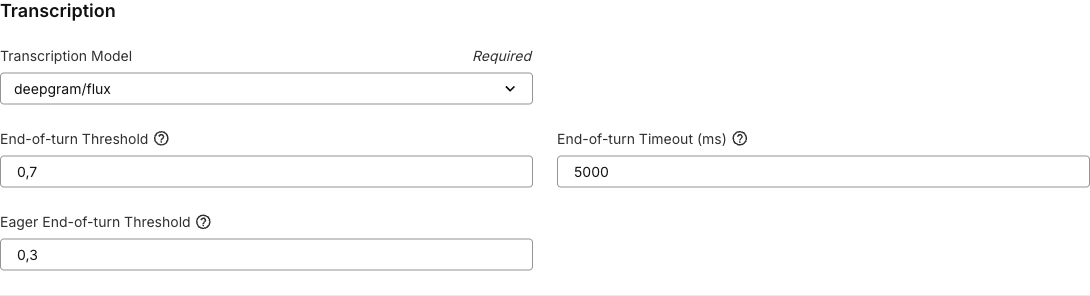 When you change models in the Portal, related settings are reset to the defaults for that provider. For example:
* `deepgram/flux` supports explicit languages, `auto`, and `multi` for its supported languages, and applies Flux end-of-turn defaults.
* Other Deepgram models enable `smart_format` and `numerals` by default.
* `assemblyai/universal-streaming` applies AssemblyAI turn detection defaults.
* `azure/fast` defaults the Azure region to `latency`, which auto-selects the closest supported Telnyx-managed region.
* `nvidia/parakeet-v3` uses automatic multilingual transcription.
### API
Set the `transcription.model` field when creating or updating an assistant:
```bash theme={null}
curl -X POST https://api.telnyx.com/v2/ai/assistants \
-H "Authorization: Bearer $TELNYX_API_KEY" \
-H "Content-Type: application/json" \
-d '{
"name": "My Assistant",
"model": "anthropic/claude-haiku-4-5",
"instructions": "You are a helpful voice assistant.",
"transcription": {
"model": "deepgram/flux"
}
}'
```
You can also set the transcription language explicitly. If omitted or set to `auto`, supported models auto-detect the language:
```json theme={null}
"transcription": {
"model": "deepgram/nova-3",
"language": "es"
}
```
***
## Languages
Supported language options depend on the selected model.
| Model | Language behavior |
| -------------------------------- | --------------------------------------------------------------------------------------------------------------------- |
| `deepgram/flux` | English, Spanish, French, German, Hindi, Russian, Portuguese, Japanese, Italian, Dutch, plus `auto` and `multi` modes |
| `deepgram/nova-3` | Auto-detect plus supported Deepgram Nova 3 language codes |
| `deepgram/nova-2` | Auto-detect plus supported Deepgram Nova 2 language codes |
| `azure/fast` | Explicit Azure locale codes, such as `en-US`, `es-MX`, or `fr-FR` |
| `assemblyai/universal-streaming` | `auto` for multilingual detection or `en` for English |
| `xai/grok-stt` | `auto` plus supported Grok STT language codes |
| `nvidia/parakeet-v3` | Automatic multilingual detection |
If your assistant has a language filter set elsewhere in the Voice tab, the Portal only shows transcription models and language choices that are compatible with that language.
***
## Deepgram settings
### Deepgram Flux end-of-turn detection
`deepgram/flux` is optimized for live voice agents. It provides end-of-turn detection so the assistant can start responding as soon as the caller finishes speaking. It also supports eager end-of-turn, which starts large language model (LLM) processing before the caller fully stops speaking to reduce perceived response latency.
When you select `deepgram/flux` in the Portal, these settings are applied by default:
| Field | Type | Range | Portal default | Description |
| --------------------- | ------- | --------- | -------------- | ---------------------------------------------------------------------------------------------------------------------------- |
| `eot_threshold` | number | 0.5-0.9 | 0.8 | Confidence required to trigger a final end of turn. Higher values require more confidence and may add latency. |
| `eot_timeout_ms` | integer | 500-10000 | 5000 | Maximum silence duration, in milliseconds, before forcing an end of turn. |
| `eager_eot_threshold` | number | 0.3-0.9 | 0.4 | Confidence required to start speculative LLM processing before final end-of-turn confirmation. Lower values trigger earlier. |
`eager_eot_threshold` must be less than or equal to `eot_threshold`. Setting both thresholds to the same value effectively disables eager end-of-turn behavior because the system waits for final end-of-turn confirmation before starting LLM processing.
The `eager_eot_threshold` field is controlled by the `FE-eager-eot-threshold` Portal feature flag. When that flag is disabled, the Portal hides the field, but API payloads can still include it if your account supports the setting.
When using Flux, the Portal may also prompt you to lower the assistant's start speaking plan timings. Flux works best with low start speaking delays, such as `0.1` seconds for wait time and endpointing plan thresholds.
### Keyterm Boost
`deepgram/flux` and `deepgram/nova-3` support `keyterm`, a comma-separated list of terms to boost during recognition. Use it for product names, customer names, acronyms, or domain-specific vocabulary.
Keyterm Boost also supports [dynamic variables](/docs/inference/ai-assistants/dynamic-variables). Use variables when boosted terms are caller-specific, such as a customer name, participant names, account name, or product names passed into the assistant at conversation start.
```json theme={null}
"transcription": {
"model": "deepgram/nova-3",
"settings": {
"keyterm": "Telnyx,VoIP,SIP,{{customer_name}},{{product_name}}"
}
}
```
### Smart Format and Numerals
For Deepgram models other than Flux, the Portal exposes these settings and enables both by default when you select the model:
| Field | Type | Default | Description |
| -------------- | ------- | ------- | ------------------------------------------------------------------------------------ |
| `smart_format` | boolean | `true` | Automatically formats transcripts for readability, including punctuation and casing. |
| `numerals` | boolean | `true` | Converts spoken numbers to digits, for example "five hundred" to "500". |
***
## AssemblyAI settings
`assemblyai/universal-streaming` supports configurable turn detection. When you select it in the Portal, these defaults are applied:
| Field | Type | Range | Portal default | Description |
| ---------------------------------- | ------- | -------- | -------------- | --------------------------------------------------------------------------------------------------------- |
| `end_of_turn_confidence_threshold` | number | 0-1 | 0.4 | Confidence required to trigger an end of turn. Higher values require more certainty before ending a turn. |
| `min_turn_silence` | integer | 100-5000 | 400 | Minimum silence duration, in milliseconds, before a turn can end. |
| `max_turn_silence` | integer | 100-5000 | 1280 | Maximum silence duration, in milliseconds, before forcing an end of turn. |
`min_turn_silence` must be less than or equal to `max_turn_silence`.
```json theme={null}
"transcription": {
"model": "assemblyai/universal-streaming",
"language": "auto",
"settings": {
"end_of_turn_confidence_threshold": 0.4,
"min_turn_silence": 400,
"max_turn_silence": 1280
}
}
```
***
## Parakeet settings
`nvidia/parakeet-v3` supports multilingual transcription with automatic language detection. It does not require provider-specific transcription settings.
```json theme={null}
"transcription": {
"model": "nvidia/parakeet-v3",
"language": "auto"
}
```
***
## Azure settings
`azure/fast` supports region selection and an optional Azure API key reference.
| Field | Type | Description |
| ------------- | ------ | ---------------------------------------------------------------------------------------------------------------------------------------- |
| `region` | string | Azure transcription region. The Portal defaults to `latency`, which auto-selects the closest supported Telnyx-managed region. |
| `api_key_ref` | string | Optional integration secret reference for your Azure API key. When provided, the Portal only shows regions that support custom API keys. |
Common Telnyx-managed regions include `latency`, `australiaeast`, `centralindia`, `eastus`, `northcentralus`, `westeurope`, and `westus2`. Additional Azure regions are available when using your own Azure API key.
```json theme={null}
"transcription": {
"model": "azure/fast",
"language": "en-US",
"region": "latency"
}
```
***
## Configure advanced settings via API
Create an assistant with tuned transcription settings:
```bash theme={null}
curl -X POST https://api.telnyx.com/v2/ai/assistants \
-H "Authorization: Bearer $TELNYX_API_KEY" \
-H "Content-Type: application/json" \
-d '{
"name": "Low Latency Assistant",
"model": "anthropic/claude-haiku-4-5",
"instructions": "You are a helpful voice assistant.",
"transcription": {
"model": "deepgram/flux",
"language": "en",
"settings": {
"eot_threshold": 0.8,
"eot_timeout_ms": 5000,
"eager_eot_threshold": 0.4,
"keyterm": "Telnyx,VoIP,SIP,{{customer_name}},{{product_name}}"
}
}
}'
```
***
## Related resources
* [Create an Assistant API Reference](/api-reference/assistants/create-an-assistant)
* [Voice Assistant quickstart](/docs/inference/ai-assistants/no-code-voice-assistant)
* [STT WebSocket Streaming](/docs/tts-stt/stt-websocket-streaming)
When you change models in the Portal, related settings are reset to the defaults for that provider. For example:
* `deepgram/flux` supports explicit languages, `auto`, and `multi` for its supported languages, and applies Flux end-of-turn defaults.
* Other Deepgram models enable `smart_format` and `numerals` by default.
* `assemblyai/universal-streaming` applies AssemblyAI turn detection defaults.
* `azure/fast` defaults the Azure region to `latency`, which auto-selects the closest supported Telnyx-managed region.
* `nvidia/parakeet-v3` uses automatic multilingual transcription.
### API
Set the `transcription.model` field when creating or updating an assistant:
```bash theme={null}
curl -X POST https://api.telnyx.com/v2/ai/assistants \
-H "Authorization: Bearer $TELNYX_API_KEY" \
-H "Content-Type: application/json" \
-d '{
"name": "My Assistant",
"model": "anthropic/claude-haiku-4-5",
"instructions": "You are a helpful voice assistant.",
"transcription": {
"model": "deepgram/flux"
}
}'
```
You can also set the transcription language explicitly. If omitted or set to `auto`, supported models auto-detect the language:
```json theme={null}
"transcription": {
"model": "deepgram/nova-3",
"language": "es"
}
```
***
## Languages
Supported language options depend on the selected model.
| Model | Language behavior |
| -------------------------------- | --------------------------------------------------------------------------------------------------------------------- |
| `deepgram/flux` | English, Spanish, French, German, Hindi, Russian, Portuguese, Japanese, Italian, Dutch, plus `auto` and `multi` modes |
| `deepgram/nova-3` | Auto-detect plus supported Deepgram Nova 3 language codes |
| `deepgram/nova-2` | Auto-detect plus supported Deepgram Nova 2 language codes |
| `azure/fast` | Explicit Azure locale codes, such as `en-US`, `es-MX`, or `fr-FR` |
| `assemblyai/universal-streaming` | `auto` for multilingual detection or `en` for English |
| `xai/grok-stt` | `auto` plus supported Grok STT language codes |
| `nvidia/parakeet-v3` | Automatic multilingual detection |
If your assistant has a language filter set elsewhere in the Voice tab, the Portal only shows transcription models and language choices that are compatible with that language.
***
## Deepgram settings
### Deepgram Flux end-of-turn detection
`deepgram/flux` is optimized for live voice agents. It provides end-of-turn detection so the assistant can start responding as soon as the caller finishes speaking. It also supports eager end-of-turn, which starts large language model (LLM) processing before the caller fully stops speaking to reduce perceived response latency.
When you select `deepgram/flux` in the Portal, these settings are applied by default:
| Field | Type | Range | Portal default | Description |
| --------------------- | ------- | --------- | -------------- | ---------------------------------------------------------------------------------------------------------------------------- |
| `eot_threshold` | number | 0.5-0.9 | 0.8 | Confidence required to trigger a final end of turn. Higher values require more confidence and may add latency. |
| `eot_timeout_ms` | integer | 500-10000 | 5000 | Maximum silence duration, in milliseconds, before forcing an end of turn. |
| `eager_eot_threshold` | number | 0.3-0.9 | 0.4 | Confidence required to start speculative LLM processing before final end-of-turn confirmation. Lower values trigger earlier. |
`eager_eot_threshold` must be less than or equal to `eot_threshold`. Setting both thresholds to the same value effectively disables eager end-of-turn behavior because the system waits for final end-of-turn confirmation before starting LLM processing.
The `eager_eot_threshold` field is controlled by the `FE-eager-eot-threshold` Portal feature flag. When that flag is disabled, the Portal hides the field, but API payloads can still include it if your account supports the setting.
When using Flux, the Portal may also prompt you to lower the assistant's start speaking plan timings. Flux works best with low start speaking delays, such as `0.1` seconds for wait time and endpointing plan thresholds.
### Keyterm Boost
`deepgram/flux` and `deepgram/nova-3` support `keyterm`, a comma-separated list of terms to boost during recognition. Use it for product names, customer names, acronyms, or domain-specific vocabulary.
Keyterm Boost also supports [dynamic variables](/docs/inference/ai-assistants/dynamic-variables). Use variables when boosted terms are caller-specific, such as a customer name, participant names, account name, or product names passed into the assistant at conversation start.
```json theme={null}
"transcription": {
"model": "deepgram/nova-3",
"settings": {
"keyterm": "Telnyx,VoIP,SIP,{{customer_name}},{{product_name}}"
}
}
```
### Smart Format and Numerals
For Deepgram models other than Flux, the Portal exposes these settings and enables both by default when you select the model:
| Field | Type | Default | Description |
| -------------- | ------- | ------- | ------------------------------------------------------------------------------------ |
| `smart_format` | boolean | `true` | Automatically formats transcripts for readability, including punctuation and casing. |
| `numerals` | boolean | `true` | Converts spoken numbers to digits, for example "five hundred" to "500". |
***
## AssemblyAI settings
`assemblyai/universal-streaming` supports configurable turn detection. When you select it in the Portal, these defaults are applied:
| Field | Type | Range | Portal default | Description |
| ---------------------------------- | ------- | -------- | -------------- | --------------------------------------------------------------------------------------------------------- |
| `end_of_turn_confidence_threshold` | number | 0-1 | 0.4 | Confidence required to trigger an end of turn. Higher values require more certainty before ending a turn. |
| `min_turn_silence` | integer | 100-5000 | 400 | Minimum silence duration, in milliseconds, before a turn can end. |
| `max_turn_silence` | integer | 100-5000 | 1280 | Maximum silence duration, in milliseconds, before forcing an end of turn. |
`min_turn_silence` must be less than or equal to `max_turn_silence`.
```json theme={null}
"transcription": {
"model": "assemblyai/universal-streaming",
"language": "auto",
"settings": {
"end_of_turn_confidence_threshold": 0.4,
"min_turn_silence": 400,
"max_turn_silence": 1280
}
}
```
***
## Parakeet settings
`nvidia/parakeet-v3` supports multilingual transcription with automatic language detection. It does not require provider-specific transcription settings.
```json theme={null}
"transcription": {
"model": "nvidia/parakeet-v3",
"language": "auto"
}
```
***
## Azure settings
`azure/fast` supports region selection and an optional Azure API key reference.
| Field | Type | Description |
| ------------- | ------ | ---------------------------------------------------------------------------------------------------------------------------------------- |
| `region` | string | Azure transcription region. The Portal defaults to `latency`, which auto-selects the closest supported Telnyx-managed region. |
| `api_key_ref` | string | Optional integration secret reference for your Azure API key. When provided, the Portal only shows regions that support custom API keys. |
Common Telnyx-managed regions include `latency`, `australiaeast`, `centralindia`, `eastus`, `northcentralus`, `westeurope`, and `westus2`. Additional Azure regions are available when using your own Azure API key.
```json theme={null}
"transcription": {
"model": "azure/fast",
"language": "en-US",
"region": "latency"
}
```
***
## Configure advanced settings via API
Create an assistant with tuned transcription settings:
```bash theme={null}
curl -X POST https://api.telnyx.com/v2/ai/assistants \
-H "Authorization: Bearer $TELNYX_API_KEY" \
-H "Content-Type: application/json" \
-d '{
"name": "Low Latency Assistant",
"model": "anthropic/claude-haiku-4-5",
"instructions": "You are a helpful voice assistant.",
"transcription": {
"model": "deepgram/flux",
"language": "en",
"settings": {
"eot_threshold": 0.8,
"eot_timeout_ms": 5000,
"eager_eot_threshold": 0.4,
"keyterm": "Telnyx,VoIP,SIP,{{customer_name}},{{product_name}}"
}
}
}'
```
***
## Related resources
* [Create an Assistant API Reference](/api-reference/assistants/create-an-assistant)
* [Voice Assistant quickstart](/docs/inference/ai-assistants/no-code-voice-assistant)
* [STT WebSocket Streaming](/docs/tts-stt/stt-websocket-streaming)