> ## Documentation Index
> Fetch the complete documentation index at: https://developers.telnyx.com/llms.txt
> Use this file to discover all available pages before exploring further.
# Webhook Tool Filler Messages
> Eliminate dead air during synchronous webhook tool calls by configuring scripted filler phrases that play at timed intervals while your backend processes requests.
Filler messages let your AI assistant speak scripted phrases while synchronous webhook tools execute. Instead of silence during a database lookup or API call, callers hear natural phrases like "Let me look that up for you" at configurable intervals.
In this guide, you will learn:
* How filler messages work and when to use them
* How to configure message types and timing
* How to set them up via the API and Mission Control Portal
## Video tutorial
***
## Overview
When an AI assistant calls a synchronous webhook tool, it waits for the response before speaking again. If your backend takes several seconds to respond, the caller hears silence — creating an awkward experience.
Filler messages solve this by playing scripted phrases at the start of the request and at timed intervals while the assistant waits. Messages are **scripted per tool, not generated by the LLM** — you control the exact wording, timing, and brand voice.
Filler messages work with **synchronous webhook tools** and **MCP tool calls** only. Async webhooks return immediately and don't produce dead air. If your backend consistently takes more than a few seconds, consider [async tools](/docs/inference/ai-assistants/async-tools) as an alternative.
***
## Filler message types
There are two types of filler messages, each triggered at a different point during the webhook call.
| Type | When it plays | `timing_ms` required |
| -------------------------- | -------------------------------------------------- | -------------------- |
| `request_start` | Immediately when the webhook call begins | No |
| `request_response_delayed` | After a specified delay if no response has arrived | Yes (100–120,000 ms) |
You can configure multiple `request_response_delayed` messages at different delay thresholds to keep the caller engaged during longer operations.
***
## Configuration
### API schema
Add a `filler_messages` array to your webhook tool configuration:
```json theme={null}
{
"type": "webhook",
"webhook": {
"name": "check_billing",
"description": "Look up the customer's current billing information.",
"url": "https://your-backend.com/billing",
"method": "POST",
"filler_messages": [
{
"type": "request_start",
"content": "Let me look that up for you."
},
{
"type": "request_response_delayed",
"content": "Still working on this.",
"timing_ms": 5000
},
{
"type": "request_response_delayed",
"content": "Almost there, just a moment.",
"timing_ms": 15000
}
],
"body_parameters": {
"type": "object",
"properties": {
"account_id": {
"type": "string",
"description": "The customer's account ID"
}
},
"required": ["account_id"]
}
}
}
```
### Key fields
| Field | Description |
| ----------------- | ---------------------------------------------------------------------------------------------------------- |
| `filler_messages` | Array of filler message objects on a webhook tool |
| `type` | `request_start` or `request_response_delayed` |
| `content` | The text the assistant speaks to the caller |
| `timing_ms` | Delay in milliseconds before speaking (100–120,000). Required for `request_response_delayed` messages only |
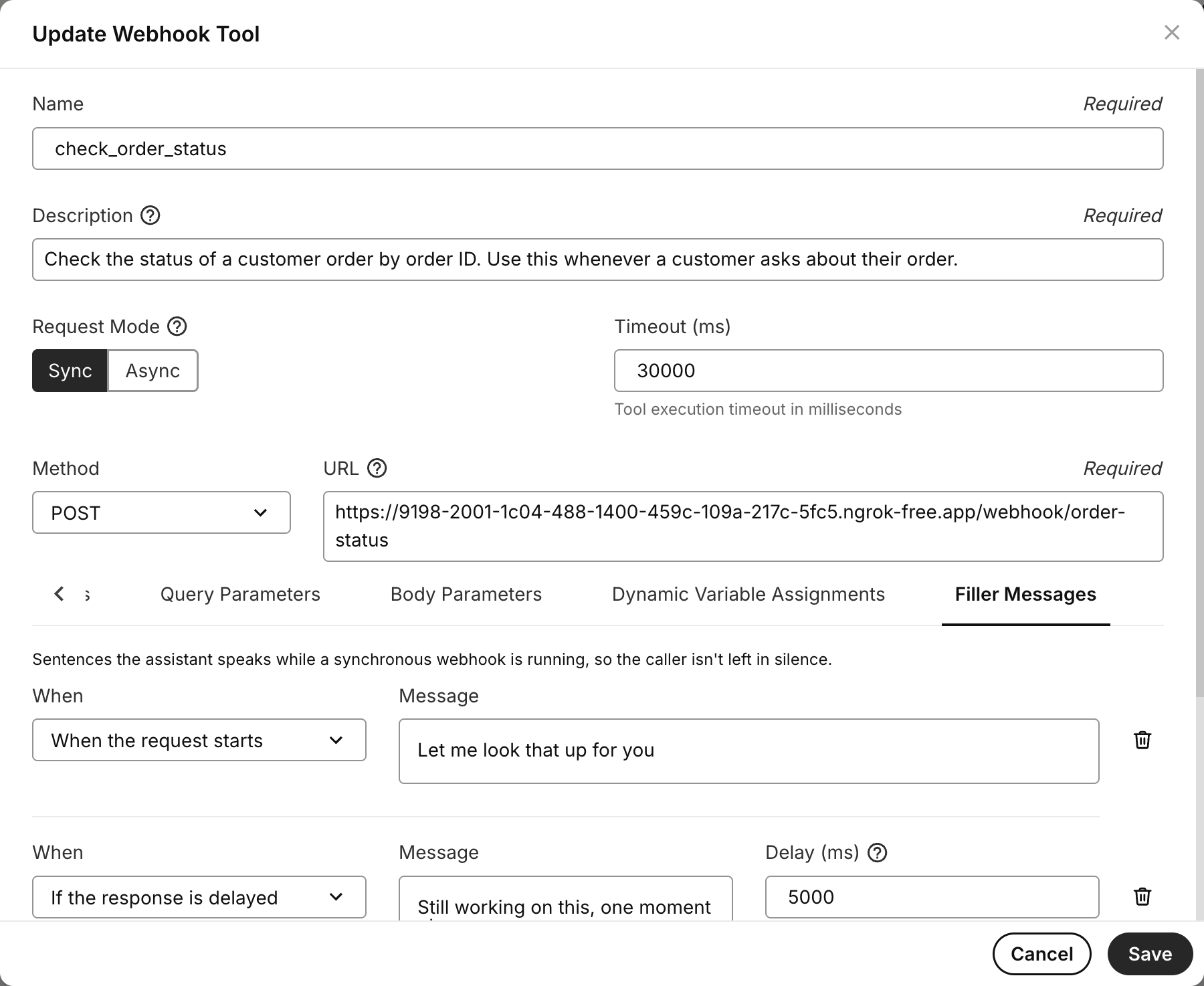
### Mission Control Portal
You can also configure filler messages through the Portal:
1. Navigate to **AI > Assistants**
2. Select your assistant and edit a webhook tool
3. Set the tool to **Sync** mode
4. Open the **Filler Messages** tab
5. Add your messages and timing thresholds
***
## Example: tiered filler messages
This example shows a billing lookup tool with three filler messages that escalate in reassurance as the wait grows:
```json theme={null}
{
"filler_messages": [
{
"type": "request_start",
"content": "Let me pull up your billing details."
},
{
"type": "request_response_delayed",
"content": "I'm still looking into that for you.",
"timing_ms": 5000
},
{
"type": "request_response_delayed",
"content": "Just a bit longer, I want to make sure I have the latest information.",
"timing_ms": 10000
}
]
}
```
**What the caller hears:**
```
Caller: "What's my current balance?"
Agent: "Let me pull up your billing details."
[5 seconds pass]
"I'm still looking into that for you."
[5 more seconds pass]
"Just a bit longer, I want to make sure I have the latest information."
[Backend responds]
"Your current balance is $142.50, due on August 1st."
```
***
## Use cases
* **Customer support**: Query billing or CRM systems mid-call without silence
* **AI receptionists**: Book appointments via webhook while keeping the caller engaged
* **Voice agents calling external LLMs**: Fill silence while a third-party LLM or RAG pipeline processes a request
* **Appointment scheduling**: Check availability across calendar systems with natural wait phrases
***
## Filler messages vs. async tools
Both features address the same problem — slow backend responses — but take different approaches.
| | Filler messages | [Async tools](/docs/inference/ai-assistants/async-tools) |
| --------------------- | --------------------------------------------------------- | ------------------------------------------------------------ |
| **Approach** | Keep the sync webhook, fill silence with scripted phrases | Make the webhook async, continue the conversation freely |
| **Best for** | Backends that respond in under \~30 seconds | Backends that take 30+ seconds or have unpredictable latency |
| **Caller experience** | Hears reassuring phrases at timed intervals | Assistant continues a natural conversation |
| **Response handling** | Assistant receives the webhook response directly | Backend injects results via the Add Messages API |
| **Configuration** | Add `filler_messages` to the tool | Set `async: true` and build an Add Messages callback |
Use filler messages when your backend is reasonably fast and you want simple, predictable caller reassurance. Use async tools when backends are slow or you want the assistant to have a free-flowing conversation while waiting.
***
## Related resources
* **[Create Assistant API Reference](https://developers.telnyx.com/api-reference/assistants/create-an-assistant)** - Full webhook tool configuration options including `filler_messages`
* **[Async Tools & Deferred Context](/docs/inference/ai-assistants/async-tools)** - Alternative approach for long-running backend operations
* **[Webhooks & Workflows](/docs/inference/ai-assistants/workflows)** - General webhook tool configuration
 ***
## Example: tiered filler messages
This example shows a billing lookup tool with three filler messages that escalate in reassurance as the wait grows:
```json theme={null}
{
"filler_messages": [
{
"type": "request_start",
"content": "Let me pull up your billing details."
},
{
"type": "request_response_delayed",
"content": "I'm still looking into that for you.",
"timing_ms": 5000
},
{
"type": "request_response_delayed",
"content": "Just a bit longer, I want to make sure I have the latest information.",
"timing_ms": 10000
}
]
}
```
**What the caller hears:**
```
Caller: "What's my current balance?"
Agent: "Let me pull up your billing details."
[5 seconds pass]
"I'm still looking into that for you."
[5 more seconds pass]
"Just a bit longer, I want to make sure I have the latest information."
[Backend responds]
"Your current balance is $142.50, due on August 1st."
```
***
## Use cases
* **Customer support**: Query billing or CRM systems mid-call without silence
* **AI receptionists**: Book appointments via webhook while keeping the caller engaged
* **Voice agents calling external LLMs**: Fill silence while a third-party LLM or RAG pipeline processes a request
* **Appointment scheduling**: Check availability across calendar systems with natural wait phrases
***
## Filler messages vs. async tools
Both features address the same problem — slow backend responses — but take different approaches.
| | Filler messages | [Async tools](/docs/inference/ai-assistants/async-tools) |
| --------------------- | --------------------------------------------------------- | ------------------------------------------------------------ |
| **Approach** | Keep the sync webhook, fill silence with scripted phrases | Make the webhook async, continue the conversation freely |
| **Best for** | Backends that respond in under \~30 seconds | Backends that take 30+ seconds or have unpredictable latency |
| **Caller experience** | Hears reassuring phrases at timed intervals | Assistant continues a natural conversation |
| **Response handling** | Assistant receives the webhook response directly | Backend injects results via the Add Messages API |
| **Configuration** | Add `filler_messages` to the tool | Set `async: true` and build an Add Messages callback |
Use filler messages when your backend is reasonably fast and you want simple, predictable caller reassurance. Use async tools when backends are slow or you want the assistant to have a free-flowing conversation while waiting.
***
## Related resources
* **[Create Assistant API Reference](https://developers.telnyx.com/api-reference/assistants/create-an-assistant)** - Full webhook tool configuration options including `filler_messages`
* **[Async Tools & Deferred Context](/docs/inference/ai-assistants/async-tools)** - Alternative approach for long-running backend operations
* **[Webhooks & Workflows](/docs/inference/ai-assistants/workflows)** - General webhook tool configuration
***
## Example: tiered filler messages
This example shows a billing lookup tool with three filler messages that escalate in reassurance as the wait grows:
```json theme={null}
{
"filler_messages": [
{
"type": "request_start",
"content": "Let me pull up your billing details."
},
{
"type": "request_response_delayed",
"content": "I'm still looking into that for you.",
"timing_ms": 5000
},
{
"type": "request_response_delayed",
"content": "Just a bit longer, I want to make sure I have the latest information.",
"timing_ms": 10000
}
]
}
```
**What the caller hears:**
```
Caller: "What's my current balance?"
Agent: "Let me pull up your billing details."
[5 seconds pass]
"I'm still looking into that for you."
[5 more seconds pass]
"Just a bit longer, I want to make sure I have the latest information."
[Backend responds]
"Your current balance is $142.50, due on August 1st."
```
***
## Use cases
* **Customer support**: Query billing or CRM systems mid-call without silence
* **AI receptionists**: Book appointments via webhook while keeping the caller engaged
* **Voice agents calling external LLMs**: Fill silence while a third-party LLM or RAG pipeline processes a request
* **Appointment scheduling**: Check availability across calendar systems with natural wait phrases
***
## Filler messages vs. async tools
Both features address the same problem — slow backend responses — but take different approaches.
| | Filler messages | [Async tools](/docs/inference/ai-assistants/async-tools) |
| --------------------- | --------------------------------------------------------- | ------------------------------------------------------------ |
| **Approach** | Keep the sync webhook, fill silence with scripted phrases | Make the webhook async, continue the conversation freely |
| **Best for** | Backends that respond in under \~30 seconds | Backends that take 30+ seconds or have unpredictable latency |
| **Caller experience** | Hears reassuring phrases at timed intervals | Assistant continues a natural conversation |
| **Response handling** | Assistant receives the webhook response directly | Backend injects results via the Add Messages API |
| **Configuration** | Add `filler_messages` to the tool | Set `async: true` and build an Add Messages callback |
Use filler messages when your backend is reasonably fast and you want simple, predictable caller reassurance. Use async tools when backends are slow or you want the assistant to have a free-flowing conversation while waiting.
***
## Related resources
* **[Create Assistant API Reference](https://developers.telnyx.com/api-reference/assistants/create-an-assistant)** - Full webhook tool configuration options including `filler_messages`
* **[Async Tools & Deferred Context](/docs/inference/ai-assistants/async-tools)** - Alternative approach for long-running backend operations
* **[Webhooks & Workflows](/docs/inference/ai-assistants/workflows)** - General webhook tool configuration