> ## Documentation Index
> Fetch the complete documentation index at: https://developers.telnyx.com/llms.txt
> Use this file to discover all available pages before exploring further.
# Object Storage llms-full.txt
> Complete machine-readable documentation content for Object Storage (Storage) for AI agents and LLMs
# Telnyx Storage: Object Storage — Full Documentation
> Complete page content for Object Storage (Storage section) of the Telnyx developer docs ([https://developers.telnyx.com](https://developers.telnyx.com)).
> This file: [https://developers.telnyx.com/docs/development/llms/storage-object-storage-llms-full-txt.md](https://developers.telnyx.com/docs/development/llms/storage-object-storage-llms-full-txt.md) · Root index: [https://developers.telnyx.com/llms.txt](https://developers.telnyx.com/llms.txt)
## Overview
### Overview
> Source: [https://developers.telnyx.com/docs/cloud-storage/overview.md](https://developers.telnyx.com/docs/cloud-storage/overview.md)
S3-compatible object storage for files, media, backups, and static assets — reached over the AWS S3 API you already know, or directly from inside a Telnyx Edge Function.
With Telnyx Cloud Storage, you can:
* **Use your existing S3 tooling** — the AWS SDKs, AWS CLI, and third-party S3 clients work unchanged; authenticate with your Telnyx API key
* **Store data in the US, EU, AP, or CA** — buckets in `us-central-1`, `us-east-1`, `us-west-1`, `eu-central-1`, `ap-southeast-1`, and `ca-central-1`
* **Reach buckets from Edge Compute** — bind a bucket to a function and read or write objects with no S3 keys in your code
* **Control access and lifecycle** — presigned URLs, public buckets, object lock and retention, SSE-C encryption, and lifecycle rules
* **Pay for what you use** — a monthly free tier plus simple usage-based pricing
Create a bucket, generate S3 credentials, and upload your first object
Bind a bucket and read or write objects with no S3 keys in your code
Copy-paste examples for Node, Python, Java, Go, Ruby, PHP, .NET, and Elixir
Regional endpoints and how requests are routed
***
## Ways to access
From inside a Telnyx Edge Function — pre-authenticated, no S3 keys
Node, Python, Java, Go, Ruby, PHP, .NET, or Elixir
Scripting and one-off operations from a terminal
Move data at scale without code
## Learn the essentials
Some behavior differs from AWS S3 — review these before going to production:
* [Compatibility matrix](/docs/cloud-storage/supported) — which S3 operations are supported, by region
* [Authentication](/docs/cloud-storage/authentication) — your Telnyx API key as the S3 credential
* [Presigned URLs](/docs/cloud-storage/presigned-urls) — the Telnyx-specific way to generate them safely
* [Billing](/docs/cloud-storage/billing) — storage and request pricing
***
## Get Started
### Quick Start Guide
> Source: [https://developers.telnyx.com/docs/cloud-storage/quick-start.md](https://developers.telnyx.com/docs/cloud-storage/quick-start.md)
There are five ways to get started on Telnyx cloud storage:
1. [Cloud Storage binding](/docs/cloud-storage/bindings) — from inside a Telnyx Edge Function
2. [AWS SDK](#use-the-aws-sdk)
3. [AWS CLI](#use-the-aws-cli)
4. [S3-compatible third-party tools](#use-s3-compatible-third-party-tools)
5. [Telnyx Mission Control Portal](#use-the-telnyx-mission-control-portal)
## Available Regions
| Region | Endpoint |
| -------------- | ------------------------------------- |
| us-central-1 | us-central-1.telnyxcloudstorage.com |
| us-east-1 | us-east-1.telnyxcloudstorage.com |
| us-west-1 | us-west-1.telnyxcloudstorage.com |
| eu-central-1 | eu-central-1.telnyxcloudstorage.com |
| ap-southeast-1 | ap-southeast-1.telnyxcloudstorage.com |
| ca-central-1 | ca-central-1.telnyxcloudstorage.com |
Specify the region via the `--endpoint-url` flag in the AWS CLI or the equivalent SDK configuration. See [API Endpoints & Organization](/docs/cloud-storage/api-endpoints) for details on regional behavior.
Some features are currently available only in US, APAC, and CA regions, including presigned URLs, public buckets, and SSL certificates. EU buckets do not support these features. See the [compatibility matrix](/docs/cloud-storage/supported) for full details.
## Use a Cloud Storage binding
Bind an existing bucket to a [Telnyx Edge Function](/docs/edge-compute/overview) and read, write, and list objects through a pre-authenticated `env` binding — the runtime injects the credential, so your code holds no S3 keys. This is the fastest path if your code already runs on Telnyx Edge Compute.
See [Use a bucket from an Edge Function](/docs/cloud-storage/bindings) to declare the binding and call `env.MY_BUCKET.get/put/head/delete/list`.
## Use the AWS SDK
Telnyx Cloud Storage is S3-compatible, so the AWS SDKs work against it. See the ready-to-run examples for [Node](/docs/cloud-storage/sdk/node), [Python](/docs/cloud-storage/sdk/python), [Java](/docs/cloud-storage/sdk/java), [Go](/docs/cloud-storage/sdk/golang), [Ruby](/docs/cloud-storage/sdk/ruby), [PHP](/docs/cloud-storage/sdk/php), [.NET](/docs/cloud-storage/sdk/dotnet), and [Elixir](/docs/cloud-storage/sdk/elixir).
## Use the AWS CLI
Follow the procedure [here](https://docs.aws.amazon.com/cli/latest/userguide/getting-started-install.html).
Use a recent AWS CLI v2. The Cloud Storage endpoint accepts the AWS CLI's default checksums (CRC64NVME) on both `put-object` and `aws s3 cp` multipart uploads.
* Inject your Telnyx [API key](https://portal.telnyx.com/#/api-keys) twice, once as access key and once as secret key.
* Leave the region as blank; regionality is specified via `--endpoint-url` as shown subsequently.
```json theme={null}
user@localhost ~ % aws configure --profile mytelnyxprofile
AWS Access Key ID [None]: XXX
AWS Secret Access Key [None]: XXX
Default region name [None]:
Default output format [None]: json
```
Validate the profile has been created successfully.
```json theme={null}
user@localhost ~ % aws configure list-profiles
mytelnyxprofile
```
Perform the following validation procedure to ensure everything is working as expected.
**Create 2 buckets**
Bucket names must be universally unique. Hence, `BucketAlreadyExists` error is expected on first attempt.
```json theme={null}
user@localhost ~ % aws s3api create-bucket --bucket demo-bucket --profile mytelnyxprofile --endpoint-url https://us-east-1.telnyxcloudstorage.com
An error occurred (BucketAlreadyExists) when calling the CreateBucket operation: Unknown
user@localhost ~ % aws s3api create-bucket --bucket demo-bucket-n1 --profile mytelnyxprofile --endpoint-url https://us-east-1.telnyxcloudstorage.com
user@localhost ~ % aws s3api create-bucket --bucket demo-bucket-n2 --profile mytelnyxprofile --endpoint-url https://us-east-1.telnyxcloudstorage.com
```
**List buckets**
Verify the buckets were created successfully.
```json theme={null}
user@localhost ~ % aws s3api list-buckets --profile mytelnyxprofile --endpoint-url https://us-east-1.telnyxcloudstorage.com
{
"Buckets": [
{
"Name": "demo-bucket-n1",
"CreationDate": "2024-07-26T17:31:14.888000+00:00"
},
{
"Name": "demo-bucket-n2",
"CreationDate": "2024-07-26T17:31:25.225000+00:00"
}
],
"Owner": {
"DisplayName": "XXX",
"ID": "XXX"
}
}
```
**Add objects to a bucket**
Upload some random objects.
```json theme={null}
user@localhost ~ % aws s3api put-object --key demo-obj-101 --body ~/Downloads/IMG_1752.mov --bucket demo-bucket-n1 --profile mytelnyxprofile --endpoint-url https://us-east-1.telnyxcloudstorage.com
{
"ETag": "\"bc864c2bc4549d72abadb0a5d44ee788\""
}
user@localhost ~ % aws s3api put-object --key demo-obj-202 --body ~/Downloads/IMG_1753.mov --bucket demo-bucket-n1 --profile mytelnyxprofile --endpoint-url https://us-east-1.telnyxcloudstorage.com
{
"ETag": "\"bc864c2bc4549d72babdb0a5d44ee988\""
}
```
**List objects**
Verify the objects were uploaded successfully.
```json theme={null}
user@localhost ~ % aws s3api list-objects-v2 --bucket demo-bucket-n1 --profile mytelnyxprofile --endpoint-url https://us-east-1.telnyxcloudstorage.com
{
"Contents": [
{
"Key": "demo-obj-101",
"LastModified": "2024-07-26T17:34:52.428000+00:00",
"ETag": "\"bc864c2bc4549d72abadb0a5d44ee788\"",
"Size": 136994934,
"StorageClass": "STANDARD"
},
{
"Key": "demo-obj-202",
"LastModified": "2024-07-26T17:36:31.799000+00:00",
"ETag": "\"bc864c2bc4549d72babdb0a5d44ee988\"",
"Size": 136994934,
"StorageClass": "STANDARD"
}
],
"RequestCharged": null
}
```
## Use S3-compatible third-party tools
Many excellent tools exist to upload data at scale without any code. You can find the configuration guides [here](https://support.telnyx.com/en/collections/3840515-telnyx-storage).
## Use the Telnyx Mission Control Portal
Follow [this support article](https://support.telnyx.com/en/articles/8344129-get-started-with-telnyx-storage-inference-guide).
The Mission Control Portal is not the right tool to:
Use the `aws s3 cp` CLI command or [multipart upload API](/docs/cloud-storage/multipart-upload) for more concurrency, better reliability, and bigger throughput.
Use one of the S3 compatible [third party tools](https://support.telnyx.com/en/collections/3840515-telnyx-storage) when moving large object counts.
## Read these documentations
Some key differences exist between Telnyx cloud storage and AWS S3. It's advisable that they are reviewed and comprehended prior to Telnyx cloud storage is put into production.
* Understand [API endpoints & organizations](/docs/cloud-storage/api-endpoints)
* Review [supported API methods](/docs/cloud-storage/supported)
* Heed the [warning on presigned URL](/docs/cloud-storage/presigned-urls)
* Pay attention to [billing](/docs/cloud-storage/billing)
* Know the [restrictions on policy and ACL](/docs/cloud-storage/public-buckets)
## Additional Resources
* All available [AWS S3 CLI Commands](https://awscli.amazonaws.com/v2/documentation/api/latest/reference/s3api/index.html)
***
## Concepts
### API Endpoints & Organization
> Source: [https://developers.telnyx.com/docs/cloud-storage/api-endpoints.md](https://developers.telnyx.com/docs/cloud-storage/api-endpoints.md)
There exists two suites of Storage APIs:
* S3 compatible, and
* JSON companion
## S3 Compatible APIs
This suite of APIs is compatible with AWS S3; as a result, minimal changes to existing integration are needed for migration to Telnyx.
Endpoint URL
Region
us-central-1.telnyxcloudstorage.com
us-central-1
us-east-1.telnyxcloudstorage.com
us-east-1
us-west-1.telnyxcloudstorage.com
us-west-1
eu-central-1.telnyxcloudstorage.com
eu-central-1
ap-southeast-1.telnyxcloudstorage.com
ap-southeast-1
ca-central-1.telnyxcloudstorage.com
ca-central-1
`ListBuckets` and `GetBucketLocation` are global: any regional endpoint returns every bucket in your account regardless of the region it is homed in. However, all other API methods need to be directed at the regional endpoint that the bucket is homed. Otherwise an error will be returned. Hence, it is advisable to query the location of the bucket first before forming the correct regional endpoint for all subsequent API operations.
Supported S3 APIs are documented in [this table](/docs/cloud-storage/supported).
## JSON Companion API
This suite of APIs is an extension to the S3 API, accommodating the following functionalities:
* [Querying usage](/docs/cloud-storage/billing)
* [Create presigned URL](/docs/cloud-storage/presigned-urls)
* [Manage SSL](/docs/cloud-storage/ssl-certificates)
* [Migrating data from AWS S3](/docs/cloud-storage/migrating-from-aws)
API endpoint to be used is `api.telnyx.com`.
***
### Authentication
> Source: [https://developers.telnyx.com/docs/cloud-storage/authentication.md](https://developers.telnyx.com/docs/cloud-storage/authentication.md)
API requests are authenticated with [API Keys](https://portal.telnyx.com/#/api-keys).
Telnyx Storage requires passing an AWS Signature Version 4 authorization header in the API request. Telnyx Storage also requires that the Telnyx API key is substituted into the authorization header as the `access-key-id`. When an API request is made, Telnyx will parse the API key from the header, validate it, and then authorize the request.
The remaining components of the authorization header (`date`, `aws-region`, `aws-service`, `secret-key`) are irrelevant to us. These values, as well as the generated signature from the secret key are all ignored. They only remain in the authorization header to maintain S3 compatibility. As long as you are passing an AWS Signature Version 4 authorization header, and the Telnyx API key is substituted into the header as the `access-key-id`, the request can be authenticated.
An example is shown below, where `{{your_telnyx_api_key_here}}` is where you will substitute in your Telnyx API Key:
```bash theme={null}
Authorization: AWS4-HMAC-SHA256
Credential={{your_telnyx_api_key_here}}/20221129/us-east-1/s3/aws4_request,
SignedHeaders=host;range;x-amz-date,
Signature=d82d11938fe5edf39a778ec710ac79899bae1d9a46ae36607be30fb55f655a3c
```
After pasting the above content, remove any new line added.
## AWS CLI and S3 third party applications
A general rule of thumb when trying to use Telnyx Storage with a third party application is:
* `Access Key` → substitute in the Telnyx API token
* `Secret Access Key` → either leave blank, or type something random in as a placeholder, or duplicate Telnyx API tokens
***
### Bucket Addressing
> Source: [https://developers.telnyx.com/docs/cloud-storage/bucket-addressing.md](https://developers.telnyx.com/docs/cloud-storage/bucket-addressing.md)
## Path-style requests
`https://[region].telnyxcloudstorage.com/[bucketname]/[objectname]`
## Virtual-hosted-style requests
`https://[bucketname].[region].telnyxcloudstorage.com/[objectname]`
***
## Access via S3 API
### Node.js
> Source: [https://developers.telnyx.com/docs/cloud-storage/sdk/node.md](https://developers.telnyx.com/docs/cloud-storage/sdk/node.md)
Recent AWS SDK v3 versions work against Cloud Storage with default checksum settings. If you hit a checksum error on an older v3 release, set all checksum calculation and validation options to `WHEN_REQUIRED` (as shown in the client config below).
The following example shows how the AWS Node.js SDK can be used to interact with Telnyx Cloud Storage.
```javascript theme={null}
const { S3Client, CreateBucketCommand, PutObjectCommand, ListObjectsCommand, GetObjectCommand } = require("@aws-sdk/client-s3");
const axios = require("axios");
const { v4: uuidv4 } = require("uuid");
const telnyxApiKey = process.env.TELNYX_API_KEY;
if (!telnyxApiKey) {
console.error("TELNYX_API_KEY environment variable not set");
process.exit(1);
}
const endpointUrl = "https://us-central-1.telnyxcloudstorage.com";
// 1. Initialize the AWS S3 client with specific options
const s3Client = new S3Client({
endpoint: endpointUrl,
region: "us-central-1",
credentials: {
accessKeyId: telnyxApiKey,
secretAccessKey: telnyxApiKey
},
forcePathStyle: true,
requestChecksumCalculation: 'WHEN_REQUIRED',
requestChecksumValidation: 'WHEN_REQUIRED',
responseChecksumCalculation: 'WHEN_REQUIRED',
responseChecksumValidation: 'WHEN_REQUIRED'
});
(async () => {
// 2. Create a bucket
const bucketName = `my-test-bucket-${uuidv4()}`;
await s3Client.send(new CreateBucketCommand({ Bucket: bucketName }));
// 3. Upload two objects with random data
for (let i = 0; i < 2; i++) {
const name = `my-test-object-${i}`;
const body = `Telnyx Cloud Storage ${i}`;
await s3Client.send(new PutObjectCommand({ Bucket: bucketName, Key: name, Body: body }));
}
// 4. List objects in the bucket
const listResult = await s3Client.send(new ListObjectsCommand({ Bucket: bucketName }));
(listResult.Contents || []).forEach(obj => {
console.log(obj.Key);
});
// 5. Download the first object
const getResult = await s3Client.send(new GetObjectCommand({ Bucket: bucketName, Key: "my-test-object-0" }));
const streamToString = (stream) => new Promise((resolve, reject) => {
const chunks = [];
stream.on("data", (chunk) => chunks.push(chunk));
stream.on("error", reject);
stream.on("end", () => resolve(Buffer.concat(chunks).toString("utf-8")));
});
console.log(await streamToString(getResult.Body));
// 6. Create a presigned URL for the first file
const presignResponse = await axios.post(
`https://api.telnyx.com/v2/storage/buckets/${bucketName}/my-test-object-0/presigned_url`,
{ ttl: 30 },
{ headers: { Authorization: `Bearer ${telnyxApiKey}` } }
);
console.log(presignResponse.data);
// 7. Download the file using the presigned URL
const fileResponse = await axios.get(presignResponse.data.data.presigned_url);
console.log(fileResponse.data);
})();
```
***
### Python
> Source: [https://developers.telnyx.com/docs/cloud-storage/sdk/python.md](https://developers.telnyx.com/docs/cloud-storage/sdk/python.md)
Recent boto3 versions (1.36+) work against Cloud Storage with default checksum settings. If you hit a checksum error, disable checksum calculation and verification with the `Config` shown below.
The following example shows how AWS Python SDK can be used to interact with Telnyx Cloud Storage.
```python theme={null}
import requests
import uuid
import os
from botocore.config import Config
import boto3
# Only perform CRC checks `when_required`
config = Config(
request_checksum_calculation="when_required",
response_checksum_validation="when_required",
)
telnyx_api_key = os.getenv("TELNYX_API_KEY")
if not telnyx_api_key:
print("TELNYX_API_KEY environment variable not set")
exit(1)
# 1. Initialize the AWS client with specific options
client = boto3.client(
"s3",
endpoint_url="https://us-central-1.telnyxcloudstorage.com",
aws_access_key_id=telnyx_api_key,
aws_secret_access_key=telnyx_api_key,
config=config
)
# 2. Create a bucket
bucket_name = f"my-test-bucket-{uuid.uuid4()}"
client.create_bucket(Bucket=bucket_name)
# 3. Upload two objects with random data
for i in range(2):
name = f"my-test-object-{i}"
body = f"Telnyx Cloud Storage {i}"
client.put_object(Bucket=bucket_name, Key=name, Body=body)
# 4. List objects in the bucket
for obj in client.list_objects(Bucket=bucket_name)["Contents"]:
print(obj["Key"])
# 5. Download the first object
result = client.get_object(Bucket=bucket_name, Key="my-test-object-0")
print(result["Body"].read())
# 6. Create a presigned URL for the first file
response = requests.post(
f"https://api.telnyx.com/v2/storage/buckets/{bucket_name}/my-test-object-0/presigned_url",
json={"ttl": 30},
headers={"Authorization": f"Bearer {telnyx_api_key}"},
)
body = response.json()
print(body)
# 7. Download the file using the presigned URL
response = requests.get(body["data"]["presigned_url"])
print(response.text)
```
***
### Java
> Source: [https://developers.telnyx.com/docs/cloud-storage/sdk/java.md](https://developers.telnyx.com/docs/cloud-storage/sdk/java.md)
If you hit a checksum error with AWS SDK for Java v2 (2.30+), set request checksum calculation and response checksum validation to `WHEN_REQUIRED`, as shown in the client builder below.
The following example shows how AWS Java SDK can be used to interact with Telnyx Cloud Storage.
## Add Dependency
```
software.amazon.awssdk
s3
2.20.0
```
## Create S3 Bucket
```
import software.amazon.awssdk.auth.credentials.AwsBasicCredentials;
import software.amazon.awssdk.auth.credentials.StaticCredentialsProvider;
import software.amazon.awssdk.regions.Region;
import software.amazon.awssdk.services.s3.S3Client;
import software.amazon.awssdk.services.s3.model.CreateBucketRequest;
import java.net.URI;
public class CreateBucket {
public static void main(String[] args) {
String bucketName = "--your-bucket-name--";
Region region = Region.US_EAST_1;
String telnyxUrl = "https://us-central-1.telnyxcloudstorage.com";
String telnyxApiKey = "-- api key --";
// Create an S3 client
S3Client s3 = S3Client.builder()
.region(region)
.endpointOverride(URI.create(telnyxUrl))
// Only perform CRC checks `when_required`
.requestChecksumCalculation(RequestChecksumCalculation.WHEN_REQUIRED)
.responseChecksumValidation(ResponseChecksumValidation.WHEN_REQUIRED)
.credentialsProvider(
StaticCredentialsProvider.create(AwsBasicCredentials.create(telnyxApiKey, "does not matter")))
.build();
// create bucket
CreateBucketRequest createBucketRequest = CreateBucketRequest.builder()
.bucket(bucketName)
.build();
s3.createBucket(createBucketRequest);
System.out.println("Bucket created successfully: " + bucketName);
// Close the S3 client
s3.close();
}
}
```
## Upload an Object
```
import software.amazon.awssdk.auth.credentials.AwsBasicCredentials;
import software.amazon.awssdk.auth.credentials.StaticCredentialsProvider;
import software.amazon.awssdk.core.sync.RequestBody;
import software.amazon.awssdk.regions.Region;
import software.amazon.awssdk.services.s3.S3Client;
import software.amazon.awssdk.services.s3.model.PutObjectRequest;
import java.net.URI;
import java.nio.file.Paths;
public class UploadObjectToS3 {
public static void main(String[] args) {
String bucketName = "--your-bucket-name--";
String keyName = "your-object-key";
String filePath = "--path to file for upload--";
Region region = Region.US_EAST_1;
String telnyxUrl = "https://us-central-1.telnyxcloudstorage.com";
String telnyxApiKey = "--your api key --";
// Create an S3 client
S3Client s3 = S3Client.builder()
.region(region)
.endpointOverride(URI.create(telnyxUrl))
.credentialsProvider(
StaticCredentialsProvider.create(AwsBasicCredentials.create(telnyxApiKey, "does not matter")))
.build();
// upload object
PutObjectRequest putObjectRequest = PutObjectRequest.builder()
.bucket(bucketName)
.key(keyName)
.build();
// Upload the file to S3
s3.putObject(putObjectRequest, RequestBody.fromFile(Paths.get(filePath)));
// Close the S3 client
s3.close();
}
}
```
## List Objects
```
import software.amazon.awssdk.auth.credentials.AwsBasicCredentials;
import software.amazon.awssdk.auth.credentials.StaticCredentialsProvider;
import software.amazon.awssdk.regions.Region;
import software.amazon.awssdk.services.s3.S3Client;
import software.amazon.awssdk.services.s3.model.ListObjectsV2Request;
import software.amazon.awssdk.services.s3.model.ListObjectsV2Response;
import software.amazon.awssdk.services.s3.model.S3Object;
import java.net.URI;
public class ListObjects {
public static void main(String[] args) {
String bucketName = "--your-bucket-name--";
Region region = Region.US_EAST_1;
String telnyxUrl = "https://us-central-1.telnyxcloudstorage.com";
String telnyxApiKey = "--your api key --";
// Create an S3 client
S3Client s3 = S3Client.builder()
.region(region)
.endpointOverride(URI.create(telnyxUrl))
.credentialsProvider(
StaticCredentialsProvider.create(AwsBasicCredentials.create(telnyxApiKey, "does not matter")))
.build();
// Create a ListObjectsV2Request
ListObjectsV2Request listObjectsRequest = ListObjectsV2Request.builder()
.bucket(bucketName)
.build();
// Get the list of objects in the bucket
ListObjectsV2Response listObjectsResponse = s3.listObjectsV2(listObjectsRequest);
for (S3Object s3Object : listObjectsResponse.contents()) {
System.out.println( s3Object.key());
}
// Close the S3 client
s3.close();
}
}
```
## Download Object
```
import software.amazon.awssdk.auth.credentials.AwsBasicCredentials;
import software.amazon.awssdk.auth.credentials.StaticCredentialsProvider;
import software.amazon.awssdk.core.ResponseBytes;
import software.amazon.awssdk.core.sync.ResponseTransformer;
import software.amazon.awssdk.regions.Region;
import software.amazon.awssdk.services.s3.S3Client;
import software.amazon.awssdk.services.s3.model.GetObjectRequest;
import software.amazon.awssdk.services.s3.model.GetObjectResponse;
import java.io.File;
import java.io.FileOutputStream;
import java.io.IOException;
import java.net.URI;
public class DownloadObject {
public static void main(String[] args) throws IOException {
String bucketName = "--your-bucket-name--";
Region region = Region.US_EAST_1;
String telnyxUrl = "https://us-central-1.telnyxcloudstorage.com";
String telnyxApiKey = "--your api key --";
String keyName = "your-object-key";
S3Client s3 = S3Client.builder()
.region(region)
.endpointOverride(URI.create(telnyxUrl))
.credentialsProvider(
StaticCredentialsProvider.create(AwsBasicCredentials.create(telnyxApiKey, "does not matter")))
.build();
// Create a GetObjectRequest
GetObjectRequest getObjectRequest = GetObjectRequest.builder()
.bucket(bucketName)
.key(keyName)
.build();
// Download the object and transform the response to a byte array
ResponseBytes objectBytes = s3.getObject(getObjectRequest, ResponseTransformer.toBytes());
// Write the file to the specified path
File downloadedFile = new File("-- path to where to save the file --");
try (FileOutputStream fos = new FileOutputStream(downloadedFile)) {
fos.write(objectBytes.asByteArray());
System.out.println("File downloaded successfully to -- path to where to save the file --");
}
// Close the S3 client
s3.close();
}
}
```
## Generate Presigned URLs for Upload and Download
In order for this part to work, we will need to add json decoding library and http client. Any libraries will do, but for this example we picked: gson and okhttp3.
```
com.squareup.okhttp3
okhttp
4.9.2
com.google.code.gson
gson
2.8.7
```
```
import com.google.gson.Gson;
import com.google.gson.reflect.TypeToken;
import okhttp3.*;
import java.io.IOException;
import java.util.Map;
public class GeneratePresignedURLAndDownloadObject {
public static void main(String[] args) throws IOException {
OkHttpClient httpClient = new OkHttpClient();
Gson gson = new Gson();
String presignedUrlRequestJson = gson.toJson(Map.of("ttl", 30));
RequestBody presignedUrlRequestBody = RequestBody.create(MediaType.parse("application/json"), presignedUrlRequestJson);
Request presignedUrlRequest = new Request.Builder()
.url("https://api.telnyx.com/v2/storage/buckets/-- name of the bucket --/--name of the object--/presigned_url")
.header("Authorization", "Bearer --your api key---")
.post(presignedUrlRequestBody)
.build();
try (Response response = httpClient.newCall(presignedUrlRequest).execute()) {
if (!response.isSuccessful()) {
throw new IOException("Failed to create presigned URL: " + response);
}
String responseBody = response.body().string();
Map responseBodyMap = gson.fromJson(responseBody, new TypeToken>() {}.getType());
String presignedUrl = ((Map) responseBodyMap.get("data")).get("presigned_url");
System.out.println("Presigned URL: " + presignedUrl);
// 6. Download the file using the presigned URL
Request downloadRequest = new Request.Builder()
.url(presignedUrl)
.build();
try (Response downloadResponse = httpClient.newCall(downloadRequest).execute()) {
if (!downloadResponse.isSuccessful()) {
throw new IOException("Failed to download file using presigned URL: " + downloadResponse);
}
System.out.println("Downloaded via presigned URL: " + downloadResponse.body().string());
}
}
}
}
```
***
### Go
> Source: [https://developers.telnyx.com/docs/cloud-storage/sdk/golang.md](https://developers.telnyx.com/docs/cloud-storage/sdk/golang.md)
The following example shows how AWS Golang SDK can be used to interact with Telnyx Cloud Storage.
```
package main
import (
"bytes"
"context"
crand "crypto/rand"
"encoding/json"
"fmt"
"io"
"log"
"math/rand"
"net/http"
"os"
"time"
"github.com/aws/aws-sdk-go-v2/aws"
"github.com/aws/aws-sdk-go-v2/config"
"github.com/aws/aws-sdk-go-v2/service/s3"
)
func main() {
ctx := context.Background()
randSeq := rand.Intn(1_000_000)
telnyxAPIKey := os.Getenv("TELNYX_API_KEY")
if telnyxAPIKey == "" {
log.Fatal("TELNYX_API_KEY environment variable not set")
}
region := "us-central-1"
endpoint := fmt.Sprintf("https://%s.telnyxcloudstorage.com", region)
// 1. Initializing the AWS client with specific options
cfg, err := config.LoadDefaultConfig(ctx,
config.WithRegion(region),
config.WithCredentialsProvider(aws.CredentialsProviderFunc(
func(context.Context) (aws.Credentials, error) {
return aws.Credentials{
AccessKeyID: telnyxAPIKey, // Use your Telnyx API key
SecretAccessKey: telnyxAPIKey, // Optional, can be left blank
}, nil
})),
config.WithS3UseARNRegion(true),
config.WithS3DisableExpressAuth(true),
config.WithS3DisableMultiRegionAccessPoints(true),
)
if err != nil {
log.Fatalf("s3 configuration error: %v", err)
}
cfg.BaseEndpoint = aws.String(endpoint)
s3Client := s3.NewFromConfig(cfg)
log.Printf("Created S3 client for region (%v) and endpoint (%v)", cfg.Region, *cfg.BaseEndpoint)
// test-bucket-us-central-1.23-34.randomNumber
ts := time.Now()
bucketName := fmt.Sprintf("%v-%s.%v-%v.%v", "test-bucket", region, ts.Hour(), ts.Minute(), randSeq)
log.Printf("Generated bucket name: %q", bucketName)
// Create two objects in memory
objs := make(map[string]*bytes.Reader)
noFiles := 2
for i := 0; i < noFiles; i++ {
ct := make([]byte, 1024*32)
// fill with random data
if _, err := crand.Read(ct); err != nil {
log.Fatalf("failed to read random data: %v", err)
}
objName := fmt.Sprintf("%v.txt", i)
objs[objName] = bytes.NewReader(ct)
}
// 2. Create a bucket
_, err = s3Client.CreateBucket(ctx, &s3.CreateBucketInput{
Bucket: aws.String(bucketName),
})
if err != nil {
log.Fatalf("unable to create bucket: %v", err)
}
log.Printf("Created bucket: %v", bucketName)
// 3. Upload the two objects into the newly created bucket
for objName, body := range objs {
if _, err = s3Client.PutObject(ctx, &s3.PutObjectInput{
Bucket: aws.String(bucketName),
Key: aws.String(objName),
Body: body,
}); err != nil {
log.Fatalf("unable to upload file (%v): %v", objName, err)
}
log.Printf("Uploaded file (%v) to bucket: %v", objName, bucketName)
}
// 4. List objects in the bucket
listObj, err := s3Client.ListObjectsV2(ctx, &s3.ListObjectsV2Input{
Bucket: aws.String(bucketName),
})
if err != nil {
log.Fatalf("unable to list objects: %v", err)
}
for _, item := range listObj.Contents {
log.Printf("Listed object: %v", *item.Key)
}
// 5. Download the object first
out, err := s3Client.GetObject(ctx, &s3.GetObjectInput{
Bucket: aws.String(bucketName),
Key: aws.String("1.txt"),
})
if err != nil {
log.Fatalf("unable to download object: %v", err)
}
defer out.Body.Close()
dl, err := io.ReadAll(out.Body)
if err != nil {
log.Fatalf("unable to read object data: %v", err)
}
log.Printf("downloaded file size: %d", len(dl))
// 6. Create a presigned URL for the first file
url := fmt.Sprintf("https://api.telnyx.com/v2/storage/buckets/%v/%v/presigned_url", bucketName, "1.txt")
req, err := http.NewRequest(http.MethodPost, url, bytes.NewReader([]byte(`{"ttl": 30}`)))
if err != nil {
log.Fatalf("unable to create presigned request: %v", err)
}
req.Header.Set("Authorization", "Bearer "+telnyxAPIKey)
resp, err := http.DefaultClient.Do(req)
if err != nil {
log.Fatalf("unable to send presigned request: %v", err)
}
defer resp.Body.Close()
if resp.StatusCode != http.StatusOK {
b, _ := io.ReadAll(resp.Body)
log.Fatalf("unexpected status code: %v | response: %s", resp.StatusCode, b)
}
type presignedURL struct {
Data struct {
Token string `json:"token"`
ExpiresAt time.Time `json:"expires_at"`
PresignedURL string `json:"presigned_url"`
} `json:"data"`
}
var purl presignedURL
if err := json.NewDecoder(resp.Body).Decode(&purl); err != nil {
log.Fatalf("unable to decode presigned URL: %v", err)
}
log.Printf("Generated presigned URL: %v", purl.Data.PresignedURL)
// 7. Download the file again using the presigned URL
res, err := http.Get(purl.Data.PresignedURL)
if err != nil {
log.Fatalf("unable to download presigned URL: %v", err)
}
defer res.Body.Close()
log.Printf("Downloaded presigned URL status code: %v", res.StatusCode)
}
```
Run the program.
```bash theme={null}
TELNYX_API_KEY=_YOUR_API_KEY go run main.go
2024/08/15 13:14:29 Created S3 client for region (us-central-1) and endpoint (https://us-central-1.telnyxcloudstorage.com)
2024/08/15 13:14:29 Generated bucket name: "test-bucket-us-central-1.13-14.536341"
2024/08/15 13:14:30 Created bucket: test-bucket-us-central-1.13-14.536341
2024/08/15 13:14:31 Uploaded file (0.txt) to bucket: test-bucket-us-central-1.13-14.536341
2024/08/15 13:14:31 Uploaded file (1.txt) to bucket: test-bucket-us-central-1.13-14.536341
2024/08/15 13:14:31 Listed object: 0.txt
2024/08/15 13:14:31 Listed object: 1.txt
2024/08/15 13:14:32 downloaded file size: 32768
2024/08/15 13:14:32 Generated presigned URL: https://us-central-1.telnyxcloudstorage.com/test-bucket-us-central-1.13-14.536341/1.txt?X-AMZ-Security-Token=sometoken
2024/08/15 13:14:33 Downloaded presigned URL status code: 200
```
***
### Ruby
> Source: [https://developers.telnyx.com/docs/cloud-storage/sdk/ruby.md](https://developers.telnyx.com/docs/cloud-storage/sdk/ruby.md)
The following example shows how AWS Ruby SDK can be used to interact with Telnyx Cloud Storage.
```
require "aws-sdk-s3"
require "net/http"
require "securerandom"
require "json"
# Create a new S3 resource
telnyx_api_key = ENV["TELNYX_API_KEY"]
resource = Aws::S3::Resource.new(
region: "us-central-1",
endpoint: "https://us-central-1.telnyxcloudstorage.com",
access_key_id: telnyx_api_key,
secret_access_key: "doesn't matter"
)
bucket_name = "example-#{SecureRandom.hex(24)}"
# Creating a bucket
bucket = resource.create_bucket(bucket: bucket_name)
puts "*" * 50
puts("Created bucket named #{bucket.name}.")
puts "*" * 50
# Listing buckets
puts "Listing buckets"
puts "*" * 50
resource.buckets.each do |b|
puts " - #{b.name}"
end
puts "*" * 50
# Upload a file
File.open("document.txt", "w+") { |f| f.write("This is a text document.\n") }
bucket = resource.bucket(bucket_name)
the_object = bucket.object("document.txt")
the_object.upload_file("document.txt")
puts("Uploaded file document.txt into bucket #{bucket.name} with key #{the_object.key}.")
puts "*" * 50
# Download an object from the bucket
puts "Downloading object from bucket #{bucket.name}"
file_name = "a-local-file.txt"
the_object.download_file(file_name)
puts("Object #{the_object.key} successfully downloaded to #{file_name}.")
puts("Contents of #{file_name}: #{File.read(file_name).inspect}")
puts "*" * 50
# Creating a presigned URL to upload a file
object_key = "important-document.txt"
uri = URI("https://api.telnyx.com/v2/storage/buckets/#{bucket_name}/#{object_key}/presigned_url")
response = Net::HTTP.post(
uri,
{ ttl: 30 }.to_json,
"Authorization" => "Bearer #{telnyx_api_key}"
)
raise "Bad response creating presigned URL" unless response.code == "200"
parsed_response = JSON.parse(response.body)
presigned_url = parsed_response["data"]["presigned_url"]
puts "Created presigned upload URL:"
puts "*" * 50
puts presigned_url
puts "*" * 50
# Upload a file using the Telnyx presigned URL
uri = URI(presigned_url)
request = Net::HTTP.new(uri.host)
response = request.put(uri, "This is an important text document.\n")
raise "Couldn't upload file using presigned URL: #{response.inspect}" unless response.code == "200"
puts "Uploaded file using presigned URL: #{response.inspect}"
# Listing objects in the bucket
puts "Listing objects in bucket #{bucket.name}"
puts "*" * 50
bucket.objects.each do |o|
puts " * #{o.key}"
end
puts "*" * 50
# Creating a presigned URL to download the file
uri = URI("https://api.telnyx.com/v2/storage/buckets/#{bucket_name}/#{object_key}/presigned_url")
response = Net::HTTP.post(
uri,
{ ttl: 30 }.to_json,
"Authorization" => "Bearer #{telnyx_api_key}"
)
raise "Bad response creating presigned URL" unless response.code == "200"
parsed_response = JSON.parse(response.body)
presigned_url = parsed_response["data"]["presigned_url"]
puts "Created presigned download URL:"
puts "*" * 50
puts presigned_url
puts "*" * 50
# Download the object using the presigned URL
uri = URI(presigned_url)
response = Net::HTTP.get(uri)
puts("Downloaded object contents from presigned URL: #{response.inspect}")
puts "*" * 50
# Cleaning up
File.delete("document.txt")
File.delete("a-local-file.txt")
# Deleting the objects
the_object.delete
puts("Deleted object #{the_object.key}.")
important_object = bucket.object(object_key)
important_object.delete
puts("Deleted object #{important_object.key}.")
# Deleting the bucket
bucket.delete
puts("Deleted bucket #{bucket.name}.")
puts("Done.")
```
***
### PHP
> Source: [https://developers.telnyx.com/docs/cloud-storage/sdk/php.md](https://developers.telnyx.com/docs/cloud-storage/sdk/php.md)
The following example shows how AWS PHP SDK can be used to interact with Telnyx Cloud Storage.
```php theme={null}
$region,
'version' => 'latest',
'endpoint' => $endpoint,
'credentials' => [
'key' => $telnyxAPIKey,
'secret' => $telnyxAPIKey,
],
'use_path_style_endpoint' => true
]);
$bucketName = "test-bucket-" . $region . '-' . date('H-i') . '-' . rand(0, 1000000);
echo "Generated bucket name: " . $bucketName . PHP_EOL;
// 2. Create a bucket
try {
$s3Client->createBucket([
'Bucket' => $bucketName
]);
echo "Created bucket: {$bucketName}" . PHP_EOL;
} catch (AwsException $e) {
die("Unable to create bucket: " . $e->getMessage());
}
// 3. Upload two objects with random data
for ($i = 0; $i < 2; $i++) {
$content = random_bytes(1024 * 32); // 32KB of random data
$objName = "{$i}.txt";
try {
$s3Client->putObject([
'Bucket' => $bucketName,
'Key' => $objName,
'Body' => $content
]);
echo "Uploaded file ({$objName}) to bucket: {$bucketName}" . PHP_EOL;
} catch (AwsException $e) {
die("Unable to upload file ({$objName}): " . $e->getMessage());
}
}
// 4. List objects in the bucket
try {
$result = $s3Client->listObjects([
'Bucket' => $bucketName
]);
foreach ($result['Contents'] as $item) {
echo "Listed object: " . $item['Key'] . PHP_EOL;
}
} catch (AwsException $e) {
die("Unable to list objects: " . $e->getMessage());
}
// 5. Download the first object
try {
$result = $s3Client->getObject([
'Bucket' => $bucketName,
'Key' => '1.txt'
]);
$data = $result['Body']->getContents();
echo "Downloaded file size: " . strlen($data) . PHP_EOL;
} catch (AwsException $e) {
die("Unable to download object: " . $e->getMessage());
}
// 6. Create a presigned URL for the first file
$url = "https://api.telnyx.com/v2/storage/buckets/{$bucketName}/1.txt/presigned_url";
$ch = curl_init();
curl_setopt($ch, CURLOPT_URL, $url);
curl_setopt($ch, CURLOPT_POST, true);
curl_setopt($ch, CURLOPT_POSTFIELDS, json_encode(['ttl' => 30]));
curl_setopt($ch, CURLOPT_HTTPHEADER, [
'Authorization: Bearer ' . $telnyxAPIKey,
'Content-Type: application/json'
]);
curl_setopt($ch, CURLOPT_RETURNTRANSFER, true);
$response = curl_exec($ch);
$httpcode = curl_getinfo($ch, CURLINFO_HTTP_CODE);
curl_close($ch);
if ($httpcode != 200) {
die("Unexpected status code: {$httpcode} | response: {$response}");
}
$presignedData = json_decode($response, true);
$presignedURL = $presignedData['data']['presigned_url'];
echo "Generated presigned URL: {$presignedURL}" . PHP_EOL;
// 7. Download the file using the presigned URL
$ch = curl_init($presignedURL);
curl_setopt($ch, CURLOPT_RETURNTRANSFER, true);
$result = curl_exec($ch);
curl_close($ch);
echo "Downloaded presigned URL data size: " . strlen($result) . PHP_EOL;
?>
```
***
### .NET
> Source: [https://developers.telnyx.com/docs/cloud-storage/sdk/dotnet.md](https://developers.telnyx.com/docs/cloud-storage/sdk/dotnet.md)
Chunk encoding is not supported by the Cloud Storage API. Please set `putObjectRequest.UseChunkEncoding = false`.
The following example shows how AWS .Net SDK can be used to interact with Telnyx Cloud Storage.
```csharp theme={null}
using System.Text;
using System.Text.Json;
using Amazon.Runtime;
using Amazon.S3;
using Amazon.S3.Model;
// 1. Configure and create Telnyx API Client
var apiKeyTelnyx = "API-KEY-HERE";
var bucketName = "BUCKET-NAME-HERE";
var objectName = "OBJECT-NAME-HERE";
var region = "us-central-1";
var s3Config = new AmazonS3Config
{
ServiceURL = $"https://{region}.telnyxcloudstorage.com",
ForcePathStyle = true,
LogResponse = true,
DisableLogging = false,
SignatureVersion = "4",
};
var telnyxClient = new AmazonS3Client(
new BasicAWSCredentials(apiKeyTelnyx, apiKeyTelnyx),
s3Config
);
// 2. Create Bucket
var createBucketRequest = new PutBucketRequest
{
BucketName = bucketName
};
var createBucketResponse = await telnyxClient.PutBucketAsync(createBucketRequest);
// 3. Upload object
var putObjectRequest = new PutObjectRequest
{
BucketName = bucketName,
Key = "objectName",
FilePath = "/Users/yiuming/test.txt"
};
// IMPORTANT: chunk encoding is not supported by the Cloud Storage API.
putObjectRequest.UseChunkEncoding = false;
var putObjectResponse = await telnyxClient.PutObjectAsync(putObjectRequest);
// 4. List Objects
var listObjectRequest = new ListObjectsRequest
{
BucketName = bucketName
};
var listObjectResponse = await telnyxClient.ListObjectsAsync(listObjectRequest);
// 5. List Buckets
var listBucketsRequest = new ListBucketsRequest { };
var listBucketsResponse = await telnyxClient.ListBucketsAsync(listBucketsRequest);
// 6. Download Object
var getObjectRequest = new GetObjectRequest
{
BucketName = bucketName,
Key = objectName
};
var getObjectResponse = await telnyxClient.GetObjectAsync(getObjectRequest);
// 7. Presigned URL Get
using (HttpClient client = new HttpClient())
{
client.BaseAddress = new Uri("https://api.telnyx.com");
var presignedUrlRequest = new Dictionary
{
{ "ttl", 200 }
};
var presignedUrlRequestJson = JsonSerializer.Serialize(presignedUrlRequest);
var presignedUrlRequestContent = new StringContent(
presignedUrlRequestJson,
Encoding.UTF8,
"application/json");
client.DefaultRequestHeaders.Authorization =
new System.Net.Http.Headers.AuthenticationHeaderValue("Bearer", apiKeyTelnyx);
var presignedUrlResponse =
await client.PostAsync($"/v2/storage/buckets/{bucketName}/{objectName}/presigned_url",
presignedUrlRequestContent);
var content = await presignedUrlResponse.Content.ReadAsStringAsync();
Console.WriteLine(content);
}
```
***
### Elixir
> Source: [https://developers.telnyx.com/docs/cloud-storage/sdk/elixir.md](https://developers.telnyx.com/docs/cloud-storage/sdk/elixir.md)
The following example shows how AWS Elixir SDK can be used to interact with Telnyx Cloud Storage.
This example requires the following dependencies be added to your mix.exs file
```elixir theme={null}
{:aws, "~> 1.0.0"},
{:hackney, "~> 1.18"}
```
```elixir theme={null}
telnyx_storage_client =
AWS.Client.create(
System.fetch_env!("TELNYX_V2_API_KEY"),
# secret access key can be left blank for Telnyx Storage
"",
System.get_env("TELNYX_STORAGE_REGION", "us-east-1")
)
|> AWS.Client.put_endpoint(fn options -> "#{options.region}.telnyxcloudstorage.com" end)
# create a bucket
bucket_name = System.get_env("TELNYX_STORAGE_BUCKET_NAME", "my-test-bucket-#{Enum.random(1..1_000_000)}")
{:ok, _, _} = AWS.S3.create_bucket(telnyx_storage_client, bucket_name, %{})
# write a couple of objects to the bucket
for i <- 1..2 do
object_key = "object-#{i}.bin"
# create a blob of random bytes
upload_request = %{
"Body" => :rand.bytes(42),
"ContentType" => "application/octet-stream"
}
{:ok, _, _} = AWS.S3.put_object(telnyx_storage_client, bucket_name, object_key, upload_request)
end
# list contents of a bucket
{:ok, %{"ListBucketResult" => bucket_details}, _} = AWS.S3.list_objects(telnyx_storage_client, bucket_name)
# print the object keys
Enum.each(bucket_details["Contents"], fn content ->
IO.puts("Object key: #{content["Key"]}")
end)
# download the first object
object_key = List.first(bucket_details["Contents"])["Key"]
{:ok, %{"Body" => object_data}, _} = AWS.S3.get_object(telnyx_storage_client, bucket_name, object_key)
IO.puts("Downloaded object data: #{inspect(object_data)}")
```
For generating presigned URLs, the below example requires the following additional libraries added to your mix.exs file
```elixir theme={null}
{:req, "~> 0.5"},
{:jason, "~> 1.4"}
```
```elixir theme={null}
url = "https://api.telnyx.com/v2/storage/buckets/#{bucket_name}/#{object_key}/presigned_url"
api_key = System.fetch_env!("TELNYX_V2_API_KEY")
headers = %{
"authorization" => "Bearer #{api_key}",
"content_type" => "application/json",
"accept" => "application/json"
}
body = %{
"ttl" => 30
}
{:ok, %{body: %{"data" => %{"presigned_url" => presigned_url}}}} = Req.post(url, headers: headers, json: body)
# download the object using the presigned url
{:ok, %{body: object_data}} = Req.get(presigned_url)
IO.puts("Downloaded object data using presigned URL: #{inspect(object_data)}")
```
***
### Third Party Applications
> Source: [https://developers.telnyx.com/docs/cloud-storage/third-party.md](https://developers.telnyx.com/docs/cloud-storage/third-party.md)
All S3 third-party tools, applications, clients, and libraries can be used to interact with Telnyx Cloud Storage. This includes popular applications like Cyberduck, S3 Browser, Wal-G, and many others.
Visit our support page
to find configuration guides for many of these commonly used third-party tools. If you don't see a guide for a particular application, please don't hesitate to reach out to us through our contact page. We would be happy to create a configuration guide for you.
***
## Access from Edge Compute
### Edge Function Binding
> Source: [https://developers.telnyx.com/docs/cloud-storage/bindings.md](https://developers.telnyx.com/docs/cloud-storage/bindings.md)
A **Cloud Storage binding** gives a [Telnyx Edge Function](/docs/edge-compute/overview) a pre-authenticated handle to one of your buckets. You declare the binding in `func.toml`; the runtime resolves it to `env.<BINDING>` and injects the credential — your code holds **no access key or secret key**, and nothing sensitive appears in your bundle or logs.
The handle is a small, focused surface — `get`, `put`, `head`, `delete`, `list`. It is the in-function counterpart of the [S3-compatible API](/docs/cloud-storage/quick-start): same buckets, same objects, reached from inside a function instead of over HTTP.
Cloud Storage bindings are **TypeScript-only** — the typed `env` handle comes from the `@telnyx/edge-runtime` SDK (**≥ 0.5.0**). Other runtimes (JS, Go, Python) don't get a typed binding.
This guide builds one complete function end to end: a small **file API** backed by a bucket — `PUT`, `GET`, and `DELETE` an object by key, and list objects by prefix.
## 1. Scaffold the function
Create a TypeScript function. You also need an **existing** bucket for it to use — the binding points at a bucket, it doesn't create one. If you don't have one, create it first via the [Mission Control portal](https://portal.telnyx.com/#/storage/buckets), the [AWS CLI, or an S3 SDK](/docs/cloud-storage/quick-start).
```bash theme={null}
telnyx-edge new-func --language ts --name file-api
cd file-api
```
## 2. Declare the binding
Add a `[storage.cloudstorage.<name>]` block to the generated `func.toml`. The block key is a name **you choose** — it becomes the property on `env`. Here it's `ASSETS`, reached as `env.ASSETS`:
```toml theme={null}
[edge_compute]
func_id = "…" # filled in by new-func
func_name = "file-api"
[storage.cloudstorage.ASSETS]
bucket_name = "my-assets" # an existing bucket
region = "us-east-1" # us-central-1 | us-east-1 | us-west-1 | eu-central-1 | ap-southeast-1 | ca-central-1
```
Declare more than one bucket by adding more blocks — each `[storage.cloudstorage.<name>]` becomes `env.<name>`.
## 3. Install and generate types
`new-func` already lists `@telnyx/edge-runtime` and `@aws-sdk/client-s3` in `package.json`. Install them, then generate the typed `env`:
```bash theme={null}
npm install
telnyx-edge types
```
`telnyx-edge types` writes `telnyx-env.d.ts`, which types `env.ASSETS` as `CloudStorageBucket` so the calls below type-check.
## 4. Write the function
Replace `index.ts` with the complete file API. Every bucket operation — `list`, `put`, `get`, `delete` — goes through `env.ASSETS`; there are no credentials anywhere in the code.
```ts theme={null}
// index.ts
import * as http from "node:http";
import { env } from "@telnyx/edge-runtime";
// A small file API backed by a Cloud Storage bucket binding (env.ASSETS):
// PUT /files/ store the request body as an object
// GET /files/ download an object
// GET /files list objects (optional ?prefix=)
// DELETE /files/ delete an object
const bucket = env.ASSETS;
function sendJson(res: http.ServerResponse, status: number, body: unknown) {
res.writeHead(status, { "content-type": "application/json" });
res.end(JSON.stringify(body));
}
async function readBody(req: http.IncomingMessage): Promise {
const chunks: Buffer[] = [];
for await (const chunk of req) chunks.push(chunk as Buffer);
return Buffer.concat(chunks);
}
const server = http.createServer(async (req, res) => {
// Health probes must stay unauthenticated
if (req.url === "/health" || req.url?.startsWith("/health/")) {
res.writeHead(200);
res.end();
return;
}
const url = new URL(req.url ?? "/", "http://localhost");
const isCollection = url.pathname === "/files" || url.pathname === "/files/";
const key = decodeURIComponent(url.pathname.replace(/^\/files\//, ""));
try {
// List: GET /files?prefix=
if (req.method === "GET" && isCollection) {
const { objects, truncated, cursor } = await bucket.list({
prefix: url.searchParams.get("prefix") ?? undefined,
limit: 100,
});
return sendJson(res, 200, {
objects: objects.map((o) => ({ key: o.key, size: o.size, uploaded: o.uploaded })),
truncated,
cursor,
});
}
// Upload: PUT /files/
if (req.method === "PUT" && key) {
const body = await readBody(req);
const put = await bucket.put(key, new Uint8Array(body), {
httpMetadata: { contentType: req.headers["content-type"] ?? "application/octet-stream" },
});
return sendJson(res, 200, { key: put?.key, etag: put?.etag });
}
// Download: GET /files/
if (req.method === "GET" && key) {
const obj = await bucket.get(key);
if (obj === null) return sendJson(res, 404, { error: "not found" });
const bytes = Buffer.from(await obj.arrayBuffer());
res.writeHead(200, {
"content-type": obj.httpMetadata?.contentType ?? "application/octet-stream",
"content-length": String(bytes.byteLength),
});
res.end(bytes);
return;
}
// Delete: DELETE /files/ (idempotent)
if (req.method === "DELETE" && key) {
await bucket.delete(key);
res.writeHead(204);
res.end();
return;
}
sendJson(res, 405, { error: "method not allowed" });
} catch (err: any) {
sendJson(res, 500, { error: err?.message ?? "internal error" });
}
});
server.listen(Number(process.env.PORT ?? 8080), () => console.log("file-api up"));
```
## 5. Ship it
```bash theme={null}
telnyx-edge ship
```
When the deploy finishes, get the function's invoke URL:
```bash theme={null}
telnyx-edge list # shows STATUS and the INVOKE URL for file-api
```
## 6. Try it
With `URL` set to your function's invoke URL:
```bash theme={null}
# Upload an object
curl -X PUT "$URL/files/hello.txt" -H "content-type: text/plain" --data "hello from the edge"
# → {"key":"hello.txt","etag":"11c9dad6fdb6ae2efe36b9c7aef39031"}
# Download it back
curl "$URL/files/hello.txt"
# → hello from the edge
# List objects
curl "$URL/files"
# → {"objects":[{"key":"hello.txt","size":19,"uploaded":"2026-07-04T…Z"}],"truncated":false}
# Delete it (idempotent — 204 whether or not it existed)
curl -i -X DELETE "$URL/files/hello.txt"
# → HTTP/1.1 204 No Content
```
## Beyond the basics
This file API sticks to the core `get`/`put`/`delete`/`list` calls. The same binding also does **ranged and conditional reads**, **batch delete**, **hierarchical (folder) listing**, **multipart uploads** for objects past the request/response size cap, and **SSE‑C** customer-key encryption — all on `env.<BINDING>`. See the [Binding API reference](/docs/cloud-storage/bindings/reference) for every method, option, and object type.
## Related
* [Binding API reference](/docs/cloud-storage/bindings/reference) — every method, option, and object type
* [Bindings overview](/docs/edge-compute/runtime/bindings) — how bindings work across Telnyx API, Secrets, KV, and Cloud Storage
* [S3-compatible quick start](/docs/cloud-storage/quick-start) — the same buckets over HTTP
***
### Binding API Reference
> Source: [https://developers.telnyx.com/docs/cloud-storage/bindings/reference.md](https://developers.telnyx.com/docs/cloud-storage/bindings/reference.md)
`env.<BINDING>` (a `CloudStorageBucket`) is the in-function handle to a Cloud Storage bucket, declared with a [`[storage.cloudstorage.<name>]` block](/docs/cloud-storage/bindings). It's a pre-authenticated wrapper over the bucket — the runtime injects the credential, so your code holds **no S3 access key or secret key**.
This reference tracks `@telnyx/edge-runtime` **≥ 0.5.0**. Ranged and conditional reads, batch delete, hierarchical listing, SSE-C, and the `version` / `writeHttpMetadata` object fields need **≥ 0.4.0**; multipart uploads need **≥ 0.5.0**.
```ts theme={null}
interface CloudStorageBucket {
get(key: string, options?: CloudStorageGetOptions): Promise;
put(key: string, body: CloudStoragePutBody, options?: CloudStoragePutOptions): Promise;
head(key: string, options?: CloudStorageOnlyIf): Promise;
delete(key: string | string[]): Promise;
list(options?: CloudStorageListOptions): Promise;
createMultipartUpload(key: string, options?: CloudStoragePutOptions): Promise;
resumeMultipartUpload(key: string, uploadId: string, options?: CloudStoragePutOptions): CloudStorageMultipartUpload;
}
```
Key behaviors:
* **Missing keys read as `null`** — `get` and `head` resolve to `null` for a key that doesn't exist, not an error.
* **A failed conditional read returns a body-less object** — when a `get` [`onlyIf`](#conditional-reads) precondition isn't met, `get` resolves to a plain [`CloudStorageObject`](#object-types) (metadata only, **no `body` and no readers**) so you can reuse your cached copy. Check for a body before reading it.
* **`delete` is idempotent** — deleting a missing key (single or in a batch) succeeds and resolves to `void`.
* **`put` returns partial metadata** — the resolved object carries `key`, `etag`, `httpEtag`, `version`, and any metadata you set, but not `size` or `uploaded`. Use `head` to read those after a write.
* **Custom metadata keys are lower-cased on read** — `x-amz-meta-*` header names are stored lower-cased, so `customMetadata` keys come back lower-cased (`uploadedBy` → `uploadedby`).
* **SSE-C applies to US, APAC, and CA (ap-southeast-1, ca-central-1) region buckets** — [`ssecKey`](#server-side-encryption-sse-c) is honored for buckets in US regions.
## `get(key, options?)`
Read an object and its body. Returns `null` if the key does not exist.
```ts theme={null}
const obj = await env.MY_BUCKET.get("uploads/logo.png");
if (obj === null) {
// not found
} else {
const bytes = await obj.arrayBuffer(); // consume the body once
// obj.key, obj.size, obj.etag, obj.httpMetadata, obj.customMetadata, …
}
```
A successful read returns a [`CloudStorageObjectBody`](#object-types) — a `CloudStorageObject` plus the `body` stream and one-shot readers `arrayBuffer()`, `text()`, `json()`, and `blob()`.
```ts theme={null}
type CloudStorageGetOptions = CloudStorageOnlyIf & {
range?: CloudStorageRange;
ssecKey?: ArrayBuffer | string;
};
```
### Ranged reads
Pass `range` to fetch part of an object instead of the whole thing — byte-range streaming, reading a header, or resuming a download. The resolved object echoes the requested `range`.
```ts theme={null}
interface CloudStorageRange {
offset?: number; // start byte
length?: number; // number of bytes from offset
suffix?: number; // final N bytes (mutually exclusive with offset/length)
}
```
```ts theme={null}
const head = await env.MY_BUCKET.get("videos/clip.mp4", { range: { offset: 0, length: 1024 } });
const tail = await env.MY_BUCKET.get("videos/clip.mp4", { range: { suffix: 512 } });
```
### Conditional reads
Pass `onlyIf` to read only when a precondition holds — cache revalidation and "only fetch if changed." A `CloudStorageConditional` maps to `If-Match` / `If-None-Match` / `If-Unmodified-Since` / `If-Modified-Since`; you can also pass a `Headers` object directly.
```ts theme={null}
interface CloudStorageConditional {
etagMatches?: string; // read only if the current etag matches (If-Match)
etagDoesNotMatch?: string; // read only if the current etag differs (If-None-Match)
uploadedBefore?: Date; // read only if unchanged since this time (If-Unmodified-Since)
uploadedAfter?: Date; // read only if changed since this time (If-Modified-Since)
}
interface CloudStorageOnlyIf {
onlyIf?: CloudStorageConditional | Headers;
}
```
```ts theme={null}
// Revalidate a cached copy: fetch the body only if the object changed.
const obj = await env.MY_BUCKET.get("data.json", { onlyIf: { etagDoesNotMatch: cachedEtag } });
if (obj !== null && !("body" in obj)) {
// precondition failed → not modified; keep using the cached copy
} else if (obj) {
const fresh = await obj.json();
}
```
Conditional **writes** are not supported — `onlyIf` applies to `get`/`head` only.
## `put(key, body, options?)`
Write an object. Resolves to a [`CloudStorageObject`](#object-types) describing the write.
```ts theme={null}
type CloudStoragePutBody = ReadableStream | ArrayBuffer | ArrayBufferView | Blob | string;
interface CloudStoragePutOptions {
httpMetadata?: CloudStorageHTTPMetadata; // Content-Type, Cache-Control, …
customMetadata?: Record; // x-amz-meta-* — keys lower-cased on read
ssecKey?: ArrayBuffer | string; // SSE-C key (US, APAC, and CA region buckets)
}
```
```ts theme={null}
await env.MY_BUCKET.put("uploads/logo.png", bytes, {
httpMetadata: { contentType: "image/png", cacheControl: "max-age=3600" },
customMetadata: { uploadedby: "alice" },
});
// Strings, ArrayBuffers, typed arrays, Blobs, and streams all work
await env.MY_BUCKET.put("notes/today.txt", "hello world");
```
The resolved object carries `key`, `etag` (unquoted MD5 for a single-part write), `httpEtag` (the quoted, header-ready form), `version` (when bucket versioning is enabled), and the metadata you set. `size` and `uploaded` are **not** populated on the `put` result — read them back with `head` if you need them.
## `head(key, options?)`
Read an object's metadata without its body. Returns `null` if the key does not exist. Accepts the same [`onlyIf`](#conditional-reads) preconditions as `get`.
```ts theme={null}
const meta = await env.MY_BUCKET.head("uploads/logo.png");
// meta?.size, meta?.uploaded (Date), meta?.version, meta?.httpMetadata, meta?.customMetadata
```
Unlike `put`, `head` returns the full [`CloudStorageObject`](#object-types) including `size` and `uploaded`.
## `delete(key | keys)`
Remove one object, or many in a single call. Idempotent — deleting a missing key resolves normally.
```ts theme={null}
// Single key
await env.MY_BUCKET.delete("uploads/logo.png");
// Batch — up to 1000 keys per call
await env.MY_BUCKET.delete(["uploads/a.png", "uploads/b.png", "uploads/c.png"]);
```
Passing an array maps to a single S3 batch delete. Deleting more than 1000 keys splits into 1000-key batches automatically.
## `list(options?)`
Enumerate objects (metadata only — `list` does not return bodies).
```ts theme={null}
interface CloudStorageListOptions {
prefix?: string;
limit?: number;
cursor?: string; // from a previous result's `cursor`
delimiter?: string; // roll up keys sharing a prefix into `delimitedPrefixes`
include?: Array<"httpMetadata" | "customMetadata">; // opt into per-entry metadata
}
interface CloudStorageListResult {
objects: CloudStorageObject[];
delimitedPrefixes: string[]; // "folders" — present when `delimiter` is set
truncated: boolean;
cursor?: string; // present when truncated is true
}
```
```ts theme={null}
let cursor: string | undefined;
do {
const page = await env.MY_BUCKET.list({ prefix: "uploads/", limit: 100, cursor });
for (const obj of page.objects) {
// obj.key, obj.size, obj.etag, …
}
cursor = page.truncated ? page.cursor : undefined;
} while (cursor);
```
When `truncated` is `true`, pass the returned `cursor` back in `list({ cursor })` to fetch the next page.
By default a `list` entry carries only `key`, `size`, `etag`, and `uploaded`. Pass `include` to also populate `httpMetadata` and/or `customMetadata` on each returned object — a heavier listing, so ask for it only when you need it.
```ts theme={null}
const page = await env.MY_BUCKET.list({ prefix: "uploads/", include: ["httpMetadata", "customMetadata"] });
page.objects[0].httpMetadata?.contentType; // populated because "httpMetadata" was included
```
### Hierarchical ("folder") listing
Set `delimiter` to `/` to browse one level of a key hierarchy: keys below the current level collapse into `delimitedPrefixes`, and only keys directly at the level appear in `objects`.
```ts theme={null}
const page = await env.MY_BUCKET.list({ prefix: "uploads/", delimiter: "/" });
page.delimitedPrefixes; // e.g. ["uploads/2026/", "uploads/logos/"] — the "subfolders"
page.objects; // keys that live directly under "uploads/"
```
## Multipart upload
Upload a large object in parts from inside a function — for objects past the Edge Compute request/response size cap, or for parallel/resumable uploads. Available on **US, APAC, and CA (ap-southeast-1, ca-central-1)** region buckets.
```ts theme={null}
interface CloudStorageMultipartUpload {
key: string;
uploadId: string;
uploadPart(partNumber: number, body: CloudStoragePutBody, options?: CloudStoragePutOptions): Promise;
complete(parts: CloudStorageUploadedPart[]): Promise;
abort(): Promise;
}
interface CloudStorageUploadedPart {
partNumber: number;
etag: string;
}
```
```ts theme={null}
const upload = await env.MY_BUCKET.createMultipartUpload("videos/large.mp4", {
httpMetadata: { contentType: "video/mp4" },
});
const parts: CloudStorageUploadedPart[] = [];
parts.push(await upload.uploadPart(1, firstChunk)); // every part except the last must be ≥ 5 MiB
parts.push(await upload.uploadPart(2, lastChunk));
const object = await upload.complete(parts); // returns the assembled CloudStorageObject
// object.etag is the multipart form "-", e.g. "…8a0-2"
```
* **`createMultipartUpload(key, options?)`** starts the upload and returns a handle. `options` takes the same `httpMetadata` / `customMetadata` / `ssecKey` as [`put`](#putkey-body-options).
* **`uploadPart(partNumber, body, options?)`** uploads one part and returns its `{ partNumber, etag }`. Parts are numbered from 1; every part except the last must be at least 5 MiB.
* **`complete(parts)`** assembles the object. You may pass the parts in any order — they're sorted by `partNumber`.
* **`abort()`** discards an in-progress upload and its parts.
* **`resumeMultipartUpload(key, uploadId, options?)`** rebuilds a handle for an existing `uploadId` (no server round-trip) so you can upload more parts or `complete()`/`abort()` from a later invocation.
```ts theme={null}
// Resume an upload started elsewhere, then finish it
const resumed = env.MY_BUCKET.resumeMultipartUpload("videos/large.mp4", uploadId);
parts.push(await resumed.uploadPart(3, moreBytes));
await resumed.complete(parts);
```
## Server-side encryption (SSE-C)
Pass `ssecKey` on `get`, `put`, and multipart calls to encrypt with a customer-provided key. The key is a 256-bit (32-byte) AES key, given as an `ArrayBuffer` or a 64-character hex `string`. Supply the **same key** on read that you used on write; the object exposes `ssecKeyMd5` (hex) so you can identify which key encrypted it. SSE-C applies to **US, APAC, and CA (ap-southeast-1, ca-central-1)** region buckets.
```ts theme={null}
const key = crypto.getRandomValues(new Uint8Array(32)).buffer; // keep this safe — it's not stored for you
await env.MY_BUCKET.put("secret.bin", bytes, { ssecKey: key });
const obj = await env.MY_BUCKET.get("secret.bin", { ssecKey: key });
// obj?.ssecKeyMd5 identifies the key; reading without the matching key fails
```
## Object types
```ts theme={null}
interface CloudStorageObject {
key: string;
size?: number;
etag?: string; // unquoted (e.g. "5eb63bbbe0…")
httpEtag?: string; // quoted, header-ready (e.g. "\"5eb63bbbe0…\"")
uploaded?: Date;
version?: string; // object version id (when bucket versioning is enabled)
httpMetadata?: CloudStorageHTTPMetadata;
customMetadata?: Record; // keys lower-cased on read
ssecKeyMd5?: string; // hex MD5 of the SSE-C key, when the object is SSE-C encrypted
range?: CloudStorageRange; // the requested range, echoed on a ranged get
writeHttpMetadata(headers: Headers): void; // copy the stored Content-Type / Cache-Control / … onto a Headers
}
interface CloudStorageObjectBody extends CloudStorageObject {
body: ReadableStream;
bodyUsed: boolean; // true once the body has been consumed
arrayBuffer(): Promise;
text(): Promise;
json(): Promise;
blob(): Promise;
}
interface CloudStorageHTTPMetadata {
contentType?: string;
cacheControl?: string;
contentLanguage?: string;
contentDisposition?: string;
contentEncoding?: string;
cacheExpiry?: Date;
}
```
`head` and each `list` entry populate `size` and `uploaded`; `put`'s result does not. The body readers on `CloudStorageObjectBody` consume the stream once — call a single one per `get`, and `bodyUsed` flips to `true` once you do. `writeHttpMetadata` is handy for serving an object straight back out of a function with its stored headers:
```ts theme={null}
const obj = await env.MY_BUCKET.get("uploads/logo.png");
if (obj && "body" in obj) {
const headers = new Headers();
obj.writeHttpMetadata(headers); // sets Content-Type, Cache-Control, …
return new Response(obj.body, { headers });
}
```
## Related
* [Use a bucket from an Edge Function](/docs/cloud-storage/bindings) — declare the binding and get started
* [Bindings overview](/docs/edge-compute/runtime/bindings) — bindings across Telnyx API, Secrets, KV, and Cloud Storage
* [S3-compatible API reference](/docs/cloud-storage/api-endpoints) — the same buckets over HTTP
***
## Features
### Multipart Upload
> Source: [https://developers.telnyx.com/docs/cloud-storage/multipart-upload.md](https://developers.telnyx.com/docs/cloud-storage/multipart-upload.md)
Large objects should be uploaded to your bucket via multipart upload.
## Using AWS CLI
Assuming you have [AWS CLI set up](/docs/cloud-storage/quick-start#use-the-aws-cli) already:
```
user@localhost ~ % aws s3 cp ~/Projects/s3-test/testdata/10Gfile s3://target-bucket/10Gfile --profile mytelnyxprofile --endpoint-url https://us-west-1.telnyxcloudstorage.com
```
where
* `~/Projects/s3-test/testdata/10Gfile` is the path to the raw bytes stored locally
* `s3://target-bucket/10Gfile` is the target bucket name and the object key (aka object name)
Depending on your environment, you may achieve throughput between 20 MiB/s (locally on a home network) to upward of 100+ MiB/s (on a lab or production network in a data center.)
## Using AWS API/SDK
The general procedure to use the API/SDK is as follows:
Initiate the upload session with [CreateMultipartUpload](https://developers.telnyx.com/docs/cloud-storage/api-reference/multipart-operations/create-multipart-upload/index#create-multipart-upload).
Stream each chunk with [UploadPart](https://developers.telnyx.com/docs/cloud-storage/api-reference/multipart-operations/upload-part/index#upload-part).
Finalize the transfer by calling [CompleteMultipartUpload](https://developers.telnyx.com/docs/cloud-storage/api-reference/multipart-operations/complete-multipart-upload/index#complete-multipart-upload).
***
### Presigned URLs
> Source: [https://developers.telnyx.com/docs/cloud-storage/presigned-urls.md](https://developers.telnyx.com/docs/cloud-storage/presigned-urls.md)
This is currently supported for buckets located in the US, APAC, and CA (ap-southeast-1, ca-central-1).
We do NOT follow how AWS does authentication — hence, you *MUST NOT* use the existing AWS SDK or CLI to generate presigned URLs. Otherwise, you will expose your API key to the public.
Please use the [JSON companion API](/api-reference/presigned-object-urls/create-presigned-object-url) to generate ephemeral presigned URLs to allow anonymous **downloads** and **uploads** of objects to your bucket(s).
In addition, creating long-lived presigned URL is a privileged action. Non-verified accounts are limited to presigned URLs with TTL no greater than 5 minutes.
To verify your account, [request and obtain Level 2 verification](https://portal.telnyx.com/#/account/my-account/verifications) status.
## Examples
Considering `8f0nh1jk8qvf` as an example of a presigned URL token, you can perform the following actions:
### Downloading an object using a presigned URL
```
curl -o my-object.bin https://us-central-1.telnyxcloudstorage.com/my-bucket/my-object.bin\?X-AMZ-Security-Token\=8f0nh1jk8qvf
```
### Uploading an object using a presigned URL
```
curl -X PUT -T a-new-object.bin https://us-central-1.telnyxcloudstorage.com/my-bucket/a-new-object.bin\?X-AMZ-Security-Token\=8f0nh1jk8qvf
```
where `a-new-object.bin` is the file you want to upload in `my-bucket`. If the object already exists, it will be overwritten.
***
### Object Encryption
> Source: [https://developers.telnyx.com/docs/cloud-storage/object-encryption.md](https://developers.telnyx.com/docs/cloud-storage/object-encryption.md)
This is supported for buckets located in the US, APAC, and CA (ap-southeast-1, ca-central-1). On EU buckets the SSE-C headers are silently ignored: the object is stored **unencrypted** and can be retrieved without the key.
We support [SSE-C](https://docs.aws.amazon.com/AmazonS3/latest/userguide/ServerSideEncryptionCustomerKeys.html).
Here is an example on how to `PutObject` with encryption.
## PutObject with SSE-C
*Don't forget to update `--sse-customer-key` here.*
```bash theme={null}
user@host ~ % aws s3api put-object --body /path/to/file.png --bucket mybestbucket --key objenc --sse-customer-algorithm AES256 --sse-customer-key XXX
{
"ETag": "\"18830c2cf6204ca111864bf967c40959\"",
"SSECustomerAlgorithm": "AES256",
"SSECustomerKeyMD5": "YYY"
}
```
***
### Public Buckets
> Source: [https://developers.telnyx.com/docs/cloud-storage/public-buckets.md](https://developers.telnyx.com/docs/cloud-storage/public-buckets.md)
This is currently supported for buckets located in the US, APAC, and CA (ap-southeast-1, ca-central-1).
Making a bucket public (via [policy](https://developers.telnyx.com/docs/cloud-storage/api-reference/bucket-operations/put-bucket-policy/index#put-bucket-policy) or [ACL](https://developers.telnyx.com/docs/cloud-storage/api-reference/bucket-operations/put-bucket-acl/index#put-bucket-acl)) is a privileged action.
Follow the following procedure:
Request and obtain [Level 2 verification](https://portal.telnyx.com/#/account/my-account/verifications) status.
Use the [CLI](https://developers.telnyx.com/docs/cloud-storage/api-reference/bucket-operations/put-bucket-policy/index#put-bucket-policy), API, or SDK to apply the desired policy to your bucket.
***
### HTTPS with Custom Domain
> Source: [https://developers.telnyx.com/docs/cloud-storage/ssl-certificates.md](https://developers.telnyx.com/docs/cloud-storage/ssl-certificates.md)
This is currently supported for buckets located in the US, APAC, and CA (ap-southeast-1, ca-central-1).
## 1. Validate availability of bucket
You must ensure the subdomain is available as a bucket name. If so, you may create the bucket. In this example, we created asset.gardening-homes.com.
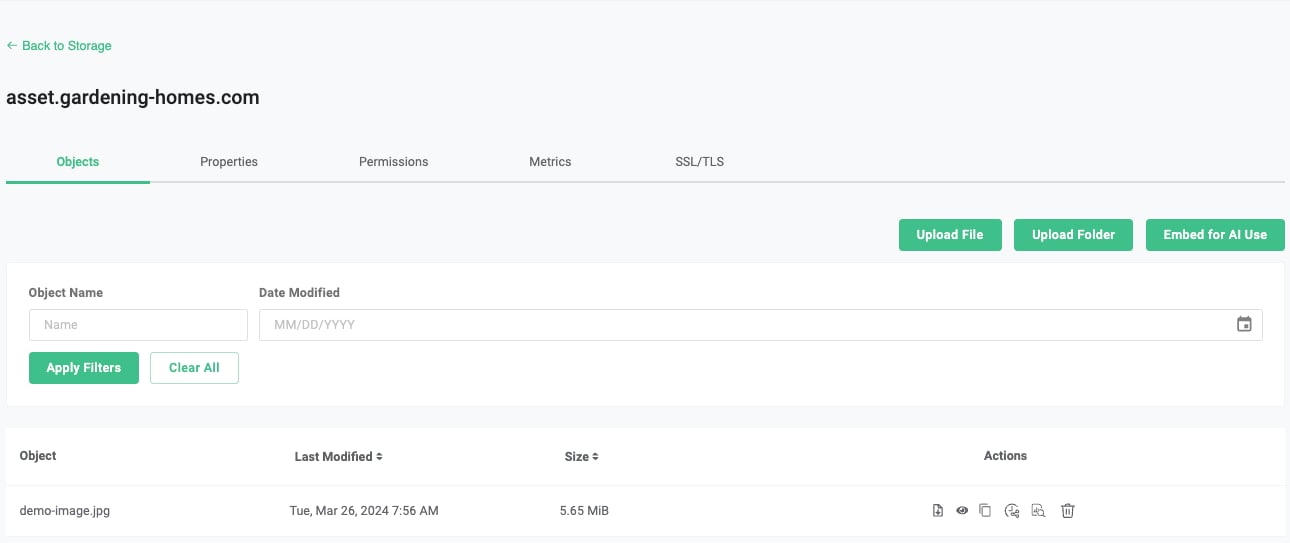 ## 2. Make the bucket public
Since the content of this bucket will be publicly accessible, you need to apply a public read policy to it. Follow the instructions here:
[Put Bucket Policy](/docs/cloud-storage/api-reference/bucket-operations/put-bucket-policy)
## 2. Make the bucket public
Since the content of this bucket will be publicly accessible, you need to apply a public read policy to it. Follow the instructions here:
[Put Bucket Policy](/docs/cloud-storage/api-reference/bucket-operations/put-bucket-policy)
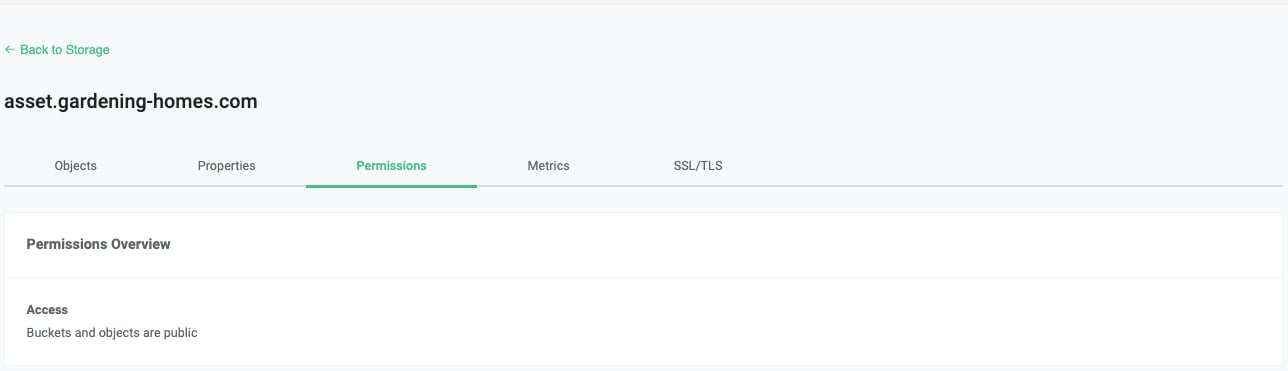 ## 3. Configure DNS
Through your domain/DNS provider, you need to set up an alias to the bucket with virtual addressing style ([Bucket Addressing](/docs/cloud-storage/bucket-addressing))
## 3. Configure DNS
Through your domain/DNS provider, you need to set up an alias to the bucket with virtual addressing style ([Bucket Addressing](/docs/cloud-storage/bucket-addressing))
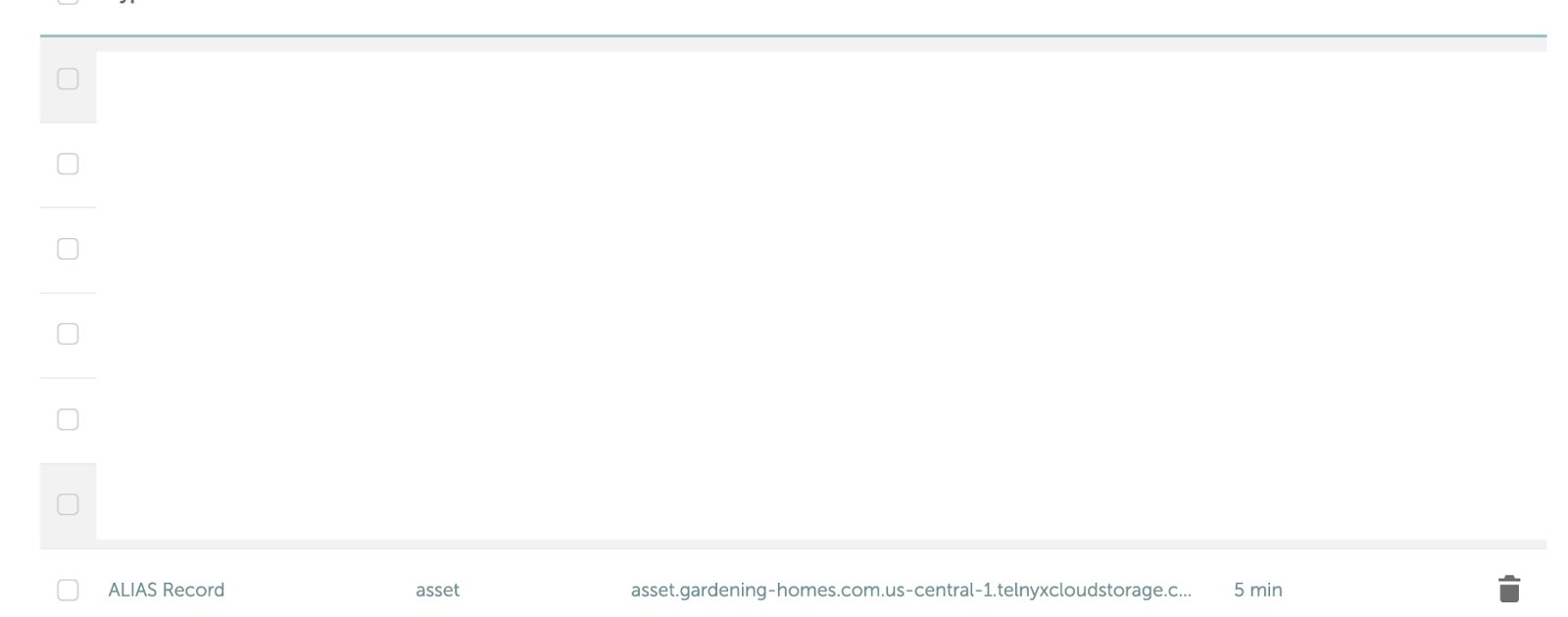 ## 4. Upload Certificate and Matching Key
Select the bucket you created, under SSL/TLS, upload the certificate and matching key.
## 4. Upload Certificate and Matching Key
Select the bucket you created, under SSL/TLS, upload the certificate and matching key.
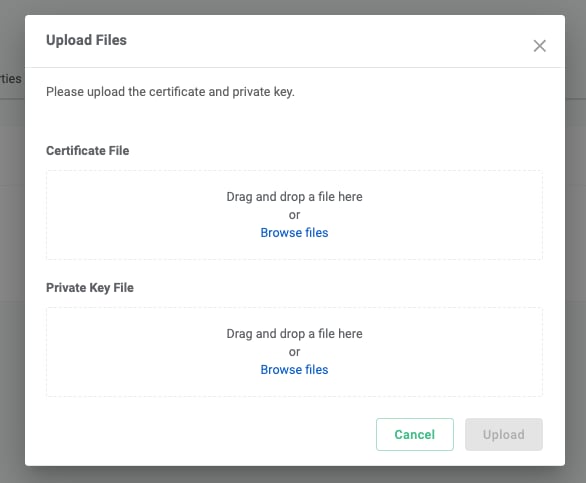 When uploading a certificate file, please ensure the following:
* The bucket name must match one of the certificate SNIs (Server Name Indication) exactly. If you have a wildcard SNI \*.example.com, help.example.com will work, but example.com will not work.
* If you have intermediate certificates, you must include them in the certificate file with the leaf certificate being at the top.
* You may omit the root certificate, as we will verify known root certificates automatically. However, if you’d like to guarantee that your certificate will be accepted, it is better to include it.
## 5. Test
Assuming all of the above is successful and there is an object named demo-image.jpg in the bucket, you may put [https://asset.gardening-homes.com/demo-image.jpg](https://asset.gardening-homes.com/demo-image.jpg) in your browser and expect the following
* The image shows up in your browser, and
* Your browser will show “Connection is secure” and “Certificate is valid”
When uploading a certificate file, please ensure the following:
* The bucket name must match one of the certificate SNIs (Server Name Indication) exactly. If you have a wildcard SNI \*.example.com, help.example.com will work, but example.com will not work.
* If you have intermediate certificates, you must include them in the certificate file with the leaf certificate being at the top.
* You may omit the root certificate, as we will verify known root certificates automatically. However, if you’d like to guarantee that your certificate will be accepted, it is better to include it.
## 5. Test
Assuming all of the above is successful and there is an object named demo-image.jpg in the bucket, you may put [https://asset.gardening-homes.com/demo-image.jpg](https://asset.gardening-homes.com/demo-image.jpg) in your browser and expect the following
* The image shows up in your browser, and
* Your browser will show “Connection is secure” and “Certificate is valid”
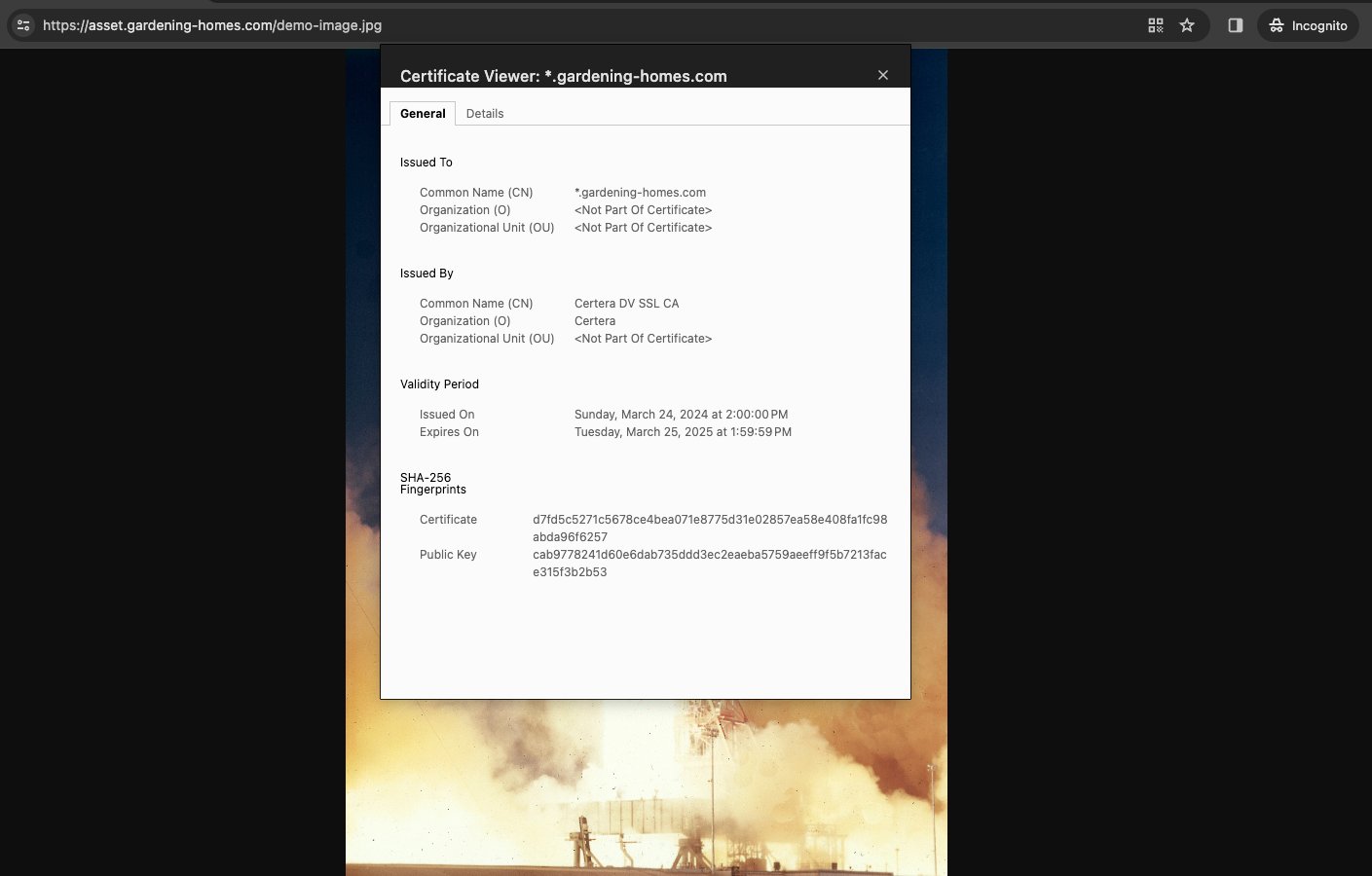 ***
### Data Protection & Retention
> Source: [https://developers.telnyx.com/docs/cloud-storage/lock-and-retention.md](https://developers.telnyx.com/docs/cloud-storage/lock-and-retention.md)
This is currently supported for buckets located in the US, APAC, and CA (ap-southeast-1, ca-central-1).
To enable this feature, object lock MUST be enabled at bucket creation time.
```bash theme={null}
aws s3api create-bucket --bucket test-lock-v4 --object-lock-enabled-for-bucket --profile "*.telnyxcloudstorage.com" --endpoint-url https://us-central-1.telnyxcloudstorage.com
```
Confirm this is set properly.
```bash theme={null}
aws s3api get-object-lock-configuration --bucket test-lock-v4 --profile "*.telnyxcloudstorage.com" --endpoint-url https://us-central-1.telnyxcloudstorage.com
{
"ObjectLockConfiguration": {
"ObjectLockEnabled": "Enabled"
}
}
```
Versioning is automatically enabled as a result.
```bash theme={null}
s3-test % aws s3api get-bucket-versioning --bucket test-lock-v4 --profile "*.telnyxcloudstorage.com" --endpoint-url https://us-central-1.telnyxcloudstorage.com
{
"Status": "Enabled",
"MFADelete": "Disabled"
}
```
Upload an object.
```bash theme={null}
aws s3api put-object --key my-object --body ~/Downloads/random-bytes --bucket test-lock-v4 --profile "*.telnyxcloudstorage.com" --endpoint-url https://us-central-1.telnyxcloudstorage.com
{
"ETag": "\"21074fc6c4a7aaee18b61bb235a9d372\"",
"VersionId": "Z.gwUKVtPQx9bqbfD4VTxv3SraZdUlF"
}
```
Now set the object retention policy.
```bash theme={null}
aws s3api put-object-retention --bucket test-lock-v4 --key my-object --retention '{ "Mode": "GOVERNANCE", "RetainUntilDate": "2024-11-20T00:00:00" }' --profile "*.telnyxcloudstorage.com" --endpoint-url https://us-central-1.telnyxcloudstorage.com
```
And confirm it's set properly.
```bash theme={null}
aws s3api get-object-retention --bucket test-lock-v4 --key my-object --profile "*.telnyxcloudstorage.com" --endpoint-url https://us-central-1.telnyxcloudstorage.com
{
"Retention": {
"Mode": "GOVERNANCE",
"RetainUntilDate": "2024-11-20T00:00:00+00:00"
}
}
```
Deleting the object produces an expected error.
```bash theme={null}
aws s3api delete-object --bucket test-lock-v4 --key my-object --version-id "Z.gwUKVtPQx9bqbfD4VTxv3SraZdUlF" --profile "*.telnyxcloudstorage.com" --endpoint-url https://us-central-1.telnyxcloudstorage.com
An error occurred (AccessDenied) when calling the DeleteObject operation: forbidden by object lock
```
For additional information, please consult S3's API reference.
***
### Emptying Buckets
> Source: [https://developers.telnyx.com/docs/cloud-storage/emptying-bucket.md](https://developers.telnyx.com/docs/cloud-storage/emptying-bucket.md)
When a bucket has more than 1000 objects, it's burdensome to empty it synchronously.
The best solution is to take advantage of lifecycle rules which asynchronously operate on destination bucket.
Here is a sample lifecycle rule
***
## Sample lifecycle rule
```json theme={null}
{
"Rules": [
{
"ID": "delete_all_versions_and_delete_markers",
"Status": "Enabled",
"Filter": {
"Prefix": ""
},
"NoncurrentVersionExpiration": {
"NoncurrentDays": 1
},
"AbortIncompleteMultipartUpload": {
"DaysAfterInitiation": 1
},
"Expiration": {
"Days": 1
}
}
]
}
```
Name that file as `lifecycle.json` and you can apply that to the bucket you intend to empty ---
```json theme={null}
aws s3api put-bucket-lifecycle-configuration --bucket mybucketname --lifecycle-configuration file://lifecycle.json --profile mytelnyxprofile --endpoint-url https://us-west-1.telnyxcloudstorage.com
```
You can verify that it's applied correctly the following way.
```json theme={null}
aws s3api get-bucket-lifecycle-configuration --bucket mybucketname --profile mytelnyxprofile --endpoint-url https://us-west-1.telnyxcloudstorage.com
```
Check on your bucket after 24 hours to validate it's being cleared.
***
## Compatibility & Migration
### AWS S3 Compatibility
> Source: [https://developers.telnyx.com/docs/cloud-storage/aws-s3-compatibility.md](https://developers.telnyx.com/docs/cloud-storage/aws-s3-compatibility.md)
[This table](/docs/cloud-storage/supported) documents all the supported S3 APIs. When an unsupported API method is invoked, an S3-compatible, XML-formatted `NotImplemented` error response is returned.
For the ***supported*** API methods documented, not all of the AWS S3 parameters, headers, and body XML elements are supported.
## AWS S3 PutObject
For example, AWS S3 PutObject supports many headers. However, we only support what's documented under the [PutObject](https://developers.telnyx.com/docs/cloud-storage/api-reference/object-operations/put-object/index#put-object) section.
*They are unsupported by default unless otherwise explicitly specified.*
```json theme={null}
PUT /Key+ HTTP/1.1
Host: Bucket.s3.amazonaws.com
x-amz-acl: ACL
Cache-Control: CacheControl
Content-Disposition: ContentDisposition
Content-Encoding: ContentEncoding
Content-Language: ContentLanguage
Content-Length: ContentLength
Content-MD5: ContentMD5
Content-Type: ContentType
x-amz-sdk-checksum-algorithm: ChecksumAlgorithm
x-amz-checksum-crc32: ChecksumCRC32
x-amz-checksum-crc32c: ChecksumCRC32C
x-amz-checksum-sha1: ChecksumSHA1
x-amz-checksum-sha256: ChecksumSHA256
Expires: Expires
x-amz-grant-full-control: GrantFullControl
x-amz-grant-read: GrantRead
x-amz-grant-read-acp: GrantReadACP
x-amz-grant-write-acp: GrantWriteACP
x-amz-server-side-encryption: ServerSideEncryption
x-amz-storage-class: StorageClass
x-amz-website-redirect-location: WebsiteRedirectLocation
x-amz-server-side-encryption-customer-algorithm: SSECustomerAlgorithm
x-amz-server-side-encryption-customer-key: SSECustomerKey
x-amz-server-side-encryption-customer-key-MD5: SSECustomerKeyMD5
x-amz-server-side-encryption-aws-kms-key-id: SSEKMSKeyId
x-amz-server-side-encryption-context: SSEKMSEncryptionContext
x-amz-server-side-encryption-bucket-key-enabled: BucketKeyEnabled
x-amz-request-payer: RequestPayer
x-amz-tagging: Tagging
x-amz-object-lock-mode: ObjectLockMode
x-amz-object-lock-retain-until-date: ObjectLockRetainUntilDate
x-amz-object-lock-legal-hold: ObjectLockLegalHoldStatus
x-amz-expected-bucket-owner: ExpectedBucketOwner
Body
```
***
### Compatibility Matrix
> Source: [https://developers.telnyx.com/docs/cloud-storage/supported.md](https://developers.telnyx.com/docs/cloud-storage/supported.md)
| API Data Type | API | Supported in US | Supported in EU | Supported in APAC | Supported in CA |
| -------------------------------------- | ------------------------------------------- | --------------- | --------------- | ----------------- | --------------- |
| Bucket | CreateBucket | Yes | Yes | Yes | Yes |
| Bucket | DeleteBucket | Yes | Yes | Yes | Yes |
| Bucket | HeadBucket | Yes | Yes | Yes | Yes |
| Bucket | ListBuckets | Yes | Yes | Yes | Yes |
| BucketAccelerateConfiguration | GetBucketAccelerateConfiguration | No | No | No | No |
| BucketAccelerateConfiguration | PutBucketAccelerateConfiguration | No | No | No | No |
| BucketAcl | GetBucketAcl | Yes | No | Yes | Yes |
| BucketAcl | PutBucketAcl | Yes | No | Yes | Yes |
| BucketAnalyticsConfiguration | DeleteBucketAnalyticsConfiguration | No | No | No | No |
| BucketAnalyticsConfiguration | GetBucketAnalyticsConfiguration | No | No | No | No |
| BucketAnalyticsConfiguration | PutBucketAnalyticsConfiguration | No | No | No | No |
| BucketAnalyticsConfigurations | ListBucketAnalyticsConfigurations | No | No | No | No |
| BucketCors | DeleteBucketCors | Yes | No | Yes | Yes |
| BucketCors | GetBucketCors | Yes | No | Yes | Yes |
| BucketCors | PutBucketCors | Yes | No | Yes | Yes |
| BucketEncryption | DeleteBucketEncryption | No | No | No | No |
| BucketEncryption | GetBucketEncryption | No | No | No | No |
| BucketEncryption | PutBucketEncryption | No | No | No | No |
| BucketIntelligentTieringConfiguration | DeleteBucketIntelligentTieringConfiguration | No | No | No | No |
| BucketIntelligentTieringConfiguration | GetBucketIntelligentTieringConfiguration | No | No | No | No |
| BucketIntelligentTieringConfiguration | PutBucketIntelligentTieringConfiguration | No | No | No | No |
| BucketIntelligentTieringConfigurations | ListBucketIntelligentTieringConfigurations | No | No | No | No |
| BucketInventoryConfiguration | DeleteBucketInventoryConfiguration | No | No | No | No |
| BucketInventoryConfiguration | GetBucketInventoryConfiguration | No | No | No | No |
| BucketInventoryConfiguration | PutBucketInventoryConfiguration | No | No | No | No |
| BucketInventoryConfigurations | ListBucketInventoryConfigurations | No | No | No | No |
| BucketLifecycle | DeleteBucketLifecycle | Yes | No | Yes | Yes |
| BucketLifecycle | GetBucketLifecycle | No | No | No | No |
| BucketLifecycle | PutBucketLifecycle | No | No | No | No |
| BucketLifecycleConfiguration | GetBucketLifecycleConfiguration | Yes | No | Yes | Yes |
| BucketLifecycleConfiguration | PutBucketLifecycleConfiguration | Yes | No | Yes | Yes |
| BucketLocation | GetBucketLocation | Yes | Yes | Yes | Yes |
| BucketLogging | GetBucketLogging | No | No | No | No |
| BucketLogging | PutBucketLogging | No | No | No | No |
| BucketMetricsConfiguration | DeleteBucketMetricsConfiguration | No | No | No | No |
| BucketMetricsConfiguration | GetBucketMetricsConfiguration | No | No | No | No |
| BucketMetricsConfiguration | PutBucketMetricsConfiguration | No | No | No | No |
| BucketMetricsConfigurations | ListBucketMetricsConfigurations | No | No | No | No |
| BucketNotification | GetBucketNotification | No | No | No | No |
| BucketNotification | PutBucketNotification | No | No | No | No |
| BucketNotificationConfiguration | GetBucketNotificationConfiguration | No | No | No | No |
| BucketNotificationConfiguration | PutBucketNotificationConfiguration | No | No | No | No |
| BucketOwnershipControls | DeleteBucketOwnershipControls | No | No | No | No |
| BucketOwnershipControls | GetBucketOwnershipControls | No | No | No | No |
| BucketOwnershipControls | PutBucketOwnershipControls | No | No | No | No |
| BucketPolicy | DeleteBucketPolicy | Yes | No | Yes | Yes |
| BucketPolicy | GetBucketPolicy | Yes | No | Yes | Yes |
| BucketPolicy | PutBucketPolicy | Yes | No | Yes | Yes |
| BucketPolicyStatus | GetBucketPolicyStatus | Yes | No | Yes | Yes |
| BucketReplication | DeleteBucketReplication | No | No | No | No |
| BucketReplication | GetBucketReplication | No | No | No | No |
| BucketReplication | PutBucketReplication | No | No | No | No |
| BucketRequestPayment | GetBucketRequestPayment | No | No | No | No |
| BucketRequestPayment | PutBucketRequestPayment | No | No | No | No |
| BucketTagging | DeleteBucketTagging | Yes | No | Yes | Yes |
| BucketTagging | GetBucketTagging | Yes | No | Yes | Yes |
| BucketTagging | PutBucketTagging | Yes | No | Yes | Yes |
| BucketVersioning | GetBucketVersioning | Yes | No | Yes | Yes |
| BucketVersioning | PutBucketVersioning | Yes | No | Yes | Yes |
| BucketWebsite | DeleteBucketWebsite | No | No | No | No |
| BucketWebsite | GetBucketWebsite | No | No | No | No |
| BucketWebsite | PutBucketWebsite | No | No | No | No |
| Multipart | AbortMultipartUpload | Yes | No | Yes | Yes |
| Multipart | CompleteMultipartUpload | Yes | No | Yes | Yes |
| Multipart | CreateMultipartUpload | Yes | No | Yes | Yes |
| Multipart | ListMultipartUploads | Yes | No | Yes | Yes |
| Multipart | ListParts | Yes | No | Yes | Yes |
| Multipart | UploadPart | Yes | No | Yes | Yes |
| Multipart | UploadPartCopy | No | No | No | No |
| Object | CopyObject | No | No | No | No |
| Object | DeleteObject | Yes | Yes | Yes | Yes |
| Object | DeleteObjects | Yes | Yes | Yes | Yes |
| Object | GetObject | Yes | Yes | Yes | Yes |
| Object | HeadObject | Yes | Yes | Yes | Yes |
| Object | ListObjects | Yes | Yes | Yes | Yes |
| Object | ListObjectsV2 | Yes | Yes | Yes | Yes |
| Object | ListObjectVersions | Yes | No | Yes | Yes |
| Object | PutObject | Yes | Yes | Yes | Yes |
| Object | RestoreObject | No | No | No | No |
| Object | WriteGetObjectResponse | No | No | No | No |
| ObjectAcl | GetObjectAcl | Yes | No | Yes | Yes |
| ObjectAcl | PutObjectAcl | Yes | No | Yes | Yes |
| ObjectAttributes | GetObjectAttributes | No | No | No | No |
| ObjectContent | SelectObjectContent | No | No | No | No |
| ObjectLegalHold | GetObjectLegalHold | No | No | No | No |
| ObjectLegalHold | PutObjectLegalHold | No | No | No | No |
| ObjectLockConfiguration | GetObjectLockConfiguration | Yes | No | Yes | Yes |
| ObjectLockConfiguration | PutObjectLockConfiguration | No | No | No | No |
| ObjectRetention | GetObjectRetention | Yes | No | Yes | Yes |
| ObjectRetention | PutObjectRetention | Yes | No | Yes | Yes |
| ObjectTagging | DeleteObjectTagging | Yes | No | Yes | Yes |
| ObjectTagging | GetObjectTagging | Yes | No | Yes | Yes |
| ObjectTagging | PutObjectTagging | Yes | No | Yes | Yes |
| ObjectTorrent | GetObjectTorrent | No | No | No | No |
| PublicAccessBlock | DeletePublicAccessBlock | No | No | No | No |
| PublicAccessBlock | GetPublicAccessBlock | No | No | No | No |
| PublicAccessBlock | PutPublicAccessBlock | No | No | No | No |
***
### Migration from AWS S3
> Source: [https://developers.telnyx.com/docs/cloud-storage/migrating-from-aws.md](https://developers.telnyx.com/docs/cloud-storage/migrating-from-aws.md)
The [migration API](/api-reference/data-migration/create-a-migration) moves all data from a source AWS S3 bucket to a destination Telnyx Storage bucket without the user incurring a data egress charge by AWS.
This is currently supported for buckets located in the US, APAC, and CA (ap-southeast-1, ca-central-1).
## Feature
The owner of the AWS account does not get charged by AWS on data transfer to Telnyx when this API is employed.
## Achieving minimal costs
There are 3 components to this data pipeline:
User’s AWS S3 bucket in AWS Region X.
Telnyx’s migration engine in the same AWS Region X.
Telnyx’s direct connects with AWS used to transfer the data.
Cost minimization is achieved via the following billing practices by AWS.
Intra-region data transfer between S3 and EC2, within the same account, or across different accounts, is free of charge.
***
### Data Protection & Retention
> Source: [https://developers.telnyx.com/docs/cloud-storage/lock-and-retention.md](https://developers.telnyx.com/docs/cloud-storage/lock-and-retention.md)
This is currently supported for buckets located in the US, APAC, and CA (ap-southeast-1, ca-central-1).
To enable this feature, object lock MUST be enabled at bucket creation time.
```bash theme={null}
aws s3api create-bucket --bucket test-lock-v4 --object-lock-enabled-for-bucket --profile "*.telnyxcloudstorage.com" --endpoint-url https://us-central-1.telnyxcloudstorage.com
```
Confirm this is set properly.
```bash theme={null}
aws s3api get-object-lock-configuration --bucket test-lock-v4 --profile "*.telnyxcloudstorage.com" --endpoint-url https://us-central-1.telnyxcloudstorage.com
{
"ObjectLockConfiguration": {
"ObjectLockEnabled": "Enabled"
}
}
```
Versioning is automatically enabled as a result.
```bash theme={null}
s3-test % aws s3api get-bucket-versioning --bucket test-lock-v4 --profile "*.telnyxcloudstorage.com" --endpoint-url https://us-central-1.telnyxcloudstorage.com
{
"Status": "Enabled",
"MFADelete": "Disabled"
}
```
Upload an object.
```bash theme={null}
aws s3api put-object --key my-object --body ~/Downloads/random-bytes --bucket test-lock-v4 --profile "*.telnyxcloudstorage.com" --endpoint-url https://us-central-1.telnyxcloudstorage.com
{
"ETag": "\"21074fc6c4a7aaee18b61bb235a9d372\"",
"VersionId": "Z.gwUKVtPQx9bqbfD4VTxv3SraZdUlF"
}
```
Now set the object retention policy.
```bash theme={null}
aws s3api put-object-retention --bucket test-lock-v4 --key my-object --retention '{ "Mode": "GOVERNANCE", "RetainUntilDate": "2024-11-20T00:00:00" }' --profile "*.telnyxcloudstorage.com" --endpoint-url https://us-central-1.telnyxcloudstorage.com
```
And confirm it's set properly.
```bash theme={null}
aws s3api get-object-retention --bucket test-lock-v4 --key my-object --profile "*.telnyxcloudstorage.com" --endpoint-url https://us-central-1.telnyxcloudstorage.com
{
"Retention": {
"Mode": "GOVERNANCE",
"RetainUntilDate": "2024-11-20T00:00:00+00:00"
}
}
```
Deleting the object produces an expected error.
```bash theme={null}
aws s3api delete-object --bucket test-lock-v4 --key my-object --version-id "Z.gwUKVtPQx9bqbfD4VTxv3SraZdUlF" --profile "*.telnyxcloudstorage.com" --endpoint-url https://us-central-1.telnyxcloudstorage.com
An error occurred (AccessDenied) when calling the DeleteObject operation: forbidden by object lock
```
For additional information, please consult S3's API reference.
***
### Emptying Buckets
> Source: [https://developers.telnyx.com/docs/cloud-storage/emptying-bucket.md](https://developers.telnyx.com/docs/cloud-storage/emptying-bucket.md)
When a bucket has more than 1000 objects, it's burdensome to empty it synchronously.
The best solution is to take advantage of lifecycle rules which asynchronously operate on destination bucket.
Here is a sample lifecycle rule
***
## Sample lifecycle rule
```json theme={null}
{
"Rules": [
{
"ID": "delete_all_versions_and_delete_markers",
"Status": "Enabled",
"Filter": {
"Prefix": ""
},
"NoncurrentVersionExpiration": {
"NoncurrentDays": 1
},
"AbortIncompleteMultipartUpload": {
"DaysAfterInitiation": 1
},
"Expiration": {
"Days": 1
}
}
]
}
```
Name that file as `lifecycle.json` and you can apply that to the bucket you intend to empty ---
```json theme={null}
aws s3api put-bucket-lifecycle-configuration --bucket mybucketname --lifecycle-configuration file://lifecycle.json --profile mytelnyxprofile --endpoint-url https://us-west-1.telnyxcloudstorage.com
```
You can verify that it's applied correctly the following way.
```json theme={null}
aws s3api get-bucket-lifecycle-configuration --bucket mybucketname --profile mytelnyxprofile --endpoint-url https://us-west-1.telnyxcloudstorage.com
```
Check on your bucket after 24 hours to validate it's being cleared.
***
## Compatibility & Migration
### AWS S3 Compatibility
> Source: [https://developers.telnyx.com/docs/cloud-storage/aws-s3-compatibility.md](https://developers.telnyx.com/docs/cloud-storage/aws-s3-compatibility.md)
[This table](/docs/cloud-storage/supported) documents all the supported S3 APIs. When an unsupported API method is invoked, an S3-compatible, XML-formatted `NotImplemented` error response is returned.
For the ***supported*** API methods documented, not all of the AWS S3 parameters, headers, and body XML elements are supported.
## AWS S3 PutObject
For example, AWS S3 PutObject supports many headers. However, we only support what's documented under the [PutObject](https://developers.telnyx.com/docs/cloud-storage/api-reference/object-operations/put-object/index#put-object) section.
*They are unsupported by default unless otherwise explicitly specified.*
```json theme={null}
PUT /Key+ HTTP/1.1
Host: Bucket.s3.amazonaws.com
x-amz-acl: ACL
Cache-Control: CacheControl
Content-Disposition: ContentDisposition
Content-Encoding: ContentEncoding
Content-Language: ContentLanguage
Content-Length: ContentLength
Content-MD5: ContentMD5
Content-Type: ContentType
x-amz-sdk-checksum-algorithm: ChecksumAlgorithm
x-amz-checksum-crc32: ChecksumCRC32
x-amz-checksum-crc32c: ChecksumCRC32C
x-amz-checksum-sha1: ChecksumSHA1
x-amz-checksum-sha256: ChecksumSHA256
Expires: Expires
x-amz-grant-full-control: GrantFullControl
x-amz-grant-read: GrantRead
x-amz-grant-read-acp: GrantReadACP
x-amz-grant-write-acp: GrantWriteACP
x-amz-server-side-encryption: ServerSideEncryption
x-amz-storage-class: StorageClass
x-amz-website-redirect-location: WebsiteRedirectLocation
x-amz-server-side-encryption-customer-algorithm: SSECustomerAlgorithm
x-amz-server-side-encryption-customer-key: SSECustomerKey
x-amz-server-side-encryption-customer-key-MD5: SSECustomerKeyMD5
x-amz-server-side-encryption-aws-kms-key-id: SSEKMSKeyId
x-amz-server-side-encryption-context: SSEKMSEncryptionContext
x-amz-server-side-encryption-bucket-key-enabled: BucketKeyEnabled
x-amz-request-payer: RequestPayer
x-amz-tagging: Tagging
x-amz-object-lock-mode: ObjectLockMode
x-amz-object-lock-retain-until-date: ObjectLockRetainUntilDate
x-amz-object-lock-legal-hold: ObjectLockLegalHoldStatus
x-amz-expected-bucket-owner: ExpectedBucketOwner
Body
```
***
### Compatibility Matrix
> Source: [https://developers.telnyx.com/docs/cloud-storage/supported.md](https://developers.telnyx.com/docs/cloud-storage/supported.md)
| API Data Type | API | Supported in US | Supported in EU | Supported in APAC | Supported in CA |
| -------------------------------------- | ------------------------------------------- | --------------- | --------------- | ----------------- | --------------- |
| Bucket | CreateBucket | Yes | Yes | Yes | Yes |
| Bucket | DeleteBucket | Yes | Yes | Yes | Yes |
| Bucket | HeadBucket | Yes | Yes | Yes | Yes |
| Bucket | ListBuckets | Yes | Yes | Yes | Yes |
| BucketAccelerateConfiguration | GetBucketAccelerateConfiguration | No | No | No | No |
| BucketAccelerateConfiguration | PutBucketAccelerateConfiguration | No | No | No | No |
| BucketAcl | GetBucketAcl | Yes | No | Yes | Yes |
| BucketAcl | PutBucketAcl | Yes | No | Yes | Yes |
| BucketAnalyticsConfiguration | DeleteBucketAnalyticsConfiguration | No | No | No | No |
| BucketAnalyticsConfiguration | GetBucketAnalyticsConfiguration | No | No | No | No |
| BucketAnalyticsConfiguration | PutBucketAnalyticsConfiguration | No | No | No | No |
| BucketAnalyticsConfigurations | ListBucketAnalyticsConfigurations | No | No | No | No |
| BucketCors | DeleteBucketCors | Yes | No | Yes | Yes |
| BucketCors | GetBucketCors | Yes | No | Yes | Yes |
| BucketCors | PutBucketCors | Yes | No | Yes | Yes |
| BucketEncryption | DeleteBucketEncryption | No | No | No | No |
| BucketEncryption | GetBucketEncryption | No | No | No | No |
| BucketEncryption | PutBucketEncryption | No | No | No | No |
| BucketIntelligentTieringConfiguration | DeleteBucketIntelligentTieringConfiguration | No | No | No | No |
| BucketIntelligentTieringConfiguration | GetBucketIntelligentTieringConfiguration | No | No | No | No |
| BucketIntelligentTieringConfiguration | PutBucketIntelligentTieringConfiguration | No | No | No | No |
| BucketIntelligentTieringConfigurations | ListBucketIntelligentTieringConfigurations | No | No | No | No |
| BucketInventoryConfiguration | DeleteBucketInventoryConfiguration | No | No | No | No |
| BucketInventoryConfiguration | GetBucketInventoryConfiguration | No | No | No | No |
| BucketInventoryConfiguration | PutBucketInventoryConfiguration | No | No | No | No |
| BucketInventoryConfigurations | ListBucketInventoryConfigurations | No | No | No | No |
| BucketLifecycle | DeleteBucketLifecycle | Yes | No | Yes | Yes |
| BucketLifecycle | GetBucketLifecycle | No | No | No | No |
| BucketLifecycle | PutBucketLifecycle | No | No | No | No |
| BucketLifecycleConfiguration | GetBucketLifecycleConfiguration | Yes | No | Yes | Yes |
| BucketLifecycleConfiguration | PutBucketLifecycleConfiguration | Yes | No | Yes | Yes |
| BucketLocation | GetBucketLocation | Yes | Yes | Yes | Yes |
| BucketLogging | GetBucketLogging | No | No | No | No |
| BucketLogging | PutBucketLogging | No | No | No | No |
| BucketMetricsConfiguration | DeleteBucketMetricsConfiguration | No | No | No | No |
| BucketMetricsConfiguration | GetBucketMetricsConfiguration | No | No | No | No |
| BucketMetricsConfiguration | PutBucketMetricsConfiguration | No | No | No | No |
| BucketMetricsConfigurations | ListBucketMetricsConfigurations | No | No | No | No |
| BucketNotification | GetBucketNotification | No | No | No | No |
| BucketNotification | PutBucketNotification | No | No | No | No |
| BucketNotificationConfiguration | GetBucketNotificationConfiguration | No | No | No | No |
| BucketNotificationConfiguration | PutBucketNotificationConfiguration | No | No | No | No |
| BucketOwnershipControls | DeleteBucketOwnershipControls | No | No | No | No |
| BucketOwnershipControls | GetBucketOwnershipControls | No | No | No | No |
| BucketOwnershipControls | PutBucketOwnershipControls | No | No | No | No |
| BucketPolicy | DeleteBucketPolicy | Yes | No | Yes | Yes |
| BucketPolicy | GetBucketPolicy | Yes | No | Yes | Yes |
| BucketPolicy | PutBucketPolicy | Yes | No | Yes | Yes |
| BucketPolicyStatus | GetBucketPolicyStatus | Yes | No | Yes | Yes |
| BucketReplication | DeleteBucketReplication | No | No | No | No |
| BucketReplication | GetBucketReplication | No | No | No | No |
| BucketReplication | PutBucketReplication | No | No | No | No |
| BucketRequestPayment | GetBucketRequestPayment | No | No | No | No |
| BucketRequestPayment | PutBucketRequestPayment | No | No | No | No |
| BucketTagging | DeleteBucketTagging | Yes | No | Yes | Yes |
| BucketTagging | GetBucketTagging | Yes | No | Yes | Yes |
| BucketTagging | PutBucketTagging | Yes | No | Yes | Yes |
| BucketVersioning | GetBucketVersioning | Yes | No | Yes | Yes |
| BucketVersioning | PutBucketVersioning | Yes | No | Yes | Yes |
| BucketWebsite | DeleteBucketWebsite | No | No | No | No |
| BucketWebsite | GetBucketWebsite | No | No | No | No |
| BucketWebsite | PutBucketWebsite | No | No | No | No |
| Multipart | AbortMultipartUpload | Yes | No | Yes | Yes |
| Multipart | CompleteMultipartUpload | Yes | No | Yes | Yes |
| Multipart | CreateMultipartUpload | Yes | No | Yes | Yes |
| Multipart | ListMultipartUploads | Yes | No | Yes | Yes |
| Multipart | ListParts | Yes | No | Yes | Yes |
| Multipart | UploadPart | Yes | No | Yes | Yes |
| Multipart | UploadPartCopy | No | No | No | No |
| Object | CopyObject | No | No | No | No |
| Object | DeleteObject | Yes | Yes | Yes | Yes |
| Object | DeleteObjects | Yes | Yes | Yes | Yes |
| Object | GetObject | Yes | Yes | Yes | Yes |
| Object | HeadObject | Yes | Yes | Yes | Yes |
| Object | ListObjects | Yes | Yes | Yes | Yes |
| Object | ListObjectsV2 | Yes | Yes | Yes | Yes |
| Object | ListObjectVersions | Yes | No | Yes | Yes |
| Object | PutObject | Yes | Yes | Yes | Yes |
| Object | RestoreObject | No | No | No | No |
| Object | WriteGetObjectResponse | No | No | No | No |
| ObjectAcl | GetObjectAcl | Yes | No | Yes | Yes |
| ObjectAcl | PutObjectAcl | Yes | No | Yes | Yes |
| ObjectAttributes | GetObjectAttributes | No | No | No | No |
| ObjectContent | SelectObjectContent | No | No | No | No |
| ObjectLegalHold | GetObjectLegalHold | No | No | No | No |
| ObjectLegalHold | PutObjectLegalHold | No | No | No | No |
| ObjectLockConfiguration | GetObjectLockConfiguration | Yes | No | Yes | Yes |
| ObjectLockConfiguration | PutObjectLockConfiguration | No | No | No | No |
| ObjectRetention | GetObjectRetention | Yes | No | Yes | Yes |
| ObjectRetention | PutObjectRetention | Yes | No | Yes | Yes |
| ObjectTagging | DeleteObjectTagging | Yes | No | Yes | Yes |
| ObjectTagging | GetObjectTagging | Yes | No | Yes | Yes |
| ObjectTagging | PutObjectTagging | Yes | No | Yes | Yes |
| ObjectTorrent | GetObjectTorrent | No | No | No | No |
| PublicAccessBlock | DeletePublicAccessBlock | No | No | No | No |
| PublicAccessBlock | GetPublicAccessBlock | No | No | No | No |
| PublicAccessBlock | PutPublicAccessBlock | No | No | No | No |
***
### Migration from AWS S3
> Source: [https://developers.telnyx.com/docs/cloud-storage/migrating-from-aws.md](https://developers.telnyx.com/docs/cloud-storage/migrating-from-aws.md)
The [migration API](/api-reference/data-migration/create-a-migration) moves all data from a source AWS S3 bucket to a destination Telnyx Storage bucket without the user incurring a data egress charge by AWS.
This is currently supported for buckets located in the US, APAC, and CA (ap-southeast-1, ca-central-1).
## Feature
The owner of the AWS account does not get charged by AWS on data transfer to Telnyx when this API is employed.
## Achieving minimal costs
There are 3 components to this data pipeline:
User’s AWS S3 bucket in AWS Region X.
Telnyx’s migration engine in the same AWS Region X.
Telnyx’s direct connects with AWS used to transfer the data.
Cost minimization is achieved via the following billing practices by AWS.
Intra-region data transfer between S3 and EC2, within the same account, or across different accounts, is free of charge.
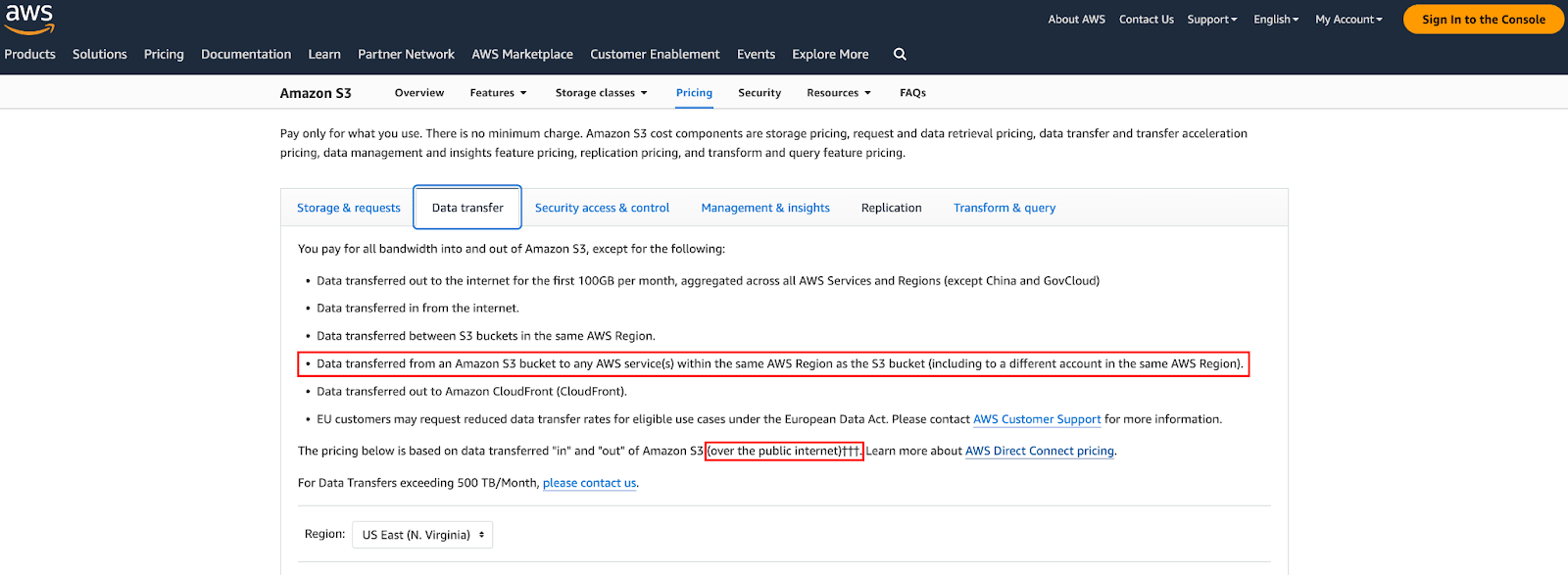 Source: [AWS S3 Pricing](https://aws.amazon.com/s3/pricing/?nc=sn\&loc=4)
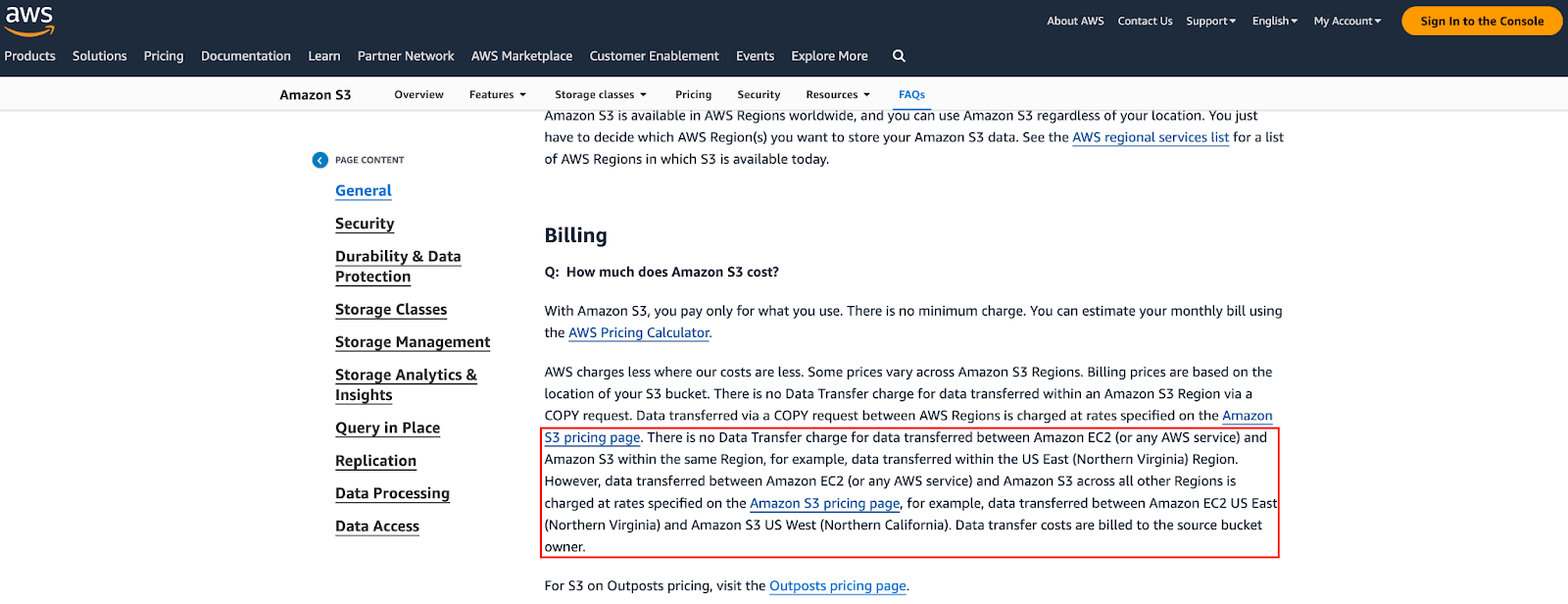 Source: [AWS S3 FAQ](https://aws.amazon.com/s3/faqs/?nc=sn\&loc=7)
Hence, depending on the region of the source AWS S3 bucket, the API will select the co-located migration engines to best take advantage of this billing practice.
Data Transfer Out (DTO) over AWS Direct Connect within the same geopolitical region is heavily discounted in comparison to DTO over the internet.
Source: [AWS S3 FAQ](https://aws.amazon.com/s3/faqs/?nc=sn\&loc=7)
Hence, depending on the region of the source AWS S3 bucket, the API will select the co-located migration engines to best take advantage of this billing practice.
Data Transfer Out (DTO) over AWS Direct Connect within the same geopolitical region is heavily discounted in comparison to DTO over the internet.
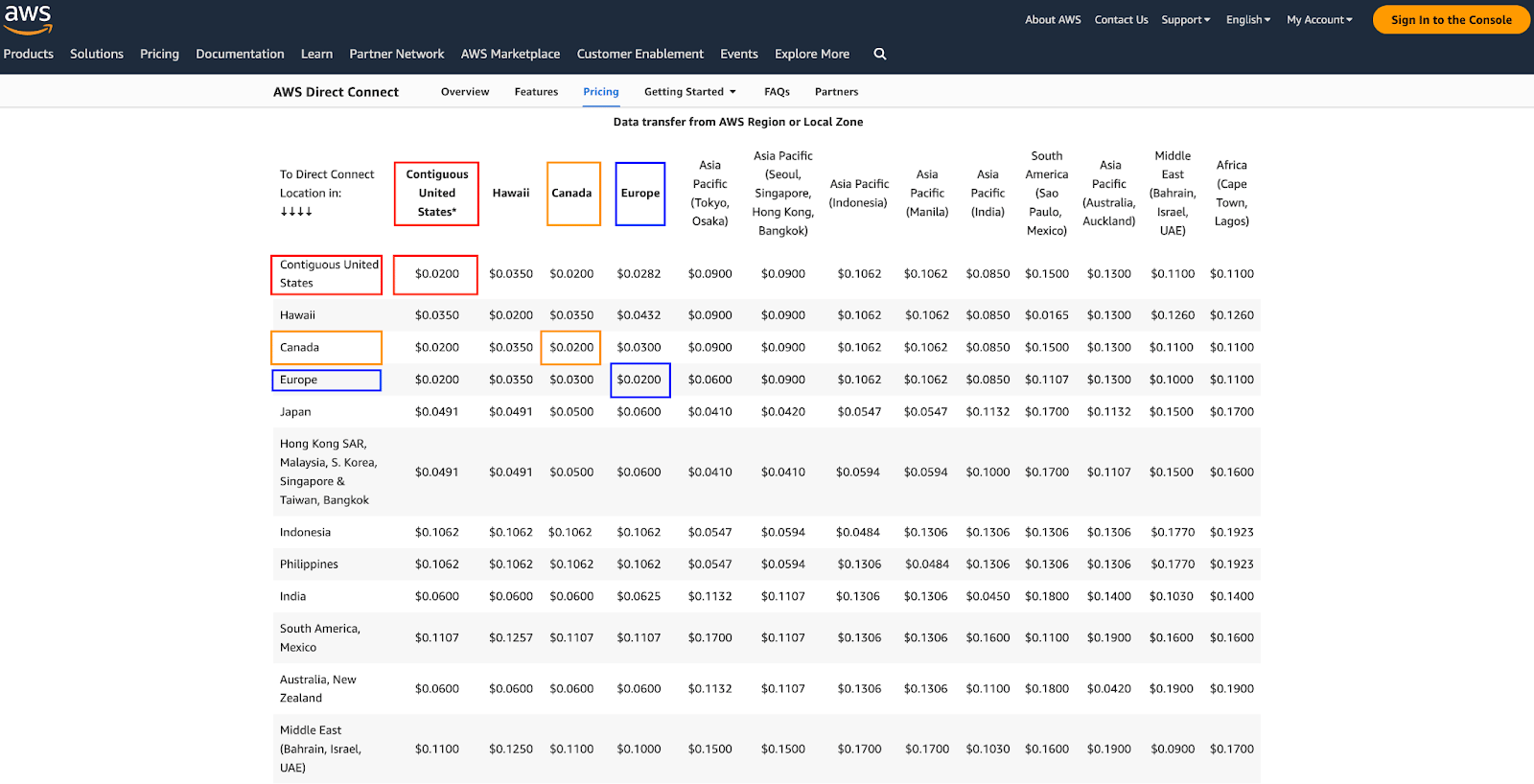 Source: [AWS Direct Connect](https://aws.amazon.com/directconnect/pricing/?nc=sn\&loc=3)
Telnyx’s infrastructure is multi-cloud and multi-region with PoPs in multiple geopolitical regions. AWS Direct Connect is one of the components of that architecture. As a result, the migration API takes advantage of the discounted rate of DTO within the same geopolitical region to move data off AWS into Telnyx.
## AWS S3 vs Telnyx Storage Costs Revisited
Assume a user has the following pattern in us-east-2 Ohio.
Source: [AWS Direct Connect](https://aws.amazon.com/directconnect/pricing/?nc=sn\&loc=3)
Telnyx’s infrastructure is multi-cloud and multi-region with PoPs in multiple geopolitical regions. AWS Direct Connect is one of the components of that architecture. As a result, the migration API takes advantage of the discounted rate of DTO within the same geopolitical region to move data off AWS into Telnyx.
## AWS S3 vs Telnyx Storage Costs Revisited
Assume a user has the following pattern in us-east-2 Ohio.
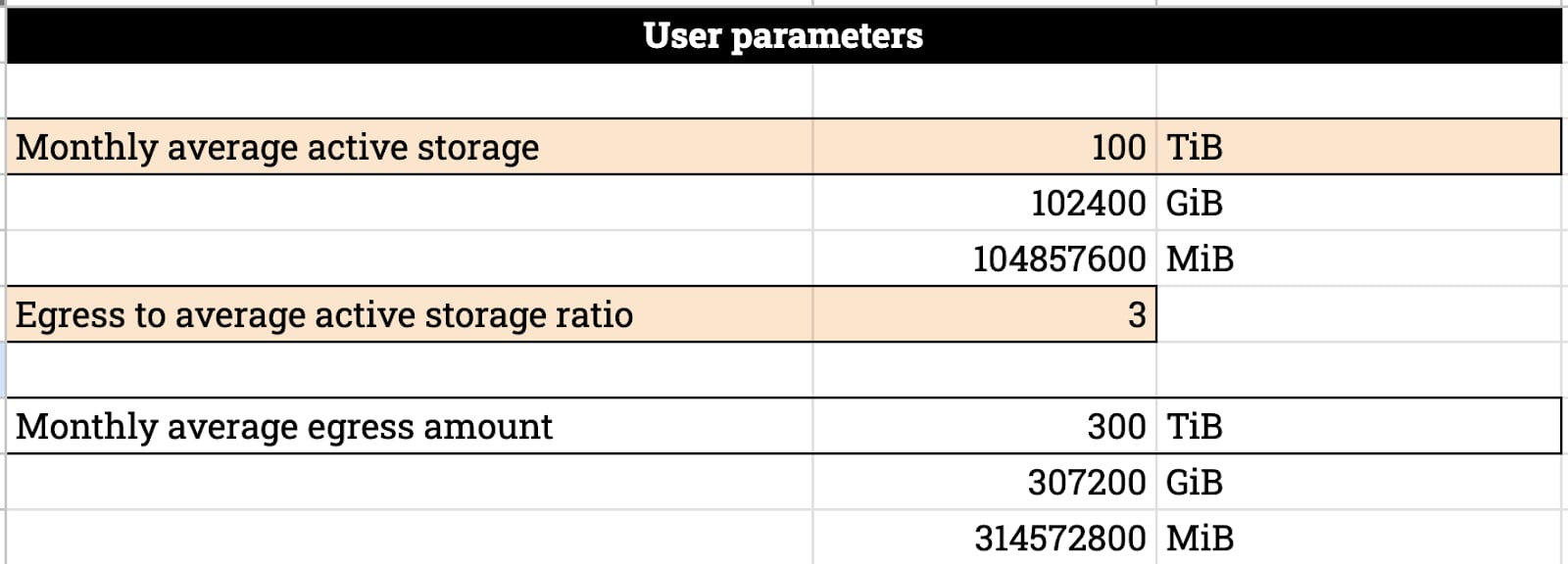 Ignoring API operations since those costs are marginal, this is their costs breakdown. In the Appendix, you can see these costs are corroborated by AWS Cost Calculator.
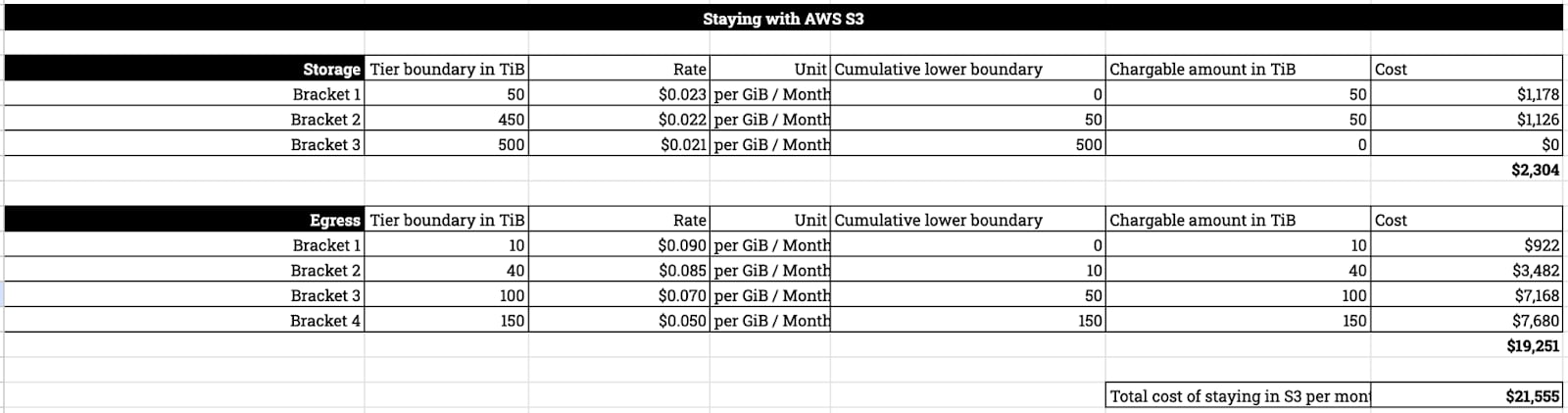 With the migration API, data can be moved to Telnyx without egress charge from AWS. The post migration costs are as follows.
 We are offering this API free of charge to users in its beta stage.
In the future, we will require minimum storage duration to offset the costs we incur with AWS for DTO over Direct Connect.
## API Concepts and Procedure
### Coverage
This API shows you the supported AWS S3 regions. Prior to using the API for migration, ensure the AWS S3 bucket you want to migrate is among the supported regions.
```bash theme={null}
curl --location 'https://api.telnyx.com/v2/storage/migration_source_coverage' \
--header 'Authorization: Bearer XXX'
{
"data": [
{
"provider": "aws",
"source_region": "us-west-1"
},
{
"provider": "aws",
"source_region": "us-east-1"
},
{
"provider": "aws",
"source_region": "us-east-2"
}
]
}
```
### Migration Sources
Only standard class is supported. Restore data in glacier before attempting migration.
This API allows you to define the source bucket in AWS. In order to use this API, you need to provide it with a pair of AWS access key and secret access key. We advise you to create an IAM role with a Read Only user for this purpose.
```bash theme={null}
curl --location 'https://api.telnyx.com/v2/storage/migration_sources' \
--header 'Content-Type: application/json' \
--header 'Authorization: Bearer XXX' \
--data '{
"provider": "aws",
"provider_auth": {
"access_key": "XXX",
"secret_access_key": "XXX"
},
"bucket_name": "source-west-bucket-demo"
}'
{
"data": {
"id": "48f215e7-8f16-4e65-aa31-9340d4a18745",
"provider": "aws",
"provider_auth": {
"access_key": "XXX",
"secret_access_key": "XXXXXX"
},
"bucket_name": "source-west-bucket-demo",
"source_region": "us-west-1"
}
}
```
The following errors might be possible —
```json theme={null}
{
"errors": [
{
"code": "15005",
"title": "Bucket does not exist",
"detail": "Bucket does not exist."
}
]
}
```
```json theme={null}
{
"errors": [
{
"code": "15025",
"title": "Access denied",
"detail": "Access denied reading migration source bucket."
}
]
}
```
```json theme={null}
{
"errors": [
{
"code": "15003",
"title": "Bucket region invalid",
"detail": "You have provided an invalid bucket region."
}
]
}
```
### Migrations
Lastly, you can create a migration. If the target bucket doesn’t exist, the API will attempt to create it for you. If the desired bucket name is not available or invalid, you will receive an error right away.
In addition, you do not have to match source bucket region to target bucket region; in other words, you can migrate data from an AWS source bucket in us-west-1 to Telnyx target bucket in us-east-1. You will not be charged for DTO by AWS as the API will use a migration engine in us-west-1.
When the refresh parameter is set to false, a one time migration will be created. Otherwise, the API will periodically synchronize the source and destination bucket.
```bash theme={null}
curl --location 'https://api.telnyx.com/v2/storage/migrations' \
--header 'Content-Type: application/json' \
--header 'Authorization: Bearer XXX' \
--data '{
"source_id": "1c73c8d9-d65a-4f61-ab41-afa095324c5d",
"target_bucket_name": "target-bucket-test-account",
"target_region": "us-west-1",
"refresh": false
}'
{
"data": {
"id": "04532400-7d40-4862-8437-17937d48b405",
"source_id": "1c73c8d9-d65a-4f61-ab41-afa095324c5d",
"target_bucket_name": "target-bucket-test-account",
"target_region": "us-west-1",
"refresh": false,
"last_copy": "0001-01-01T00:00:00Z",
"status": "pending",
"bytes_to_migrate": 0,
"bytes_migrated": 0,
"speed": 0,
"eta": "2024-05-10T20:47:33.821604511Z",
"created_at": "2024-05-10T20:47:33.756241Z"
}
}
```
### Checking Migration Progress
You can periodically poll the API to see its status.
```bash theme={null}
curl --location 'https://api.telnyx.com/v2/storage/migrations/04532400-7d40-4862-8437-17937d48b405' \
--header 'Authorization: Bearer XXX'
{
"data": {
"id": "04532400-7d40-4862-8437-17937d48b405",
"source_id": "1c73c8d9-d65a-4f61-ab41-afa095324c5d",
"target_bucket_name": "target-bucket-test-account",
"target_region": "us-west-1",
"refresh": false,
"last_copy": "2024-05-10T21:07:27.43006Z",
"status": "complete",
"bytes_to_migrate": 10485760000,
"bytes_migrated": 10485760000,
"speed": 7226700,
"eta": "0001-01-01T00:00:00Z",
"created_at": "2024-05-10T20:47:33.756241Z"
}
}
```
Alternatively, check in on the metric of the target bucket. When it’s reached the expected size or all the objects appear in there, the migration is complete.
We are offering this API free of charge to users in its beta stage.
In the future, we will require minimum storage duration to offset the costs we incur with AWS for DTO over Direct Connect.
## API Concepts and Procedure
### Coverage
This API shows you the supported AWS S3 regions. Prior to using the API for migration, ensure the AWS S3 bucket you want to migrate is among the supported regions.
```bash theme={null}
curl --location 'https://api.telnyx.com/v2/storage/migration_source_coverage' \
--header 'Authorization: Bearer XXX'
{
"data": [
{
"provider": "aws",
"source_region": "us-west-1"
},
{
"provider": "aws",
"source_region": "us-east-1"
},
{
"provider": "aws",
"source_region": "us-east-2"
}
]
}
```
### Migration Sources
Only standard class is supported. Restore data in glacier before attempting migration.
This API allows you to define the source bucket in AWS. In order to use this API, you need to provide it with a pair of AWS access key and secret access key. We advise you to create an IAM role with a Read Only user for this purpose.
```bash theme={null}
curl --location 'https://api.telnyx.com/v2/storage/migration_sources' \
--header 'Content-Type: application/json' \
--header 'Authorization: Bearer XXX' \
--data '{
"provider": "aws",
"provider_auth": {
"access_key": "XXX",
"secret_access_key": "XXX"
},
"bucket_name": "source-west-bucket-demo"
}'
{
"data": {
"id": "48f215e7-8f16-4e65-aa31-9340d4a18745",
"provider": "aws",
"provider_auth": {
"access_key": "XXX",
"secret_access_key": "XXXXXX"
},
"bucket_name": "source-west-bucket-demo",
"source_region": "us-west-1"
}
}
```
The following errors might be possible —
```json theme={null}
{
"errors": [
{
"code": "15005",
"title": "Bucket does not exist",
"detail": "Bucket does not exist."
}
]
}
```
```json theme={null}
{
"errors": [
{
"code": "15025",
"title": "Access denied",
"detail": "Access denied reading migration source bucket."
}
]
}
```
```json theme={null}
{
"errors": [
{
"code": "15003",
"title": "Bucket region invalid",
"detail": "You have provided an invalid bucket region."
}
]
}
```
### Migrations
Lastly, you can create a migration. If the target bucket doesn’t exist, the API will attempt to create it for you. If the desired bucket name is not available or invalid, you will receive an error right away.
In addition, you do not have to match source bucket region to target bucket region; in other words, you can migrate data from an AWS source bucket in us-west-1 to Telnyx target bucket in us-east-1. You will not be charged for DTO by AWS as the API will use a migration engine in us-west-1.
When the refresh parameter is set to false, a one time migration will be created. Otherwise, the API will periodically synchronize the source and destination bucket.
```bash theme={null}
curl --location 'https://api.telnyx.com/v2/storage/migrations' \
--header 'Content-Type: application/json' \
--header 'Authorization: Bearer XXX' \
--data '{
"source_id": "1c73c8d9-d65a-4f61-ab41-afa095324c5d",
"target_bucket_name": "target-bucket-test-account",
"target_region": "us-west-1",
"refresh": false
}'
{
"data": {
"id": "04532400-7d40-4862-8437-17937d48b405",
"source_id": "1c73c8d9-d65a-4f61-ab41-afa095324c5d",
"target_bucket_name": "target-bucket-test-account",
"target_region": "us-west-1",
"refresh": false,
"last_copy": "0001-01-01T00:00:00Z",
"status": "pending",
"bytes_to_migrate": 0,
"bytes_migrated": 0,
"speed": 0,
"eta": "2024-05-10T20:47:33.821604511Z",
"created_at": "2024-05-10T20:47:33.756241Z"
}
}
```
### Checking Migration Progress
You can periodically poll the API to see its status.
```bash theme={null}
curl --location 'https://api.telnyx.com/v2/storage/migrations/04532400-7d40-4862-8437-17937d48b405' \
--header 'Authorization: Bearer XXX'
{
"data": {
"id": "04532400-7d40-4862-8437-17937d48b405",
"source_id": "1c73c8d9-d65a-4f61-ab41-afa095324c5d",
"target_bucket_name": "target-bucket-test-account",
"target_region": "us-west-1",
"refresh": false,
"last_copy": "2024-05-10T21:07:27.43006Z",
"status": "complete",
"bytes_to_migrate": 10485760000,
"bytes_migrated": 10485760000,
"speed": 7226700,
"eta": "0001-01-01T00:00:00Z",
"created_at": "2024-05-10T20:47:33.756241Z"
}
}
```
Alternatively, check in on the metric of the target bucket. When it’s reached the expected size or all the objects appear in there, the migration is complete.
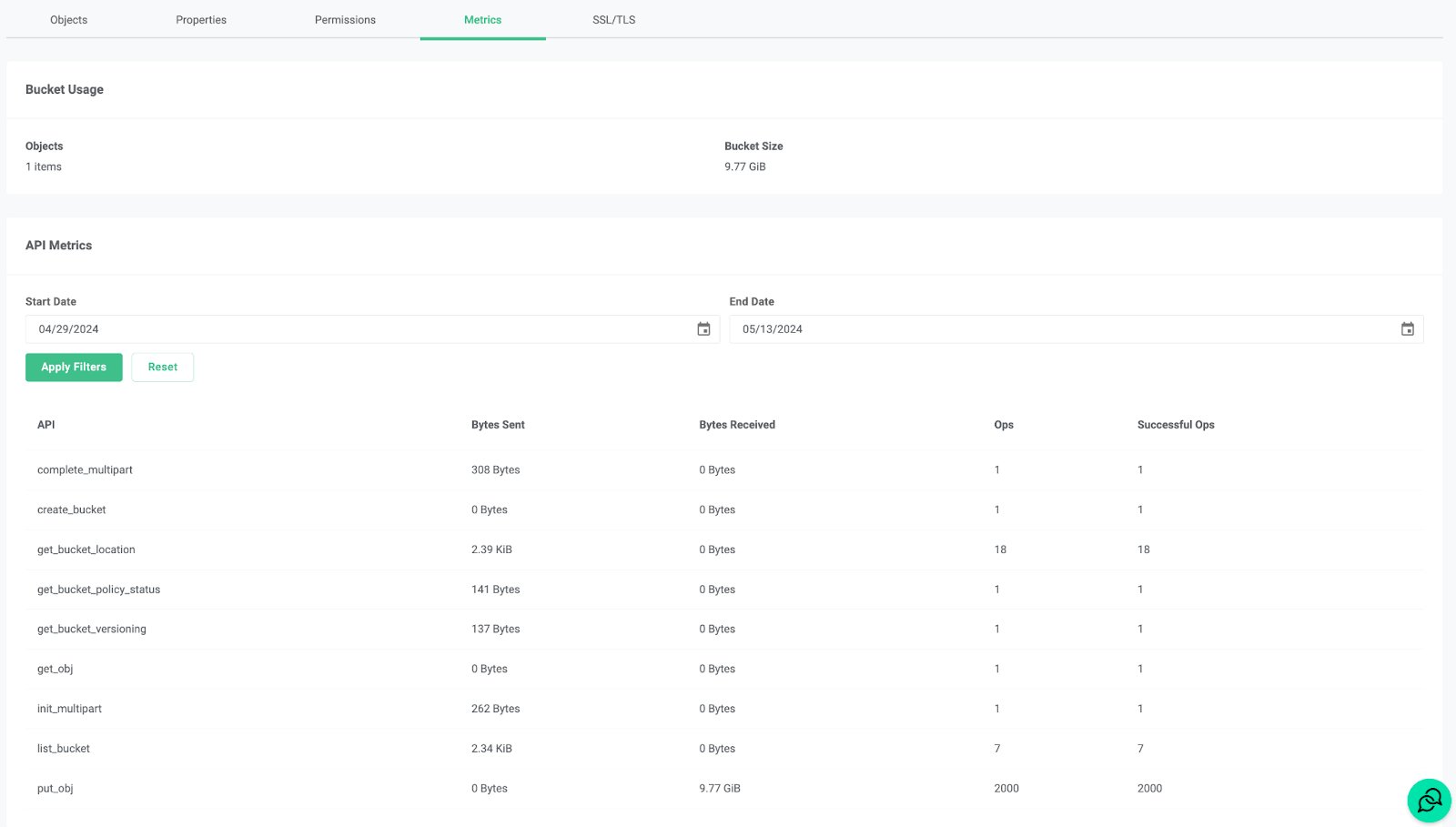 ***
## Platform
### Limits & Quotas
> Source: [https://developers.telnyx.com/docs/cloud-storage/limits.md](https://developers.telnyx.com/docs/cloud-storage/limits.md)
## General API limits
| Limit | Value |
| ------------------------------------------ | ----- |
| Requests per second per account | 500 |
| Requests per second per bucket | 200 |
| Concurrent PUT or COPY requests per object | 10 |
These limits are subject to change. If you require higher throughput, please [contact support](https://support.telnyx.com) to discuss your use case.
## Specific limits
* Max count of buckets per account is 100
* Max size of single object upload via PUT request is 5 GB
* Max size of single part upload of a multi-part upload is 5 GB
* Min size of single part upload of a multi-part upload is 5 MiB, except for the final part
* Max count of parts of a multi-part upload is 10,000
* Max size of a completed multi-part upload is 5 TiB
* Max count of objects per bucket is 50 million
***
### Billing & Pricing
> Source: [https://developers.telnyx.com/docs/cloud-storage/billing.md](https://developers.telnyx.com/docs/cloud-storage/billing.md)
You are billed on two things
* The bytes stored
* The count of API operations invoked
## Storage billing explained
The minimum billable **object** size is 4 KiB. Here is an example — if you have two 11-byte objects in a bucket, they will be counted as 4 KiB each, i.e. 8 KiB in total.
Storage consumed by each bucket is billed in multiples of 4 KiB, rounded up; Metadata counts towards storage consumed.
### US Storage
Every month, your **first 10 GiB is free of charge**. Any bytes beyond that are billed at:
* **\$0.006 per GiB per month** for regular storage
* **\$0.60 per GiB per month** for AI embedded storage
### EU Storage
EU storage has **no free tier** and is billed at:
* **\$0.025 per GiB per month** for regular storage
* **\$0.60 per GiB per month** for AI embedded storage
Bytes stored across all buckets are **recorded hourly**. Usage is subsequently calculated and debited from your balance.
Here is a hypothetical example:
* You have a \$10 balance in your account.
* At time `t`, you uploaded 11 GiB of objects into various buckets in your account.
* At the next whole clock hour after time `t`
* a snapshot of your total storage is recorded as 11 GiB
* your usage is calculated as (11 GiB - 10 GiB) x (\$ 0.006 / 30 days / 24 hrs)
* that usage is then debited from your \$10 balance
Lastly, free tier is not available to an account if its available credit is negative.
Here is a hypothetical example:
* You have a \$10 balance in your account
* Through usage of Voice and Messaging API, you've depleted your balance and resulted in a negative available credit of -0.1 USD.
* You will not be able to create a bucket and upload objects until your available credit is restored.
## API operations billing explained
API operations are classified and billed the following way —
### US Storage
Categories
Applicable API Ops
Prices
Class A
PUT, COPY, POST, LIST requests
Every month, the first 1 Million is free of charge, thereafter $0.50 per 1 Million
Class B
GET, SELECT, and all other request
Every month, the first 10 Million is free of charge, thereafter $0.04 per 1 Million
### EU Storage
Categories
Applicable API Ops
Prices
State-change operations
PUT, COPY, POST, LIST requests
$5.00 per 1 Million
Read operations
GET, SELECT, and all other requests
$0.40 per 1 Million
## Account suspension and loss of data
When an account's available credit becomes negative:
* You will be notified via email of insufficient balance.
* Your data is ***still retained*** in the system but API requests will fail with error message `UserSuspended`.
* Access will be restored when available credit is made positive via payment.
If available credit remains negative for 30 days, your account will be abolished. As a consequence, all data will be irreversibly purged.
## Relevant companion APIs
Two companion APIs exist to allow for querying of usage:
* [Bucket Snapshot](https://developers.telnyx.com/api-reference/bucket-usage/get-bucket-usage#get-bucket-usage) is a snapshot of the bytes your bucket is taking up at the moment of query.
* [API Usage](https://developers.telnyx.com/api-reference/bucket-usage/get-api-usage#get-api-usage) shows the stats of your API requests.
### Query bucket snapshot
**Example Request**
```json theme={null}
GET /v2/storage/buckets/mybucket/usage/storage HTTP/1.1
Host: api.telnyx.com
Authorization: Bearer XXX
```
**Example Response**
```json theme={null}
{
"data": [
{
"size": 1078984704,
"size_kb": 1053696,
"num_objects": 2,
"timestamp": "2024-07-30T14:26:43Z"
}
],
"meta": {
"page_number": 1,
"page_size": 1,
"total_pages": 1,
"total_results": 1
}
}
```
### Query API usage
**Example Request**
```json theme={null}
GET /v2/storage/buckets/mybucket/usage/api?filter[start_time]=2024-07-01T00:00:00.000Z&filter[end_time]=2024-07-31T00:00:00.000Z HTTP/1.1
Host: api.telnyx.com
Authorization: Bearer XXX
```
**Example Response**
```json theme={null}
{
"data": [
{
"categories": [
{
"bytes_sent": 1768,
"bytes_received": 0,
"ops": 13,
"successful_ops": 13,
"category": "get_bucket_location"
},
{
"bytes_sent": 141,
"bytes_received": 0,
"ops": 1,
"successful_ops": 1,
"category": "get_bucket_policy_status"
},
{
"bytes_sent": 137,
"bytes_received": 0,
"ops": 1,
"successful_ops": 1,
"category": "get_bucket_versioning"
},
{
"bytes_sent": 2022703104,
"bytes_received": 0,
"ops": 2,
"successful_ops": 2,
"category": "get_obj"
},
{
"bytes_sent": 1623,
"bytes_received": 0,
"ops": 3,
"successful_ops": 3,
"category": "list_bucket"
}
],
"total": {
"bytes_sent": 2022706773,
"bytes_received": 0,
"ops": 20,
"successful_ops": 20
},
"timestamp": "2024-07-02T17:00:00.000Z"
}
]
}
```
***
### Performance Benchmarks
> Source: [https://developers.telnyx.com/docs/cloud-storage/performance-benchmarks.md](https://developers.telnyx.com/docs/cloud-storage/performance-benchmarks.md)
## Storage benchmark summary
We achieved the following throughput results given the bench test setup described in the subsequent sections.
* **PutObject Aggregate: 2.029 GiB/s**
* **GetObject Aggregate: 2.714 GiB/s**
A few disclaimers
* We did not exhaustively search the client configuration that produces the highest achievable throughputs.
* This result is only indicative of what can be achieved with the available testbed hardware specifications and arrangement.
* The test clients are not subjected to the limits outlined in the previous section.
* As we launch new sites, we will continuously update our test results and methodology.
## Benchmark environment explained
### Client hardware
(8) of the following bare metal machines are used as clients initiating requests to one of the regional endpoints. They are located off network with 100 Gbps uplink to the public internet.
Type
Count of nodes
CPU
Mem
Storage
Network
Type 1
4
64
2 TiB
4 x 6.4TiB NVMe
100 Gbps
Type 2
4
32
2 TiB
1 x 960GiB NVMe
100 Gbps
No special optimizations are made on the client OS.
### Benchmark Software
[https://github.com/wasabi-tech/s3-benchmark](https://github.com/wasabi-tech/s3-benchmark)
### Client Setup
Each client bare metal reads and writes to their individual bucket.
### Results
***
## Platform
### Limits & Quotas
> Source: [https://developers.telnyx.com/docs/cloud-storage/limits.md](https://developers.telnyx.com/docs/cloud-storage/limits.md)
## General API limits
| Limit | Value |
| ------------------------------------------ | ----- |
| Requests per second per account | 500 |
| Requests per second per bucket | 200 |
| Concurrent PUT or COPY requests per object | 10 |
These limits are subject to change. If you require higher throughput, please [contact support](https://support.telnyx.com) to discuss your use case.
## Specific limits
* Max count of buckets per account is 100
* Max size of single object upload via PUT request is 5 GB
* Max size of single part upload of a multi-part upload is 5 GB
* Min size of single part upload of a multi-part upload is 5 MiB, except for the final part
* Max count of parts of a multi-part upload is 10,000
* Max size of a completed multi-part upload is 5 TiB
* Max count of objects per bucket is 50 million
***
### Billing & Pricing
> Source: [https://developers.telnyx.com/docs/cloud-storage/billing.md](https://developers.telnyx.com/docs/cloud-storage/billing.md)
You are billed on two things
* The bytes stored
* The count of API operations invoked
## Storage billing explained
The minimum billable **object** size is 4 KiB. Here is an example — if you have two 11-byte objects in a bucket, they will be counted as 4 KiB each, i.e. 8 KiB in total.
Storage consumed by each bucket is billed in multiples of 4 KiB, rounded up; Metadata counts towards storage consumed.
### US Storage
Every month, your **first 10 GiB is free of charge**. Any bytes beyond that are billed at:
* **\$0.006 per GiB per month** for regular storage
* **\$0.60 per GiB per month** for AI embedded storage
### EU Storage
EU storage has **no free tier** and is billed at:
* **\$0.025 per GiB per month** for regular storage
* **\$0.60 per GiB per month** for AI embedded storage
Bytes stored across all buckets are **recorded hourly**. Usage is subsequently calculated and debited from your balance.
Here is a hypothetical example:
* You have a \$10 balance in your account.
* At time `t`, you uploaded 11 GiB of objects into various buckets in your account.
* At the next whole clock hour after time `t`
* a snapshot of your total storage is recorded as 11 GiB
* your usage is calculated as (11 GiB - 10 GiB) x (\$ 0.006 / 30 days / 24 hrs)
* that usage is then debited from your \$10 balance
Lastly, free tier is not available to an account if its available credit is negative.
Here is a hypothetical example:
* You have a \$10 balance in your account
* Through usage of Voice and Messaging API, you've depleted your balance and resulted in a negative available credit of -0.1 USD.
* You will not be able to create a bucket and upload objects until your available credit is restored.
## API operations billing explained
API operations are classified and billed the following way —
### US Storage
Categories
Applicable API Ops
Prices
Class A
PUT, COPY, POST, LIST requests
Every month, the first 1 Million is free of charge, thereafter $0.50 per 1 Million
Class B
GET, SELECT, and all other request
Every month, the first 10 Million is free of charge, thereafter $0.04 per 1 Million
### EU Storage
Categories
Applicable API Ops
Prices
State-change operations
PUT, COPY, POST, LIST requests
$5.00 per 1 Million
Read operations
GET, SELECT, and all other requests
$0.40 per 1 Million
## Account suspension and loss of data
When an account's available credit becomes negative:
* You will be notified via email of insufficient balance.
* Your data is ***still retained*** in the system but API requests will fail with error message `UserSuspended`.
* Access will be restored when available credit is made positive via payment.
If available credit remains negative for 30 days, your account will be abolished. As a consequence, all data will be irreversibly purged.
## Relevant companion APIs
Two companion APIs exist to allow for querying of usage:
* [Bucket Snapshot](https://developers.telnyx.com/api-reference/bucket-usage/get-bucket-usage#get-bucket-usage) is a snapshot of the bytes your bucket is taking up at the moment of query.
* [API Usage](https://developers.telnyx.com/api-reference/bucket-usage/get-api-usage#get-api-usage) shows the stats of your API requests.
### Query bucket snapshot
**Example Request**
```json theme={null}
GET /v2/storage/buckets/mybucket/usage/storage HTTP/1.1
Host: api.telnyx.com
Authorization: Bearer XXX
```
**Example Response**
```json theme={null}
{
"data": [
{
"size": 1078984704,
"size_kb": 1053696,
"num_objects": 2,
"timestamp": "2024-07-30T14:26:43Z"
}
],
"meta": {
"page_number": 1,
"page_size": 1,
"total_pages": 1,
"total_results": 1
}
}
```
### Query API usage
**Example Request**
```json theme={null}
GET /v2/storage/buckets/mybucket/usage/api?filter[start_time]=2024-07-01T00:00:00.000Z&filter[end_time]=2024-07-31T00:00:00.000Z HTTP/1.1
Host: api.telnyx.com
Authorization: Bearer XXX
```
**Example Response**
```json theme={null}
{
"data": [
{
"categories": [
{
"bytes_sent": 1768,
"bytes_received": 0,
"ops": 13,
"successful_ops": 13,
"category": "get_bucket_location"
},
{
"bytes_sent": 141,
"bytes_received": 0,
"ops": 1,
"successful_ops": 1,
"category": "get_bucket_policy_status"
},
{
"bytes_sent": 137,
"bytes_received": 0,
"ops": 1,
"successful_ops": 1,
"category": "get_bucket_versioning"
},
{
"bytes_sent": 2022703104,
"bytes_received": 0,
"ops": 2,
"successful_ops": 2,
"category": "get_obj"
},
{
"bytes_sent": 1623,
"bytes_received": 0,
"ops": 3,
"successful_ops": 3,
"category": "list_bucket"
}
],
"total": {
"bytes_sent": 2022706773,
"bytes_received": 0,
"ops": 20,
"successful_ops": 20
},
"timestamp": "2024-07-02T17:00:00.000Z"
}
]
}
```
***
### Performance Benchmarks
> Source: [https://developers.telnyx.com/docs/cloud-storage/performance-benchmarks.md](https://developers.telnyx.com/docs/cloud-storage/performance-benchmarks.md)
## Storage benchmark summary
We achieved the following throughput results given the bench test setup described in the subsequent sections.
* **PutObject Aggregate: 2.029 GiB/s**
* **GetObject Aggregate: 2.714 GiB/s**
A few disclaimers
* We did not exhaustively search the client configuration that produces the highest achievable throughputs.
* This result is only indicative of what can be achieved with the available testbed hardware specifications and arrangement.
* The test clients are not subjected to the limits outlined in the previous section.
* As we launch new sites, we will continuously update our test results and methodology.
## Benchmark environment explained
### Client hardware
(8) of the following bare metal machines are used as clients initiating requests to one of the regional endpoints. They are located off network with 100 Gbps uplink to the public internet.
Type
Count of nodes
CPU
Mem
Storage
Network
Type 1
4
64
2 TiB
4 x 6.4TiB NVMe
100 Gbps
Type 2
4
32
2 TiB
1 x 960GiB NVMe
100 Gbps
No special optimizations are made on the client OS.
### Benchmark Software
[https://github.com/wasabi-tech/s3-benchmark](https://github.com/wasabi-tech/s3-benchmark)
### Client Setup
Each client bare metal reads and writes to their individual bucket.
### Results
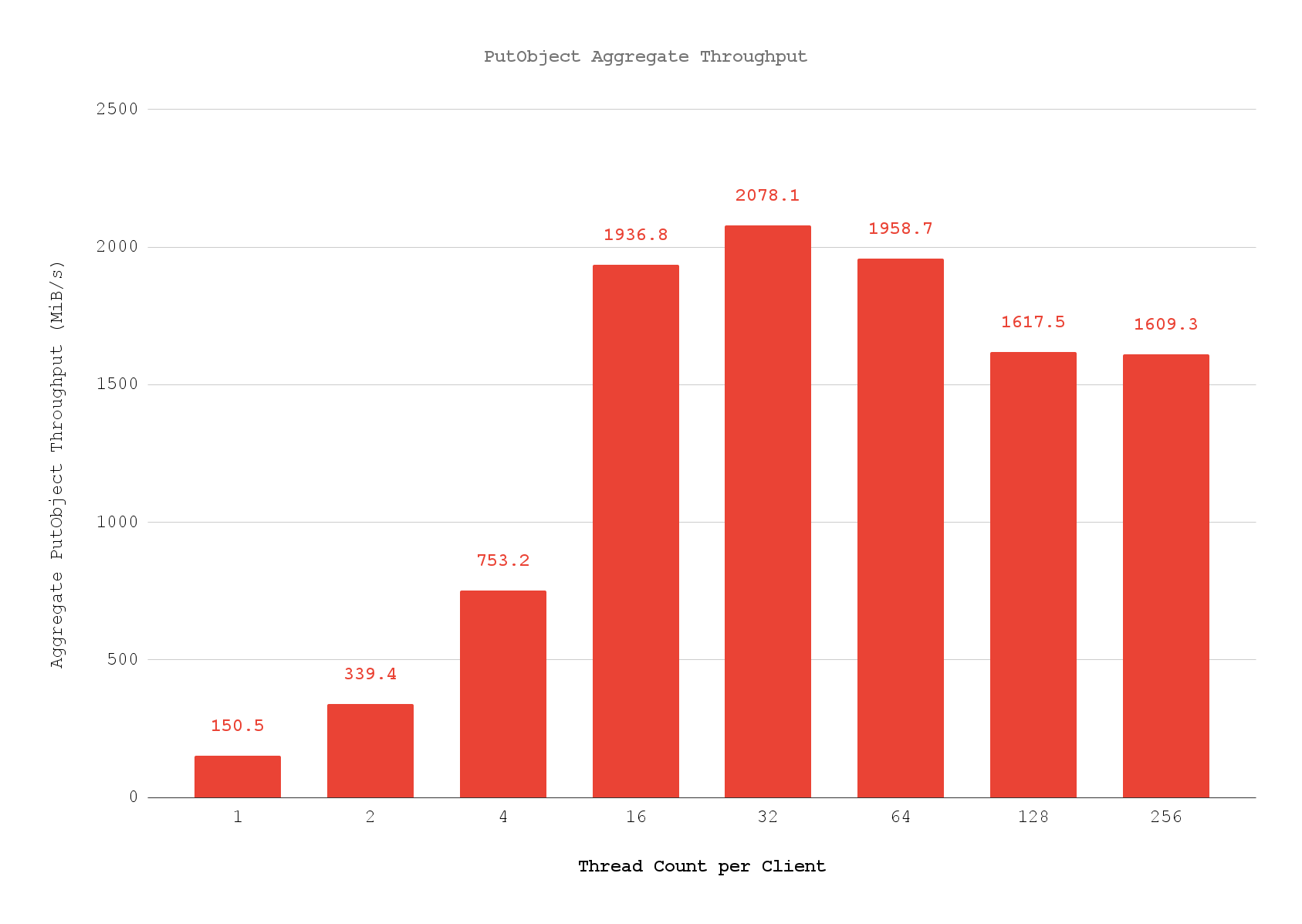
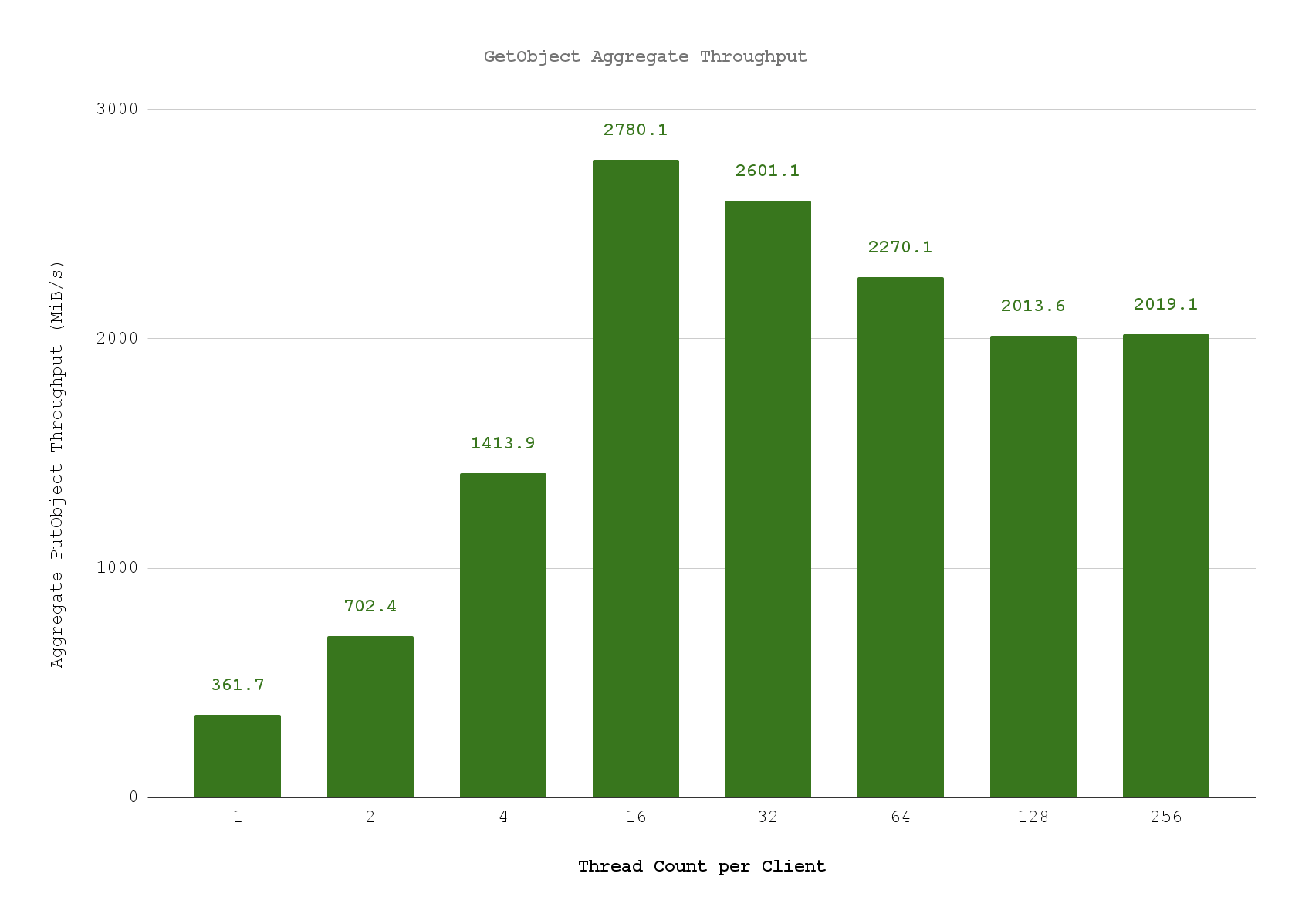 ***
## API Reference (S3-Compatible)
### Create bucket
> Source: [https://developers.telnyx.com/docs/cloud-storage/api-reference/bucket-operations/create-bucket.md](https://developers.telnyx.com/docs/cloud-storage/api-reference/bucket-operations/create-bucket.md)
# CreateBucket
[CreateBucket - Amazon Simple Storage Service](https://docs.aws.amazon.com/AmazonS3/latest/API/API_CreateBucket.html)
## Supported headers and XML elements
**✅Supported Headers**
`x-amz-acl`
* `private`
* `public-read`
**✅Supported XML Element**
* `LocationConstraint`
**Example request**
```bash theme={null}
PUT /mybucket HTTP/1.1
Host: [region].telnyxcloudstorage.com
Accept: text/xml
x-amz-acl: private
Content-Type: application/xml
X-Amz-Content-Sha256: beaead3198f7da1e70d03ab969765e0821b24fc913697e929e726aeaebf0eba3
X-Amz-Date: 20230927T152207Z
Authorization: AWS4-HMAC-SHA256 Credential=YOUR_TELNYX_API_KEY/20230927/test/execute-api/aws4_request, SignedHeaders=accept;content-length;content-type;host;x-amz-acl;x-amz-content-sha256;x-amz-date, Signature=eb67629c5cd507c56c5c5447323cc0190c605ab87c2b2fd3046825ca09a28425
Content-Length: 197
us-east-1
```
Bucket’s location is inherited from the regional endpoint to which you sent the CreateBucket request. If LocationConstraint is specified in the request body, its value must match that of the location in the regional endpoint. Otherwise, an error will be returned.
```xml theme={null}
***
## API Reference (S3-Compatible)
### Create bucket
> Source: [https://developers.telnyx.com/docs/cloud-storage/api-reference/bucket-operations/create-bucket.md](https://developers.telnyx.com/docs/cloud-storage/api-reference/bucket-operations/create-bucket.md)
# CreateBucket
[CreateBucket - Amazon Simple Storage Service](https://docs.aws.amazon.com/AmazonS3/latest/API/API_CreateBucket.html)
## Supported headers and XML elements
**✅Supported Headers**
`x-amz-acl`
* `private`
* `public-read`
**✅Supported XML Element**
* `LocationConstraint`
**Example request**
```bash theme={null}
PUT /mybucket HTTP/1.1
Host: [region].telnyxcloudstorage.com
Accept: text/xml
x-amz-acl: private
Content-Type: application/xml
X-Amz-Content-Sha256: beaead3198f7da1e70d03ab969765e0821b24fc913697e929e726aeaebf0eba3
X-Amz-Date: 20230927T152207Z
Authorization: AWS4-HMAC-SHA256 Credential=YOUR_TELNYX_API_KEY/20230927/test/execute-api/aws4_request, SignedHeaders=accept;content-length;content-type;host;x-amz-acl;x-amz-content-sha256;x-amz-date, Signature=eb67629c5cd507c56c5c5447323cc0190c605ab87c2b2fd3046825ca09a28425
Content-Length: 197
us-east-1
```
Bucket’s location is inherited from the regional endpoint to which you sent the CreateBucket request. If LocationConstraint is specified in the request body, its value must match that of the location in the regional endpoint. Otherwise, an error will be returned.
```xml theme={null}
InvalidLocationConstraint
The specified location-constraint is not valid
mybucket
tx00000e9df2217c8f5a351-00651445e0-e3e7-fl1
e3e7-fl1-us-east-1
```
In general, bucket names should follow domain name constraints.
Bucket names
* must be unique.
* cannot be formatted as IP address.
* can be between 3 and 63 characters long.
* must not contain uppercase characters or underscores.
* must start with a lowercase letter or number.
* can contain a dash (-).
* must be a series of one or more labels. Adjacent labels are separated by a single period (.). Bucket names can contain lowercase letters, numbers, and hyphens. Each label must start and end with a lowercase letter or a number.
Otherwise the following error will be returned
```xml theme={null}
InvalidBucketName
invalidBucket
tx0000040523d3a2d1ba956-006514716b-e3a0-fl1
e3a0-fl1-us-east-1
```
***
### Delete bucket
> Source: [https://developers.telnyx.com/docs/cloud-storage/api-reference/bucket-operations/delete-bucket.md](https://developers.telnyx.com/docs/cloud-storage/api-reference/bucket-operations/delete-bucket.md)
# DeleteBucket
[DeleteBucket - Amazon Simple Storage Service](https://docs.aws.amazon.com/AmazonS3/latest/API/API_DeleteBucket.html)
## Example DeleteBucket request
```bash theme={null}
curl --location --request DELETE 'https:// [region].telnyxcloudstorage.com/[bucket_name]' \
--header 'X-Amz-Date: 20230927T175031Z' \
--header 'Authorization: AWS4-HMAC-SHA256 Credential=YOUR_TELNYX_API_KEY/20230927/test/execute-api/aws4_request, SignedHeaders=host;x-amz-date, Signature=06c306e4a75de6aa98a875cfe76ee3977a1c99d60aee86b6db1f53a47539d464'
```
***
### Delete bucket CORS
> Source: [https://developers.telnyx.com/docs/cloud-storage/api-reference/bucket-operations/delete-bucket-cors.md](https://developers.telnyx.com/docs/cloud-storage/api-reference/bucket-operations/delete-bucket-cors.md)
# DeleteBucketCors
## Example DeleteBucketCors request
```bash theme={null}
user@host % aws s3api delete-bucket-cors --bucket chatgpt-bucket-1696358562 --profile us-east-1.telnyxcloudstorage.com --endpoint-url https://us-east-1.telnyxcloudstorage.com
```
***
### Delete bucket lifecycle
> Source: [https://developers.telnyx.com/docs/cloud-storage/api-reference/bucket-operations/delete-bucket-lifecycle.md](https://developers.telnyx.com/docs/cloud-storage/api-reference/bucket-operations/delete-bucket-lifecycle.md)
# DeleteBucketLifecycle
[DeleteBucketLifecycle - Amazon Simple Storage Service](https://docs.aws.amazon.com/AmazonS3/latest/API/API_DeleteBucketLifecycle.html)
## Example DeleteBucketLifecycle request
```bash theme={null}
DELETE /versionedbucket?lifecycle=null HTTP/1.1
Host: [region].telnyxcloudstorage.com
Accept: text/xml
X-Amz-Date: 20230927T173847Z
Authorization: AWS4-HMAC-SHA256 Credential=YOUR_TELNYX_API_KEY/20230927/test/execute-api/aws4_request, SignedHeaders=accept;host;x-amz-date, Signature=63c7e3d367d62488f9eba08ec8fdbe5bf89ef4484772b5fee952a4ac2dcd3362
```
***
### Delete bucket policy
> Source: [https://developers.telnyx.com/docs/cloud-storage/api-reference/bucket-operations/delete-bucket-policy.md](https://developers.telnyx.com/docs/cloud-storage/api-reference/bucket-operations/delete-bucket-policy.md)
# DeleteBucketPolicy
[DeleteBucketPolicy - Amazon Simple Storage Service](https://docs.aws.amazon.com/AmazonS3/latest/API/API_DeleteBucketPolicy.html)
## Example DeleteBucketPolicy request
```bash theme={null}
user@host % aws s3api delete-bucket-policy --bucket pubreadbuc
```
***
### Delete bucket tagging
> Source: [https://developers.telnyx.com/docs/cloud-storage/api-reference/bucket-operations/delete-bucket-tagging.md](https://developers.telnyx.com/docs/cloud-storage/api-reference/bucket-operations/delete-bucket-tagging.md)
# DeleteBucketTagging
[DeleteBucketTagging - Amazon Simple Storage Service](https://docs.aws.amazon.com/AmazonS3/latest/API/API_DeleteBucketTagging.html)
## Example DeleteBucketTagging request
````bash theme={null}
DELETE /versionedbucket?tagging=null HTTP/1.1
Host: [region].telnyxcloudstorage.com
Accept: text/xml
x-amz-acl: private
X-Amz-Date: 20230927T182455Z
Authorization: AWS4-HMAC-SHA256 Credential=YOUR_TELNYX_API_KEY/20230927/test/execute-api/aws4_request, SignedHeaders=accept;host;x-amz-acl;x-amz-date, Signature=8bad860d937751e40011d5953da3f2463f57e30b1f00d9f25707d393f68f582b```
````
***
### Get bucket ACL
> Source: [https://developers.telnyx.com/docs/cloud-storage/api-reference/bucket-operations/get-bucket-acl.md](https://developers.telnyx.com/docs/cloud-storage/api-reference/bucket-operations/get-bucket-acl.md)
# GetBucketAcl
[GetBucketAcl - Amazon Simple Storage Service](https://docs.aws.amazon.com/AmazonS3/latest/API/API_GetBucketAcl.html)
## Example GetBucketAcl request
```bash theme={null}
GET /versionedbucket?acl=null HTTP/1.1
Host: [region].telnyxcloudstorage.com
Accept: text/xml
x-amz-acl: public-read
X-Amz-Date: 20230927T174306Z
Authorization: AWS4-HMAC-SHA256 Credential=YOUR_TELNYX_API_KEY/20230927/test/execute-api/aws4_request, SignedHeaders=accept;host;x-amz-acl;x-amz-date, Signature=050c7795578015f9b3f51bc6d3785d90f7394e5ef7e611ebb6ede54802faa996
```
## Example GetBucketAcl Response
```xml theme={null}
27784a49-1f14-4209-a58d-27fe905efe58
27784a49-1f14-4209-a58d-27fe905efe58
http://acs.amazonaws.com/groups/global/AllUsers
READ
27784a49-1f14-4209-a58d-27fe905efe58
27784a49-1f14-4209-a58d-27fe905efe58
FULL_CONTROL
```
***
### Get bucket CORS
> Source: [https://developers.telnyx.com/docs/cloud-storage/api-reference/bucket-operations/get-bucket-cors.md](https://developers.telnyx.com/docs/cloud-storage/api-reference/bucket-operations/get-bucket-cors.md)
# GetBucketCors
## Example GetBucketCors request
```bash theme={null}
user@host % aws s3api get-bucket-cors --bucket my_bucket
{
"CORSRules": [
{
"AllowedHeaders": [
"*"
],
"AllowedMethods": [
"PUT",
"DELETE",
"POST"
],
"AllowedOrigins": [
"http://www.example.com"
]
},
{
"AllowedMethods": [
"GET"
],
"AllowedOrigins": [
"*"
]
}
]
}
```
***
### Get bucket lifecycle configuration
> Source: [https://developers.telnyx.com/docs/cloud-storage/api-reference/bucket-operations/get-bucket-lifecycle-configuration.md](https://developers.telnyx.com/docs/cloud-storage/api-reference/bucket-operations/get-bucket-lifecycle-configuration.md)
# GetBucketLifecycleConfiguration
[GetBucketLifecycleConfiguration - Amazon Simple Storage Service](https://docs.aws.amazon.com/AmazonS3/latest/API/API_GetBucketLifecycleConfiguration.html)
## Example GetBucketLifecycleConfiguration request
```bash theme={null}
GET /versionedbucket?lifecycle=null HTTP/1.1
Host: [region].telnyxcloudstorage.com
Accept: text/xml
X-Amz-Date: 20230927T172450Z
Authorization: AWS4-HMAC-SHA256 Credential=YOUR_TELNYX_API_KEY/20230927/test/execute-api/aws4_request, SignedHeaders=accept;host;x-amz-date, Signature=c8e6ec2d0c5c34ea061e4dd47d2e7103fde5a885c25d9dca3ac743d8b6ab3330
```
## Example GetBucketLifecycleConfiguration response
```xml theme={null}
DeleteAfterBecomingNonCurrent
logs/
Enabled
100
```
***
### Get bucket location
> Source: [https://developers.telnyx.com/docs/cloud-storage/api-reference/bucket-operations/get-bucket-location.md](https://developers.telnyx.com/docs/cloud-storage/api-reference/bucket-operations/get-bucket-location.md)
# GetBucketLocation
[GetBucketLocation - Amazon Simple Storage Service](https://docs.aws.amazon.com/AmazonS3/latest/API/API_GetBucketLocation.html)
## Example GetBucketLocation request
```bash theme={null}
GET /versionedbucket?location=null HTTP/1.1
Host: [region].telnyxcloudstorage.com
Accept: text/xml
x-amz-acl: private
X-Amz-Date: 20230927T170849Z
Authorization: AWS4-HMAC-SHA256 Credential=YOUR_TELNYX_API_KEY/20230927/test/execute-api/aws4_request, SignedHeaders=accept;host;x-amz-acl;x-amz-date, Signature=107fa2b75c0af7f1982923de787b767f407718c4f1eb19937ff3445f2c0be332
```
## Example GetBucketLocation response
```xml theme={null}
us-east-1
```
***
### Get bucket policy
> Source: [https://developers.telnyx.com/docs/cloud-storage/api-reference/bucket-operations/get-bucket-policy.md](https://developers.telnyx.com/docs/cloud-storage/api-reference/bucket-operations/get-bucket-policy.md)
# GetBucketPolicy
[GetBucketPolicy - Amazon Simple Storage Service](https://docs.aws.amazon.com/AmazonS3/latest/API/API_GetBucketPolicy.html)
## Example GetBucketPolicy request
```bash theme={null}
user@host % aws s3api get-bucket-policy --bucket pubreadbuc
{
"Policy": "{\n
\"Version\": \"2012-10-17\",\n
\"Statement\": [\n
{\n
\"Sid\": \"PublicReadGetObject\",\n
\"Effect\": \"Allow\",\n
\"Principal\": \"*\",\n
\"Action\": \"s3:GetObject\",\n
\"Resource\": \"arn:aws:s3:::pubreadbuc *\"\n
}\n
]\n
}\n
\n"
}
```
***
### Get bucket policy status
> Source: [https://developers.telnyx.com/docs/cloud-storage/api-reference/bucket-operations/get-bucket-policy-status.md](https://developers.telnyx.com/docs/cloud-storage/api-reference/bucket-operations/get-bucket-policy-status.md)
# GetBucketPolicyStatus
[GetBucketPolicyStatus - Amazon Simple Storage Service](https://docs.aws.amazon.com/AmazonS3/latest/API/API_GetBucketPolicyStatus.html)
## Example GetBucketPolicyStatus request
```bash theme={null}
user@host % aws s3api get-bucket-policy-status --bucket pubreadbuc
{
"PolicyStatus": {
"IsPublic": true
}
}
```
***
### Get bucket tagging
> Source: [https://developers.telnyx.com/docs/cloud-storage/api-reference/bucket-operations/get-bucket-tagging.md](https://developers.telnyx.com/docs/cloud-storage/api-reference/bucket-operations/get-bucket-tagging.md)
# GetBucketTagging
[GetBucketTagging - Amazon Simple Storage Service](https://docs.aws.amazon.com/AmazonS3/latest/API/API_GetBucketTagging.html)
## Example GetBucketTagging request
```bash theme={null}
GET /versionedbucket?tagging=null HTTP/1.1
Host: [region].telnyxcloudstorage.com
Accept: text/xml
x-amz-acl: private
X-Amz-Date: 20230927T182418Z
Authorization: AWS4-HMAC-SHA256 Credential=YOUR_TELNYX_API_KEY/20230927/test/execute-api/aws4_request, SignedHeaders=accept;host;x-amz-acl;x-amz-date, Signature=94c986f7bf15c5ce04a1cdd83c0ee058d78eabfb8d0bab35caac92b965490b96
```
## Example GetBucketTagging response
```xml theme={null}
dimention_1
value_1
dimention_2
value_2
```
***
### Get bucket versioning
> Source: [https://developers.telnyx.com/docs/cloud-storage/api-reference/bucket-operations/get-bucket-versioning.md](https://developers.telnyx.com/docs/cloud-storage/api-reference/bucket-operations/get-bucket-versioning.md)
# GetBucketVersioning
[GetBucketVersioning - Amazon Simple Storage Service](https://docs.aws.amazon.com/AmazonS3/latest/API/API_GetBucketVersioning.html)
## Example GetBucketVersioning request
```bash theme={null}
GET /versionedbucket?versioning=null HTTP/1.1
Host: [region].telnyxcloudstorage.com
Accept: text/xml
x-amz-acl: private
X-Amz-Date: 20230927T165704Z
Authorization: AWS4-HMAC-SHA256 Credential=YOUR_TELNYX_API_KEY/20230927/test/execute-api/aws4_request, SignedHeaders=accept;host;x-amz-acl;x-amz-date, Signature=8d8723b48a60f1fef06b43a2f34ca9f4426efa5ae01f9dce8fcc49cba893b69e
```
## Example GetBucketVersioning response
```xml theme={null}
Enabled
Disabled
```
***
### Head bucket
> Source: [https://developers.telnyx.com/docs/cloud-storage/api-reference/bucket-operations/head-bucket.md](https://developers.telnyx.com/docs/cloud-storage/api-reference/bucket-operations/head-bucket.md)
# HeadBucket
[HeadBucket - Amazon Simple Storage Service](https://docs.aws.amazon.com/AmazonS3/latest/API/API_HeadBucket.html)
## Example HeadBucket request
```bash theme={null}
HEAD /versionedbucket HTTP/1.1
Host: [region].telnyxcloudstorage.com
Accept: text/xml
X-Amz-Date: 20230927T174619Z
Authorization: AWS4-HMAC-SHA256 Credential=YOUR_TELNYX_API_KEY/20230927/test/execute-api/aws4_request, SignedHeaders=accept;host;x-amz-date, Signature=8cf0e5ebf1a74d2607aa36eb085659f696de84dd491a4b62adaf584572c8e90b
```
## Example HeadBucket response
```bash theme={null}
HTTP/1.1 200 OK
content-length: 0
date: Wed, 27 Sep 2023 17:48:02 GMT
x-amz-request-id: tx000007a82340b0a467215-0065146ad2-e3bf-fl1
x-rgw-bytes-used: 608686
x-rgw-object-count: 4
x-rgw-quota-bucket-objects: -1
x-rgw-quota-bucket-size: -1
x-rgw-quota-max-buckets: 1000
x-rgw-quota-user-objects: -1
x-rgw-quota-user-size: -1
server: Telnyx API
```
***
### List buckets
> Source: [https://developers.telnyx.com/docs/cloud-storage/api-reference/bucket-operations/list-bucket.md](https://developers.telnyx.com/docs/cloud-storage/api-reference/bucket-operations/list-bucket.md)
# ListBuckets
[ListBuckets - Amazon Simple Storage Service](https://docs.aws.amazon.com/AmazonS3/latest/API/API_ListBuckets.html)
## Example ListBuckets request
```bash theme={null}
GET / HTTP/1.1
Host: [region].telnyxcloudstorage.com
X-Amz-Date: 20230927T165213Z
Authorization: AWS4-HMAC-SHA256 Credential=YOUR_TELNYX_API_KEY/20230927/test/execute-api/aws4_request, SignedHeaders=host;x-amz-date, Signature=5e8edce90f122eaf3810bb5934d8a4208530da8fe9bf634a1950f5eb49bf6197
```
## Example ListBuckets response
```xml theme={null}
27784a49-1f14-4209-a58d-27fe905efe58
27784a49-1f14-4209-a58d-27fe905efe58
mybucket
2023-09-27T15:15:47.026Z
publicbucket
2023-09-27T15:50:14.996Z
testpostdeploybxx
2023-09-26T14:26:19.996Z
versionedbucket
2023-09-27T16:51:50.678Z
```
***
### Put bucket ACL
> Source: [https://developers.telnyx.com/docs/cloud-storage/api-reference/bucket-operations/put-bucket-acl.md](https://developers.telnyx.com/docs/cloud-storage/api-reference/bucket-operations/put-bucket-acl.md)
# PutBucketAcl
**Warning:** Only verified users can update bucket policy. To request KYC on your account, go to [Portal Account Verifications](https://portal.telnyx.com/#/app/account/verifications)
[PutBucketAcl - Amazon Simple Storage Service](https://docs.aws.amazon.com/AmazonS3/latest/API/API_PutBucketAcl.html)
**✅ Supported Headers**
`x-amz-acl`
* `private`
* `public-read`
## Example PutBucketAcl request
```bash theme={null}
PUT /versionedbucket?acl=null HTTP/1.1
Host: [region].telnyxcloudstorage.com
Accept: text/xml
x-amz-acl: public-read
X-Amz-Date: 20230927T174201Z
Authorization: AWS4-HMAC-SHA256 Credential=YOUR_TELNYX_API_KEY/20230927/test/execute-api/aws4_request, SignedHeaders=accept;host;x-amz-acl;x-amz-date, Signature=3e206ed8dfb07bddf453f4735e4685527f2d7fb207ccaf00826353bb21db2164
```
***
### Put bucket CORS
> Source: [https://developers.telnyx.com/docs/cloud-storage/api-reference/bucket-operations/put-bucket-cors.md](https://developers.telnyx.com/docs/cloud-storage/api-reference/bucket-operations/put-bucket-cors.md)
# PutBucketCors
## Example PutBucketCors request
### Prepare a JSON file like this
```json theme={null}
{
"CORSRules": [
{
"AllowedOrigins": ["http://www.example.com"],
"AllowedMethods": ["PUT", "POST", "DELETE"],
"AllowedHeaders": ["*"]
},
{
"AllowedOrigins": ["*"],
"AllowedMethods": ["GET"]
}
]
}
```
### Then apply it to the target bucket
```bash theme={null}
user@host % aws s3api put-bucket-cors --bucket my_bucket --cors-configuration file://cors.json
```
***
### Put bucket lifecycle configuration
> Source: [https://developers.telnyx.com/docs/cloud-storage/api-reference/bucket-operations/put-bucket-life-cycle-configuration.md](https://developers.telnyx.com/docs/cloud-storage/api-reference/bucket-operations/put-bucket-life-cycle-configuration.md)
# PutBucketLifecycleConfiguration
[PutBucketLifecycleConfiguration - Amazon Simple Storage Service](https://docs.aws.amazon.com/AmazonS3/latest/API/API_PutBucketLifecycleConfiguration.html)
**✅ Supported XML Elements**
* `ID`
* `Status`
* `Prefix`
* `Expiration`
* `AbortIncompleteMultipartUpload`
## Example PutBucketLifecycleConfiguration request — Non-versioned bucket
```bash theme={null}
PUT /mybucket?lifecycle=null HTTP/1.1
Host: [region].telnyxcloudstorage.com
Accept: text/xml
Content-Type: application/xml
X-Amz-Content-Sha256: beaead3198f7da1e70d03ab969765e0821b24fc913697e929e726aeaebf0eba3
X-Amz-Date: 20230927T171857Z
Authorization: AWS4-HMAC-SHA256 Credential=YOUR_TELNYX_API_KEY/20230927/test/execute-api/aws4_request, SignedHeaders=accept;content-length;content-type;host;x-amz-acl;x-amz-content-sha256;x-amz-date, Signature=bf5f1ef0813a985a4798dbbd63a722555f45a04de648f6bb7e975b4808974d80
Content-Length: 355
id2
logs/
Enabled
30
```
## Example PutBucketLifecycleConfiguration request - versioned bucket
```bash theme={null}
PUT /versionedbucket?lifecycle=null HTTP/1.1
Host: [region].telnyxcloudstorage.com
Accept: text/xml
Content-Type: application/xml
X-Amz-Content-Sha256: beaead3198f7da1e70d03ab969765e0821b24fc913697e929e726aeaebf0eba3
X-Amz-Date: 20230927T172104Z
Authorization: AWS4-HMAC-SHA256 Credential=YOUR_TELNYX_API_KEY/20230927/test/execute-api/aws4_request, SignedHeaders=accept;content-length;content-type;host;x-amz-content-sha256;x-amz-date, Signature=a831851b8259ffb9e222ef5c755e5e44549972db7643d28f0570ac07b0600401
Content-Length: 436
DeleteAfterBecomingNonCurrent
logs/
Enabled
100
```
***
### Put bucket policy
> Source: [https://developers.telnyx.com/docs/cloud-storage/api-reference/bucket-operations/put-bucket-policy.md](https://developers.telnyx.com/docs/cloud-storage/api-reference/bucket-operations/put-bucket-policy.md)
# PutBucketPolicy
[PutBucketPolicy - Amazon Simple Storage Service](https://docs.aws.amazon.com/AmazonS3/latest/API/API_PutBucketPolicy.html)
**Warning:** Only verified users can update bucket policy. To request KYC on your account, go to [Portal Account Verifications](https://portal.telnyx.com/#/app/account/verifications)
## Example PutBucketPolicy request
Create a bucket where the objects stored in there can be read publicly without authentication
Create a JSON file locally, e.g. `public_read_policy.json`
### Prepare a JSON file like this
```json theme={null}
{
"Version": "2012-10-17",
"Statement": [
{
"Sid": "PublicReadGetObject",
"Effect": "Allow",
"Principal": "*",
"Action": "s3:GetObject",
"Resource": "arn:aws:s3:::/*"
}
]
}
```
### Then apply that to an existing bucket
```bash theme={null}
user@host % aws s3api put-bucket-policy --bucket pubreadbuc --policy file://public_read_policy.json
```
***
### Put bucket tagging
> Source: [https://developers.telnyx.com/docs/cloud-storage/api-reference/bucket-operations/put-bucket-tagging.md](https://developers.telnyx.com/docs/cloud-storage/api-reference/bucket-operations/put-bucket-tagging.md)
# PutBucketTagging
[PutBucketTagging - Amazon Simple Storage Service](https://docs.aws.amazon.com/AmazonS3/latest/API/API_PutBucketTagging.html)
## Example PutBucketTagging request
```bash theme={null}
PUT /versionedbucket?tagging=null HTTP/1.1
Host: [region].telnyxcloudstorage.com
Accept: text/xml
x-amz-acl: private
Content-Type: application/xml
X-Amz-Content-Sha256: beaead3198f7da1e70d03ab969765e0821b24fc913697e929e726aeaebf0eba3
X-Amz-Date: 20230927T182056Z
Authorization: AWS4-HMAC-SHA256 Credential=YOUR_TELNYX_API_KEY/20230927/test/execute-api/aws4_request, SignedHeaders=accept;content-length;content-type;host;x-amz-acl;x-amz-content-sha256;x-amz-date, Signature=7eb598e87b95668e4502fef0694a515e960a98890c30185fc974bea5d8e72fe6
Content-Length: 310
dimention_1
value_1
dimention_2
value_2
```
***
### Put bucket versioning
> Source: [https://developers.telnyx.com/docs/cloud-storage/api-reference/bucket-operations/put-bucket-versioning.md](https://developers.telnyx.com/docs/cloud-storage/api-reference/bucket-operations/put-bucket-versioning.md)
# PutBucketVersioning
[PutBucketVersioning - Amazon Simple Storage Service](https://docs.aws.amazon.com/AmazonS3/latest/API/API_PutBucketVersioning.html)
**✅ Supported XML element**
* `Status`
## Example PutBucketVersioning request
```bash theme={null}
PUT /versionedbucket?versioning=null HTTP/1.1
Host: [region].telnyxcloudstorage.com
Accept: text/xml
x-amz-acl: private
Content-Type: application/xml
X-Amz-Content-Sha256: beaead3198f7da1e70d03ab969765e0821b24fc913697e929e726aeaebf0eba3
X-Amz-Date: 20230927T165559Z
Authorization: AWS4-HMAC-SHA256 Credential=YOUR_TELNYX_API_KEY/20230927/test/execute-api/aws4_request, SignedHeaders=accept;content-length;content-type;host;x-amz-acl;x-amz-content-sha256;x-amz-date, Signature=b9e0ced3fbf8e42c75b98f84c91758b74916b5bfe2d8a0208a67dffdbcb168e2
Content-Length: 167
Enabled
```
***
### Delete object
> Source: [https://developers.telnyx.com/docs/cloud-storage/api-reference/object-operations/delete-object.md](https://developers.telnyx.com/docs/cloud-storage/api-reference/object-operations/delete-object.md)
# DeleteObject
[DeleteObject - Amazon Simple Storage Service](https://docs.aws.amazon.com/AmazonS3/latest/API/API_DeleteObject.html)
## Example DeleteObject Request
```bash theme={null}
DELETE /publicbucket/mymultiloader_1 HTTP/1.1
Host: [region].telnyxcloudstorage.com
X-Amz-Date: 20230927T164329Z
Authorization: AWS4-HMAC-SHA256 Credential=YOUR_TELNYX_API_KEY/20230927/test/execute-api/aws4_request, SignedHeaders=host;x-amz-date, Signature=539be1c5c92d8b89bcc4ea79eccb1f6e8ee3e1bd5c362dbf7b5f9bb2fa5515ca
```
***
### Delete object tagging
> Source: [https://developers.telnyx.com/docs/cloud-storage/api-reference/object-operations/delete-object-tagging.md](https://developers.telnyx.com/docs/cloud-storage/api-reference/object-operations/delete-object-tagging.md)
# DeleteObjectTagging
[DeleteObjectTagging - Amazon Simple Storage Service](https://docs.aws.amazon.com/AmazonS3/latest/API/API_DeleteObjectTagging.html)
## Example DeleteObjectTagging request
```bash theme={null}
DELETE /mybucket/myobject?tagging=null HTTP/1.1
Host: [region].telnyxcloudstorage.com
x-amz-acl: private
X-Amz-Date: 20230927T180605Z
Authorization: AWS4-HMAC-SHA256 Credential=YOUR_TELNYX_API_KEY/20230927/test/execute-api/aws4_request, SignedHeaders=host;x-amz-acl;x-amz-date, Signature=361bbc366be4fa4e2f770dad0130b09948383d8e2bb58540fd469be3af24bbb0
```
***
### Delete objects
> Source: [https://developers.telnyx.com/docs/cloud-storage/api-reference/object-operations/delete-objects.md](https://developers.telnyx.com/docs/cloud-storage/api-reference/object-operations/delete-objects.md)
# DeleteObjects
[DeleteObjects - Amazon Simple Storage Service](https://docs.aws.amazon.com/AmazonS3/latest/API/API_DeleteObjects.html)
## Example DeleteObjects request (using AWS S3 CLI)
* Originally 3 objects exists in this bucket
```bash theme={null}
user@host ~ % aws s3api list-objects --bucket created-in-fl-1
{
"Contents": [
{
"Key": "xxx",
"LastModified": "2023-10-02T19:11:54.788000+00:00",
"ETag": "\"2da8bc8e8133ec2af9268515aae59e7a\"",
"Size": 22905,
"StorageClass": "STANDARD",
"Owner": {
"DisplayName": "xd",
"ID": "xd"
}
},
{
"Key": "yyy",
"LastModified": "2023-10-02T19:11:38.436000+00:00",
"ETag": "\"2da8bc8e8133ec2af9268515aae59e7a\"",
"Size": 22905,
"StorageClass": "STANDARD",
"Owner": {
"DisplayName": "xd",
"ID": "xd"
}
},
{
"Key": "zzz",
"LastModified": "2023-10-02T19:11:25.551000+00:00",
"ETag": "\"2da8bc8e8133ec2af9268515aae59e7a\"",
"Size": 22905,
"StorageClass": "STANDARD",
"Owner": {
"DisplayName": "xd",
"ID": "xd"
}
}
],
"RequestCharged": null
}
```
* Delete 2 objects
```bash theme={null}
user@host ~ % aws s3api delete-objects --delete '{"Objects":[{"Key":"xxx"},{"Key":"yyy"}]}' --bucket created-in-fl-1
{
"Deleted": [
{
"Key": "xxx"
},
{
"Key": "yyy"
}
]
}
```
***
### Get object
> Source: [https://developers.telnyx.com/docs/cloud-storage/api-reference/object-operations/get-object.md](https://developers.telnyx.com/docs/cloud-storage/api-reference/object-operations/get-object.md)
# GetObject
[GetObject - Amazon Simple Storage Service](https://docs.aws.amazon.com/AmazonS3/latest/API/API_GetObject.html)
**✅ Supported Headers**
* `If-Match``If-Modified-Since`
* `If-None-Match`
* `If-Unmodified-Since`
* `Range`
## Example GetObject request
```bash theme={null}
GET /mybucket/myobject HTTP/1.1
Host: [region].telnyxcloudstorage.com
Accept: application/octet-stream
X-Amz-Date: 20230927T152801Z
Authorization: AWS4-HMAC-SHA256 Credential=YOUR_TELNYX_API_KEY/20230927/test/execute-api/aws4_request, SignedHeaders=accept;host;x-amz-date, Signature=41797df5b33f76003806aeb1eba3f25e108ecdb8582e6575e3bb1aaff4ddb839
```
***
### Get object ACL
> Source: [https://developers.telnyx.com/docs/cloud-storage/api-reference/object-operations/get-object-acl.md](https://developers.telnyx.com/docs/cloud-storage/api-reference/object-operations/get-object-acl.md)
# GetObjectAcl
[GetObjectAcl - Amazon Simple Storage Service](https://docs.aws.amazon.com/AmazonS3/latest/API/API_GetObjectAcl.html)
## Example GetObjectAcl request
```bash theme={null}
GET /mybucket/myobject?acl=null HTTP/1.1
Host: [region].telnyxcloudstorage.com
x-amz-acl: private
X-Amz-Date: 20230927T175743Z
Authorization: AWS4-HMAC-SHA256 Credential=YOUR_TELNYX_API_KEY/20230927/test/execute-api/aws4_request, SignedHeaders=host;x-amz-acl;x-amz-date, Signature=4edb4e62f2a28e4ff8e6b317fd867b4baf382b3c87b26e2404ea7a766779be4d
```
## Example GetObjectAcl response
```xml theme={null}
27784a49-1f14-4209-a58d-27fe905efe58
27784a49-1f14-4209-a58d-27fe905efe58
http://acs.amazonaws.com/groups/global/AllUsers
READ
27784a49-1f14-4209-a58d-27fe905efe58
27784a49-1f14-4209-a58d-27fe905efe58
FULL_CONTROL
```
***
### Get object tagging
> Source: [https://developers.telnyx.com/docs/cloud-storage/api-reference/object-operations/get-object-tagging.md](https://developers.telnyx.com/docs/cloud-storage/api-reference/object-operations/get-object-tagging.md)
# GetObjectTagging
[GetObjectTagging - Amazon Simple Storage Service](https://docs.aws.amazon.com/AmazonS3/latest/API/API_GetObjectTagging.html)
## Example GetObjectTagging request
```bash theme={null}
GET /mybucket/myobject?tagging=null HTTP/1.1
Host: [region].telnyxcloudstorage.com
x-amz-acl: private
X-Amz-Date: 20230927T180458Z
Authorization: AWS4-HMAC-SHA256 Credential=YOUR_TELNYX_API_KEY/20230927/test/execute-api/aws4_request, SignedHeaders=host;x-amz-acl;x-amz-date, Signature=655002dff20fc340dcfb66b4e06595ddfe950b9e091992f4c82ac0777b42ff8e
```
## Example GetObjectTagging response
```xml theme={null}
dimention_1
value_1
dimention_2
value_2
```
***
### Head object
> Source: [https://developers.telnyx.com/docs/cloud-storage/api-reference/object-operations/head-object.md](https://developers.telnyx.com/docs/cloud-storage/api-reference/object-operations/head-object.md)
# HeadObject
[HeadObject - Amazon Simple Storage Service](https://docs.aws.amazon.com/AmazonS3/latest/API/API_HeadObject.html)
**✅ Supported Headers**
* `If-Match`
* `If-Modified-Since`
* `If-None-Match`
* `If-Unmodified-Since`
* `Range`
## Example HeadObject request
```bash theme={null}
HEAD /mybucket/myobject HTTP/1.1
Host: [region].telnyxcloudstorage.com
X-Amz-Date: 20230927T164456Z
Authorization: AWS4-HMAC-SHA256 Credential=YOUR_TELNYX_API_KEY/20230927/test/execute-api/aws4_request, SignedHeaders=host;x-amz-date, Signature=d198d5440102737bd0dc5753ce6e5a843a673779ece724acd84ae08aedfe8297
```
## Example HeadObject response
```bash theme={null}
HTTP/1.1 200 OK
accept-ranges: bytes
content-length: 22905
content-type: image/png
date: Wed, 27 Sep 2023 16:47:00 GMT
etag: "2da8bc8e8133ec2af9268515aae59e7a"
last-modified: Wed, 27 Sep 2023 15:23:52 GMT
x-amz-meta-author: john
x-amz-request-id: tx00000b6702bae22c9729e-0065145c84-e3bf-fl1
x-amz-storage-class: STANDARD
x-rgw-object-type: Normal
server: Telnyx API
```
***
### List object versions
> Source: [https://developers.telnyx.com/docs/cloud-storage/api-reference/object-operations/list-object-versions.md](https://developers.telnyx.com/docs/cloud-storage/api-reference/object-operations/list-object-versions.md)
# ListObjectVersions
[ListObjectVersions - Amazon Simple Storage Service](https://docs.aws.amazon.com/AmazonS3/latest/API/API_ListObjectVersions.html)
**✅ Supported Parameters**
* `prefix`
* `delimiter`
* `marker `
* `max-keys`
## Example ListObjectVersions request
```bash theme={null}
GET /versionedbucket?versions=null HTTP/1.1
Host: [region].telnyxcloudstorage.com
Accept: application/octet-stream
X-Amz-Date: 20230927T170348Z
Authorization: AWS4-HMAC-SHA256 Credential=YOUR_TELNYX_API_KEY/20230927/test/execute-api/aws4_request, SignedHeaders=accept;host;x-amz-date, Signature=15c5f0d8404b4e43153138818ca4cd0895c6a0bd4b94173bb6080a71f41bc49f
```
## Example ListObjectVersions response
```xml theme={null}
versionedbucket
1000
false
versionedobject
X04kXxTyoh1YjplIl647teiNbL0foEN
true
2023-09-27T17:01:09.522Z
"22472751e76c3a57583d89785e2330e4"
279010
STANDARD
27784a49-1f14-4209-a58d-27fe905efe58
27784a49-1f14-4209-a58d-27fe905efe58
Normal
versionedobject
IWv2xkiXwOQvN1RClOuCeJZKKFIjjc7
false
2023-09-27T17:00:51.542Z
"2da8bc8e8133ec2af9268515aae59e7a"
22905
STANDARD
27784a49-1f14-4209-a58d-27fe905efe58
27784a49-1f14-4209-a58d-27fe905efe58
Normal
versionedobject
Hmvl0sI98e-m9fyFZW23gC2vz2hODKC
false
2023-09-27T17:00:22.591Z
"0e43168b1e60136a3d4292c54763d449"
27761
STANDARD
27784a49-1f14-4209-a58d-27fe905efe58
27784a49-1f14-4209-a58d-27fe905efe58
Normal
versionedobject_xxx
TUKc1O3XHubZcxH9Wo.MPaddPsJY7Wi
true
2023-09-27T17:03:44.249Z
"22472751e76c3a57583d89785e2330e4"
279010
STANDARD
27784a49-1f14-4209-a58d-27fe905efe58
27784a49-1f14-4209-a58d-27fe905efe58
Normal
```
***
### List objects
> Source: [https://developers.telnyx.com/docs/cloud-storage/api-reference/object-operations/list-objects.md](https://developers.telnyx.com/docs/cloud-storage/api-reference/object-operations/list-objects.md)
# ListObjects
[ListObjects - Amazon Simple Storage Service](https://docs.aws.amazon.com/AmazonS3/latest/API/API_ListObjects.html)
**✅ Supported Parameters**
* `prefix`
* `delimiter`
* `marker `
* `max-keys`
## Example ListObjects request
```bash theme={null}
GET /mybucket?prefix=myobject HTTP/1.1
Host: [region].telnyxcloudstorage.com
X-Amz-Date: 20230927T154626Z
Authorization: AWS4-HMAC-SHA256 Credential=YOUR_TELNYX_API_KEY/20230927/test/execute-api/aws4_request, SignedHeaders=host;x-amz-date, Signature=b77c8c94d8f0bd0913708ae7da0fbac552d14a6f2b8853b6e297a12127156e38
```
## Example ListObjects response
```xml theme={null}
mybucket
myobject
1000
false
myobject
2023-09-27T15:23:52.668Z
"2da8bc8e8133ec2af9268515aae59e7a"
22905
STANDARD
27784a49-1f14-4209-a58d-27fe905efe58
27784a49-1f14-4209-a58d-27fe905efe58
Normal
myobject_2
2023-09-27T15:44:06.670Z
"0e43168b1e60136a3d4292c54763d449"
27761
STANDARD
27784a49-1f14-4209-a58d-27fe905efe58
27784a49-1f14-4209-a58d-27fe905efe58
Normal
```
***
### Put object
> Source: [https://developers.telnyx.com/docs/cloud-storage/api-reference/object-operations/put-object.md](https://developers.telnyx.com/docs/cloud-storage/api-reference/object-operations/put-object.md)
# PutObject
[PutObject - Amazon Simple Storage Service](https://docs.aws.amazon.com/AmazonS3/latest/API/API_PutObject.html)
**✅ Supported Headers**
`x-amz-acl`
* `private`
* `public-read`
`x-amz-storage-class`
* `STANDARD`
`x-amz-meta-*`
`x-amz-server-side-encryption-customer-algorithm`
`x-amz-server-side-encryption-customer-key`
`x-amz-server-side-encryption-customer-key-MD5`
```bash theme={null}
PUT /mybucket/myobject HTTP/1.1
Host: [region].telnyxcloudstorage.com
x-amz-storage-class: STANDARD
x-amz-acl: private
x-amz-meta-author: john
Content-Type: image/png
X-Amz-Date: 20230927T152352Z
Authorization: AWS4-HMAC-SHA256 Credential=YOUR_TELNYX_API_KEY/20230927/test/execute-api/aws4_request, SignedHeaders=content-length;content-type;host;x-amz-date, Signature=f1a15846adc6247727c0dcfbb738d8ee4463527023e7818bf128866944981dea
Content-Length: 22
""
```
***
### Put object ACL
> Source: [https://developers.telnyx.com/docs/cloud-storage/api-reference/object-operations/put-object-acl.md](https://developers.telnyx.com/docs/cloud-storage/api-reference/object-operations/put-object-acl.md)
# PutObjectACL
**Warning:** Only verified users can update bucket policy. To request KYC on your account, go to [Portal Account Verifications](https://portal.telnyx.com/#/app/account/verifications)
[PutObjectAcl - Amazon Simple Storage Service](https://docs.aws.amazon.com/AmazonS3/latest/API/API_PutObjectAcl.html)
**✅ Supported Headers**
`x-amz-acl`
* `private`
* `public-read`
`versionId`
## Example PutObjectACL request
```bash theme={null}
PUT /mybucket/myobject?acl=null HTTP/1.1
Host: [region].telnyxcloudstorage.com
x-amz-acl: public-read
X-Amz-Date: 20230927T175633Z
Authorization: AWS4-HMAC-SHA256 Credential=YOUR_TELNYX_API_KEY/20230927/test/execute-api/aws4_request, SignedHeaders=host;x-amz-acl;x-amz-date, Signature=71b70f25be863194c5d573fdf09ea02139af3cbcaa5e16dc53a0f30d41f7311a
```
***
### Put object tagging
> Source: [https://developers.telnyx.com/docs/cloud-storage/api-reference/object-operations/put-object-tagging.md](https://developers.telnyx.com/docs/cloud-storage/api-reference/object-operations/put-object-tagging.md)
# PutObjectTagging
[PutObjectTagging - Amazon Simple Storage Service](https://docs.aws.amazon.com/AmazonS3/latest/API/API_PutObjectTagging.html)
**✅ Supported Headers**
* `versionId`
## Example PutObjectTagging request
```bash theme={null}
PUT /mybucket/myobject?tagging=null HTTP/1.1
Host: [region].telnyxcloudstorage.com
x-amz-acl: private
Content-Type: application/xml
X-Amz-Content-Sha256: beaead3198f7da1e70d03ab969765e0821b24fc913697e929e726aeaebf0eba3
X-Amz-Date: 20230927T180401Z
Authorization: AWS4-HMAC-SHA256 Credential=YOUR_TELNYX_API_KEY/20230927/test/execute-api/aws4_request, SignedHeaders=content-length;content-type;host;x-amz-acl;x-amz-content-sha256;x-amz-date, Signature=cd6f3a0350f531a0bc89cfc145463f963fc967bcaeef2ae9d68490cee01ed8af
Content-Length: 271
dimention_1
value_1
dimention_2
value_2
```
***
### Abort multipart upload
> Source: [https://developers.telnyx.com/docs/cloud-storage/api-reference/multipart-operations/abort-multipart-upload.md](https://developers.telnyx.com/docs/cloud-storage/api-reference/multipart-operations/abort-multipart-upload.md)
# AbortMultipartUpload
[AbortMultipartUpload - Amazon Simple Storage Service](https://docs.aws.amazon.com/AmazonS3/latest/API/API_AbortMultipartUpload.html)
**✅ Supported Parameters**
* `uploadId`
## Example AbortMultipartUpload Request
```bash theme={null}
DELETE /publicbucket/mymultiloader?uploadId=2~vl8z2yj8-4JWQiQJZ1XiS-gUY9sIkcH HTTP/1.1
Host: [region].telnyxcloudstorage.com
X-Amz-Date: 20230927T161834Z
Authorization: AWS4-HMAC-SHA256 Credential=YOUR_TELNYX_API_KEY/20230927/test/execute-api/aws4_request, SignedHeaders=host;x-amz-date, Signature=9f9271ad23f0d4da20bb880962c217fe6c5b56731bacf96a895da12abeb7fca4
```
***
### Complete multipart upload
> Source: [https://developers.telnyx.com/docs/cloud-storage/api-reference/multipart-operations/complete-multipart-upload.md](https://developers.telnyx.com/docs/cloud-storage/api-reference/multipart-operations/complete-multipart-upload.md)
# CompleteMultipartUpload
[CompleteMultipartUpload - Amazon Simple Storage Service](https://docs.aws.amazon.com/AmazonS3/latest/API/API_CompleteMultipartUpload.html)
**✅ Supported Parameters**
* `uploadId`
**✅ Supported XML element**
* `Etag``PartNUmber`
## Example CompleteMultipartUpload request
```bash theme={null}
POST /publicbucket/mymultiloader_1?uploadId=2~3Y81uRI7FdyjpBLwnWlT_twccOWO5BB HTTP/1.1
Host: [region].telnyxcloudstorage.com
Content-Type: application/xml
X-Amz-Content-Sha256: beaead3198f7da1e70d03ab969765e0821b24fc913697e929e726aeaebf0eba3
X-Amz-Date: 20230927T162813Z
Authorization: AWS4-HMAC-SHA256 Credential=YOUR_TELNYX_API_KEY/20230927/test/execute-api/aws4_request, SignedHeaders=content-length;content-type;host;x-amz-content-sha256;x-amz-date, Signature=b2cdd3c55ecfddc4f9f8773984b8ce2754672f8c3740fcc65feadae8d8905b94
Content-Length: 348
1
"df38b7a75236d2b16ce24c6f770b2615"
2
"df38b7a75236d2b16ce24c6f770b2615"
```
## Example CompleteMultipartUpload response
```xml theme={null}
[region].telnyxcloudstorage.com/publicbucket/mymultiloader_1
publicbucket
mymultiloader_1
```
***
### Create multipart upload
> Source: [https://developers.telnyx.com/docs/cloud-storage/api-reference/multipart-operations/create-multipart-upload.md](https://developers.telnyx.com/docs/cloud-storage/api-reference/multipart-operations/create-multipart-upload.md)
# CreateMultipartUpload
[CreateMultipartUpload - Amazon Simple Storage Service](https://docs.aws.amazon.com/AmazonS3/latest/API/API_CreateMultipartUpload.html)
**✅ Supported Headers**
`x-amz-acl`
* `private`
* `public-read`
`x-amz-storage-class`
* `STANDARD`
## Example CreateMultipartUpload request
```bash theme={null}
POST /publicbucket/mymultiloader?uploads=null HTTP/1.1
Host: [region].telnyxcloudstorage.com
x-amz-acl: public-read
x-amz-storage-class: STANDARD
X-Amz-Date: 20230927T155204Z
Authorization: AWS4-HMAC-SHA256 Credential=YOUR_TELNYX_API_KEY/20230927/test/execute-api/aws4_request, SignedHeaders=host;x-amz-acl;x-amz-date;x-amz-storage-class, Signature=c4b61aa3aa192e1e569c5c6c458138b11f098cbbaaac9f7c88afeb37aa7500ef
Content-Type: text/plain
Content-Length: 22
""
```
## Example CreateMultipartUpload response
```xml theme={null}
publicbucket
mymultiloader
2~vl8z2yj8-4JWQiQJZ1XiS-gUY9sIkcH
```
***
### List multipart uploads
> Source: [https://developers.telnyx.com/docs/cloud-storage/api-reference/multipart-operations/list-multipart-uploads.md](https://developers.telnyx.com/docs/cloud-storage/api-reference/multipart-operations/list-multipart-uploads.md)
# ListMultipartUploads
[ListMultipartUploads - Amazon Simple Storage Service](https://docs.aws.amazon.com/AmazonS3/latest/API/API_ListMultipartUploads.html)
**✅Supported Parameters**
* `prefix`
* `delimiter`
* `key-marke`
* `max-keys`
* `max-uploads`
* `upload-id-marker`
## Example ListMultipartUploads request
```bash theme={null}
GET /publicbucket?uploads=null HTTP/1.1
Host: [region].telnyxcloudstorage.com
x-amz-acl: public-read
x-amz-storage-class: STANDARD
X-Amz-Date: 20230927T162150Z
Authorization: AWS4-HMAC-SHA256 Credential=YOUR_TELNYX_API_KEY/20230927/test/execute-api/aws4_request, SignedHeaders=host;x-amz-acl;x-amz-date;x-amz-storage-class, Signature=3475df7d1f022226a816241819edc7a152691dc99f018f49a3a5023aed6da467
```
## Example ListMultipartUploads response
```xml theme={null}
publicbucket
mymultiloader_2
2~xbDHpXAq1dlmdGM7Kuj7mL9gPDCYuZx
1000
false
mymultiloader_1
2~3Y81uRI7FdyjpBLwnWlT_twccOWO5BB
27784a49-1f14-4209-a58d-27fe905efe58
27784a49-1f14-4209-a58d-27fe905efe58
27784a49-1f14-4209-a58d-27fe905efe58
27784a49-1f14-4209-a58d-27fe905efe58
STANDARD
2023-09-27T16:21:50.208Z
mymultiloader_2
2~xbDHpXAq1dlmdGM7Kuj7mL9gPDCYuZx
27784a49-1f14-4209-a58d-27fe905efe58
27784a49-1f14-4209-a58d-27fe905efe58
27784a49-1f14-4209-a58d-27fe905efe58
27784a49-1f14-4209-a58d-27fe905efe58
STANDARD
2023-09-27T16:21:50.208Z
```
***
### Upload parts
> Source: [https://developers.telnyx.com/docs/cloud-storage/api-reference/multipart-operations/upload-part.md](https://developers.telnyx.com/docs/cloud-storage/api-reference/multipart-operations/upload-part.md)
# UploadPart
[UploadPart - Amazon Simple Storage Service](https://docs.aws.amazon.com/AmazonS3/latest/API/API_UploadPart.html)
**✅Supported Parameters**
* `partNumber`
* `uploadId`
## Example UploadPart request
```bash theme={null}
PUT /publicbucket/mymultiloader?partNumber=1&uploadId=2~vl8z2yj8-4JWQiQJZ1XiS-gUY9sIkcH HTTP/1.1
Host: [region].telnyxcloudstorage.com
Content-Type: image/png
X-Amz-Date: 20230927T155504Z
Authorization: AWS4-HMAC-SHA256 Credential=YOUR_TELNYX_API_KEY/20230927/test/execute-api/aws4_request, SignedHeaders=content-length;content-type;host;x-amz-date, Signature=7c96230e5ac9b1a3d9fdf95349c5eaadc78157b16321dcc5355727faf8aa1132
Content-Length: 22
""
```
***
### List parts
> Source: [https://developers.telnyx.com/docs/cloud-storage/api-reference/multipart-operations/list-parts.md](https://developers.telnyx.com/docs/cloud-storage/api-reference/multipart-operations/list-parts.md)
# ListParts
[ListParts - Amazon Simple Storage Service](https://docs.aws.amazon.com/AmazonS3/latest/API/API_ListParts.html)
**✅ Supported Parameters**
* `uploadId`
* `max-parts`
* `part-number-marker`
## Example ListParts request
```bsh theme={null}
GET /publicbucket/mymultiloader?uploadId=2~vl8z2yj8-4JWQiQJZ1XiS-gUY9sIkcH HTTP/1.1
Host: [region].telnyxcloudstorage.com
X-Amz-Date: 20230927T160734Z
Authorization: AWS4-HMAC-SHA256 Credential=YOUR_TELNYX_API_KEY/20230927/test/execute-api/aws4_request, SignedHeaders=host;x-amz-date, Signature=c2224c5a6a794e0e41f6aa962ab72f0fc2ccb9156b946d22fdb106dd1f95586b
```
## Example ListParts response
```xml theme={null}
publicbucket
mymultiloader
2~vl8z2yj8-4JWQiQJZ1XiS-gUY9sIkcH
STANDARD
0
4
1000
false
27784a49-1f14-4209-a58d-27fe905efe58
27784a49-1f14-4209-a58d-27fe905efe58
2023-09-27T15:55:04.138Z
1
"2da8bc8e8133ec2af9268515aae59e7a"
22905
2023-09-27T15:55:30.828Z
2
"2da8bc8e8133ec2af9268515aae59e7a"
22905
2023-09-27T15:55:35.044Z
3
"2da8bc8e8133ec2af9268515aae59e7a"
22905
2023-09-27T15:55:38.630Z
4
"2da8bc8e8133ec2af9268515aae59e7a"
22905
```
***
## API Reference (Object Storage)
### Presigned Object URLs
* [Create Presigned Object URL](https://developers.telnyx.com/api-reference/presigned-object-urls/create-presigned-object-url.md): Returns a timed and authenticated URL to download (GET) or upload (PUT) an object. This is the equivalent to AWS S3’s “presigned” URL. Please note that Telnyx…
### Bucket SSL Certificate
* [Remove SSL Certificate](https://developers.telnyx.com/api-reference/bucket-ssl-certificate/remove-ssl-certificate.md): Deletes an SSL certificate and its matching secret.
* [Get Bucket SSL Certificate](https://developers.telnyx.com/api-reference/bucket-ssl-certificate/get-bucket-ssl-certificate.md): Returns the stored certificate detail of a bucket, if applicable.
* [Add SSL Certificate](https://developers.telnyx.com/api-reference/bucket-ssl-certificate/add-ssl-certificate.md): Uploads an SSL certificate and its matching secret so that you can use Telnyx's storage as your CDN.
### Bucket Usage
* [Get API Usage](https://developers.telnyx.com/api-reference/bucket-usage/get-api-usage.md): Returns the detail on API usage on a bucket of a particular time period, group by method category.
* [Get Bucket Usage](https://developers.telnyx.com/api-reference/bucket-usage/get-bucket-usage.md): Returns the amount of storage space and number of files a bucket takes up.
### Data Migration
* [List Migration Source coverage](https://developers.telnyx.com/api-reference/data-migration/list-migration-source-coverage.md): List the external storage providers and regions supported as migration sources.
* [List all Migration Sources](https://developers.telnyx.com/api-reference/data-migration/list-all-migration-sources.md): List the migration sources configured on your account. A migration source is an external storage bucket from which data can be migrated into Telnyx Cloud Stora…
* [Create a Migration Source](https://developers.telnyx.com/api-reference/data-migration/create-a-migration-source.md): Create a source from which data can be migrated from.
* [Delete a Migration Source](https://developers.telnyx.com/api-reference/data-migration/delete-a-migration-source.md): Delete a migration source configuration.
* [Get a Migration Source](https://developers.telnyx.com/api-reference/data-migration/get-a-migration-source.md): Retrieve the details of a specific migration source.
* [List all Migrations](https://developers.telnyx.com/api-reference/data-migration/list-all-migrations.md): Retrieve a list of the storage migrations on your account.
* [Create a Migration](https://developers.telnyx.com/api-reference/data-migration/create-a-migration.md): Initiate a migration of data from an external provider into Telnyx Cloud Storage. Currently, only S3 is supported.
* [Get a Migration](https://developers.telnyx.com/api-reference/data-migration/get-a-migration.md): Retrieve the details and status of a specific storage migration.
* [Stop a Migration](https://developers.telnyx.com/api-reference/data-migration/stop-a-migration.md): Stop an in-progress storage migration.