> ## Documentation Index
> Fetch the complete documentation index at: https://developers.telnyx.com/llms.txt
> Use this file to discover all available pages before exploring further.
# Telnyx WebRTC Voice SDKs Interpreting Debug Data
> Step-by-step guide to interpreting debug logs from the Telnyx WebRTC Voice SDKs — read INVITE/BYE flows, ICE candidates, and identify common errors.
# Interpreting WebRTC Voice SDKs Debug Data
This is a beta feature with limited availability by SDK type. Data schema and presentation may change without notice.
To make full use of this guide, the reader is encouraged to complete the following steps in order to have a real world example to follow along.
1. Initiates an outbound call from a [properly configured](https://developers.telnyx.com/docs/voice/webrtc/js-sdk/demo-app) `https://webrtc.telnyx.com/` with debug enabled and data sent over socket.
2. [Locate](https://developers.telnyx.com/docs/voice/webrtc/troubleshooting/debug-logs#locating-the-debug-data) the debug data.
3. Upload the data to `https://webrtc-debug.telnyx.com/`.
## Peer Configuration
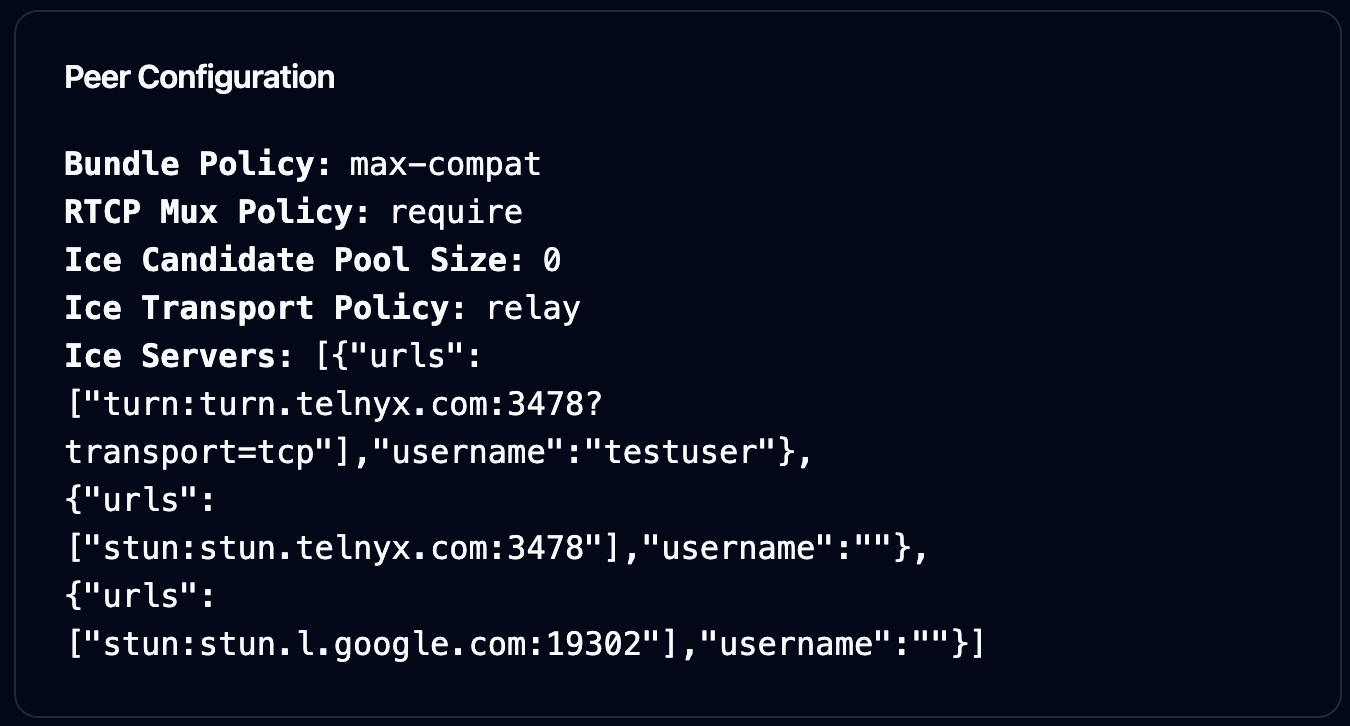 This section provides data on the configuration of the [RTCPeerConnection](https://developer.mozilla.org/en-US/docs/Web/API/RTCPeerConnection/RTCPeerConnection).
If [`prefetchIceCandidates`](https://developers.telnyx.com/docs/voice/webrtc/js-sdk/interfaces/icalloptions#prefetchicecandidates) is disabled, the pool size is set to 0. Otherwise, it's set to 255.
If [`forceRelayCandidate`](https://developers.telnyx.com/docs/voice/webrtc/js-sdk/interfaces/icalloptions#forcerelaycandidate) is enabled, then transport policy will be set to `relay`.
Lastly, by default, Telnyx SDKs use the following endpoints to gather ICE candidates.
* `stun.l.google.com`
* `stun.telnyx.com`
* `turn.telnyx.com`
## ICE Candidates & Candidate Pair
This section provides data on the configuration of the [RTCPeerConnection](https://developer.mozilla.org/en-US/docs/Web/API/RTCPeerConnection/RTCPeerConnection).
If [`prefetchIceCandidates`](https://developers.telnyx.com/docs/voice/webrtc/js-sdk/interfaces/icalloptions#prefetchicecandidates) is disabled, the pool size is set to 0. Otherwise, it's set to 255.
If [`forceRelayCandidate`](https://developers.telnyx.com/docs/voice/webrtc/js-sdk/interfaces/icalloptions#forcerelaycandidate) is enabled, then transport policy will be set to `relay`.
Lastly, by default, Telnyx SDKs use the following endpoints to gather ICE candidates.
* `stun.l.google.com`
* `stun.telnyx.com`
* `turn.telnyx.com`
## ICE Candidates & Candidate Pair
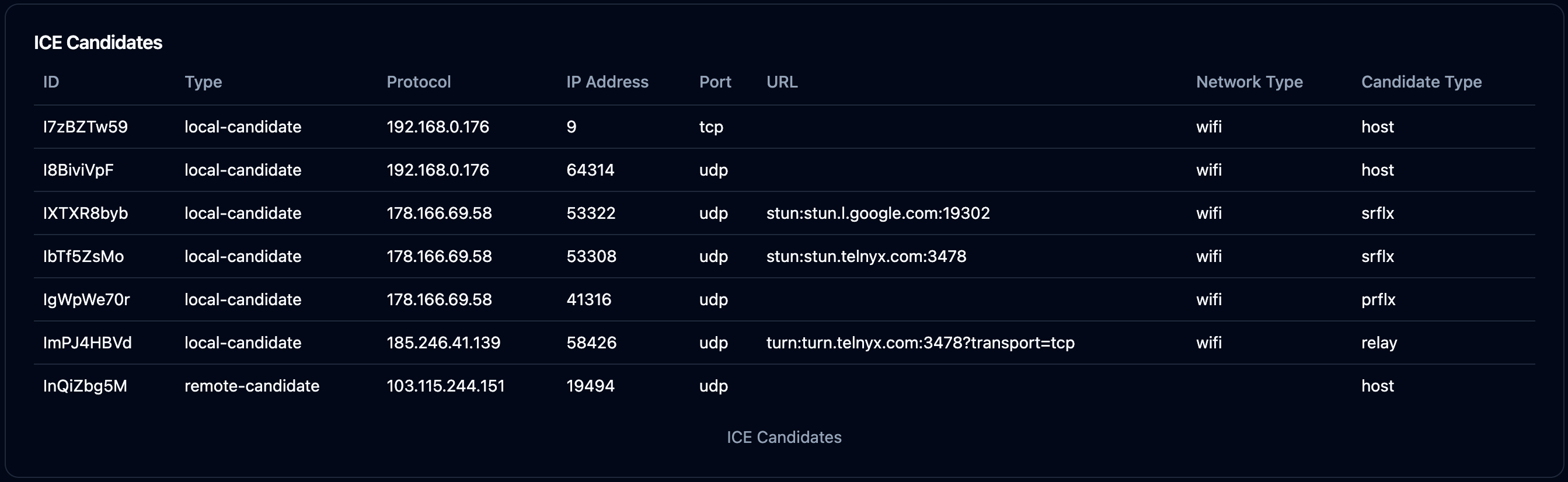 This section lists out all the [ICE candidates](https://developer.mozilla.org/en-US/docs/Web/API/RTCIceCandidate) gathered prior to a call is established.
There will always be one `remote-candidate` of `host` type offered. This represents the Telnyx's end of the peer connection.
There will always be multiple `local-candidate` offered unless `relay` candidate was configured to be used.
For a call to be successfully established, at least one `local-candidate` of the following type must be present:
* `prflx`
* `srflx`
* `relay`
`host` candidate type cannot be used to establish peer connection over the internet.
If no viable `local-candidate` are present, it's highly likely that the SDK client is located on a very restrictive network where all UDP traffic is blocked and access to certain endpoints (turn.telnyx.com) are not allowed.
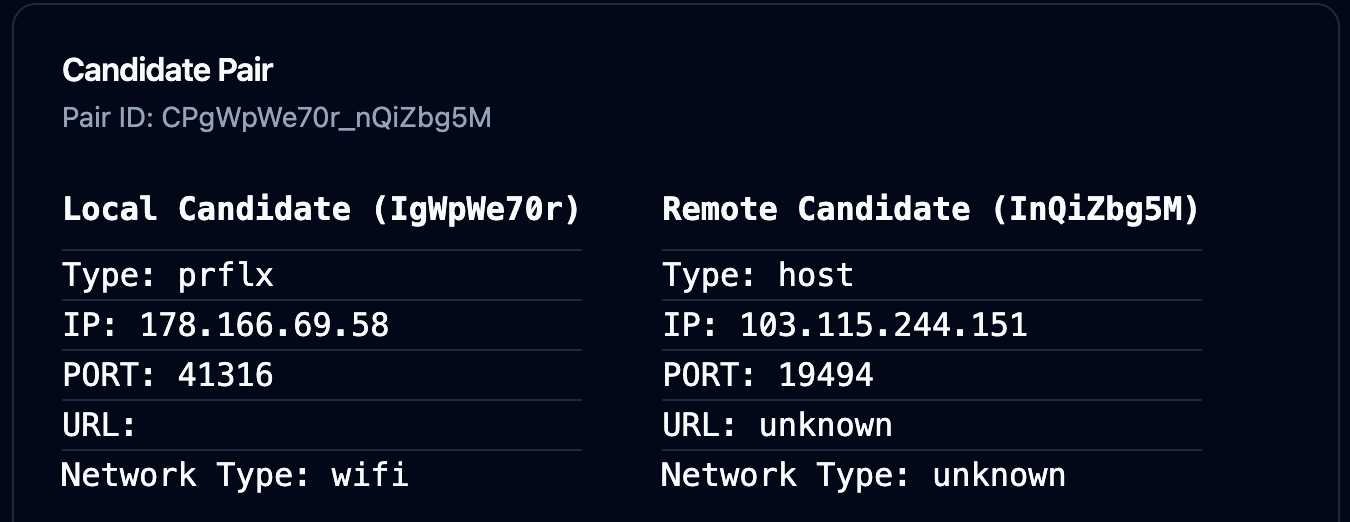
Barring that, there will be one pair of ICE candidates used for this call.
This section lists out all the [ICE candidates](https://developer.mozilla.org/en-US/docs/Web/API/RTCIceCandidate) gathered prior to a call is established.
There will always be one `remote-candidate` of `host` type offered. This represents the Telnyx's end of the peer connection.
There will always be multiple `local-candidate` offered unless `relay` candidate was configured to be used.
For a call to be successfully established, at least one `local-candidate` of the following type must be present:
* `prflx`
* `srflx`
* `relay`
`host` candidate type cannot be used to establish peer connection over the internet.
If no viable `local-candidate` are present, it's highly likely that the SDK client is located on a very restrictive network where all UDP traffic is blocked and access to certain endpoints (turn.telnyx.com) are not allowed.
Barring that, there will be one pair of ICE candidates used for this call.
 ## RTT
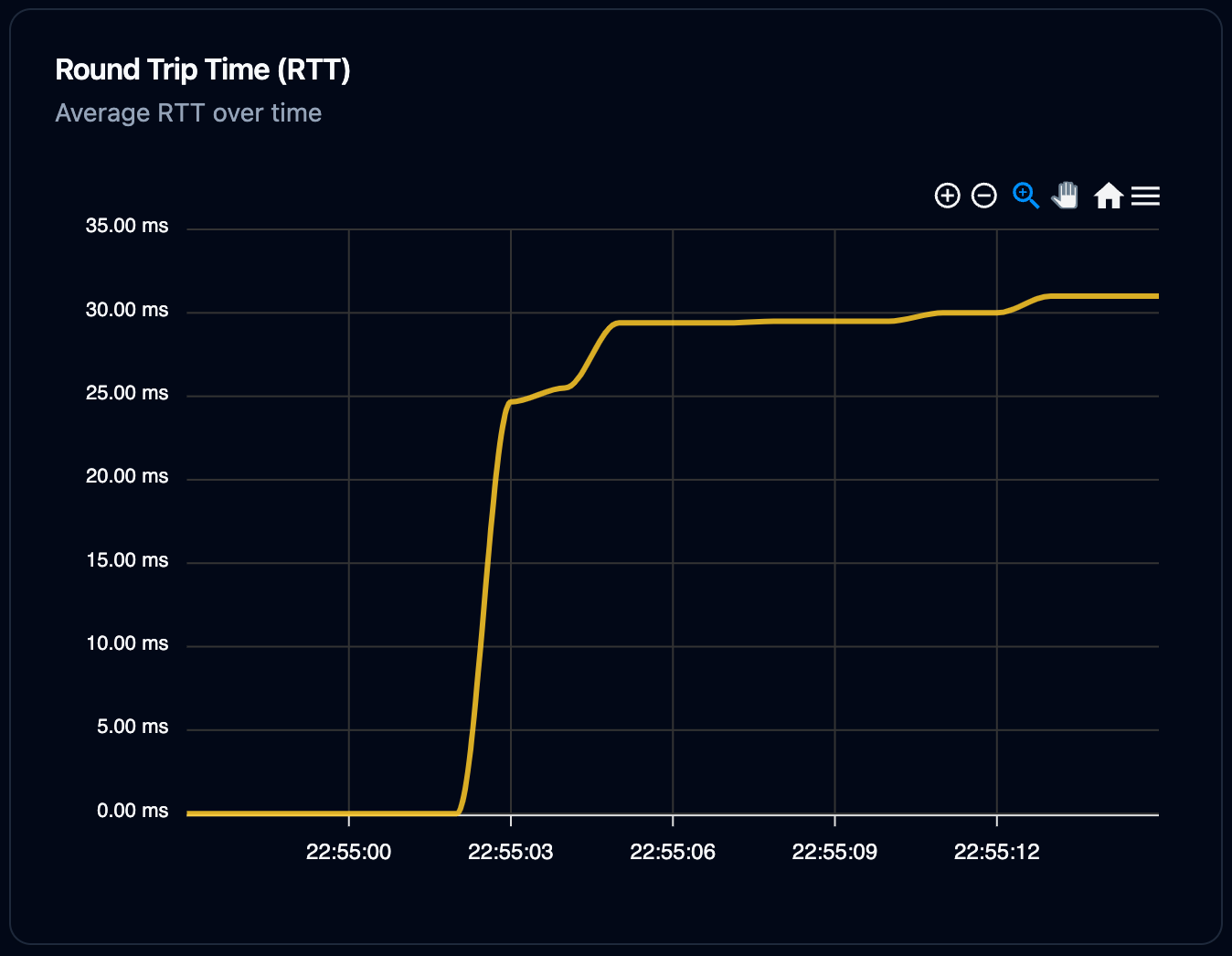 A high RTT value provides clues to voice delay.
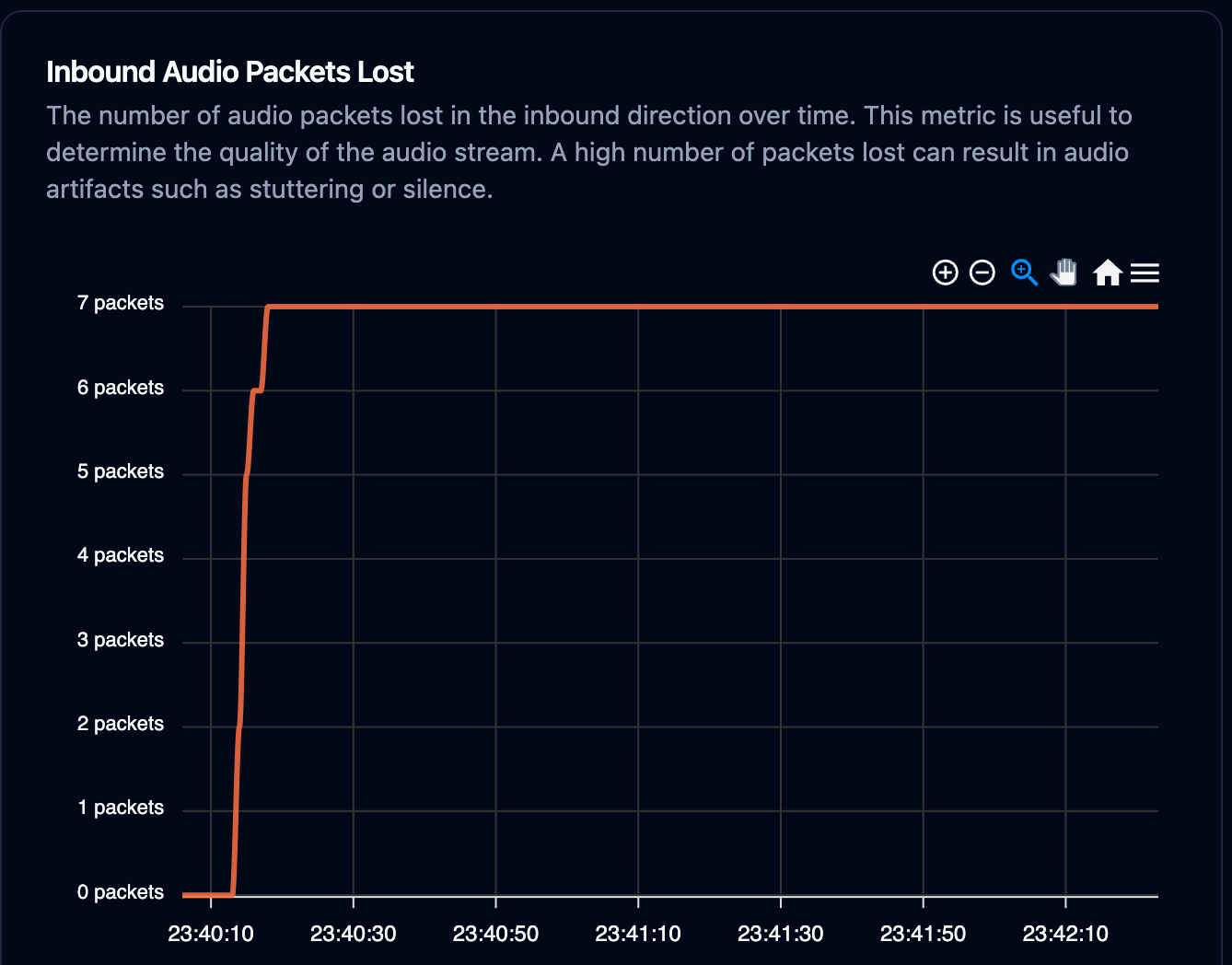
## Packets Lost
A high packet lost value provides clues to skipped audio.
A high RTT value provides clues to voice delay.
## Packets Lost
A high packet lost value provides clues to skipped audio.
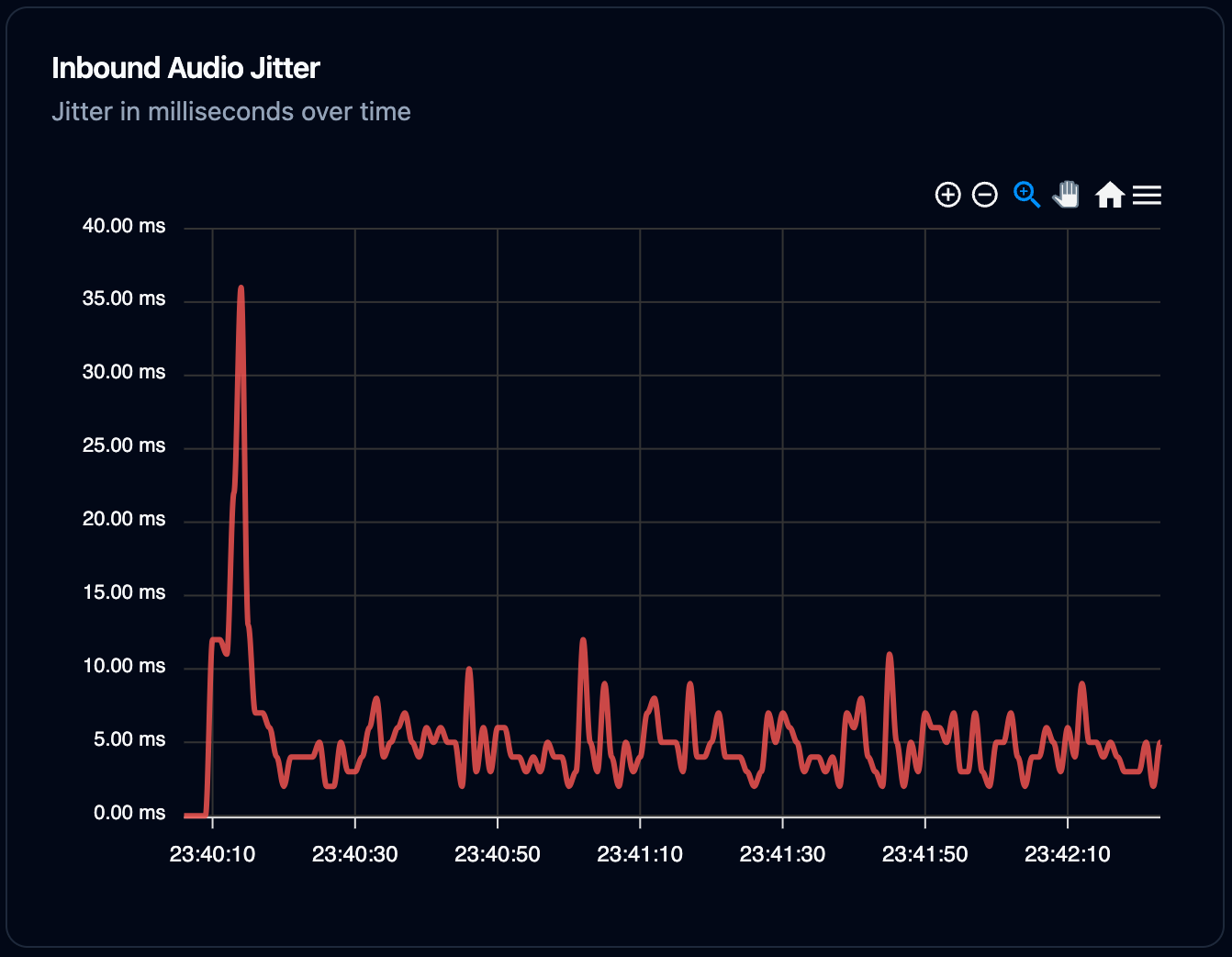
 ## Jitter
A high jitter value provides clues to inconsistent audio quality throughout the call.
## Jitter
A high jitter value provides clues to inconsistent audio quality throughout the call.
 ## Other Useful Data
If the user is experiencing one way audio, it's worth checking inbound and outbound audio level to corroborate the user's claim.
## Other Useful Data
If the user is experiencing one way audio, it's worth checking inbound and outbound audio level to corroborate the user's claim.