> ## Documentation Index
> Fetch the complete documentation index at: https://developers.telnyx.com/llms.txt
> Use this file to discover all available pages before exploring further.
# Telnyx WebRTC Voice SDKs Debug Data
> Enable and read debug logs from the Telnyx WebRTC Voice SDKs to diagnose signaling, media, and call quality issues in production and development.
# WebRTC Voice SDKs Debug Data
This is a beta feature. The data schema and presentation may change without notice.
Debug data is collected on the SDK client. It provides empirical data on the call leg between SDK client and Telnyx.
## Availability
| SDK | Availability |
| -------------- | ------------ |
| JS | Available |
| iOS Native | Available |
| Android Native | Available |
| Flutter | Available |
## Enabling Debug
Initialize the SDK client with [debug](https://developers.telnyx.com/docs/voice/webrtc/js-sdk/interfaces/iclientoptions#debug) set to `true` and output set to `socket`.
## Locating the Debug Data
When properly enabled, the SDK client will ship debug data frames to Telnyx over the websocket. The data frames are assembled into a single `json` file and stored in a Telnyx Cloud Storage bucket located in `us-central-1` belonging to the user.
The bucket is named `voice-sdk-debug-reports-[USER-ID]` where `USER-ID` is the user's account ID.
The objects are named following this schema `[call_id]/rtc_stats_reports/[segment_id]` where `call_id` is the ID identifying the [call leg](https://developers.telnyx.com/docs/voice/webrtc/troubleshooting/detail-records#ids-in-the-webrtc-domain) between the SDK client and Telnyx. In most cases, there is only one data segment. When there is a reconnect between the SDK client and Telnyx, there may be more than one data segment.
To illustrate the above point more concretely, consider this example:
1. A call is made from a JS SDK client to a phone number.
2. The WebRTC call record is located using the [detail record API](https://developers.telnyx.com/docs/voice/webrtc/troubleshooting/detail-records#ids-in-the-webrtc-domain).
3. Noting the `call_id`, locate the data using Telnyx Mission Control portal or a [properly configured AWS CLI](https://developers.telnyx.com/docs/cloud-storage/quick-start#option-2-using-aws-cli).
```
user@host ~ % aws s3api list-objects-v2 --bucket voice-sdk-debug-reports-22 --profile "*.telnyxcloudstorage.com" --endpoint-url https://us-central-1.telnyxcloudstorage.com --output table --prefix 064d6317-4837-41e2-8795-cfc304ced4d1
------------------------------------------------------------------------------------------------------------------------
| ListObjectsV2 |
+---------------------------------------------------------------------------------+------------------------------------+
| RequestCharged | None |
+---------------------------------------------------------------------------------+------------------------------------+
|| Contents ||
|+--------------+-----------------------------------------------------------------------------------------------------+|
|| ETag | "c351226c014f9589c11b43fa47152374" ||
|| Key | 064d6317-4837-41e2-8795-cfc304ced4d1/rtc_stats_reports/0654064a-0f09-4b33-8f3e-66cd89941abb.json ||
|| LastModified| 2024-12-11T17:43:25.722000+00:00 ||
|| Size | 318313 ||
|| StorageClass| STANDARD ||
|+--------------+-----------------------------------------------------------------------------------------------------+|
```
where `prefix` is the `call_id`.
## Visualizing the Data
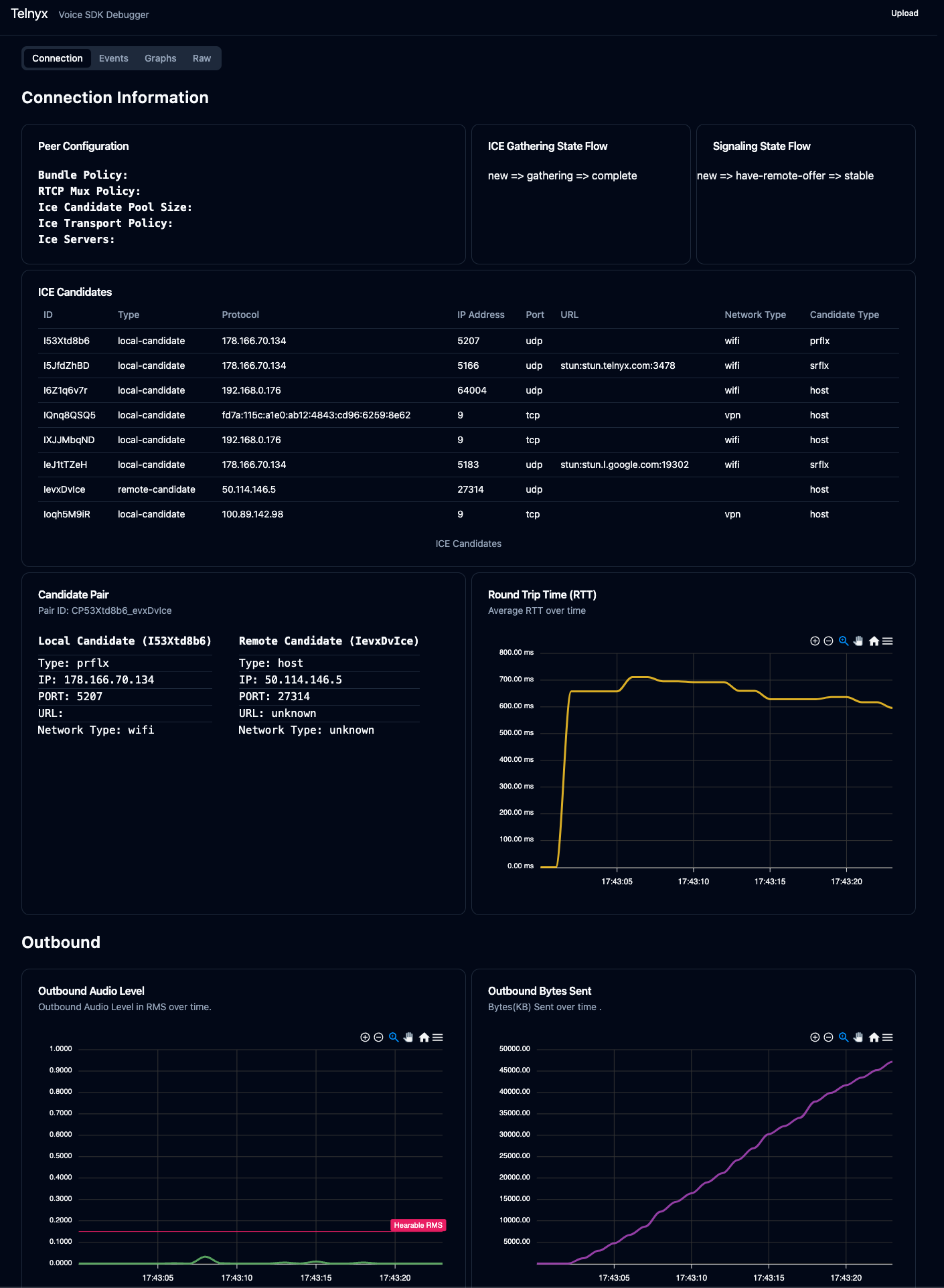
The data can be uploaded and visualized via [https://webrtc-debug.telnyx.com/](https://webrtc-debug.telnyx.com/).
 ## Interpreting the Data
The next section provides addition information on how to use the data to diagnose user issues.
## Interpreting the Data
The next section provides addition information on how to use the data to diagnose user issues.